AnyTrans for Mac: An iPhone Manager That Goes Where Finder Doesn't
AnyTrans for Mac is iMobie's iPhone, iPad and iPod manager for macOS, sold here as a $39.99-a-year subscription for one Mac: it moves photos, music, messages, WhatsApp chats and 20-odd other kinds of iOS data between your devices, the Mac and iCloud, backs up and restores iPhones, and migrates an old iPhone or Android phone to a new iPhone.
Apple's Finder will back up and sync an iPhone, but it won't let you drag your photos out by album, export a text conversation as a PDF, copy one app's WhatsApp history to a new phone, or pull music off the iPhone onto the Mac. Those are the gaps AnyTrans fills.
Quick facts
- Version: 8.9.15 for Mac, released October 9, 2026
- Developer: iMobie Inc., founded in 2011
- Runs on: macOS 10.13 High Sierra through macOS 27. The Windows version is a separate license.
- Devices: iPhone, iPad and iPod with iOS 5 to iOS 27, plus Android 5.0 and later for moving to iPhone
- Price: $39.99 for 1 year, 1 Mac, unlimited devices. It renews automatically each year.
- Free trial: 30 items of each data type within 3 days, with Phone to iPhone and restores locked
- Guarantee: 60-day money-back
What we checked: AnyTrans for Mac - 1-Year Subscription at $39.99 on the order page, iMobie's update history listing Mac version 8.9.15, and the Mac download (a 3.9 MB disk image from iMobie's server), on October 26, 2026. We didn't install it on a Mac or connect an iPhone.
Before you buy
- Buyer reviews are poor. AnyTrans's Trustpilot page scores 2.6 out of 5 from 29 reviews, and 73% of them give 1 star: complaints about features that didn't work, support and refunds. Run the trial with your own iPhone, your Mac and the exact task you need before paying.
- This plan renews every year. If you only need AnyTrans for one move to a new phone, turn off renewal after buying, or consider the One-Time Purchase ($59.99) if you'll keep using it.
- Mac and Windows need separate licenses. One license code activates one computer, so a Mac license won't work on your PC.
- Ask for a refund within 60 days if it doesn't do the job. Several Trustpilot reviewers who asked did get their money back.
Download Free TrialBuy Now ($39.99/year)
Overview
AnyTrans opens on its Device Manager: your connected iPhone on the left, big icons for Photos, Music, Videos, Messages and Apps on the right, and a Quick Start panel for common jobs such as Content to iTunes, Back up Device and Phone to iPhone. Down the side are iCloud Manager, iTunes Library, Phone Switcher, Backup Manager, Social Messages Manager and utilities such as a HEIC converter, ringtone maker and screen mirroring.
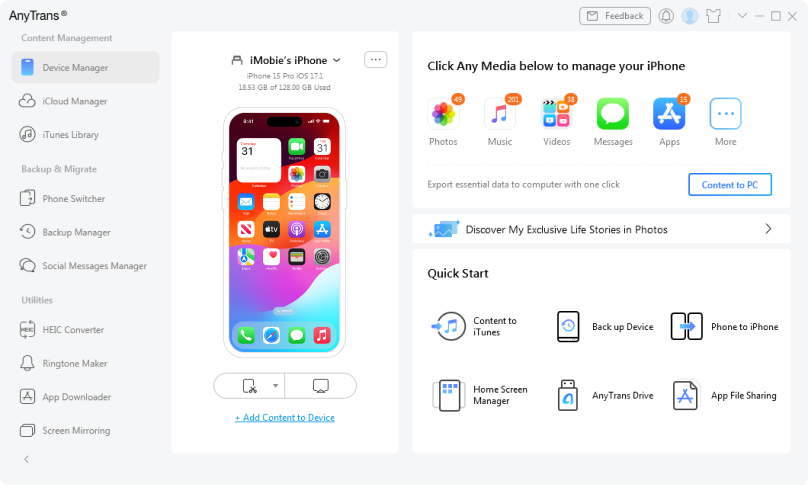
AnyTrans's Device Manager with a connected iPhone 15 Pro, its media categories with item counts, and Quick Start shortcuts. iMobie only publishes screenshots of the Windows version; the Mac version has the same layout.
Features
Move 27 kinds of iOS data, in any direction
AnyTrans for Mac manages 27 types of iOS data, including photos, music, videos, messages, contacts, notes, calendars, voice memos, books, Safari bookmarks and apps, and moves them between iPhone, iPad, iPod, iTunes, iCloud and the Mac. You can export a selection to the Mac, add files to the device, or send content from one iOS device to another. Music can go from the iPhone to the Mac, not just the other way.
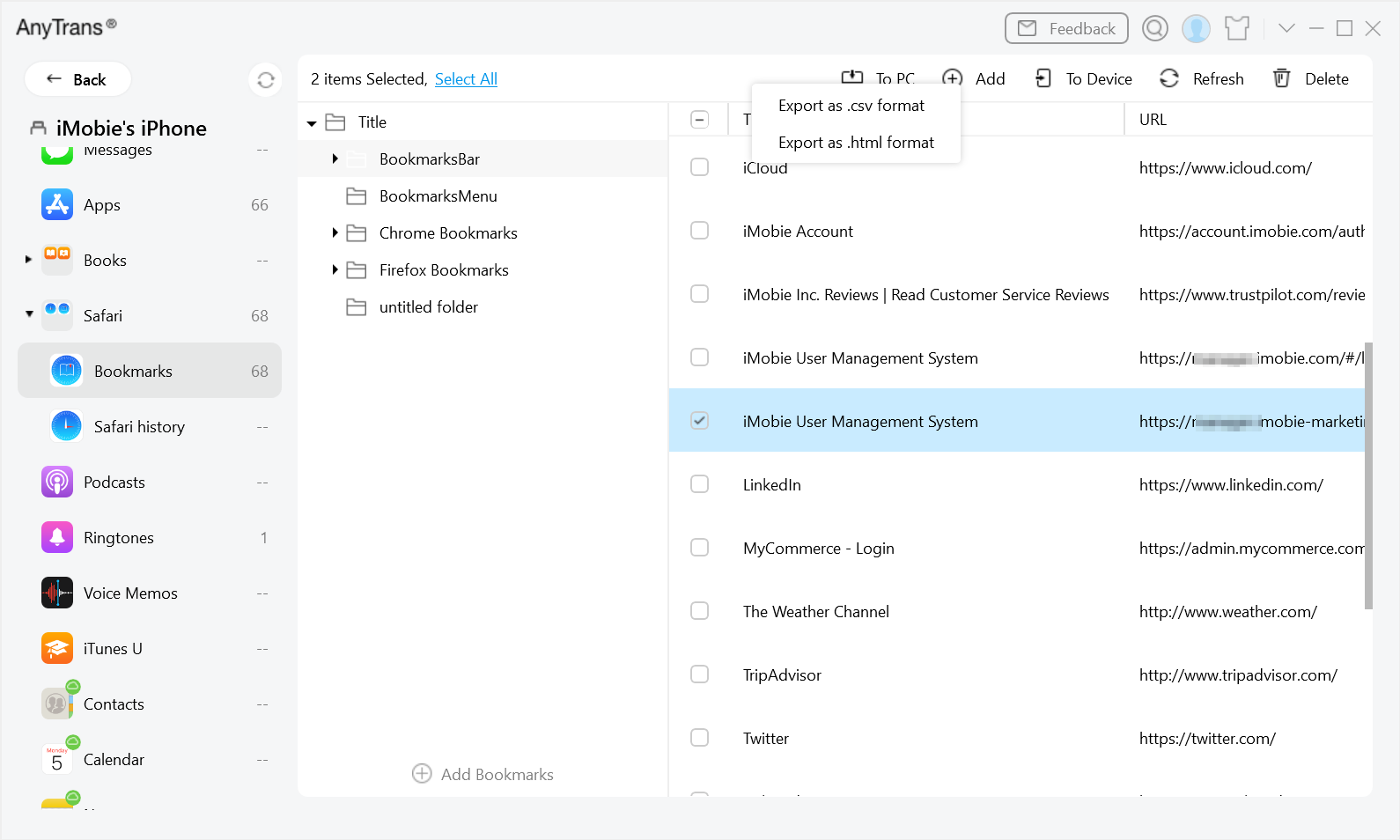
Managing an iPhone's Safari bookmarks: the category list on the left, bookmark folders and URLs, and the export menu offering .csv or .html format. Windows version shown.
Back up and print iPhone messages
AnyTrans for Mac shows your iPhone's text messages and iMessages by conversation, with a date range filter, and exports or prints them with their images, stickers and audio files, in PDF, TXT or HTML.
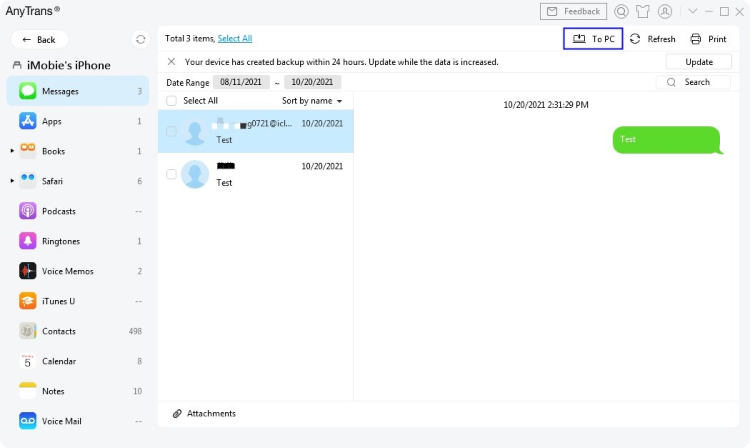
The Messages view: conversations on the left, the selected thread on the right, a date range filter, and the export and Print buttons at the top. Windows version shown, where the export button reads "To PC".
Backups you can browse, including wireless ones
AnyTrans for Mac makes complete iPhone backups, including scheduled wireless backups over Wi-Fi, and lets you browse a backup and restore only the items you want rather than the whole phone.
Switch phones: iPhone to iPhone, or Android to iPhone
AnyTrans for Mac's Phone Switcher copies data from an old iPhone to a new one, or from an Android phone to an iPhone, including WhatsApp and messages. Its Social Messages Manager transfers and backs up WhatsApp and LINE chats, and can restore WhatsApp from a Google Drive backup.
iCloud, ringtones and screen mirroring
AnyTrans for Mac manages your iCloud content, turns any song into a ringtone or text tone, converts HEIC photos, and mirrors, records or captures the iPhone's screen on the Mac over the same Wi-Fi network.
Benefits
AnyTrans puts the iPhone jobs Apple scatters across Finder, Photos, Music and iCloud, plus several Apple doesn't offer at all, into one app with one consistent view of what's on the phone. The practical win is selectivity: export one album, restore one conversation, move one app's chats, instead of an all-or-nothing sync or restore. One license also covers every iPhone and iPad in the house.
Real-World Uses
- A new iPhone: move contacts, photos and WhatsApp history from an Android phone you're replacing.
- A full iPhone: copy ten years of photos to the Mac by album, check they're there, then delete them from the phone.
- Evidence or keepsakes: export a text conversation with its photos as a PDF.
- A music collection stuck on an old iPod or iPhone: copy the songs back to the Mac's music library.
- Peace of mind: schedule wireless backups so the iPhone backs up whenever it's on the same Wi-Fi as the Mac.
Who It's For, and Who Should Skip It
AnyTrans for Mac is for Mac users with one or more iPhones or iPads who want more control than Finder gives: selective exports, message printing, WhatsApp moves and backups they can browse.
Skip it if you only need a full backup and restore: Finder and iCloud do that free. Skip it if you only want to put music or videos on an iPhone, which needs far less than an all-in-one suite. And given the weak buyer reviews, skip it if you can't test your exact task in the trial first. If you're on Windows, you need the Windows version instead.
Usage Guide
- Install and launch. Open the downloaded disk image, double-click the AnyTrans icon and click Install Now. When it finishes, start AnyTrans from Applications.
- Connect your iPhone. Plug it in with a USB cable, enter its passcode and tap Trust on the iPhone. It appears in Device Manager.
- Activate. Click Activate and enter the account email and activation code from your order email.
- Transfer. Click a category such as Photos or Messages, select items and use the export or Add buttons, or use the one-click export in Device Manager to copy everything at once.
- Back up. Open Backup Manager to make a backup now, or turn on wireless backups and set a schedule.
- Switch phones. Use Phone Switcher to move from an old iPhone or an Android phone to the new iPhone.
Where it falls short
- Restores and migrations draw the most complaints. On Trustpilot, one reviewer wrote "The backup works but won't restore", and a Mac user found it "skips many songs" when copying playlists between iPhones.
- Support. Several reviewers say help tickets went unanswered, though others report good, if slow, support and successful refunds.
- Apple's limits apply. Some iOS data, such as certain system records and full-resolution iCloud photos, can't always be reached, and these features can change with iOS updates.
- Most jobs need a cable. Only backups run wirelessly.
- The trial is short (3 days) and locks the features people most often buy it for: Phone to iPhone and restores.
What Users Say
Trustpilot: 2.6 out of 5 from 29 reviews
AnyTrans's own Trustpilot page is mostly negative: 73% of reviews give 1 star and 10% give 5 stars. These excerpts were read through a summarizer, so treat the wording as close but not guaranteed exact.
Maj (1 star, June 2025): "Product did not work on Mac 10.13.6 or Sonoma version."
Eigres (1 star, 2020), on the Mac version: "Cannot copy playlist or albums from iphone to iphone using Mac Anytrans. App skips many songs."
Poway Bowie Won (1 star, September 2023): "The backup works but won't restore. What's the use then?"
Rene Wells (1 star, May 2023): "AnyTrans is a great app when it works but if you need any help and submit a ticket you're out of luck."
Will (2 stars, March 2024): "I am giving it 2 stars as it did the job I bought it for, moving WhatsApp messages from my Android phone to my iPhone."
Lorraine (4 stars, November 2024): "Could not install but got my money back no problem after contacting them and explaining to them what the problem was."
Gorgeous Ruth (5 stars, November 2025): "AnyTrans honored their lifetime license, which I purchased in 2022."
MacBreeze: 4.6 out of 5
MacBreeze's founder, who says he has used AnyTrans on the Mac for years, is far more positive (updated June 2025, a page that earns a commission on sales): "AnyTrans is a powerful iPhone manager offering backup, media transfer, and app management. It's a solid iTunes alternative with wireless backup and a great UI." He notes that most functions need a cable and that Apple's restrictions can block some full-resolution iCloud photos.
The two pictures don't contradict each other so much as describe different users. People whose task works describe AnyTrans as a capable, well-designed all-in-one manager. People whose task fails, most often a restore, a migration or an older macOS, are left frustrated, and some found support hard to reach. That's why the trial and the 60-day refund window matter more here than usual.
Comparisons
AnyTrans vs Finder and iCloud
Finder and iCloud back up, restore and sync an iPhone for free. AnyTrans adds what they don't: browsing a backup and restoring single items, exporting photos, music and messages to the Mac selectively, printing messages, moving WhatsApp between phones, and migrating from Android with chats included.
1-Year Subscription vs One-Time Purchase
Both cover one computer and unlimited devices. The 1-Year Subscription ($39.99) renews every year. The One-Time Purchase ($59.99) is a lifetime license with lifetime updates, so it's cheaper by the second year if you'll keep using AnyTrans.
Editions and Pricing
| Plan |
Price |
Term |
Computers |
Devices |
| 1-Year Subscription (this plan) |
$39.99 |
1 year, renews automatically |
1 |
Unlimited |
| One-Time Purchase |
$59.99 |
Lifetime, with lifetime updates |
1 |
Unlimited |
| Family Plan |
$79.99 |
Lifetime, with lifetime updates |
5 |
Unlimited |
Prices from iMobie's Mac buy page, excluding sales tax, shown there as discounts from $59.99, $79.99 and $109.99. The $39.99 for this plan was confirmed on the order page on October 26, 2026. Business licenses and a 30% education discount are also available from iMobie.
FAQs
Does AnyTrans for Mac work on macOS Sonoma, Sequoia and Tahoe?
Yes, according to iMobie: AnyTrans for Mac 8.9.15 supports macOS 10.13 High Sierra through macOS 27, including Sonoma, Sequoia and Tahoe. One Trustpilot reviewer couldn't get it working on Sonoma, so check in the trial.
Can I use my AnyTrans for Mac license on a Windows PC?
No. An AnyTrans license code activates one computer, and Mac and Windows versions are licensed separately. For several computers, iMobie sells a Family Plan covering 5.
How do I stop AnyTrans renewing every year?
The AnyTrans 1-Year Subscription renews automatically, with a reminder email before the renewal date, and you can cancel at any time. Cancel before that date if you don't want another year.
Can AnyTrans move WhatsApp from Android to iPhone?
Yes. AnyTrans for Mac transfers WhatsApp, messages and other data from an Android phone (Android 5.0 or later) to an iPhone, and can restore WhatsApp from a Google Drive backup. This isn't available in the trial.
Does AnyTrans work with older iPhones and iPods?
Yes. AnyTrans supports devices running iOS 5 and later, back to the iPhone 3G, iPod classic, nano and shuffle, which makes it useful for getting music off an old iPod.
Can AnyTrans convert video files?
Not all formats. iMobie says AnyTrans doesn't convert MPEG-4 files to MP3, so use a separate converter for that.
System Requirements
- Mac: macOS 27, macOS 26 Tahoe, 15 Sequoia, 14 Sonoma, 13 Ventura, 12 Monterey, 11.5 Big Sur, 10.15 Catalina, 10.14 Mojave or 10.13 High Sierra
- iOS devices: iPhone, iPad and iPod with iOS 5 to iOS 27
- Android (for moving to iPhone): Android 5.0 and above
- Memory: 512 MB
- Disk: 100 MB, plus space for exports and backups
- Connection: USB cable for most tasks, the same Wi-Fi for wireless backup and screen mirroring
Conclusion
AnyTrans for Mac does more with an iPhone than anything Apple ships: selective exports, browsable backups, message printing and WhatsApp moves, all in one well-organized app, for $39.99 a year. The reason to buy it is that breadth of control. The reason for caution is its buyer reviews, which are poor, with failed restores and slow support among the complaints. Our verdict: it's worth it only after the 3-day trial has shown it handles your devices and your specific job, and if you'll use it beyond one phone switch, the $59.99 One-Time Purchase is the better buy than this renewing plan.
Download Free TrialBuy Now ($39.99/year)