AnyUnlock for Windows: Get Back Into an iPhone or iPad When You've Forgotten the Passcode
AnyUnlock - iPhone Password Unlocker is a Windows program from iMobie that removes a forgotten iPhone, iPad or iPod touch screen passcode, a forgotten Screen Time passcode or a lost iTunes backup password. The Full Toolkit with every module costs $79.99 one-time (or $59.99 a year), single modules start lower, and the free download checks your device before you pay.
You know the moment: the kid tried the passcode ten times, the iPad says "unavailable", and Apple's answer is a full restore through iTunes that you can't work out. Or the encrypted backup you made years ago now asks for a password nobody remembers. AnyUnlock wraps those fixes into one window with step-by-step screens.
Quick facts
- Version: 2.2.4, released May 25, 2026 (iMobie has shipped updates since 2020)
- Developer: iMobie Inc., Chengdu, China (makers of AnyTrans and PhoneRescue)
- Runs on: Windows 11, 10, 8, 7 and Vista, with iTunes installed; a separate Mac edition exists
- Works with: iPhone, iPad and iPod touch on iOS 5 through iOS 27
- Price: Full Toolkit $79.99 one-time, $59.99 a year or $49.99 a month (5 devices, 1 PC); single modules from $15.99
- Free version: scans and checks (Screen Time passcode scan, saved-password scan, backup password scan, Find Apple ID, device check); every unlock needs a license
- Money-back guarantee: 60 days on one-time and yearly plans, 30 days on 3-month and 7 days on monthly plans, for the cases iMobie's refund policy lists (see FAQs)
- What we checked: the Windows installer (a 16.0 MB web installer signed by iMobie Inc.) downloaded from imobie.com, the version history on iMobie's Tech Specs page, and the plan prices on iMobie's Windows order page, all on November 17, 2026. We didn't unlock a device with it.
Before you buy
Removing a screen passcode erases the iPhone or iPad. AnyUnlock gets you back into the hardware, not back to your photos: restore them afterwards from an iCloud or computer backup. Install iTunes before AnyUnlock (several buyers say the order matters), and keep the device's charger and a working USB cable nearby.
Download Free TrialBuy Now
Overview
AnyUnlock opens on a grid of tools, one per kind of lock. You pick the one you need, plug the device in, and each tool walks you through its own steps: putting the iPhone into recovery or DFU mode, downloading the matching iOS firmware, then running the unlock. iMobie sells each tool on its own or all of them together as the Full Toolkit, so you can pay only for the lock you actually have.
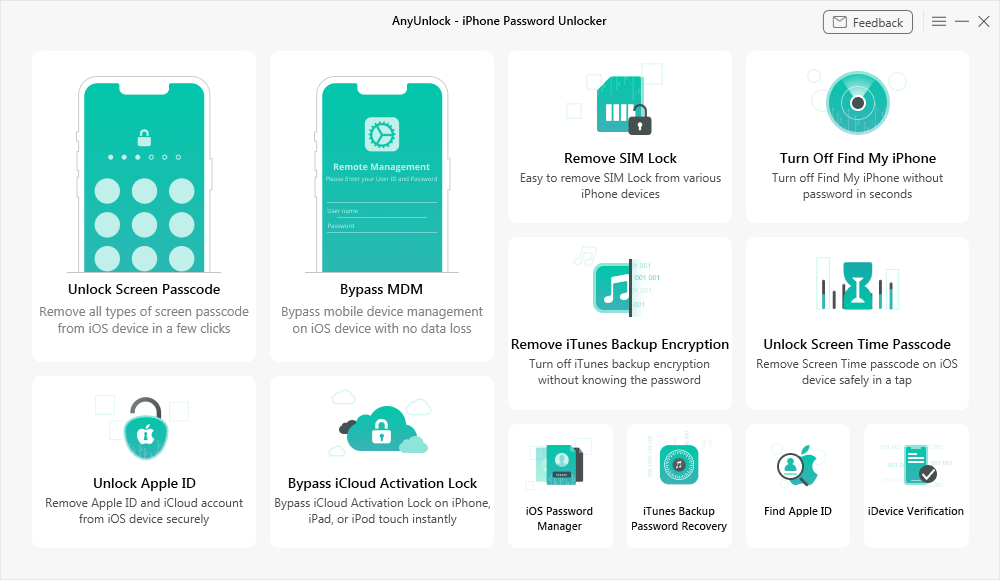
The Windows main window: Unlock Screen Passcode, Unlock Apple ID, Bypass iCloud Activation Lock, Bypass MDM, Remove SIM Lock, Unlock Screen Time Passcode, Remove iTunes Backup Encryption and More Tools.
The same window also holds modules for Apple ID removal, Activation Lock, Find My, MDM profiles and SIM locks. They are meant for your own device, with proof of purchase, and this page doesn't cover them further.
Features
Remove a forgotten screen passcode
AnyUnlock's Unlock Screen Passcode tool clears a 4- or 6-digit code, a custom numeric or alphanumeric code, Touch ID or Face ID when you're locked out, the screen is cracked or the iPhone says it's disabled after too many tries. It does this by reinstalling iOS: it finds the right firmware for your model, downloads it (or lets you pick a firmware file you already have) and restores the device. That's why the device comes back empty.

The firmware step: AnyUnlock has matched an iPhone 5S on iOS 12.5.7 and offers to download the firmware or use a package you already have.
Clear a forgotten Screen Time passcode
AnyUnlock can scan for a Screen Time (Restrictions) passcode for free, and with a license it removes the passcode, including one set through Family Sharing. Read the notice on screen first: on the iOS version shown below, Find My has to be turned off, and third-party apps and their data are erased.

The Screen Time tool for an iPhone 7 Plus on iOS 15.5, warning that Find My must be off and third-party apps and data will be erased.
Open an encrypted iTunes backup
AnyUnlock handles a forgotten iTunes backup password two ways. Remove iTunes Backup Encryption turns encryption off on the iPhone so future backups aren't locked, even when the checkbox in iTunes is greyed out. iTunes Backup Password Recovery tries to find the old password itself with dictionary, brute-force and mask attacks, which helps when you need to open a backup you already have. Neither touches the data on the phone.

Remove iTunes Backup Encryption at work: "Removing iTunes backup password. Please wait..."
Find the passwords saved on your iPhone
AnyUnlock's iOS Password Manager scans a connected device for the passwords it has saved and, with a license, shows them and exports them so you can move them into another password manager. The scan is free, so you can see what it finds before paying.
Small extra tools
AnyUnlock also finds the Apple ID signed in on a device, runs an iDevice Verification check (battery health, jailbreak status, whether parts were replaced, iCloud lock status) with an exportable report, and turns off the camera shutter sound. The check and the Apple ID lookup are free, which makes them handy when you buy a second-hand iPhone.
Benefits
- No Apple Store trip. A forgotten passcode becomes a 20-minute job at your desk instead of an appointment.
- Pay for one lock, not ten. If all you need is the screen passcode, the single module costs less than the toolkit.
- Guided steps. Recovery and DFU mode are where most people give up on Apple's own restore; AnyUnlock shows the button presses for each model and added a countdown to help with DFU mode.
- Try before paying. The free scans tell you whether AnyUnlock sees your device and what it found.
Real-World Uses
- A child changed the iPad passcode and forgot it; the iPad is "unavailable". Remove the passcode, then restore last week's iCloud backup.
- Your parents set a Screen Time passcode years ago and nobody knows it. Clear it and set a new one.
- An old encrypted iTunes backup holds the photos you need, but the password is gone. Run Backup Password Recovery overnight.
- You're about to buy a used iPhone. Run the free iDevice Verification and Find Apple ID check before handing over the money.
Who It's For, and Who Should Skip It
It's for iPhone and iPad owners locked out of their own device, families with a forgotten Screen Time or backup password, and repair shops that handle these jobs often enough to want the toolkit.
Skip it if you only want your data back: a passcode removal wipes the device, so a recovery tool or your backup is what you need. Skip it too if you can still sign in to your Apple ID: Apple's own "Forgot passcode?" erase-and-restore on the lock screen (iOS 15.2 and later) does the same job for free. And if you'll only ever use it once, buy the single module rather than the toolkit.
Usage Guide
- Install iTunes first, then download and install AnyUnlock (the installer downloads the program during setup).
- Launch AnyUnlock, click Activate and enter the email address and activation code from your order email.
- Pick the tool on the main screen, for example Unlock Screen Passcode, and connect the device with a USB cable.
- Follow the on-screen steps: put the device into recovery or DFU mode when asked, then download or select the firmware.
- Start the unlock and leave the cable alone until AnyUnlock says it's done. Then set the device up again and restore your backup.
Where It Falls Short
- Not every device or iOS version works. One October 2026 Trustpilot reviewer says it failed on an iPhone 14 Pro Max running iOS 27, and another buyer's iPad Pro model wasn't supported (they got a refund).
- Subscriptions renew automatically. The monthly, 3-month and yearly plans auto-renew; one buyer missed the reminder email and was charged, then got the money back.
- It's pricey for a one-off. Several buyers say a single use costs a lot, and iMobie doesn't sell a one-time-use license.
- The guarantee isn't a change-of-mind refund. It covers wrong or duplicate purchases, a missing code, unwanted auto-renewals and technical problems iMobie can't solve within five days.
- iTunes is required on Windows, and installing it after AnyUnlock can stop the program from seeing the device.
What Users Say
iMobie as a company scores 3.3 out of 5 on Trustpilot from 1,525 reviews (all its products, November 2026). iMobie's own AnyUnlock review page reposts Trustpilot reviews and quotes tech sites; we picked those that talk about the tools on this page, and added the critical ones from Trustpilot.
Praise from buyers
"I was not able to access my backup data because I misplaced my backup encrypted password, but their website stated their software could remove the iTunes backup encrypted password. It did in about 3 seconds." RandyJeannie McCurry
"Software worked as advertised. Easy to install and use. I am really happy that I can use my iPad Pro now!" Kathy Gorrell
"This software helped me tremendously with my grandsons ipad that got locked up" L S
"I was able to unlock my mothers iPad with no problems." Simone
Mixed and critical
"Pretty simple once you read up on how to install itunes before running AnyUnlock.I didnt do that so had uninstall and reinstall both in the correct order." Koda Dowden
"Did the job well, though i only needed a single use,it was a bit costly, though i wont need the subscription, Maybe the company could do a single use low cost" lisanorm
"Only issue we had was when the renewal time came the time between the advise email and renewal was quite shortly and was missed and I was charged." Asha (the refund came through)
"I bought a license the AnyUnlock - to unlock a ipad pro. Unfortunately it didn't work with that model. I wrote them an requested a refund. ... And the refund came through in two days." Christian W.
"Do not unlock IOS 27 on iPhone 14 pro Max on AnyUnlock software. Does not do exactly as it said on the website." Xenon Task, 1 star, Trustpilot, October 1, 2026
"I bought it in order to remove the password from future iphone backups" ... "So it wasn't worth the money." Peter, 3 stars, Trustpilot, September 10, 2026
Tech sites
TheSweetBits (a site that carries iMobie links) lists as cons that "Some unlocking processes result in data loss" and that it "Requires iTunes for operation", and concludes: "if you're in a bind and need a fast, effective way to regain access to your iPhone, AnyUnlock is a solid option."
MakeUseOf, quoted by iMobie, calls it "the perfect solution when it comes to unlocking the iPhone without a passcode", and Zaib Ali writes that "Using AnyUnlock to get rid of Screen Time passcode and to remove encryption from password protected iTunes backups is equally easy and involves a few simple steps."
The pattern: when AnyUnlock supports the device, people describe it as quick and simple, and iMobie's support and refunds get repeated praise. The complaints are about unsupported models and the newest iOS, the price of a single use, and subscriptions that renew before buyers notice.
Comparisons
AnyUnlock vs Apple's own erase and restore
Apple's free route (Erase iPhone on the lock screen, or a restore in iTunes or Finder) also removes a forgotten passcode, and it also wipes the device. It needs your Apple ID password on newer iOS versions and some patience with recovery mode. AnyUnlock's value is the guidance, the firmware handling and the tools Apple doesn't offer: Screen Time passcode removal and backup password recovery.
Full Toolkit vs one module
If you have one problem, one module is cheaper: Unlock Screen Passcode is $59.99 one-time, Remove Screen Time $49.99. The Full Toolkit at $79.99 one-time costs only $20 more than the screen passcode module alone and covers every tool, so it pays off if you expect a second job.
Editions and Pricing
Prices on iMobie's Windows order page on November 17, 2026 (USD, before tax). Every plan is bought on the same page: pick the plan there after you click Buy.
| Plan |
1 month |
3 months |
1 year |
One-time |
| Full Toolkit (every module) | $49.99 | - | $59.99 | $79.99 |
| Unlock Screen Passcode | $35.99 | $35.99 | $39.99 | $59.99 |
| Remove Screen Time | $25.99 | $25.99 | $29.99 | $49.99 |
| Remove Backup Encryption | $25.99 | $25.99 | $29.99 | $49.99 |
| Recover Backup Password | $19.99 | $19.99 | $25.99 | $35.99 |
| Password Manager | $19.99 | $19.99 | $25.99 | $35.99 |
The Full Toolkit and the yearly and one-time module plans cover 5 devices on 1 PC; the monthly and 3-month module plans cover 1 device. Prices for the other tools are on the same order page. The Mac edition is sold separately and costs more.
FAQs
Will AnyUnlock delete the data on my iPhone?
AnyUnlock erases the device when it removes a screen passcode, because it reinstalls iOS. Removing iTunes backup encryption and recovering a backup password don't touch the phone's data. For the Screen Time tool, read the notice AnyUnlock shows for your iOS version before you start.
Can I try AnyUnlock for free?
AnyUnlock's free download connects to your device and runs the scans: Screen Time passcode, saved passwords, backup password, Find Apple ID and the device check. Every unlock or recovery needs a license.
Can I get my money back if AnyUnlock doesn't work on my iPhone?
iMobie refunds within 60 days for one-time and yearly plans (30 days for 3-month, 7 days for monthly) when a technical problem isn't solved within five days, and also for wrong or duplicate purchases, a missing activation code or an auto-renewal you didn't expect. It doesn't refund a change of mind or failures caused by not following the steps. Several reviewers say refunds came quickly when their model wasn't supported.
Does AnyUnlock need iTunes on Windows?
Yes. AnyUnlock uses iTunes' Apple device drivers to see the iPhone, so install iTunes first; buyers who installed it afterwards had to reinstall both.
Do the AnyUnlock subscriptions renew automatically?
AnyUnlock's monthly, 3-month and yearly plans renew automatically until you cancel, and iMobie emails a reminder before the renewal date. The one-time plans never renew.
Can I use one AnyUnlock license on several iPhones?
The Full Toolkit and the yearly and one-time module plans cover up to 5 devices on one PC. The monthly and 3-month module plans cover a single device.
Is AnyUnlock for Windows the same as the Mac version?
AnyUnlock for Mac has the same tools, runs on macOS 10.13 to macOS 27 and is a separate purchase at higher prices, with no one-time Full Toolkit. A Windows license doesn't activate the Mac edition.
System Requirements
- Windows 11, 10, 8, 7 or Vista
- 1 GHz CPU or faster, 256 MB RAM (1 GB recommended), 500 MB free disk space
- 1024x768 display, 64 MB 3D graphics
- iTunes installed, internet connection for firmware downloads and activation
- iPhone (3G to iPhone 18 series), iPad and iPod touch on iOS 5 to iOS 27, plus a USB cable
Conclusion
AnyUnlock is worth buying when you're locked out of your own iPhone or iPad and Apple's free restore isn't working for you, or when you need the things Apple doesn't do at all: clearing a Screen Time passcode or opening an old encrypted backup. Buy the single module for a one-off job and the $79.99 one-time Full Toolkit if you look after a family's devices. The main reason to hesitate: a passcode removal wipes the device, so make sure you have a backup, and check the free scan sees your model on the latest iOS before you pay.
Download Free TrialBuy Now