AnyFix for Windows: iPhone, iPad and Apple TV System Repair from Your PC
AnyFix is iMobie's $39.99-a-year Windows program for repairing an iPhone, iPad, iPod touch or Apple TV that's stuck, frozen or won't update, and for clearing iTunes errors. You connect the device by USB, pick a repair mode, and AnyFix installs a fresh copy of the firmware.
It's for the bad moment when your iPhone sits on the Apple logo, iTunes throws a numbered error, and the Apple Store is two days away. The catch to know up front: only one of its three repair modes keeps your data.
Quick facts
- Developer: iMobie
- Version: 1.3.3, released September 10, 2025
- Runs on: Windows 11, 10, 8, 7 and Vista (a separate Mac version is sold too)
- Repairs: iPhone, iPad, iPod touch and Apple TV
- Price: $39.99 a year, renewing automatically, for one device
- Free version: enters and exits recovery mode and does a 1-click reset, but no system repair
- Refund period: 60 days on the yearly plan, for the cases listed in iMobie's policy
- Vendor's rating: 4.8 out of 5 from 157 customer reviews, as shown on iMobie's page
What we checked: a setup file of 8.3 MB served by the vendor, and an order page price of $39.99 with a 12-month renewal for "1-Year Subscription/1 Device", both on November 5, 2026. We didn't repair a device with it.
Before you buy
Back up first if the device still lets you. Standard Repair keeps your data, but Advanced Repair, Ultimate Repair and both reset options erase the device.
This is a subscription, so cancel before the year is up if you only need one rescue. iMobie's guarantee isn't a free trial period: refunds cover set cases such as a wrong purchase, an unexpected renewal or a technical problem support can't solve within five days, and a request can be refused if you didn't review the product description or the free version first.
iTunes must be installed on the PC, even though you don't have to open it. AnyFix needs the Apple Mobile Device Support that comes with it to see your device.
Download Free TrialBuy Now
Overview
AnyFix opens on one home screen with five jobs: System Repair, Enter/Exit Recovery Mode, Upgrade/Downgrade iOS, Reset Device and iTunes Repair. Each job walks you through plugging in the device, downloading the matching firmware where it's needed and pressing start. iMobie claims it can fix more than 150 iOS, iPadOS and tvOS problems and more than 200 iTunes errors. Those counts are the vendor's own.
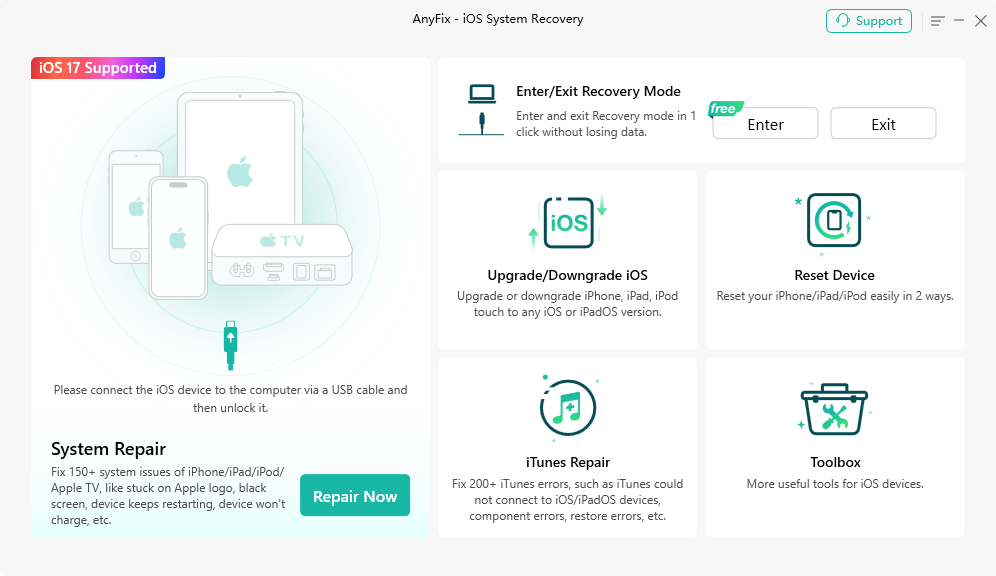
The AnyFix home screen: System Repair on the left, with recovery mode, iOS upgrades, resets and iTunes Repair on the right.
Features
Three repair levels for three kinds of trouble
AnyFix sorts repairs by how bad things are. Standard Repair handles common faults such as a device that won't charge or drains its battery, and leaves your data alone. Advanced Repair goes after stubborn problems such as being stuck on the Apple logo or refusing to update, and erases the device. Ultimate Repair is the last resort for a frozen device, a black, white or blue screen, or DFU mode trouble, and also erases everything. Ultimate Repair doesn't cover Apple TV.

AnyFix groups problems by type, such as Screen Stuck, Update Issues and Apple TV Issues, before you start a repair. Image from iMobie's user guide.
One-click recovery mode, in and out
AnyFix puts a device into recovery mode, or brings it out, with a single button and no data loss. You skip the timed button presses, which differ by iPhone model. This part is free, so try it first if your phone is only stuck in recovery mode.
Upgrade or downgrade iOS without iTunes
AnyFix can move an iPhone, iPad or iPod touch to another iOS version, including beta releases, without a developer account, and iMobie says no data is erased. The limit comes from Apple: you can only install versions Apple is still signing.

The upgrade and downgrade choice in AnyFix. Image from iMobie's user guide.
Reset a device two ways
AnyFix offers a 1-Click Reset and a Hard Reset for when you've forgotten the screen passcode. Both wipe the device. iMobie notes that a hard reset also updates it to the latest iOS version it supports, so don't use this to stay on an older version.
iTunes Repair for numbered errors
AnyFix fixes iTunes problems such as install and update failures, an iPhone that iTunes won't recognize, and errors like 4013, 9006 and 3194 during backup or restore, with no data loss. On a Mac the same feature is limited to sync errors, but the Windows edition covers the full list.
Benefits
- A try at home before the repair shop: a software fault may not need a trip to anyone's counter at all.
- You choose the risk: you can start with the mode that keeps your data and only move on to an erasing mode if it fails.
- Less guesswork: the program finds the firmware for your exact model, so you aren't hunting for files.
Real-World Uses
- An iOS update fails halfway and the iPhone sits on the recovery screen. You try the free exit first, then Standard Repair.
- A second-hand iPad boot loops. It has nothing on it worth saving, so you go straight to Advanced Repair.
- A new iOS version makes your older iPhone sluggish. You drop back to the previous version while Apple still signs it.
- iTunes refuses to restore a device with error 4013 and you want the PC side fixed first.
Who It's For, and Who Should Skip It
AnyFix fits an ordinary iPhone or iPad owner on Windows with a software problem and no patience for manual recovery steps. It also suits someone who looks after the family's devices.
Skip it if your device has hardware damage, such as a dead battery or a broken screen, because no firmware repair will help that. Skip it too if you're comfortable with Apple's own recovery in iTunes or Finder: a restore there is free and does the erasing kind of repair. And if you'd rather not manage a subscription for a one-time emergency, look at iMobie's one-time plan below.
Usage Guide
- Install iTunes if you don't have it, then download and install AnyFix.
- Open AnyFix, choose System Repair and click Repair Now.
- Connect the device by USB and unlock it if you can. If AnyFix can't see it, follow the on-screen steps to put it in recovery mode.
- Pick the problem type, click Start Now, and choose Standard Repair first.
- Download the firmware AnyFix suggests, or import one you already have.
- Click the start button and leave the cable connected until it finishes.
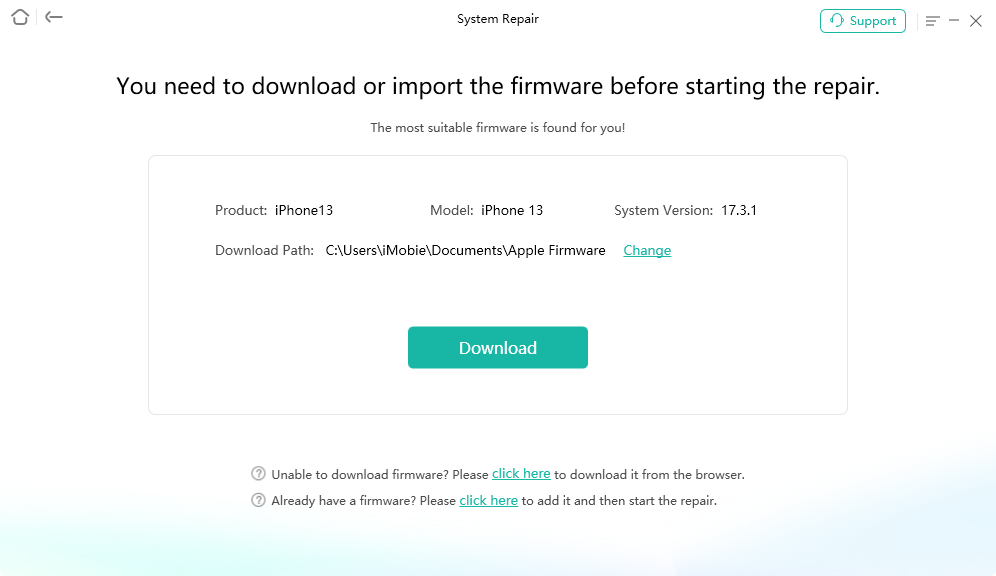
AnyFix matches the firmware to your device before a repair, and lets you change the download folder.
Where It Falls Short
- Compatibility details vary across iMobie's own pages. The tech specs say iOS 5 and above, while the FAQ and user guides say iOS 12.3 and above. If your device runs something older, ask support before paying.
- If Standard Repair can't clear the fault, your data is at risk. The next steps up erase the device.
- Firmware downloads take time. The wait depends on your connection, and the specs ask for 800 MB free on the device.
- The free version does little for a broken phone. The system repair you probably came for needs a license.
- Updates are infrequent. The update history lists one release in the year to September 2025.
What Users Say
Most of the praise for AnyFix sits on iMobie's own pages, and independent reviews are thin. Read the quotes below with their source in mind.
Trustpilot reviews shown on iMobie's AnyFix page
"I purchased the AnyFix software because my iPhone was stuck in recovery mode after a failed update (I had just bought it) and iTunes kept showing errors during the recovery process. I'm glad to say that Anyfix worked for me and saved my iPhone 8 plus!" Samuel Jaworski
"My iPhone 7+ was stuck in recovery mode, I tried all the tricks in the book but it did not work. Then I installed iMobie's "PhoneRescue" & "AnyFix" and with a few tweaks & trys I could recover all my data plus had my iPhone up and running." Sameer Jassani
"Software worked as advertised. Easy to install and use. I am really happy that I can use my iPad Pro now!" Kathy Gorrell
"easiest out of all the ones I've tried. This one does it for you Almost no thought needed ;)" Mark Murch
"Great support, Everything worked as expected. I even received a reminder to cancel my subscription if it was not needed anymore." plessard
Customer comments on iMobie's product page
"AnyFix saved my iPhone from stuck on the Apple logo, and the best thing is, it saved all data! THANK YOU SO MUCH!!!!" Lina Moss
"Fixed the problem of iTunes not recognize either my iPhone or iPad, though it cost some time. Anyway, it worked." Ed
iMobie's page shows an average of 4.8 out of 5 from 157 customer reviews.
Tech press quoted by iMobie
"AnyFix stands out as a reliable source for solving iOS system issues. It offers a user-friendly interface and a no-data-loss policy that ensures the user's safety." Dennis, on iMobie's reviews page
"AnyFix is a one-stop software solution aimed at helping you get rid of a bunch of annoying system issues that can plague your iPhone, iPod touch, iPad, Apple TV and iTunes." iDownloadBlog Team, on iMobie's reviews page. These are excerpts the vendor chose.
MacBreeze: 4.4 out of 5, an older version tested on an iPad
"I have personally tested iMobie AnyFix. It worked great for me. I have applied fixes to my iPad. It completed the whole process very smoothly." HasibX, MacBreeze, reviewing version 1.1.0
The same review's verdict: "AnyFix is a bit expensive but also effective." It lists "Free Trial is Almost Useless" among the cons, and adds: "The UI has no dark mode yet."
The wider iMobie picture
Trustpilot's page for iMobie as a company showed a TrustScore of 3.3 from 1,513 reviews on November 5, 2026 (read through a summarizing tool). That score covers all of iMobie's products, and the reviews shown there were about other programs, so treat it as a view of the company, not of AnyFix.
The recurring themes: happy users mostly had a device stuck in recovery mode or on the Apple logo, and they praise how little effort it took. The complaints are about the price and how little the free version does.
Comparisons
AnyFix vs Apple's free recovery
iTunes or Finder can restore a device at no cost, but a restore erases it and the numbered errors are left for you to solve. AnyFix adds a mode that keeps your data, iOS downgrades and a repair for iTunes itself. If your data is backed up and iTunes behaves, the free route may be all you need.
AnyFix vs PhoneRescue
These are different tools from the same company. AnyFix gets a device working again, while PhoneRescue is built to get data back. One of the Trustpilot reviewers above used both.
Editions and Pricing
| Plan | Price on iMobie's site | Term | Refund period |
|---|
| 1-Month Subscription | $35.99 | Renews monthly | 7 days |
| 1-Year Subscription | $39.99 | Renews yearly | 60 days |
| One-Time Purchase | $59.99 | Lifetime free updates | 60 days |
| AnyFix + AnyTrans, 1-Year | $49.99 | Renews yearly | 60 days |
Our Buy Now button goes to the $39.99 yearly plan, which the order page names as 1 device. iMobie's own site lists its yearly and one-time plans as 5 devices on 1 computer, so check the plan name at checkout if you need more than one device. iMobie showed these as sale prices, beside list prices of $89.99 for the yearly plan and $119.99 for the one-time plan.
FAQs
Does AnyFix work without iTunes installed?
AnyFix needs iTunes on your PC, because it relies on the Apple Mobile Device Support that iTunes installs. You don't have to open iTunes while you use it.
Will AnyFix for Windows work on my Mac?
No. AnyFix for Windows is a Windows program, and the Mac version is a separate purchase at iMobie.
Does AnyFix run on the iPhone itself?
No. AnyFix is a desktop program that controls the device over a USB cable, so you need a Windows PC or a Mac.
How often does the AnyFix subscription renew?
AnyFix on this plan renews every 12 months until you cancel. iMobie says a reminder email goes out before the renewal date, and you can cancel at any time.
What is the AnyFix activation code?
The AnyFix activation code is your order ID, sent from the store after you buy. If it doesn't arrive within 24 hours and support can't retrieve it, iMobie's policy allows a refund.
Which languages does AnyFix come in?
AnyFix is available in English, Japanese, German, French, Spanish, Arabic, Italian and Portuguese.
System Requirements
- Windows 11, 10, 8, 7 or Vista
- 1 GHz CPU or faster, 256 MB RAM (1 GB recommended)
- 500 MB of free disk space on the computer, 800 MB free on the device
- 1024 x 768 display, 3D graphics with 64 MB of RAM
- iTunes installed, and a USB cable
- Devices: iPhone up to iPhone 18 Pro Max, iPad, iPod touch, and Apple TV HD and earlier, per iMobie's specs
Conclusion
AnyFix is worth $39.99 if your iPhone or iPad has a software fault, you have data you'd like to keep, and iTunes alone isn't getting you anywhere. The one reason to buy it is Standard Repair: a guided attempt that leaves your data in place before you try anything drastic.
The main reason not to is that many emergencies end in an erasing repair anyway, and Apple's free restore does that job too. Try the free recovery mode exit first, and if you do buy, remember the yearly renewal.
Download Free TrialBuy Now