PhoneRescue for iOS (Mac): iPhone Data Recovery and iOS Repair, with Mixed Test Results
PhoneRescue for iOS (Mac) is a $69.99 one-time-purchase Mac program from iMobie that scans an iPhone, a computer backup or iCloud for lost data and also repairs stuck iPhones. It suits Mac owners who want to pull selected items out of a backup. Don't count on it to bring back items deleted from the phone itself: recent tests found it recovered very little of that.
The good news is that the free download shows you what it can find before you pay anything. For a tool like this, that scan is worth more than any review, including this one.
Quick facts
- Version: 4.3.0, released November 6, 2024
- Developer: iMobie Inc.
- Runs on: macOS 10.13 High Sierra through macOS 27. The Windows version is a separate listing.
- Devices: iPhone, iPad and iPod touch with iOS 5 to iOS 27
- Recovers from: the device itself, computer backups and iCloud
- Price: $69.99 one-time, 1 Mac, unlimited iOS devices, lifetime free upgrades
- Free version: scans and previews; recovering data and the repair tools need a license
- Guarantee: 60-day money-back under iMobie's refund policy
What we checked: iMobie's update history, whose latest entry is version 4.3.0 from November 6, 2024, the 5.1 MB Mac download from iMobie's server, and the price of $69.99 with no renewal on the order page, on November 6, 2026. We didn't run a recovery on an iPhone.
Before you buy
- Independent tests are weak. A 2026 Mac test scored it 4.8 out of 10 and recovered only a contact and a note from six deleted items. Run the free scan and pay only if the exact items you need show up in the preview.
- Updates have slowed. The public update history stops at November 2024, although iMobie's spec sheet lists support up to iOS 27.
- Removing a lock screen erases the iPhone. Use that tool only if you accept losing what's on the device or have a backup.
- Trustpilot is lukewarm. iMobie as a company scores 3.3 out of 5 from 1,514 reviews across all its products.
Download Free TrialBuy Now
Overview
PhoneRescue opens on two tabs. Data Recovery offers Recover from iOS Device, Recover from Backup and Recover from iCloud. Device Rescuer offers Repair iOS System, Remove Lock Screen Passcode and Recover Screen Time Passcode. Each mode lists its use cases beside it, which helps when you're choosing in a panic.
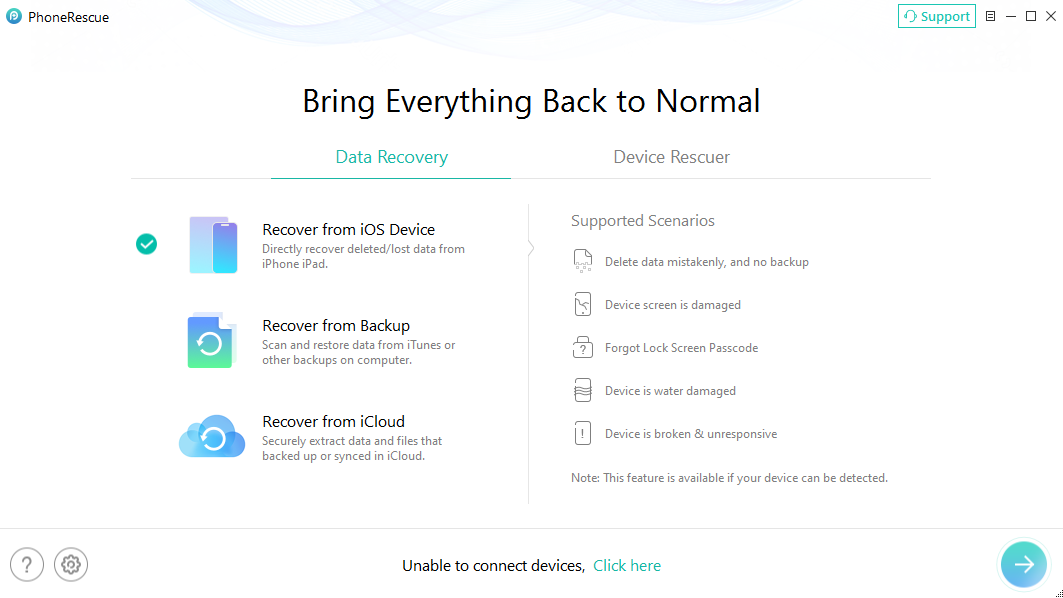
The Data Recovery tab. iMobie's guide shows the Windows build, and the three modes are the same on Mac.
Features
Choose what to scan for on a connected iPhone
PhoneRescue for iOS scans a USB-connected iPhone for the data types you tick, grouped as Personal Data, Media Data and App Data. These include contacts, messages, notes, photos, voice memos, and WhatsApp, Line and Kik chats. Unticking what you don't need shortens the scan.
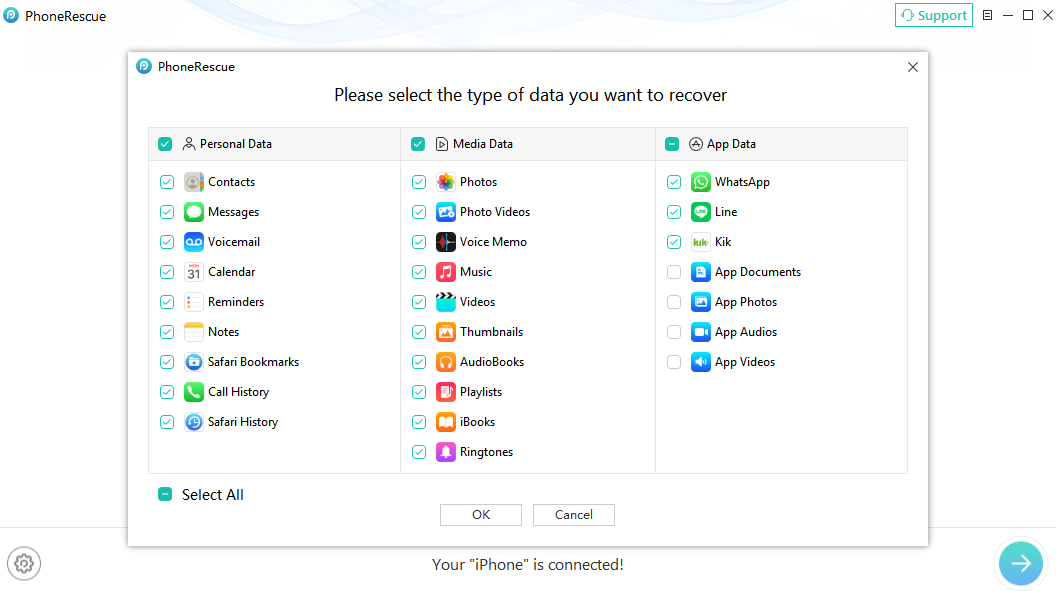
The data type picker, shown here in the Windows build.
Filter results down to deleted items
PhoneRescue for iOS lists results by category with a switch between all items, only deleted and only existing, plus a preview pane. Expect the existing list to be far longer: testers found it surfaces much more data that's still on the phone than data that was really deleted. On a Mac you can also tick an option that sends recovered contacts to the Contacts app.
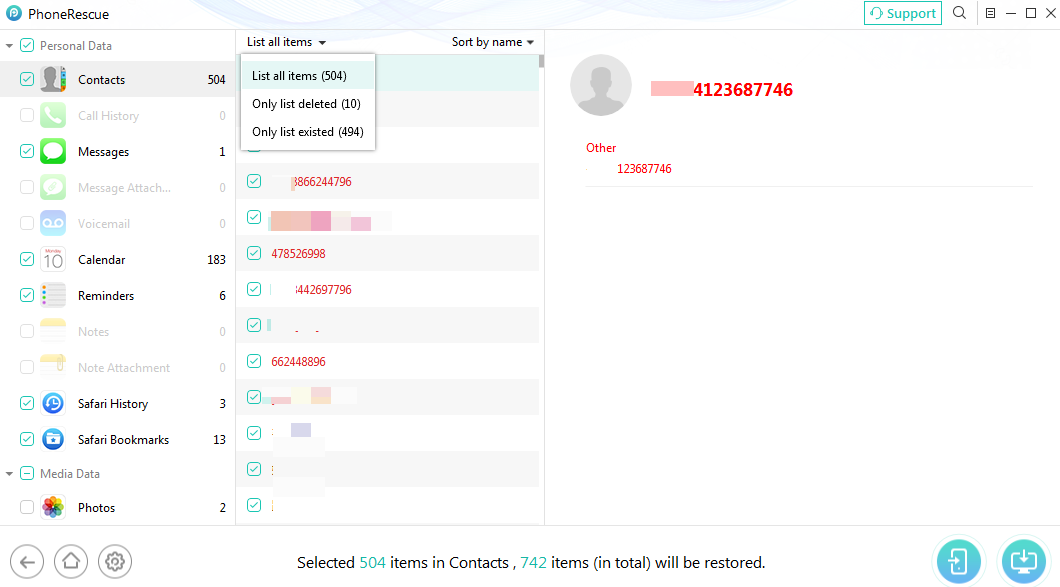
Contacts results with the filter open: 504 items in total, 10 deleted and 494 existing. Windows build shown.
Take single items out of a backup
PhoneRescue for iOS reads backups stored on your computer and lets you take only the missing items, instead of restoring the whole backup over your phone. iMobie says it handles encrypted backups, and damaged ones that won't restore normally. This is its most useful job, because the data is intact and only needs extracting.
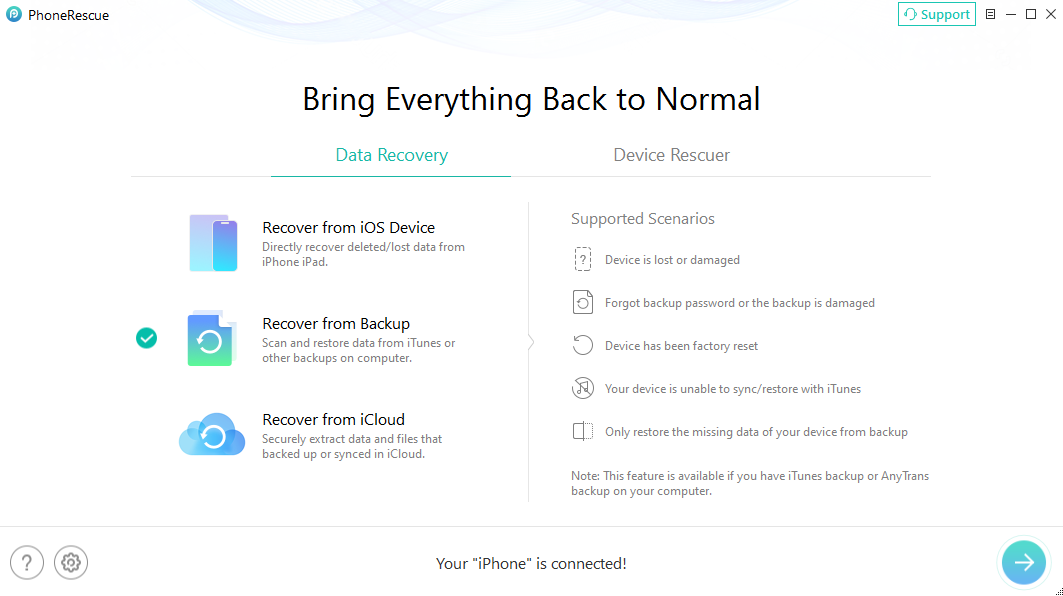
Recover from Backup and the cases it covers, in the Windows build.
Repair a stuck iPhone
PhoneRescue for iOS's Repair iOS System targets an iPhone that failed an update, shows a white or black screen, keeps restarting or is stuck in Recovery or DFU mode. Two more tools remove a lock screen passcode and retrieve or remove a Screen Time passcode. The first thing to try is Apple's own recovery, which is free.
Real-World Uses
- The phone that won't start. It backed up to your Mac last month, so Recover from Backup pulls the photos and messages out to the Mac.
- The encrypted backup. You want one conversation from a backup, not a full restore.
- The forgotten Screen Time code. You set one on a child's iPad and can't remember it.
- The failed update. An iPhone sits on the Apple logo, and you want a repair attempt that tries to keep its data.
Who It's For, and Who Should Skip It
PhoneRescue for iOS (Mac) fits a Mac owner with a computer or iCloud backup who wants selected items back, and households with several iPhones that will use the unlimited-device license.
Skip it if your only hope is recovering deleted photos or memos from the phone itself with no backup, since that's where tests went worst. Modern iPhones encrypt storage, so no tool of this kind can promise much. If your phone is only misbehaving, try Apple's free recovery options first. And check iCloud's Recently Deleted folders before spending anything.
Usage Guide
- Download the DMG, install PhoneRescue and open it.
- Connect the iPhone with a USB cable and trust the computer if asked.
- Choose a tab and mode, then click the arrow at the bottom right.
- Pick the data types and let the scan finish.
- Switch to Only list deleted and preview what it found.
- If the items you need are there, click Activate, enter the code from your order email, and recover them to the Mac or the device.
Where it falls short
- Deleted media is the weak spot. In the 2026 Mac test, the deleted photo, voice recording and calendar item never came back as usable files.
- iCloud mode adds little. Testers found it close to what you can already see in iCloud.
- Stop using the iPhone once data goes missing. New data can overwrite what you're trying to recover.
- iMobie's refund terms need reading. Trustpilot reviewers across iMobie products describe slow or complicated refunds, so keep your order email.
What Users Say
Independent tests
- PocketPCmag, 4.8 out of 10, "Not recommended" (tested on a Mac, updated October 27, 2026): "PhoneRescue found plenty of existing records, yet recovered too little of our deliberately deleted test data."
- Adrian Try, Data Rescue Tools (updated December 20, 2023): "it was only able to recover two of the six items I deleted" He adds: "PhoneRescue may be able to retrieve lost data from your phone, but you should keep your expectations in check."
- JP Zhang, SoftwareHow rated it 4 out of 5 for effectiveness, 5 for ease of use and 3.5 for price after testing the Mac version: "During my test of PhoneRescue for iOS (Mac), the full version did recover many kinds of files."
- Dejan Cvetnarevic, TechJury: "its recovery success rate can be inconsistent, and the free version has limited functionality."
Trustpilot: iMobie 3.3 out of 5 from 1,514 reviews
This score covers all iMobie products, and we found no recent reviews there that name PhoneRescue. Complaints include slow refunds and features that didn't work on a reviewer's device.
Quoted on iMobie's own site
iMobie's product page shows 4.7 from 203 reviews, and it chooses what appears, so give these less weight.
- "Excellent software for retrieving data from my broken old device. It gets back some pictures I have forgotten a long time ago. it is quite a surprise." Travis Lee
- "My iPhone was disabled due to too many failed lock screen passcode attempts. Thanks to PhoneRescue, it recovered the passcode and rescued my iPhone." Sarah
The pattern: everyone agrees it's easy to use and safe to scan with. The disagreement is over results. Testers working with backups and existing data come away happier than those who delete items from the phone and try to get them back.
Comparisons
PhoneRescue vs restoring a backup in Finder
Finder restores a whole backup over your iPhone, replacing anything newer. PhoneRescue lets you browse a backup and take only what's missing. That selective restore is the main reason to pay.
Mac version vs Windows version
The two versions do the same job and each license covers one computer, so buy the one for the machine you'll use.
Editions and Pricing
Prices are iMobie's store prices on November 6, 2026. The $69.99 Lifetime Plan is the one sold through the buttons on this page.
| Plan | Price | Coverage | Term |
|---|
| 1-Year Subscription | $49.99 | 1 computer, unlimited devices | Renews yearly |
| Lifetime Plan | $69.99 | 1 computer, unlimited devices | One-time, lifetime free upgrades |
FAQs
Does PhoneRescue for iOS work on Macs with Sequoia or Tahoe?
iMobie's spec sheet lists PhoneRescue for iOS for macOS 10.13 through macOS 27, including Sequoia and Tahoe. The last listed release is from 2024, so try the free version on your Mac first.
Can PhoneRescue recover photos deleted from an iPhone with no backup?
PhoneRescue for iOS may find some, but recent tests didn't get deleted photos back as usable files. The free scan shows what it can see, so check the preview before you buy.
Do I have to pay to see what PhoneRescue finds?
No. PhoneRescue for iOS scans and previews device, backup and iCloud data for free, and asks for a license only when you recover items or use the repair tools.
Can I use one PhoneRescue license on a Mac and a PC?
No. A PhoneRescue for iOS license covers one computer, though it works with unlimited iOS devices.
Does PhoneRescue work with Android phones?
No. This edition only works with iPhone, iPad and iPod touch. iMobie sells PhoneRescue for Android separately.
Can I get a refund if PhoneRescue finds nothing?
iMobie offers a 60-day money-back guarantee on PhoneRescue under its refund policy. Read those terms before you buy, because the free scan already shows what it can find.
System Requirements
- macOS 10.13 High Sierra through macOS 27
- iPhone, iPad or iPod touch with iOS 5 to iOS 27, and a USB cable
- 512 MB RAM
- 100 MB or more of free disk space
- 1024x768 display or above
Conclusion
PhoneRescue for iOS (Mac) is worth $69.99 only if the free scan already shows the items you need, most likely from a backup. The one reason to buy it is pulling selected data out of a backup without a full restore. The main reason not to is that independent tests recovered little of what was truly deleted from the phone, and the update history has stood still since 2024. Scan first, and pay only for a result you've already seen.
Download Free TrialBuy Now