DroidKit: Recover Deleted Android Data, Fix a Crashed Phone and Get Past a Forgotten Lock Screen
DroidKit is iMobie's Android toolkit for Windows and Mac: it recovers deleted photos, messages and WhatsApp chats without rooting, rescues data from a Samsung whose system has crashed, repairs Android systems stuck on a black screen or boot loop, and removes a forgotten screen lock. The Full Toolkit costs $69.99 a year on Windows ($79.99 on Mac), single modules are sold separately, and the free download scans and previews before you pay.
It's built for the bad-phone-day moments: the photos you deleted by mistake last night, the Samsung that won't get past its logo, the old phone whose pattern nobody remembers. You connect the phone to your computer, pick the problem, and DroidKit walks you through it.
Quick facts
- Version: 2.3.8, released March 11, 2026 (first released 2021; eight releases since April 2024)
- Developer: iMobie Inc., Chengdu, China (also makes PhoneRescue and AnyDroid)
- Runs on: Windows 11, 10, 8, 7 and Vista (32 and 64-bit) and macOS 10.13 to macOS 27
- Works with: Android phones and tablets on Android 6.0 or later (Samsung, Google, Xiaomi, OPPO, vivo, Motorola, OnePlus, Huawei and more)
- Price: Full Toolkit $69.99 a year on Windows, $79.99 a year on Mac (5 devices, 1 computer); single modules from $15.99
- Free version: scan and preview recoverable data, run the first steps of unlock and repair, 3 system reinstalls, 3 cleanups and 50 Data Manager items
- Money-back guarantee: 60 days on one-time and yearly plans, 30 days on 3-month and 7 days on monthly plans, for the cases in iMobie's refund policy (see FAQs)
- What we checked: the Windows installer (an 8.1 MB web installer signed by iMobie Inc.) and the 5.0 MB Mac disk image downloaded from imobie.com, the update history on iMobie's Tech Specs page and the plan prices on iMobie's Windows and Mac order pages, all on November 17, 2026. We didn't run a recovery or repair on a phone.
Before you buy
Run the free scan first: it shows exactly which photos, messages and chats DroidKit can find on your phone before you pay. Stop using the phone as soon as you notice data is missing, because new data overwrites what's recoverable. And know that removing a screen lock erases the phone on most models (some Samsung models keep their data).
Download Free TrialBuy for WindowsBuy for Mac
Overview
DroidKit's home screen is a set of modules: Data Recovery, Data Extractor, Data Manager, System Fix, System Reinstall, System Cleaner, Screen Unlocker and an FRP tool. Each one is its own purchase, or you buy the Full Toolkit and get them all. Everything runs from the computer over a USB cable, with USB debugging or a guided download mode on the phone depending on the job.
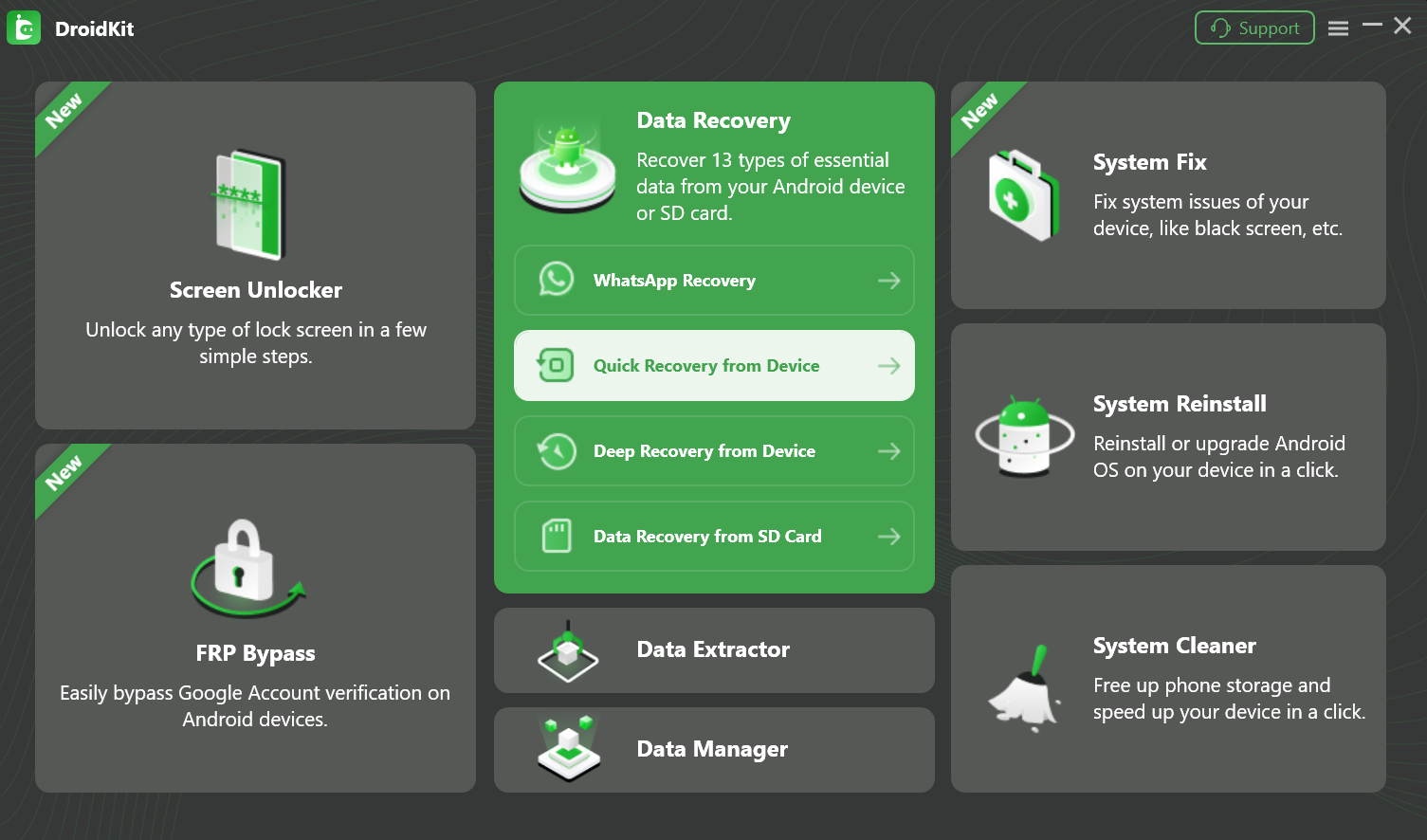
DroidKit's main window (Windows) with Data Recovery open: Quick Recovery from Device, Deep Recovery from Device, WhatsApp Recovery and Data Recovery from SD Card, next to Screen Unlocker, System Fix, System Reinstall and the other modules.
Features
Recover deleted data, no root for the quick scan
DroidKit's Data Recovery finds 13 kinds of data on a connected phone: photos, videos, audio, messages and attachments, contacts, call logs, calendars, WhatsApp and LINE attachments and more. Quick Recovery works without rooting; Deep Recovery digs further but roots the phone. You preview everything, tick what you want, and export it to the PC or back to the phone. WhatsApp Recovery and SD card recovery have their own entries.
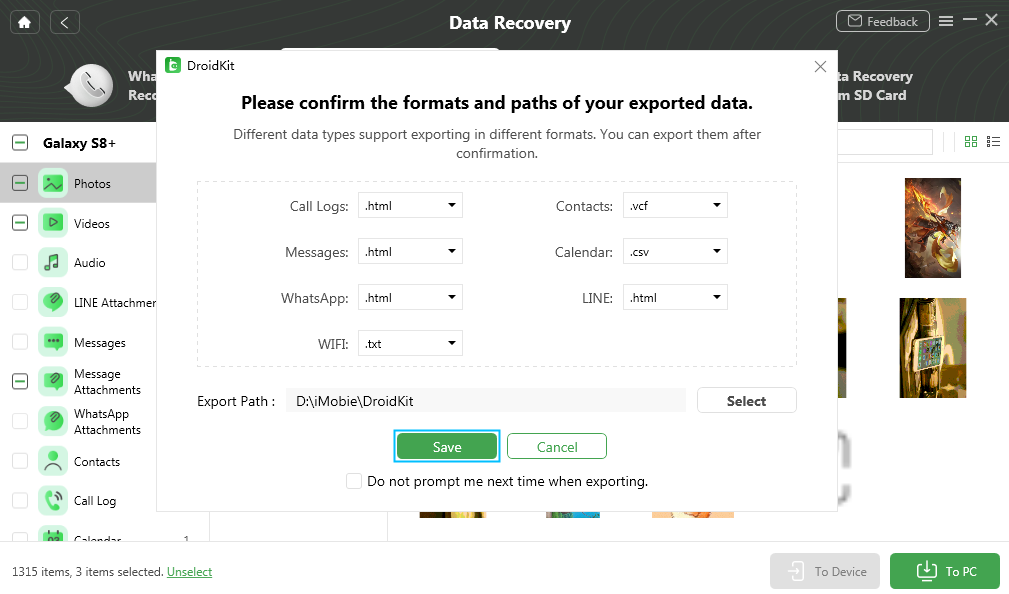
Quick Recovery results sorted by type (Photos, Videos, Audio, Messages, Contacts, Call Log, Calendar), with the dialog for choosing where to export them.
Pull data out of a broken phone or a Google backup
DroidKit's Data Extractor gets data from places Quick Recovery can't reach: a Samsung phone whose system has crashed (black screen, stuck on the logo), your Google account backups (you sign in to preview and pick items), and a SIM card. It's the module to try when the phone itself no longer boots.
Repair a stuck Android system
DroidKit's System Fix targets black screens, freezes, boot loops, a frozen touch screen and app crashes. It identifies the model (for Samsung, the PDA code), downloads the matching firmware and reflashes the system without root. Recent updates focused on Xiaomi, Redmi and POCO repairs. System Reinstall separately reinstalls or upgrades Android from an official ROM.

System Fix after matching a Samsung phone by its PDA code, ready to download the firmware.
Remove a forgotten screen lock
DroidKit's Screen Unlocker removes a PIN, password, pattern, fingerprint or face lock you've forgotten, or one you can't enter on a cracked screen. On most phones this resets the device; on some Samsung models iMobie says the data is kept. Version 2.3.7 added a solution for Qualcomm-based Samsung S23 and S24 phones. DroidKit also has an FRP module that removes Google account verification after a reset, for your own device, with proof of purchase.
Manage and clean up
DroidKit's Data Manager transfers, backs up and organizes photos, music, contacts and messages between the phone and the computer, and System Cleaner clears system junk to free storage. Both are useful extras rather than reasons to buy.
Benefits
- One tool for several emergencies. Recovery, repair and unlocking share one app, one license and one support team.
- See before you pay. The scan-and-preview step is free, so you only buy if your files are there.
- No root for the common jobs. Quick Recovery, System Fix and screen unlock don't need a rooted phone.
- Brand-specific fixes. Samsung PDA-code firmware matching and Xiaomi-specific repairs show iMobie keeps tuning it for popular phones.
Real-World Uses
- You cleared a chat or deleted a camera folder by mistake. Run Quick Recovery straight away and export what it finds.
- A Samsung Galaxy stays on a black screen after an update. Try System Fix, or use Data Extractor first to save its photos.
- A parent's old phone is locked with a pattern nobody remembers. Remove the lock and set the phone up again.
- You're switching phones and want contacts, messages and music copied to the PC. Data Manager handles it.
Who It's For, and Who Should Skip It
It's for Android owners facing lost data or a phone that won't start, who'd rather try a guided desktop tool before paying a repair shop, and for people who handle the family's phones and want one toolkit.
Skip it if you only need one thing done once (buy that single module, not the toolkit), if your phone is a newer model you need a full internal-storage recovery from (Android's file-based encryption limits every recovery tool), or if your files are already in Google Photos or Google One backup, which restore for free.
Usage Guide
- Download and install DroidKit on your PC or Mac (the installer downloads the full program).
- Launch DroidKit and click the module you need, for example Data Recovery > Quick Recovery from Device.
- Connect the phone with a USB cable and follow the prompts (allow USB debugging, or enter download mode for repairs).
- Scan and preview. Select the data types, let the scan finish and browse the results.
- Activate and finish. Click Activate, enter the email and code from your order, then export the data or run the repair or unlock.
Where It Falls Short
- Quick Recovery misses things, and Deep Recovery roots the phone. Reviewers found the quick scan doesn't find everything and the deep scan needs root.
- Modern encryption limits recovery. On recent Android versions, full recovery of internal storage is rarely possible with any tool.
- System Fix works best on Samsung and Xiaomi. Other brands get fewer repair options.
- Toolkit plans are subscriptions. The Full Toolkit is yearly or monthly only, and plans renew until you cancel.
- Refunds have conditions. The guarantee covers wrong or duplicate purchases, a missing code, unexpected renewals and technical problems not solved within five days, not a change of mind.
What Users Say
iMobie scores 3.3 out of 5 on Trustpilot from 1,525 reviews across all its products (November 2026). iMobie's DroidKit review page reposts Trustpilot reviews and quotes tech sites; we picked the ones about recovery, repair and screen unlock and added independent reviews and the critical side.
Buyers
"I purchased iMobie DroidKit repair services to fix a problem with frequent touch screen freezes of a Samsung S20+. ... They also asked if I wanted a refund after I started using iMobie DroidKit, which I did not request because the mobile works great now." Tap
"All the features are very easy to use and you end up unlocking your phone or recovering your data in no time." Saem Un
"Very nice program, clean and helpful user interface and quick response on the technical support side" Thanasis
"Great support, Everything worked as expected. I even received a reminder to cancel my subscription if it was not needed anymore." plessard
"so I purchased DroidKit App cleared the phone and happy days." STEVEN FULLER, 5 stars, Trustpilot, October 31, 2026
"I gave them a four-star rating because of the customer service I received. Even though the product did not work for me. ... And when I it didn't work they gave me a full refund." Charles "Mikey"
"Paid £30 to unlock my sony digital audio player." ... "Total waste of money." Desmond Pengelly, 1 star, Trustpilot, August 16, 2026 (iMobie's reply identifies the product as DroidKit)
Software Testing Help (tested on a Samsung S23, Google Pixel 8 and Xiaomi Redmi, updated May 2026)
On screen unlocking: "DroidKit is highly effective, though it comes at the cost of your local data."
Its cons: "Very Expensive to Own: Modules cost money individually; purchasing the entire software is very expensive." "Restricted Brand Options: Key "System Fix" module functions work only with Samsung and Xiaomi handsets." And on recovery: "The chance of successful recovery falls when there has been considerable usage of the device after the data loss."
TheSweetBits and XDA Developers
TheSweetBits (which has a discount partnership with iMobie) concludes: "DroidKit isn't a miracle fixer — but it's a capable safety net." It warns that "the app will have to root your Android smartphone to do a deep scan" and that "Due to Android's file-based encryption, full internal storage recovery is rarely possible on modern devices."
XDA Developers, quoted by iMobie: "The quick recovery will run a shorter scan and show you the results of its findings. If your missing files are harder to find, the deep scan can run a more in-depth scan to find what has been lost."
The pattern: buyers like how simple it is and praise iMobie's support and refunds. Reviewers who tested it say recovery is good for recent deletions but limited by encryption and root, repairs are strongest on Samsung and Xiaomi, and the full toolkit is expensive.
Comparisons
DroidKit vs restoring from a Google backup
If your phone was backing up to Google (photos to Google Photos, the rest to Google One), a factory reset and restore brings most things back for free. DroidKit is for what that misses: files deleted before the last backup, a phone with no backup at all, or a phone that won't boot far enough to reset. Its Data Extractor can also read your Google backups selectively from the computer.
Full Toolkit vs one module
A one-time Data Recovery license on Windows is $55.99 and never renews; the Full Toolkit is $69.99 a year with everything. If you have a single problem, the module is cheaper over time; if you're the family's phone fixer, the toolkit pays off.
Editions and Pricing
Prices on iMobie's order pages on November 17, 2026 (USD, before tax). Use the Windows or Mac Buy button and choose the module and term on the order page.
| Plan |
Windows, 1 year |
Windows, one-time |
Mac, 1 year |
Mac, one-time |
| Full Toolkit (all modules) | $69.99 | - | $79.99 | - |
| Data Recovery, Data Extractor, System Fix or Screen Unlocker (each) | $39.99 | $55.99 | $45.99 | $59.99 |
| Data Manager | $29.99 | $45.99 | $35.99 | $49.99 |
| System Reinstall or System Cleaner (each) | $19.99 | $29.99 | $25.99 | $35.99 |
Yearly and one-time plans cover 5 devices on 1 computer. There are also 1-month and 3-month single-device plans (Full Toolkit $34.99 a month on Windows, $39.99 on Mac; the bigger modules $35.99 for 3 months on Windows) and yearly plans for 10 or 15 devices.
Buy for WindowsBuy for Mac
FAQs
Does DroidKit need my phone to be rooted?
DroidKit's Quick Recovery, System Fix, System Reinstall and Screen Unlocker work without root. Deep Recovery roots the phone to scan deeper, so use it only if the quick scan didn't find what you need.
Can I see what DroidKit will recover before I buy?
Yes. DroidKit's free version scans the phone and previews the recoverable photos, messages and other data; saving them needs a license.
Will DroidKit's Screen Unlocker erase my phone?
DroidKit's Screen Unlocker resets most phones when it removes the lock. iMobie lists some Samsung models where the data is kept; check your model on iMobie's site first.
Which phones does DroidKit's System Fix support best?
DroidKit's System Fix is strongest on Samsung (it matches firmware by PDA code) and Xiaomi, Redmi and POCO, which recent updates targeted. Reviewers found fewer repair options on other brands.
Can I get a refund for DroidKit?
iMobie refunds DroidKit within 60 days on one-time and yearly plans (30 days on 3-month, 7 days on monthly) for a wrong or duplicate purchase, a missing activation code, an unexpected auto-renewal or a technical problem support can't solve within five days. It doesn't cover a change of mind.
Does one DroidKit license work on both Windows and Mac?
No. DroidKit for Windows and DroidKit for Mac are bought separately, at different prices; each license covers up to 5 phones from one computer on the yearly and one-time plans.
Does DroidKit work with iPhones?
DroidKit is for Android only. iMobie's iPhone tools are separate products, such as PhoneRescue for iOS and AnyUnlock.
System Requirements
- Windows 11, 10, 8, 7 or Vista (32 or 64-bit), or macOS 10.13 High Sierra to macOS 27
- Pentium IV 2.4 GHz or better, 512 MB RAM, 100 MB free disk space, 1024x768 display
- USB driver and ADB device driver (Windows), USB cable, internet connection
- Android 6.0 or later phone or tablet
Conclusion
DroidKit is worth it when an Android phone has lost data or stopped working and you want to try a guided fix at home before paying a shop. The free scan is the best reason to try it: you see your recoverable files before spending anything. Buy a single module for a single problem, and the $69.99 yearly Full Toolkit if you look after several phones. The main reason to hold back: recovery on newer encrypted phones is limited, deep scans need root, and repairs are strongest on Samsung and Xiaomi.
Download Free TrialBuy for WindowsBuy for Mac