FocuSee: A Screen Recorder That Does the Editing for You
FocuSee is a Windows and Mac screen recorder that automatically adds zoom, cursor effects and webcam layouts, and its 1-Computer Plan costs $69.99 once at checkout. It's for people making tutorials, product demos and course videos who want a polished result without learning a video editor.
You record as usual. When you press stop, the zooms on your clicks and the styled background are already there. The trade-off is reliability: reviews are split, and some users report export problems, so test it first.
Quick facts
- Developer: iMobie Inc.
- Version: 2.5.2 for Windows (October 15, 2026), 2.5.0 for Mac (August 27, 2026)
- Platforms: Windows 10 or later, macOS 10.15 or later
- Export: up to 4K at 60 fps, with no limit on recording length
- Price: $69.99 at checkout for the 1-Computer Plan, a one-time payment with no renewal
- Free trial: standard features, and one exported video
- Guarantee: 60 days on one-time purchases, under iMobie's refund policy
- What we checked: the order page showed the 1-Computer Plan at $69.99 as a lifetime license on November 6, 2026, and the Windows download is a 5.7 MB web installer that fetches the program during setup. We didn't record or export a video ourselves, so the feature details come from iMobie and the reviews quoted.
Before you buy
This plan isn't on FocuSee's own pricing page. That page lists yearly and monthly plans plus an Advanced Lifetime plan at $199.99 for up to 5 computers with 1,000 AI credits. The order page for this $69.99 1-Computer Plan doesn't mention AI credits, so assume it has none and ask iMobie before you pay if you need them. AI subtitles, voice enhancement and filler word removal all use credits.
Lifetime means this major version. iMobie says one-time buyers can use the current major version forever, but moving to the next one costs extra, at a discount for existing users.
Download Free TrialBuy Now
Overview
FocuSee starts with four recording choices: Full Screen, Custom, Window and Device. You can also pick your camera and microphone and open a teleprompter. After you stop, the recording opens in an editor with style controls on the left, your video on a colored background in the middle, and a timeline below.

The start screen, with the recording modes on the left and camera, microphone and teleprompter on the right.

The editor after a recording, with padding, shadow and background controls on the left.
Features
FocuSee zooms in on your clicks automatically
FocuSee watches your mouse while you record and adds smooth zooms on clicks, then pans to follow the cursor. That's the job that takes the longest in a normal editor. You can adjust or delete any zoom on the timeline, and a 3D Motion option adds tilt that follows the cursor.
FocuSee makes your cursor easier to follow
FocuSee lets you enlarge the cursor, change its style, add click effects such as ripples and spotlights, turn on click sounds and hide the cursor when it's idle. Version 2.5 for Mac added controls for cursor angle and path smoothness.

The cursor panel, with size, style and click effect settings.
FocuSee arranges your webcam for you
FocuSee records your screen and webcam together and lets you switch layouts during the video, from a small corner bubble to a large side-by-side view. It can blur or replace your background without a green screen, which is one of its AI features.
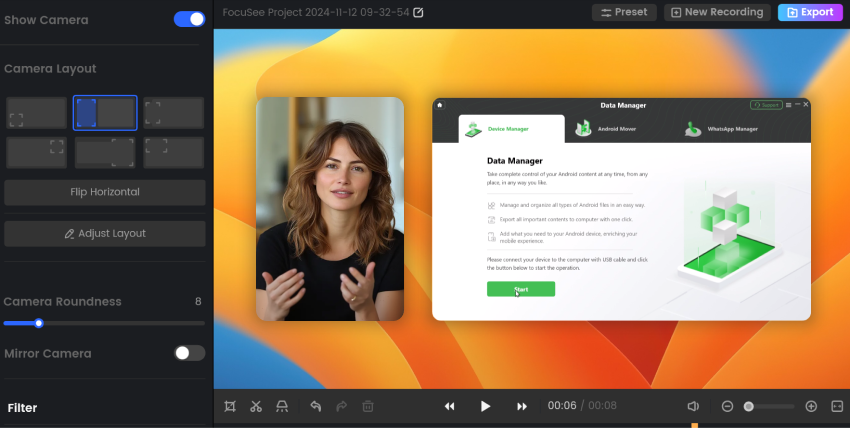
A larger webcam layout beside the screen recording.
FocuSee records phones over USB
FocuSee can record iOS and Android screens through a USB cable, with the same automatic treatment as desktop recordings. It suits app demos and mobile tutorials.
FocuSee adds subtitles and cleans up audio with AI
FocuSee generates subtitles by speech recognition in over 50 languages, removes silences and filler words such as "um," reduces noise and enhances voices. iMobie claims over 98% subtitle accuracy. Its pricing table says these AI tools use credits, so check what your plan includes.

The subtitle panel, offering an advanced online model or a local model.
FocuSee explains with annotations
FocuSee's annotation tools add text, shapes, arrows, callouts, spotlights and blur, so you can point at a button or hide private data. It also shows keyboard shortcuts on screen.
Benefits
- Hours of editing become minutes. The zooms and framing that make a demo look professional are done by the time you stop recording.
- No editor skills needed. You adjust what FocuSee produced rather than building a timeline from nothing.
- A consistent look. The same style across a course or a help center makes it look like one production.
Real-World Uses
- A SaaS product demo: click through your app once, then send the sales team a polished video the same day.
- An online course lesson: record slides with your webcam, and switch to a full-screen face at the start and end.
- A support walkthrough: show the steps to fix a problem, with arrows and a blur over customer data.
- A mobile app tutorial: record an iPhone over USB and add captions.
Who it's for, and who should skip it
Buy it if you make screen videos regularly and editing is the part you dread. Skip it if you need a full video editor with multi-track work, since reviewers on Product Hunt ask for basics such as transitions. Skip it if you just want to record quick clips, because OBS Studio is free. It's also a poor fit for an older PC: iMobie asks for at least 8 GB of RAM and a 2.9 GHz processor. Teams should look at the higher plans, because this one covers a single computer.
Usage Guide
- Download and run the installer, which fetches the program during setup.
- Sign up or log in with the email you used to buy. FocuSee activates automatically.
- Choose Full Screen, Custom, Window or Device, then set your camera and microphone.
- Record, then press stop to open the editor.
- Review the zooms on the timeline, and adjust the background, cursor and camera layout.
- Add subtitles or annotations if you need them, then click Export.
Where it falls short
- Export problems. This is the complaint that matters most. Trustpilot reviewers report an export out of sync after hours of work and a very slow cloud export, and Product Hunt's summary also mentions failed exports and crashes. Version 2.5.1 lists export stability fixes, so test a long recording.
- Thin editing tools. It's strong at automatic polish but weaker at manual work.
- Hard to cancel, by some accounts. A Trustpilot reviewer found a subscription "Insanely hard to cancel." That doesn't apply to a one-time plan, but it's worth knowing about the company.
- One device at a time. iMobie will move your account to a new device only twice a year, and you have to contact support to do it.
- Credits expire. Lifetime users on the $199.99 plan get 1,000 credits valid for one year, and using credits reduces a refund.
What Users Say
FocuSee's reviews are sharply divided. Happy users love the auto zoom, and unhappy ones usually lost time to bugs or billing. We read these pages on November 6, 2026.
Trustpilot: 3.1 out of 5 from 23 reviews
Praise:
- JAZZ A, December 18, 2025 (5 stars): "I love the auto-zoom feature, and it really saves time while exporting high-quality videos."
- Andy, June 18, 2026 (5 stars): "FocuSee is a great value product, with an excellent support team."
- LWX, April 23, 2025 (5 stars): "The auto zoom feature adds a professional touch with zero editing."
- AJAY, October 13, 2025 (5 stars): "FocuSee is simple, easy to use, and incredibly reliable."
Criticism:
- Borrowe, December 8, 2025 (1 star): "Resulting export was completely out of sync after hours of recording / editing."
- Jovan Stojanov, October 6, 2026 (2 stars): "I just wasted 2h to upload a 8m video to cloud/export."
- Laura Mühlbach, January 12, 2026 (1 star): "It is totally buggy and therefore cumbersome to use."
- Edoardo Puiatti, August 15, 2026 (1 star): "Most trash piece of software i ever had the displeasure of using, UI is so complicated to understand."
- solox, August 14, 2026 (1 star): "Insanely hard to cancel, you have to contact another company by email then respond to them."
Product Hunt: 4.6 out of 5 from 39 reviews
- simone comaita: "The interface is simple, and you don't need to be a professional editor to get professional-looking results."
- Ayush Tiwari: "Still super easy to use and saves a lot of time for creators like me who record tutorials regularly."
- XiaoBu: "I really like how FocuSee combines screen recording and editing in one place."
- Yuji Huang: "it is very easy to find something wrong after the export." He also asks for undo, panning, fades and transitions.
- nadworks: "since iMobie took over, features such as video sharing directly from the platform have been removed."
- James Woo: "It would be nice to be able to playback at 2 to 4x speed so that reviewing minor edits can be done quickly."
iMobie on Trustpilot: 3.3 out of 5 from 1,514 reviews
This score covers all of iMobie's products, including its phone unlocking tools. Complaints there center on refunds and slow support. Taylor Smith wrote on October 8, 2026: "I have had a great experience using Focusee." FocuSee's own website says 3,200 customer reviews, but that's the vendor's figure.
The themes: people value the auto zoom and how quickly a good-looking video appears. The doubts are about stability on long projects, limited manual editing and support for billing issues.
Comparisons
FocuSee vs Screen Studio
Screen Studio is the best-known tool of this type, with the same automatic zooms, but it's Mac only. FocuSee covers Windows too, which is often the deciding fact.
FocuSee vs Camtasia
Camtasia is a full editor with a recorder, so it gives you much more manual control and takes longer to learn. Pick it for detailed courses and FocuSee for speed.
FocuSee vs OBS Studio
OBS is free and very capable for recording and streaming, but it does no automatic editing, so you'd add zooms in a separate editor.
Editions and Pricing
| Plan | Price | Term | Computers |
|---|
| 1-Computer Plan (this listing) | $69.99 at checkout | One payment | 1 |
| 2-Computer Plan | $95.99 at checkout | One payment | 2 |
| 5-Computer Plan | $179.99 at checkout | One payment | 5 |
| Standard on FocuSee's site | $49.99 | Renews yearly | 1 |
| Advanced on FocuSee's site | $79.99 | Renews yearly, 3,600 credits a year | Up to 3 |
| Advanced Lifetime on FocuSee's site | $199.99 | One payment, 1,000 credits for 1 year | Up to 5 |
FAQs
Does FocuSee add a watermark to the trial?
FocuSee's pricing table lists watermark removal as a paid plan feature. The trial lets you export one video in up to 4K, so use that export on a real test.
Can I get a refund on FocuSee?
Yes, iMobie takes FocuSee refund requests within 60 days for a one-time purchase or 1-year plan, and within 7 days for a monthly plan. The cost of any AI credits you used is deducted.
Can FocuSee use my old recordings?
Yes, FocuSee can import existing footage from your computer, add effects and export it. Its automatic zooms are built around recordings made in FocuSee, so try an import in the trial if that is your main use.
Is there a recording time limit in FocuSee?
No, FocuSee has no limit on recording length, but longer recordings take more time to render and export.
Is there an education discount for FocuSee?
Yes, iMobie offers an education discount on FocuSee for students, teachers and staff through its education offer page.
Does FocuSee work on older Macs?
FocuSee runs on macOS 10.15 or later and on Intel or Apple Silicon Macs, with the best experience on macOS 12.3 and above.
System Requirements
- Windows 10 or later, or macOS 10.15 or later (macOS 12.3 and above recommended)
- Intel i5 dual-core 2.9 GHz or better, or an Apple M1 or Intel-based Mac
- 8 GB of RAM or more
- 500 MB of free disk space
Conclusion
Worth $69.99 if you record often and want to stop editing. At this price it costs about a third of FocuSee's own lifetime plan, and the automatic zooms alone can pay it back on the first few videos. The one reason to buy it is the time you'll save. The main reason not to is reliability: enough users report bad exports that you should run the trial on a long recording before paying, and treat AI credits as not included.
Download Free TrialBuy Now