Short answer: for lessons, software demos and recorded calls, get Movavi Screen Recorder ($44.95 a year): you can draw on the screen while you record, show your clicks and keystrokes, and schedule a recording, and its 7-day trial lets you try all of that first. If you want to pay once instead, pick Bandicam Screen Recorder for games and long sessions, Aiseesoft Screen Recorder for an all-in-one recorder that also mirrors your phone, or FocuSee if you want polished, auto-zoomed product demos without editing. ApowerREC is the cheapest lifetime license here. If you only record a clip now and then, the free Xbox Game Bar, Snipping Tool or OBS Studio may be all you need.
Download Movavi Screen Recorder Free TrialBuy Movavi Screen Recorder
At a glance
| Movavi Screen Recorder | Bandicam | Aiseesoft Screen Recorder | FocuSee | ApowerREC |
|---|
| Price at checkout (1 PC) | $44.95 | $44.95 | $49.96 | $69.99 | $43.91 |
| License | 1 year, renews (or $19.95 a month) | One payment, covers Bandicam 2027 | One payment, lifetime | One payment, current major version | One payment, lifetime updates |
| Windows | 10 and 11, 64-bit | 7, 8, 10, 11 | 7, 8, 8.1, 10, 11 | 10 and later | 7 and later |
| Mac | Separate product | Separate product | Separate product | ✓ Same app | Separate app |
| Free trial | 7 days, "Trial" watermark | 5 minutes per recording, no watermark | 3 minutes per recording | One exported video | Watermark and a length limit |
| Draw on screen while recording | ✓ | ✓ | ✓ | Annotations in the editor | ✓ |
| Scheduled recording | ✓ | ✓ | ✓ | — | ✓ |
| Game recording | ✗ (Movavi points gamers to Gecata) | ✓ DirectX, OpenGL, Vulkan | ✓ up to 120 fps | ✗ | Screen or window mode only |
| Standout | Live drawing, keystroke display, scheduler | Fast hotkey recording, AI transcripts | Seven recorders incl. phone mirroring, 8K | Automatic zoom and cursor effects | Numbered markers, spotlight, task scheduler |
How we picked and what we checked
- We started from every Windows screen recorder listed in our Screen Capture category and kept the ones that are still sold and updated, then dropped bundles where recording is a side feature.
- We read each vendor's product page, user manual, trial terms and refund policy for the features in the table above.
- We checked the price on each order page in US dollars, and the current version on each vendor's site or changelog.
- We read the Trustpilot pages for each vendor on the same day, plus the reviews gathered on our own product pages (Capterra, Product Hunt, TechRadar, Hongkiat and others).
What we checked: order-page prices on November 20, 2026 (Movavi $44.95 for a year, marked down from $64.95; Bandicam $44.95; Aiseesoft $49.96; FocuSee $69.99; ApowerREC $43.91), versions on the same day (Movavi 24.8.2, Bandicam 27.0.7.2687, Aiseesoft 3.2.20, FocuSee 2.5.3 for Windows), and Trustpilot scores on November 20, 2026. We compared features, prices, trials and reviews. We didn't run recording or frame-rate tests ourselves, so performance claims come from the vendors and the reviews quoted.
Movavi Screen Recorder: best for lessons, demos and recorded calls
- Price: $44.95 for a 1-year subscription at checkout, or $19.95 a month. Screen Recorder + Video Editor is $59.95 a year or $149.95 lifetime
- Version: 24.8.2, updated September 30, 2026
- Runs on: Windows 10 and 11, 64-bit (the Mac version is sold separately)
- Free trial: 7 days, with a "Trial" watermark on recordings
- Refunds: 14 days, for technical problems Movavi support can't solve
Best for: teachers, trainers, support and sales teams, and anyone who records webinars and Zoom or Teams calls
Movavi Screen Recorder is the recorder in this list that does the most while you record, which is what makes a tutorial clear the first time. A small control panel docks to the edge of the screen. You drag out an area (or press Space for the full screen), switch the webcam, microphone and system sound on or off, and click REC. During the recording, the Pencil tool draws arrows, circles, rectangles and freehand marks in eight colors, so you can circle the button you're talking about instead of describing it.
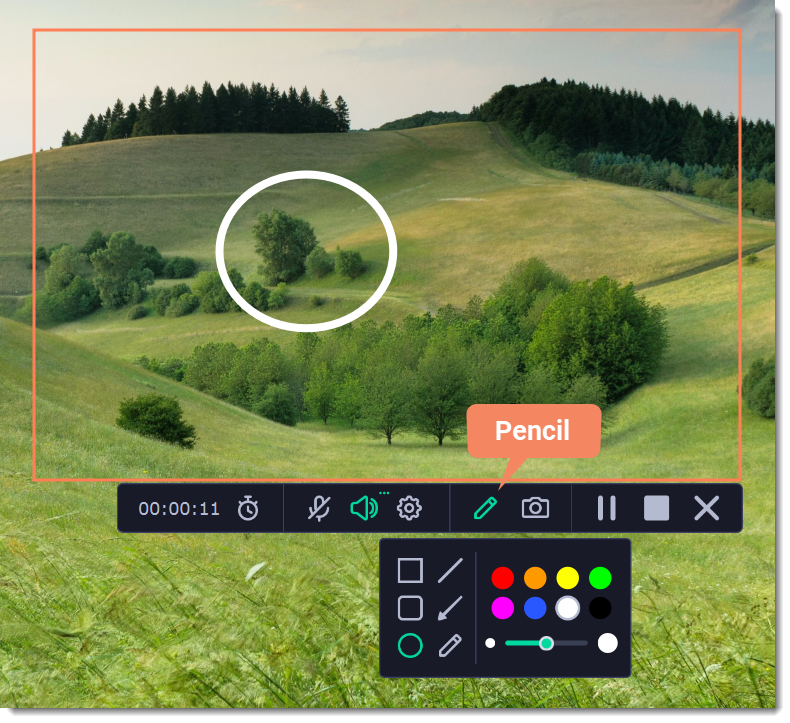
Movavi Screen Recorder during a recording: the timer and controls under the capture area, the Pencil menu with shapes, arrows and colors, and a circle drawn on the screen.
Movavi Screen Recorder also shows your mouse clicks and keystrokes on screen, records system audio and your microphone together (both sides of a video call), reduces microphone noise as it records, and can keep the audio sources on separate tracks. The scheduler starts a recording at a set time, stops it after a set duration and can put the PC to sleep or shut it down afterwards, which is how you catch a webinar you can't attend. It doubles as a screenshot tool too, with scrolling screenshots of long pages.
Where it falls short: the capture editor only trims and exports, it isn't built for games (Movavi's own FAQ sends gamers to Gecata), it doesn't record copy-protected streams, and the recorder on its own has no lifetime license. The only one-time option is the Screen Recorder + Video Editor bundle at $149.95.
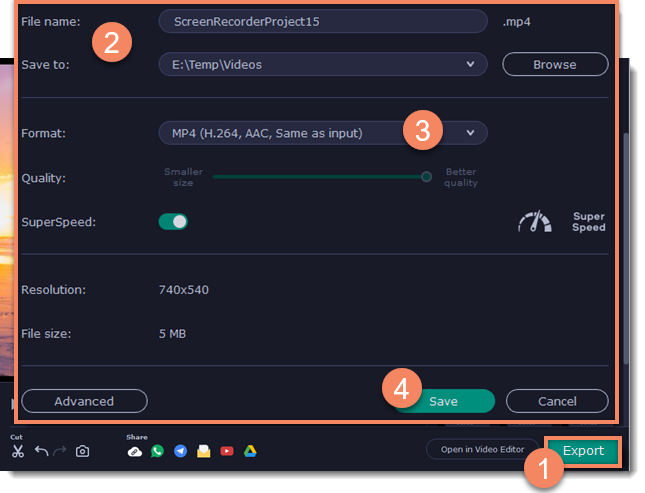
The export window: file name and save folder, MP4 (H.264, AAC), a quality slider and the SuperSpeed switch, with share buttons and Open in Video Editor at the bottom.
What we like
- Draw arrows and shapes live, so recordings explain themselves
- Shows clicks and keystrokes for software demos
- Scheduled recordings that can shut the PC down afterwards
- Microphone noise reduction and separate audio tracks
- Scrolling screenshots in the same app
Watch out for
- Subscription only, unless you buy the $149.95 bundle with Video Editor
- The editor only trims
- Not for games or protected streaming video
- Windows 10 and 11 64-bit only
What reviewers say about Movavi Screen Recorder
Hongkiat's reviewer, testing on Windows: "Yes, you can doodle while you're recording which is a feature that I absolutely love." On the editor: "When I say simple, I really mean simple. It only allows for trimming your videos."
Frances W., Learning Experience Designer, quoted on Movavi's product page: "You can highlight material, draw on the images, even put arrows on it. The program is always open as a tab on the side of your computer screen so it is quick to get to."
alex, 1 star on Trustpilot (October 2026): "Should have used the standard Windows camera app, instead of the BS Movavi screen recorder app." Movavi as a company scored 3.5 out of 5 from 22,174 Trustpilot reviews on November 20, 2026, with subscription renewals the most common complaint.
Movavi's order page also offers a 7-day trial that turns into a $19.95 monthly plan unless you cancel. The free trial download doesn't ask for a card, so start there.
Download Movavi Screen Recorder Free TrialBuy Movavi Screen Recorder
Bandicam: best one-time buy for games and long recordings
- Price: $44.95 at checkout for the Personal license on one PC ($49.95 less a $5.00 discount)
- Version: Bandicam 2027, 27.0.7.2687, released October 15, 2026
- Runs on: Windows 11, 10, 8 and 7 (Bandicam for macOS is a separate product)
- Free version: 5 minutes per recording, no watermark on recordings; trimmed exports get one
- License: Perpetual for Bandicam 2027; Personal is for non-commercial use
Best for: gamers, and anyone who records often and wants one hotkey to start
Bandicam Screen Recorder has been the gamers' default on Windows for years because it gets out of the way: press F12 and it records. Its game mode records DirectX, OpenGL and Vulkan games with an FPS counter, game sound, your microphone and a webcam overlay in one file. For desktop work it records the full screen, a dragged rectangle or one window (with just that window's audio), draws pens, arrows and text during the recording, and schedules recordings.

Bandicam 2027 recording an area of a dashboard: a red circle drawn with the pen tool, the drawing palette on the right, a round webcam overlay and the Bandicam control bar below.
The 2027 version adds AI tools after the recording: speech becomes a TXT transcript or SRT subtitles, which you can burn into the video, plus Smart Zoom and webcam background removal. The built-in editor trims; anything more needs Bandicut or a full editor.
The catch is the word "lifetime". The order page calls it Lifetime, but Bandicam's own store describes it as perpetual access to Bandicam 2027 with one year of support. Bandicam keeps separate downloads for 2025 and 2024 perpetual owners, and Trustpilot reviewers who expected free upgrades forever are its angriest customers. Companies need the Business license.
What we like
- Game mode for DirectX, OpenGL and Vulkan with FPS counter
- Free version records without a watermark
- Light on the PC, by most reviews
- AI transcripts and subtitles built in
- One payment
Watch out for
- "Lifetime" covers Bandicam 2027, not later yearly versions
- Personal license is non-commercial only
- One license per PC
- Reviewers mention large files and occasional audio drift
What reviewers say about Bandicam
Bandicam scored 4.2 out of 5 from 213 Trustpilot reviews on November 20, 2026. Software Advice shows 4.4 overall and 4.6 for ease of use.
Michael Parnis on Trustpilot (October 31, 2026): "I have been using the software for a couple of years now and find it both useful and very simple to use."
Egor Lysenko on Trustpilot (December 1, 2025): "My lifetime license isn't that lifetime anymore -- they want me to pay more for the updates now."
Download Bandicam FreeBuy Bandicam
Aiseesoft Screen Recorder: best all-in-one, including phone recording
- Price: $49.96 at checkout (20% off $62.45), lifetime license for one PC
- Version: 3.2.20 (installer dated July 20, 2026)
- Runs on: Windows 11, 10, 8.1, 8 and 7 (Mac edition sold separately)
- Free trial: saves up to 3 minutes per recording; noise cancellation and editing tools are paid
- Refunds: 30 days on lifetime licenses, for quality problems with the software
Best for: people who want one recorder for screen, webcam, games, audio and a mirrored phone
Aiseesoft Screen Recorder puts seven recorders behind one menu: Video (full screen or an area), Window, Game, Webcam, Audio, Phone and Screen Capture. The Phone Recorder mirrors an iPhone or Android phone to the PC over USB or Wi-Fi and records it there, which none of the others here do. The Game Recorder records at 5 to 120 fps with H.264 or H.265, and the video recorder goes up to 8K.
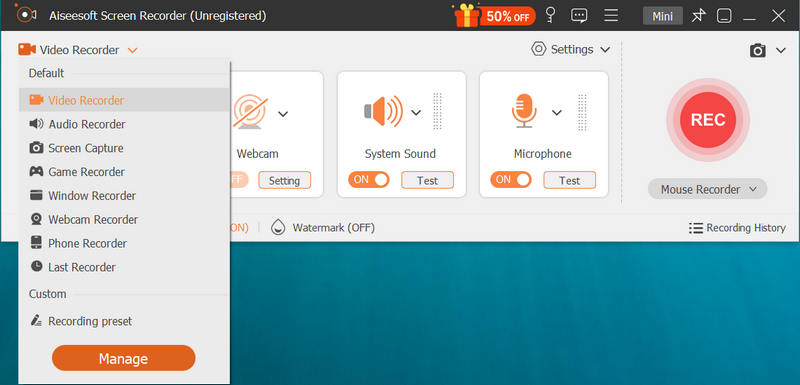
The Aiseesoft Screen Recorder main window (unregistered trial) with the mode menu open: Video, Audio, Screen Capture, Game, Window, Webcam and Phone Recorder, and the Webcam, System Sound and Microphone toggles beside the REC button.
System sound and microphone get separate levels and test buttons, and the paid version adds AI microphone noise reduction, recording from one specific app and lossless FLAC or WAV output, so it also works as an audio recorder (for audio-only recording, see our best audio recording software roundup). Live annotation, click highlighting, a task scheduler and a recording history with trim, merge and compress round it out. Webcam background removal needs an NVIDIA RTX 20 series card or newer.
What we like
- Phone mirroring and recording from the PC
- Game capture up to 120 fps, video up to 8K
- Separate system and microphone levels, AI noise reduction
- Scheduler, live annotation, quick trim and merge
- Lifetime license, and no watermark unless you add your own
Watch out for
- Trial stops at 3 minutes per recording
- One PC per license (the 3-PC license costs more)
- Refunds only for quality problems
- Background removal only on recent NVIDIA cards
What reviewers say about Aiseesoft Screen Recorder
Aiseesoft Studio as a company scored 3.9 out of 5 from 611 Trustpilot reviews on November 20, 2026; the negative ones are mostly about refunds and other Aiseesoft products.
Vinnie M. on Trustpilot (5 stars, August 2026): "I purchased Screen Recorder and I like the application's user interface."
Ethan, on Aiseesoft's own review page (November 2025): "It sticks to one job—recording your screen or webcam with system audio or a mic—and does it really well."
Download Aiseesoft Screen Recorder Free TrialBuy Aiseesoft Screen Recorder
FocuSee: best for polished product demos without editing
- Price: $69.99 at checkout for the 1-Computer Plan, one payment
- Version: 2.5.3 for Windows (October 28, 2026) and Mac (November 4, 2026)
- Runs on: Windows 10 or later and macOS 10.15 or later
- Free trial: standard features and one exported video
- Refunds: 60 days on one-time purchases, under iMobie's refund policy
Best for: SaaS demos, app walkthroughs and course videos that should look edited
FocuSee is a different kind of recorder: you record as normal, and when you stop, the editing is already done. It watches your mouse and adds smooth zooms on your clicks, pans to follow the cursor, enlarges and styles the cursor, places your video on a styled background and arranges your webcam in layouts you can switch mid-video. AI subtitles in over 50 languages, filler-word removal and voice enhancement run on credits. It's the only one here that runs on both Windows and Mac.
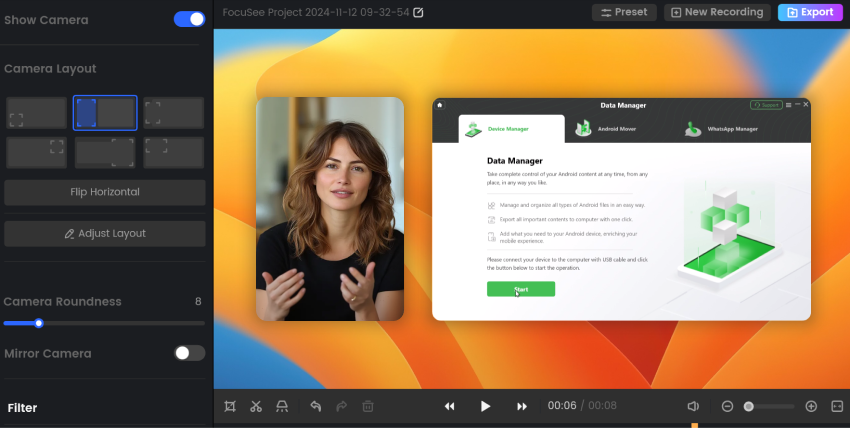
The FocuSee editor: camera layout presets and Remove Background options on the left, a large webcam view beside the recorded app, and the timeline below.
Two things to know. The $69.99 1-Computer Plan isn't on FocuSee's own pricing page, and its order page doesn't mention AI credits, so assume the AI tools need credits bought separately. And reviews are sharply split: people love the automatic zoom, but several report failed or out-of-sync exports on long projects. iMobie's changelog lists export stability fixes in 2.5.1 and later, so make a long test recording in the trial.
What we like
- Automatic zoom, cursor effects and backgrounds
- Webcam layouts you switch during the video
- Windows and Mac
- No recording length limit
- 60-day refund window
Watch out for
- Export problems in several reviews
- Manual editing is thin
- AI features use credits
- Highest price here
What reviewers say about FocuSee
FocuSee scored 3.1 out of 5 from 23 Trustpilot reviews on November 20, 2026, and 4.6 out of 5 from 39 reviews on Product Hunt.
JAZZ A on Trustpilot (5 stars, December 18, 2025): "I love the auto-zoom feature, and it really saves time while exporting high-quality videos."
Borrowe on Trustpilot (1 star, December 8, 2025): "Resulting export was completely out of sync after hours of recording / editing."
Download FocuSee Free TrialBuy FocuSee
ApowerREC: cheapest lifetime license, with a support caveat
- Price: $43.91 at checkout, one payment with lifetime updates (Apowersoft's own store lists $69.95)
- Version: 1.8.5.1
- Runs on: Windows 7 or later (separate Mac app)
- Free version: adds a watermark and limits recording length
- Activation: no license key: your Apowersoft account becomes VIP after purchase
Best for: tutorials and recorded classes on a budget, if you test it first
ApowerREC is a plain, easy recorder with a few clever extras. It records the full screen, a region, a fixed size from 1920x1080 down to 480x360, or one program window, with system sound, microphone and webcam. The annotation palette adds numbered markers, a highlighter, arrows, text and a whiteboard, and F10 zooms into part of the screen while F4 spotlights it. The Task Scheduler repeats a recording on chosen weekdays, and Auto stop ends one after a time or file size.
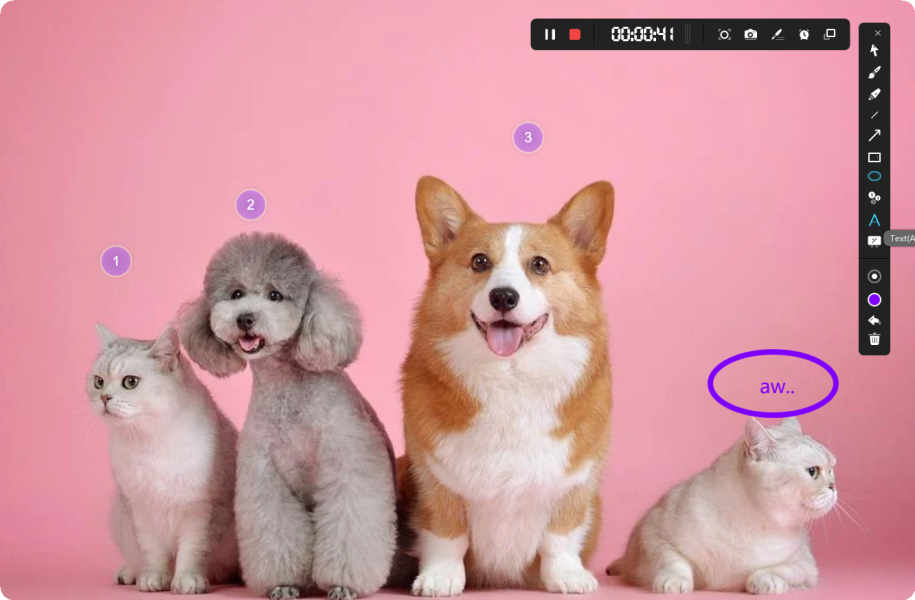
An ApowerREC recording in progress: the timer toolbar at the top, the annotation palette on the right, numbered markers 1 to 3 and a circled text note.
The weak point is the company, not the recorder. Apowersoft scored 1.9 out of 5 from 241 Trustpilot reviews on November 20, 2026, mostly over support, accounts and refunds, and its 30-day guarantee covers only the reasons its refund policy lists. The built-in editor only trims and adds a watermark, intro and outro.
What we like
- Lowest one-time price here
- Numbered markers, zoom and spotlight while recording
- Weekly repeating scheduled recordings
- Runs on Windows 7 and later
Watch out for
- Apowersoft's support has poor reviews
- License tied to an online account
- Very basic editor
- Refunds only for listed reasons
What reviewers say about ApowerREC
TechRadar's Cat Ellis reviewed the PC version in November 2018: "ApowerREC is an impressive screen recorder - simple to use, but highly customizable if you choose to delve into its settings."
Kai on Trustpilot (2 stars, May 26, 2025): "The recorder is simple but good enough." The complaint was losing account access with no answer from the help desk.
Chuck Williams on Trustpilot (1 star, October 5, 2022): "It is an inferior product that doesn't allow you to edit your videos."
Download ApowerREC FreeBuy ApowerREC
The free options: when you don't need to buy anything
Windows already records the screen, and for an occasional clip you may not need any of the above:
- Xbox Game Bar (Windows key + G, or Windows key + Alt + R to start recording) is built into Windows 10 and 11. It records one app or game window at a time, not the desktop, and has no drawing, schedule or webcam overlay.
- Snipping Tool in Windows 11 records a selected area of the screen. It's fine for a quick how-to clip with no editing.
- OBS Studio is free and open source, and it's the standard for live streaming, with scenes and as many sources as you like. It takes longer to set up and has no live drawing, scheduler or built-in trimmer.
The paid recorders earn their price when you record every week: live drawing, click and keystroke display, schedules, phone recording or automatic zooms save editing time on every video. If you also need a full editor afterwards, our guide to video editing software for YouTube covers that.
Price and ratings compared
Price for one PC at checkout (USD)
ApowerREC (lifetime)$43.91
Movavi Screen Recorder (1 year)$44.95
Bandicam (perpetual, 2027 version)$44.95
Aiseesoft Screen Recorder (lifetime)$49.96
FocuSee (current major version)$69.99
Order-page prices checked on November 20, 2026. Movavi's is a 1-year subscription that renews; the other four are one-time payments. Movavi's $44.95 was shown as a markdown from $64.95.
Trustpilot score (out of 5)
Bandicam (213 reviews, product)4.2
Aiseesoft Studio (611 reviews, company)3.9
Movavi (22,174 reviews, company)3.5
FocuSee (23 reviews, product)3.1
Apowersoft (241 reviews, company)1.9
Read on Trustpilot on November 20, 2026. Company scores cover all of that vendor's products and its billing and support, not just the screen recorder.
Which screen recorder should you choose?
| Your situation | Pick | Why |
|---|
| Tutorials, lessons, webinars, Zoom or Teams calls | Movavi Screen Recorder | Live drawing, click and keystroke display, scheduler and noise reduction in one small panel |
| Gameplay and long recording sessions | Bandicam | Game mode for DirectX, OpenGL and Vulkan, F12 to record, light on the PC |
| Screen, webcam, games and your phone in one tool | Aiseesoft Screen Recorder | Seven recorders, phone mirroring, up to 120 fps and 8K, one payment |
| Product demos and SaaS walkthroughs that look edited | FocuSee | Automatic zoom, cursor effects and webcam layouts, on Windows and Mac |
| Lowest one-time price | ApowerREC | $43.91 once, with numbered markers and a weekly scheduler, if the free version works on your PC |
| A quick clip once in a while, or live streaming | Xbox Game Bar, Snipping Tool or OBS Studio | Free, and enough when you don't need drawing, schedules or editing |
Our pick: Movavi Screen Recorder for most people who record their screen to teach or explain something. Download the trial and make one real recording of what you record most; if you'd rather pay once, Bandicam is the strongest one-time buy for general and game recording.
Who should skip each one
- Skip Movavi Screen Recorder if you record games, refuse subscriptions, or still run Windows 7 or 8.
- Skip Bandicam if you use it at work on a Personal license, or expect one payment to cover every future version.
- Skip Aiseesoft Screen Recorder if you need it on several PCs on one cheap license, or want AI background removal on AMD or Intel graphics.
- Skip FocuSee if you record hour-long sessions and can't afford a failed export, or want detailed manual editing.
- Skip ApowerREC if responsive support matters to you, or you don't want a license tied to an online account.
What commonly goes wrong
- Black screen when recording a streaming service. Copy-protected video (Netflix and similar) records as black or silent in every recorder here. That's the protection working, not a bug.
- No microphone in the recording. Windows blocks apps from the microphone until you allow them under Settings > Privacy & security > Microphone. Check it before a long session.
- Black or frozen capture on laptops with two graphics cards. Movavi's and Aiseesoft's help pages point to updating the graphics driver or switching capture mode; try a short test after any driver update.
- Only one side of a call is recorded. Turn on both system sound and microphone. Ask the other people before you record; consent rules vary by country.
- Buying the wrong license. Bandicam's Personal license is non-commercial, most licenses here cover one PC, and "lifetime" means different things: Bandicam 2027 only, FocuSee's current major version, lifetime updates for ApowerREC.
- Judging from a short trial. Aiseesoft stops at 3 minutes and Bandicam at 5, so record the hardest case (game, webcam plus both audio sources) in that time rather than a calm desktop.
FAQs
What is the best screen recorder for Windows 11?
Movavi Screen Recorder is our pick for most Windows 11 users who record lessons, demos and calls, because it draws on the screen live, shows clicks and keystrokes and schedules recordings. For games pick Bandicam, and for a one-time all-in-one with phone recording pick Aiseesoft Screen Recorder.
Is there a free screen recorder for Windows with no watermark?
Yes. Windows' own Xbox Game Bar and Snipping Tool and the open-source OBS Studio are free with no watermark. Among the paid tools, Bandicam's free version records without a watermark, but each recording stops at 5 minutes.
Which screen recorder is best for gaming on PC?
Bandicam is the best pick here for gaming: its game mode records DirectX, OpenGL and Vulkan games with an FPS counter, webcam and microphone. Aiseesoft Screen Recorder also has a Game Recorder at up to 120 fps. Movavi Screen Recorder isn't meant for games.
Can I record a Zoom or Teams meeting with both sides of the conversation?
Yes. Movavi Screen Recorder, Bandicam, Aiseesoft Screen Recorder and ApowerREC all record system sound and your microphone together, which captures the other participants and your own voice. Movavi, Bandicam, Aiseesoft and ApowerREC can also start the recording on a schedule.
Is there a screen recorder I can buy once with no subscription?
Yes. Bandicam ($44.95), Aiseesoft Screen Recorder ($49.96), FocuSee ($69.99) and ApowerREC ($43.91) are one-time payments at checkout. Movavi Screen Recorder on its own is a subscription; its only one-time option is the $149.95 Screen Recorder + Video Editor bundle.
Can these screen recorders record Netflix or other streaming services?
No. Movavi Screen Recorder and the other recorders here don't capture copy-protected video, so paid streaming services usually record as a black screen.
Which screen recorder works on both Windows and Mac?
FocuSee is the one app here that runs on Windows 10 and later and macOS 10.15 and later. Movavi, Bandicam, Aiseesoft and Apowersoft sell their Mac recorders as separate products.
Do I need a separate video editor?
Usually only for bigger projects. Movavi Screen Recorder, Bandicam, Aiseesoft Screen Recorder and ApowerREC trim recordings, and FocuSee adds zooms and effects automatically, but none of them is a multi-track editor. Movavi sells Screen Recorder with its Video Editor as a $59.95 yearly or $149.95 lifetime bundle.
Conclusion
Movavi Screen Recorder is the best screen recorder for Windows if you record to explain things: lessons, demos, support videos and calls. Drawing on the screen while you talk, showing your clicks and keystrokes, and scheduled recordings save the editing that other recorders leave you to do, and $44.95 a year is fair if you record every week. The reasons to look elsewhere are clear too: gamers should get Bandicam, people who want to pay once should look at Aiseesoft Screen Recorder or ApowerREC, and occasional users can stay with the free tools in Windows.
Try Movavi Screen Recorder's 7-day trial on your own setup first: the watermark goes once you buy.
Download Movavi Screen Recorder Free TrialBuy Movavi Screen Recorder