Movavi Screen Recorder for Windows: Record Lessons, Calls and Demos, and Mark Them Up While You Record
Movavi Screen Recorder is a Windows 10 and 11 screen recorder that costs $44.95 a year. It captures the whole screen, a window or an area, together with your webcam, microphone and system sound, and lets you draw arrows and shapes on the screen while you record. It's built for teachers, trainers, support teams and anyone who records webinars, Zoom or Teams calls and software walkthroughs. It is not a game recorder: Movavi points gamers to its separate Gecata app.
The everyday problem it solves: you need to show someone how to do something on a PC, or keep a copy of a webinar you can't attend live. Windows' own tools will record, but they won't schedule a recording, highlight your clicks or let you circle the button you're talking about.
Quick facts
- Current version: Movavi Screen Recorder 24.8.2, updated September 30, 2026 (formerly sold as Movavi Screen Capture)
- Developer: Movavi
- Runs on: Windows 10 and 11, 64-bit only. A separate Mac version is sold too.
- Price: $44.95 for a 1-year subscription, or $19.95 a month. Screen Recorder + Video Editor costs $59.95 a year or $149.95 for a lifetime license.
- Free trial: 7 days, with a "Trial" watermark on recordings and no YouTube title tags or description when you share
- Refunds: 14-day money-back guarantee for technical problems Movavi support can't solve
- Installer: a 2.7 MB online installer that downloads the program
What we checked: the Windows installer on Movavi's site (MovaviScreenRecorderSetup.exe, 2,865,984 bytes, an online installer), version 24.8.2 and the September 30, 2026 update date on Movavi's product page, the trial limits on Movavi's trial-limitations page, and the prices on Movavi's order page ($19.95 a month, $44.95 a year), all on October 31, 2026. We didn't record with it ourselves.
Before you buy
- Not for games. Movavi's own FAQ says Screen Recorder "is not suitable for game recording" and recommends Gecata by Movavi for gameplay.
- No copy-protected video. Movavi states the program does not capture copy-protected video and audio streams, so paid streaming services will usually record as a black screen.
- It's a subscription. Screen Recorder on its own is sold monthly or yearly. The only lifetime option on Movavi's order page is the Screen Recorder + Video Editor bundle at $149.95.
- Light editing only. After recording you can cut out parts and export, but anything more needs a separate editor.
Download Free TrialBuy Now
Overview
Movavi Screen Recorder runs as a small control panel docked to the edge of your screen. One button takes a screenshot, another starts a screen recording, and the + button adds shortcuts for webcam-only recording, audio-only recording or the scheduler. When you start a recording, you drag out the area to capture (or press Space for the full screen), switch the webcam, microphone and system audio on or off, and click REC. A 3-second countdown follows.
When you stop, a small capture editor opens with your video. You can play it back, cut out unwanted sections, grab a still frame, export to another format, or share it straight to YouTube, Google Drive, WhatsApp, Telegram, email or a shareable link.
Features
Draw arrows, shapes and notes while you record
Movavi Screen Recorder's Pencil tool lets you draw freehand or add rectangles, circles, lines and arrows in eight colors, in the middle of a recording. Marks fade 5 seconds after you stop drawing on screen, but stay in the finished video. It's the feature that makes this a tutorial tool rather than a plain recorder: you can circle the setting you're explaining instead of saying "the third button from the left".
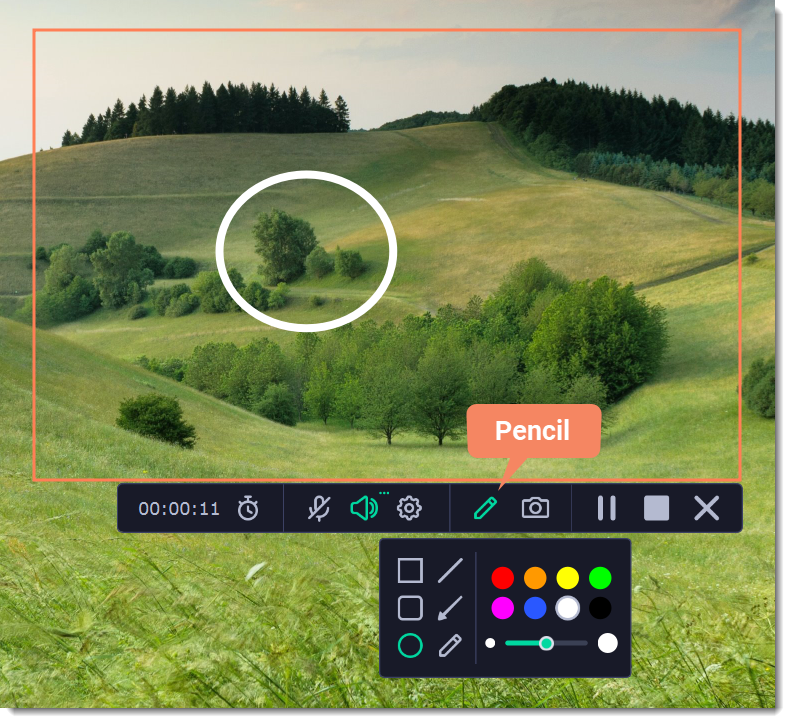
The recording panel with the Pencil menu open: rectangle, rounded rectangle, circle, line, arrow and freehand tools, a color palette and a line-width slider, with a circle drawn on the capture area.
Show keystrokes and mouse clicks
Movavi Screen Recorder can highlight the cursor, show mouse clicks and display the keys you press, so viewers can follow a software demo without guessing which shortcut you used. You can also hide the cursor completely for a cleaner recording of a video or slideshow.
Scheduled and timed recordings
Movavi Screen Recorder can start a recording at a set date and time and stop it after a set duration, so a webinar or class gets recorded while you're away from the PC. The timer also decides what happens afterwards: do nothing, put the computer to sleep, or shut it down. Movavi suggests the same feature for recurring Google Meet, Teams and Zoom calls.
Webcam, microphone and system sound together
Movavi Screen Recorder records system audio and your microphone at the same time, which is exactly what you need to keep both sides of a video call. The webcam can sit as an overlay on the screencast, and a noise reduction switch cuts background sound from the microphone. An option called Capture separate streams keeps the audio sources on separate tracks for later editing.
Screenshots, including scrolling ones
Movavi Screen Recorder doubles as a screenshot tool. You can capture a window, an area or the whole screen, take a scrolling screenshot of a long web page or document, then add arrows, frames, highlights and text before you copy, save or share the image.
Quick trim, export and share
Movavi Screen Recorder's capture editor trims your recording and exports it to MP4 and other formats, with a quality slider and SuperSpeed mode for fast saving when the format allows it. An Open in Video Editor button hands the file to Movavi Video Editor if you have it.
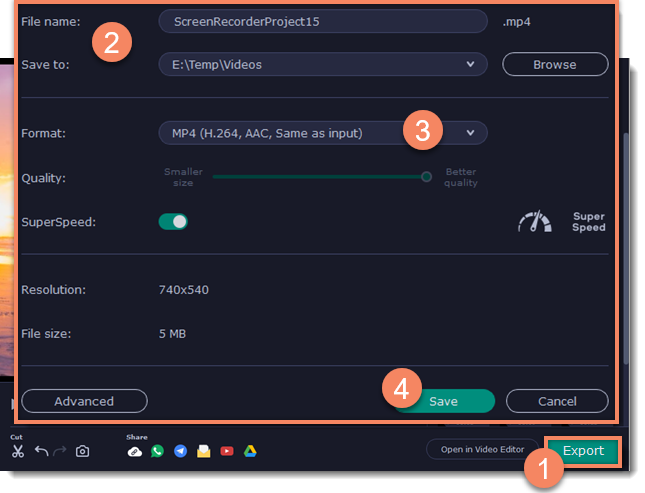
The export settings: file name, a Windows save folder (E:\Temp\Videos), MP4 (H.264, AAC), a quality slider and the SuperSpeed switch, with the share buttons and Open in Video Editor at the bottom.
Benefits
- Fewer retakes. Pointing, circling and showing keystrokes live means the recording explains itself, so you don't need a second pass in an editor to add callouts.
- You don't have to be there. Scheduled recordings catch the webinar at 3 a.m. and can shut the PC down afterwards.
- Cleaner sound from the start. Noise reduction during recording saves a trip through an audio tool.
Real-World Uses
- A how-to for a colleague: record a window, show your clicks and keystrokes, circle the right menu item, trim the start and send a link.
- A course lesson: slides on screen, webcam in the corner, microphone with noise reduction on, exported to MP4 for your course platform.
- A webinar you can't attend: schedule the recording for the start time, set the duration and let the PC go to sleep when it's done.
- A bug report: a scrolling screenshot of the error page with an arrow and a note, copied straight into the ticket.
Who It's For, and Who Should Skip It
Good fit: teachers and trainers, support and sales teams making walkthroughs, remote workers saving calls and webinars, and YouTubers who make tutorials rather than gameplay.
Skip it if:
- You record games. Movavi itself recommends Gecata for that.
- You record once in a while. Windows 11's Snipping Tool can record the screen, and a yearly subscription is hard to justify for a few clips.
- You need real editing. The capture editor only cuts. Look at the Screen Recorder + Video Editor bundle or a full video editor instead.
- You want to pay once. Screen Recorder alone has no lifetime license on Movavi's order page.
Usage Guide
- Install: run the downloaded installer, which fetches the program. Movavi asks for 300 MB for installation and 2 GB for ongoing work.
- Open the control panel on the edge of the screen and click the video camera button.
- Select the area: drag a rectangle, click a window, or press Space for the full screen.
- Choose sources: turn the webcam, microphone and system audio on or off on the recording panel.
- Record: click REC, wait for the 3-second countdown, and use the Pencil tool when you need to point something out.
- Finish: click Stop, cut anything you don't want, then Export or share.
Tips for Windows
- Microphone not recorded? Movavi's support article says to check Settings > Privacy & security > Microphone and allow the Movavi program, then restart it.
- Black screen or recording won't start? Movavi suggests turning on Use DirectX for capturing or Use alternative capture mode in the program's advanced settings, updating the graphics driver, and on laptops with two graphics cards, making the program use the integrated one.
- Audio sounds wrong in your player? Turn off Capture separate streams. Some media players pick a different audio track when there are several.
Where it falls short
- Price for occasional users. At $44.95 a year it costs more than the many free recorders, and reviewers (below) name the price as the main reason they'd hesitate.
- Thin editing. The capture editor cuts and exports, nothing more.
- A quiet feature roadmap. Recent updates have been fixes and stability work rather than new features.
- Pop-ups. A Trustpilot reviewer complains that a promotional pop-up gets in the way when selecting the recording area.
What Users Say
Reviews
Hongkiat (Rean, February 6, 2024), testing on Windows, liked the docked widget and drawing ("Yes, you can doodle while you're recording which is a feature that I absolutely love") and the system-audio capture for calls: "In this case, Movavi Screen Recorder wins since it supports this very thing." The editor is basic: "When I say simple, I really mean simple. It only allows for trimming your videos." The verdict was mixed: "But would I use it? Probably not because of the pricing and its lack of a free plan for me to test properly."
Techloy (March 24, 2026, published as partner content) calls it best for "lessons, demos, webinars, and everyday work explainers" and names its limits plainly: "It's not built for gameplay recording. It also isn't a full editing environment, so don't expect it to have a detailed post-production process. On top of that, the recent updates have been fairly modest, which may leave some users wanting a more active feature roadmap."
Trustpilot
Movavi's Trustpilot page (all Movavi products) showed 3.5 out of 5 from 22,156 reviews on October 31, 2026. Reviews that mention the screen recorder:
- Chitrang Sawant (5 stars, September 2026): "The Screen Recorder is excellent too, and the combination makes for a really powerful workflow"
- Wayne K (5 stars, October 2026): "First I use Movavi Screen Recorder, and I find it is excellent for what I wanted to do with audio files."
- Mark (3 stars, July 2026), "I bought the full version of this in 2021. Now I am forced into subscription. On all levels.", about selecting an area: "If I try to select an area for screen recording and forget to close one of their promotional pop-ups first"
- Dhanaraj (5 stars, June 2026) liked Movavi overall but wrote that "the screen recorder is having a real problem" and that it "starts pixelating and gets stuck."
- alex (1 star, October 2026): "Should have used the standard Windows camera app, instead of the BS Movavi screen recorder app."
Customer quotes on Movavi's page
Movavi's product page shows reviews such as this one from Frances W., Learning Experience Designer: "You can highlight material, draw on the images, even put arrows on it. The program is always open as a tab on the side of your computer screen so it is quick to get to." and from German Liber L., artist and graphic designer: "The screen recording looks clear and the formats to export are the ones I need."
The pattern: people who record tutorials, lessons and calls like how quickly they can start, the live drawing and the clear results. The complaints are about the subscription price, the basic editing, occasional glitches and Movavi's promotional pop-ups.
Comparisons
Movavi Screen Recorder vs Windows' Snipping Tool
The Snipping Tool in Windows 11 records the screen for free and is fine for a quick clip. Movavi Screen Recorder adds the webcam overlay, live drawing, keystroke and click display, scheduling, noise reduction and scrolling screenshots. If you record tutorials every week, those extras save real time.
Movavi Screen Recorder vs Gecata by Movavi
Gecata is Movavi's free game recorder and streaming app for Windows, built to capture gameplay and in-game sound. Screen Recorder is for desktop work: lessons, calls and demos. Pick by what you record.
Editions and Pricing
Movavi's order page showed these plans on October 31, 2026:
| Plan | Price | License term | What you get |
|---|
| Screen Recorder | $19.95 | 1 month | The recorder, renews monthly |
| Screen Recorder | $44.95 | 1 year | The recorder, renews yearly |
| Screen Recorder + Video Editor | $59.95 | 1 year | Adds Movavi Video Editor |
| Screen Recorder + Video Editor | $149.95 | Lifetime | Both programs, one-time payment |
Each license covers one computer. Movavi's page shows the yearly bundle discounted from a higher list price, and prices can vary by country.
FAQs
Can Movavi Screen Recorder record Netflix or other streaming services?
No. Movavi Screen Recorder doesn't capture copy-protected video and audio streams, so protected streaming video typically records as black or silent.
Does Movavi Screen Recorder work on Windows 7 or 8?
No. The current Movavi Screen Recorder requires 64-bit Windows 10 or 11.
Can I record a Zoom or Teams call with both sides of the conversation?
Yes. Movavi Screen Recorder records system audio and your microphone together, so you get the other participants and your own voice. Check that you're allowed to record the call first.
Does Movavi Screen Recorder work offline?
Yes. Movavi says recording and saving don't need an internet connection. You need a connection to install it (the installer downloads the program) and to share online.
If I have Movavi Screen Recorder 23, do I have to pay for version 24?
No. Movavi says owners of an activated version 23 can install version 24 and enter their existing key. Owners of older versions need to buy the current one or keep using what they have.
Can I use one license on a Windows PC and a Mac?
No. Movavi sells Movavi Screen Recorder and Movavi Screen Recorder for Mac as separate products, and each license covers one computer.
System Requirements
- Windows: Windows 10 or 11, 64-bit, with current updates
- Processor: Intel, AMD or compatible dual-core, 1 GHz
- Memory: 4 GB RAM
- Display: 1280 × 768, 32-bit color
- Disk: 300 MB for installation, 2 GB for ongoing work
Conclusion
Movavi Screen Recorder is worth $44.95 a year if you regularly record lessons, walkthroughs, webinars or calls on Windows. Drawing on the screen while you record, showing keystrokes and scheduling recordings are what set it apart from Windows' built-in recorder, and reviewers consistently call it easy to pick up.
The reasons to hold back are the subscription price for occasional use, the bare-bones editor and the fact that it won't record games or protected streams. Try the 7-day trial on the kind of recording you make most often. If you also edit video, the Screen Recorder + Video Editor bundle is the better buy.
Download Free TrialBuy Now