Aiseesoft Screen Recorder: One Window for Screen, Webcam, Game, Audio and Phone Recording
Aiseesoft Screen Recorder is a Windows screen capture app that records your desktop, a window, a game, your webcam, system audio and microphone, and even a mirrored iPhone or Android screen, at up to 8K and 120 fps. Our Buy Now button sells the lifetime license for one PC at $49.96, a one-time payment with no renewal.
Windows has a basic recorder built in (the Xbox Game Bar and the Snipping Tool's video mode), and it's fine for a quick clip. It gets awkward when you want your voice and the system sound on separate levels, a webcam bubble in the corner, arrows drawn on screen while you talk, or a recording that starts by itself at 3 a.m. That's the gap this app fills.
Quick facts
- Version: 3.2.20 (installer dated July 20, 2026)
- Developer: Aiseesoft Studio
- Runs on: Windows 11, 10, 8.1, 8 and 7; dual-core 2.0 GHz CPU and 4 GB RAM recommended. A separate Mac edition exists.
- Recording modes: video (full screen or custom area), window, game, webcam, audio only, phone, screenshot
- Quality: up to 8K resolution and 5 to 120 fps, H.264 or H.265
- Price: $49.96 one-time on the order page (20% off the $62.45 list price) for a lifetime license on one PC. A 3-PC license is on Aiseesoft's store (see Editions and Pricing).
- Free trial: saves up to 3 minutes per recording; microphone noise cancellation, lossless FLAC/WAV output and the editing tools are paid features
- Refunds: 30 days for lifetime licenses when there's a quality problem with the software
- What we checked: the 2.1 MB online installer (file version 3.2.20) downloaded from Aiseesoft on November 4, 2026, and the order page, rechecked on November 4, 2026, which sells "Aiseesoft Screen Recorder" at $49.96 as a lifetime license with no renewal. We didn't make test recordings with it.
Before you buy: one PC, one payment
The license behind our Buy Now button is a lifetime license for one PC at $49.96, paid once with no subscription to cancel. If you need it on two or three computers, the 3-PC Multi-user License on Aiseesoft's store is the better buy. Also note that the lifetime refund applies only to quality problems, so use the free trial to check that it records your games, apps and audio devices properly before paying.
Download Free TrialBuy Now
Overview
The main window is a compact control strip rather than a big editor. On the left you choose the recorder mode; in the middle are toggles for the display area, webcam, system sound and microphone, each with its own settings; on the right a large REC button. A Mini mode shrinks it further so it stays out of the recording.
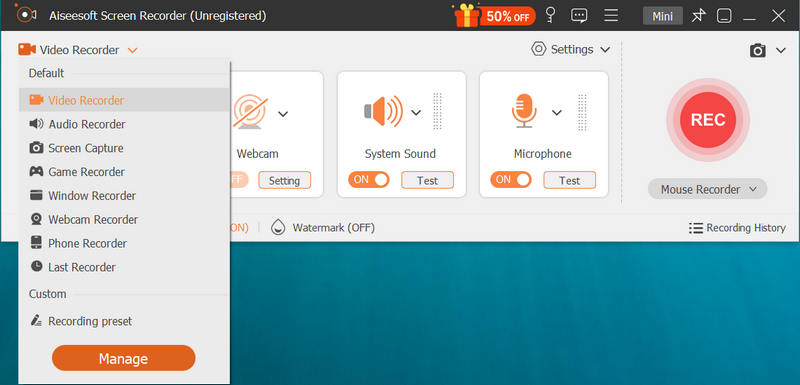
The main window with the mode menu open (Video, Audio, Screen Capture, Game, Window, Webcam and Phone Recorder), the Webcam, System Sound and Microphone toggles, and the REC button. The title bar shows the unregistered trial.
After you stop, the recording opens in a preview window with the recording history, where you trim, merge, compress or convert it without opening another program.
Features
Seven recorders behind one button
Aiseesoft Screen Recorder switches between a Video Recorder (full screen or a dragged area), Window Recorder (one app, even while minimized or covered by other windows), Game Recorder, Webcam Recorder, Audio Recorder, Phone Recorder and Screen Capture. You can save your own combination of settings as a recording preset, so a "webinar" or "tutorial" setup is one click away.
Game capture at up to 120 fps and 8K
Aiseesoft Screen Recorder's Game Recorder locks onto a game window and records at a frame rate you choose from 5 to 120 fps, with H.264 or H.265 encoding, adjustable bitrate and a 1 to 10 second keyframe interval. H.265 suits HDR games and keeps file sizes down. You can add webcam and microphone commentary to the same file.
System sound and microphone on separate controls
Aiseesoft Screen Recorder captures system audio and your microphone at the same time, each with its own device selector, volume and test button, plus an audio delay setting for syncing. The paid version adds AI microphone noise reduction (keyboard clatter, fan hum) and echo cancellation, recording audio from one specific application, and lossless FLAC or WAV output, which makes it a capable audio recorder on its own.
Phone screen recording from your PC
Aiseesoft Screen Recorder's Phone Recorder mirrors an iPhone or Android phone to the computer, over USB or Wi-Fi, and records it there. That saves recording on the phone and copying files across, and it's handy for app demos and mobile game footage.
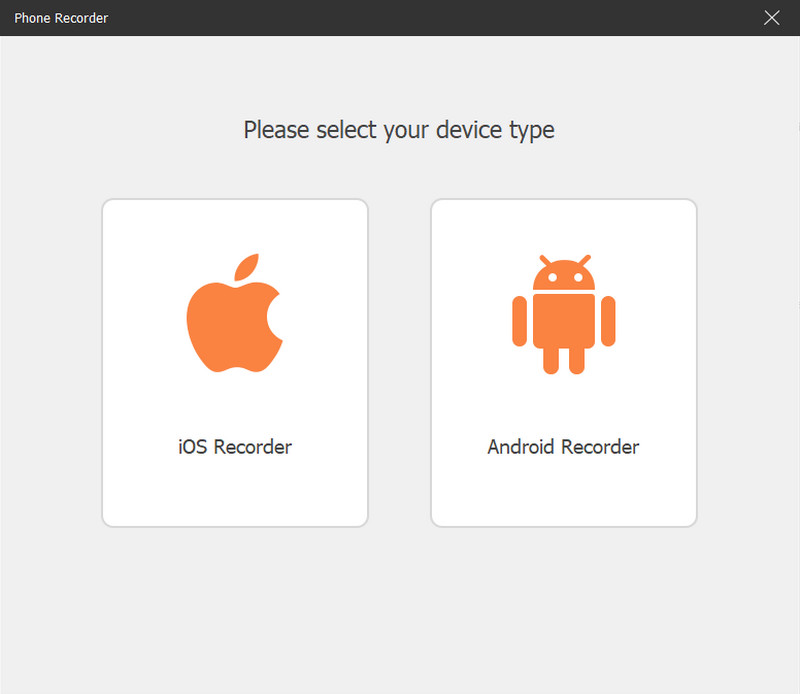
The Phone Recorder's first step: choose iOS Recorder or Android Recorder.
Drawing on screen while you record
Aiseesoft Screen Recorder's live annotation toolbar adds arrows, text, shapes, highlights, numbered callouts, images and a whiteboard during the recording, along with a magnifier and a spotlight-style focus tool. Mouse click highlighting shows viewers exactly where you clicked, which is most of what a software tutorial needs.
Webcam with AI background removal
Aiseesoft Screen Recorder can blur or replace the background behind you on the webcam feed without a green screen. This one needs an NVIDIA GeForce RTX 20 series or newer graphics card; on other hardware the webcam records normally without the effect.
Scheduled recordings and hotkeys
Aiseesoft Screen Recorder's Task Schedule starts and stops a recording at set times, for a webinar or a live stream while you're away. Custom hotkeys start, pause and stop recording and take screenshots, and the screenshot tool can capture scrolling webpages and pop-up menus.
Quick editing after the recording
Aiseesoft Screen Recorder's recording history lists every video, audio file and screenshot you've made. From there you can trim, use the advanced trimmer to cut out the middle, compress, convert, merge files, edit metadata, extract the soundtrack or boost the volume.
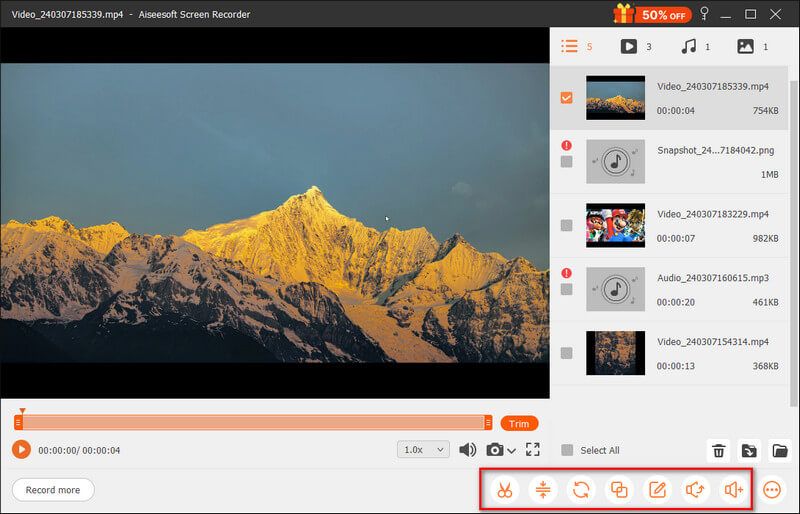
The recording history: a preview with a trim bar, the list of videos, audio files and snapshots, and the editing tools along the bottom.
Benefits
- Cleaner narration. Separate levels and noise reduction mean your voice isn't drowned out by the video you're demonstrating.
- Less post-production. Annotations, click highlights and the webcam overlay happen live, so many tutorials are done when you press stop.
- Recordings you don't have to babysit. Scheduled tasks catch webinars and streams on their own.
- A small footprint. The compact control strip and Mini mode keep the recorder out of your shot.
Real-World Uses
- A teacher recording a lesson: screen plus webcam in the corner, whiteboard and arrows for explanations, microphone noise reduction on.
- A support agent showing a fix: record one application window with click highlights and send the clip instead of writing instructions.
- A gamer capturing a match: Game Recorder at 60 or 120 fps with commentary on a separate microphone level.
- An app developer demoing a mobile build: mirror the phone, record it on the PC and trim it in the history window.
- Keeping a copy of a webinar you registered for: schedule it to start and stop on time.
Who It's For, and Who Should Skip It
It's a good fit for teachers, trainers, support staff and casual creators who want an all-in-one recorder that's easy to learn, and for anyone who needs reliable system-plus-microphone audio on Windows.
Skip it if you stream live or want scenes, sources and transitions: OBS Studio is free and built for that. Skip it if a few short clips a month is all you need, since the Xbox Game Bar and Snipping Tool already record on Windows 10 and 11. And if you edit heavily afterwards, budget for a real video editor; the built-in editing covers trimming and merging, not multi-track work.
Usage Guide
- Install: run the 2.1 MB installer from Aiseesoft; it downloads and installs the full program. Launch it and register with the code or account email from your purchase.
- Pick a mode: open the menu at the top left and choose Video Recorder, Game Recorder, Window Recorder or another mode.
- Set the sources: choose full screen or drag an area, then switch the webcam, system sound and microphone on or off and use Test to check the levels.
- Check the output: under Settings, pick the video format, codec, frame rate and quality, and where files are saved.
- Record: click REC (or your hotkey), use the annotation toolbar as you go, and press stop.
- Finish: trim or merge in the recording history, then save or share the file.
Where it falls short
- The trial is very short. Three minutes per recording is enough to test quality, not to judge a full workflow.
- The format list depends on where you look. The product page advertises 20+ formats including MKV and WebM, while the Windows tech specs list GIF, MP4, WMV, MOV, AVI, TS, F4V and M4V for video. If you need a specific container, check it in the trial.
- Background removal needs a recent NVIDIA card. AMD and Intel graphics users don't get it.
- Graphics drivers matter. Aiseesoft's FAQ has entries on updating graphics drivers and on firewall settings, which hints at the most common causes of black or failed recordings.
- Some protected video can't be recorded. Streaming services that use copy protection can show a black window in any screen recorder.
What Users Say
Trustpilot (Aiseesoft Studio, all products)
Aiseesoft Studio's TrustScore is 3.8 from 610 reviews, split between about 60% five-star and 34% one-star. Reviews that name the screen recorder are positive:
- Vinnie M. (5 stars, August 2026): "I purchased Screen Recorder and I like the application's user interface." He adds that early bugs were fixed by an update.
- Isledy P.J. (5 stars, September 2026) says it's better than the other screen recorders they tried, and that an issue was resolved quickly.
- Kirill Yanovsky (5 stars, December 2025), on the Mac edition: "I have been a happy user of Aiseesoft Mac Screen Recorder for over 6 years."
The negative reviews on the page are mostly about refunds and other Aiseesoft products, notably data recovery software, plus a complaint about being charged after a trial.
Reviews on Aiseesoft's own site
Aiseesoft lists 158 user reviews on the product's review page. They're chosen by the vendor, so treat them as examples rather than a fair sample. The specific ones:
- Ethan (November 2025), "Sticks to one job and does it well!": "It sticks to one job—recording your screen or webcam with system audio or a mic—and does it really well."
- Mark (November 2025), "Super easy to use!": "I love that I can grab screenshots or record a quick video and send it to a client or prospect in just a few clicks."
- Sullivan (April 2021), "A versatile tool": "It can not only record your screen, but also take screen shots easily, including long webpages."
- Jessica (September 2022), "Online classes recorder": "I use it to record my online classes, and download it for later use."
The pattern: people praise how easy it is and how dependable the audio capture is, and long-time users renew. Detailed independent reviews of the current version are hard to find, and most published "reviews" of it come from competing recorder makers, so they aren't quoted here. The complaints that do surface concern Aiseesoft's billing and refunds, not recording quality.
Comparisons
Aiseesoft Screen Recorder vs OBS Studio
OBS Studio is free, open source and the standard for live streaming, with scenes and unlimited sources, but it takes time to set up. Aiseesoft Screen Recorder is quicker to learn and adds things OBS doesn't have out of the box: phone mirroring, scheduled recordings, live annotation and a built-in trimmer.
Aiseesoft Screen Recorder vs the Xbox Game Bar
The Game Bar ships with Windows 10 and 11 and records one app at a time with basic audio. Aiseesoft adds custom areas, webcam overlay, separate audio controls, annotation, schedules and higher frame rates.
Editions and Pricing
| Plan | Price | Term | PCs |
|---|
| Lifetime License (our Buy Now button) | $49.96 (list $62.45) | Lifetime | 1 |
| Multi-user License (Aiseesoft store) | $79.96 (list $187.35) | Lifetime | 3 |
Our order page adds nothing else to the cart. If you buy on Aiseesoft's own purchase page instead, it pre-selects a 7-day Aiseesoft Blu-ray Player add-on that renews at $31.20 a month afterwards; untick it there if you don't want it.
FAQs
Does Aiseesoft Screen Recorder add a watermark?
Aiseesoft Screen Recorder has a Watermark switch on the main window that is off by default, so recordings carry no watermark unless you add your own. The trial's limit is the 3-minute length, not a watermark.
Is there a time limit on recordings in the paid version?
No. Aiseesoft Screen Recorder's paid version records for as long as your disk space allows.
Can I use one Aiseesoft Screen Recorder license on two computers?
The standard Aiseesoft Screen Recorder license covers one PC. For two or three computers, the Multi-user License covers 3 PCs for life; moving a single license to a new PC is covered in the next answer.
Can Aiseesoft Screen Recorder record Zoom or Teams meetings?
Yes. Aiseesoft Screen Recorder captures any window plus system sound and your microphone, which covers meeting apps. Tell the other participants you're recording; consent rules vary by country.
Why does Aiseesoft Screen Recorder say my registration code is invalid (error 4104)?
Error 4104 in Aiseesoft Screen Recorder means the single-PC registration code is already tied to another computer, which also happens after you reinstall Windows or replace the PC. Aiseesoft support resets the code on request, after which it stops working on the old computer.
Is there a Mac version?
Yes. Aiseesoft Mac Screen Recorder runs on macOS 10.13 or later on Intel and Apple silicon and is sold separately.
System Requirements
- Windows 11, 10, 8.1, 8 or 7
- Dual-core processor at 2.0 GHz or faster
- 4 GB RAM or more
- NVIDIA GeForce RTX 20 series or newer for AI webcam background removal (optional)
- An internet connection to download and activate the program
Conclusion
Aiseesoft Screen Recorder is worth buying if you make tutorials, lessons or meeting recordings and want something simpler than OBS that still handles webcam, separate audio levels, live annotation and phone mirroring. The reason to buy is that so much happens inside one small window. The reason to hold off is the single-PC limit: the $49.96 lifetime license on our button covers one computer, so anyone recording on two or three should pick the 3-PC license instead. Run the free trial first, since three minutes is enough to confirm it captures your audio and screen correctly.
Download Free TrialBuy Now