Aiseesoft M2TS Converter for Mac: Turn Camcorder M2TS Files into MP4 and MOV
Aiseesoft M2TS Converter for Mac converts the M2TS and MTS (AVCHD) videos that Sony, Panasonic, Canon and JVC camcorders record into MP4, MOV, MKV and other formats your Mac, iPhone or video editor can play, with basic editing on the way. A lifetime license for one Mac costs $45, and the free trial converts the first five minutes of each file.
If you've copied a camcorder's AVCHD folder to your Mac and found that the files won't open in QuickTime, won't import cleanly into your editor or won't play on the iPad, this is the job it does.
Quick facts
- Current version: 6.7.26 for Mac
- Developer: Aiseesoft Studio
- Runs on: Mac OS X 10.7 Lion up to macOS 15 Sequoia. It's an Intel app, so on Apple silicon Macs it runs through Rosetta 2.
- Converts: M2TS, MTS, TS and most other video formats to MP4, MOV, MKV, AVI, WMV, MPG, WebM, HD video and device presets, or to MP3, AAC, FLAC, WAV and other audio
- Price: $45 for a lifetime license on 1 Mac
- Free trial: converts only the first 5 minutes of longer files and half of files under 5 minutes, without Intel acceleration
- Refunds: within 30 days if there's a quality problem
- Download: 50 MB disk image
- What we checked: we downloaded the disk image from Aiseesoft on October 20, 2026 (50 MB, dated January 31, 2024). The app inside is version 6.7.26, its programs are built for Intel Macs only, and its registration dialog lists the trial limits above. The order page showed "Aiseesoft M2TS Converter for Mac" with the lifetime option at $45.00 on October 20, 2026, with no discount line. We didn't convert any videos with it.
Before you buy
Aiseesoft M2TS Converter for Mac is an older Intel program. The current build dates from January 2024, and Aiseesoft lists support up to macOS Sequoia. On an M1 to M5 Mac it needs Apple's Rosetta 2 translation layer, which macOS offers to install the first time you open an Intel app. Run the trial on your own camcorder clips first, and check that it opens on your version of macOS. Aiseesoft's refund promise covers "a quality problem within 30 days", and several Trustpilot reviewers say refunds are refused unless the software is faulty.
Download Free TrialBuy Now
Overview
Aiseesoft M2TS Converter for Mac is a single window. A toolbar across the top has Add File, Enhance, Trim, 3D and Edit. Your files appear in the list in the middle, a preview player sits on the right, and the bottom bar holds the Profile drop-down (the output format), Settings, the destination folder, a "Merge into one file" box and the orange Convert button. You add clips, pick a profile, and convert. Everything else is optional.
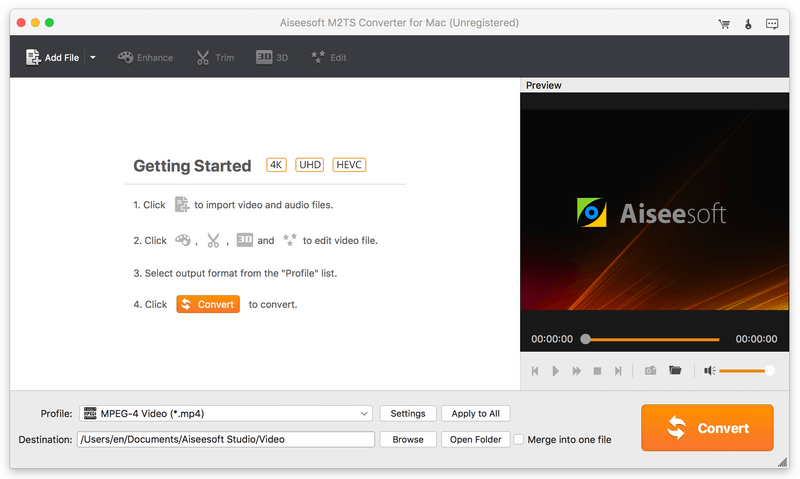
The main window of the unregistered app, from Aiseesoft's site: the four Getting Started steps, the Preview player, Profile set to MPEG-4 Video (*.mp4), the destination folder and "Merge into one file".
Features
Convert AVCHD M2TS and MTS to everyday formats
Aiseesoft M2TS Converter for Mac reads M2TS and MTS files from Sony, Panasonic, Canon, JVC, Hitachi and other AVCHD camcorders, plus TS, MKV, AVI, MOV, WMV, FLV, VOB, MP4 and many more. It writes MP4, MOV, MKV, AVI, WMV, MPG, FLV, WebM and HD versions of them, and audio-only MP3, AAC, AC3, M4A, OGG, WMA, FLAC, WAV and AIFF. You can convert several files in one batch.
Presets for devices and video editors
Aiseesoft M2TS Converter for Mac's Profile list groups output formats by device, including iPhone, iPad, iPod touch and Samsung and other Android phones, so you can pick the device rather than the codec. Aiseesoft also suggests MOV for importing camcorder clips into iMovie, Final Cut Pro or Premiere Pro. Settings lets you choose the encoder, resolution, frame rate and bitrate yourself.
Edit before you convert
Aiseesoft M2TS Converter for Mac's Edit window has Rotate, 3D, Crop, Effect and Watermark tabs, with the original and the output shown one above the other. You can clip out the parts you want, crop black bars, add a text or image watermark, adjust volume, brightness, contrast, saturation and hue, and deinterlace older interlaced camcorder footage. "Apply to All" copies the settings to every clip in the list.
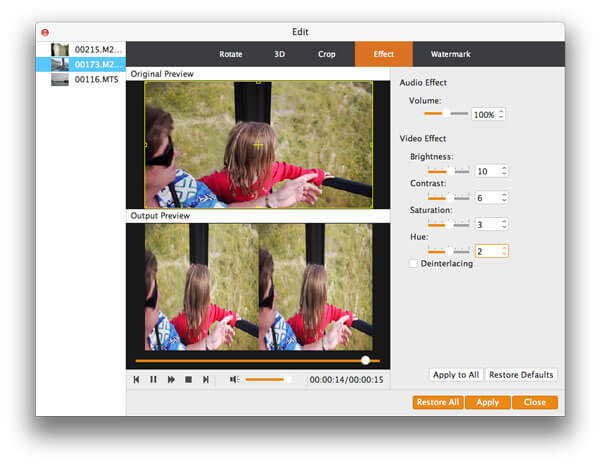
The Effect tab of the Edit window, from Aiseesoft's site: three camcorder clips (M2TS and MTS) on the left, the original and output previews, and volume, brightness, contrast, saturation, hue and deinterlacing controls.
2D to 3D, snapshots and merging
Aiseesoft M2TS Converter for Mac can turn a 2D clip into a 3D video, take still snapshots from the preview player, and join all the clips in the list into one output file with "Merge into one file". Merging is handy because AVCHD camcorders split long recordings into several M2TS files.
Benefits
- Old camcorder footage becomes usable. Clips that only played on the camera or the TV become MP4 or MOV files any Mac, phone or tablet can play.
- Less storage hassle. Batch conversion and merging turn a folder of split AVCHD files into a few named videos.
- Small fixes in the same step. Crop, deinterlace and brighten while converting, without a second app.
- Pay once. The $45 license doesn't expire.
Real-World Uses
- Family archive: convert ten years of Sony Handycam M2TS clips to MP4 and merge each holiday into one file for the family photo library.
- Editing in iMovie or Final Cut: convert Panasonic MTS clips to MOV before importing, so the editor handles them smoothly.
- Watching on an iPad: pick the iPad preset and copy a school play recording to the tablet for grandparents.
- Clean-up for sharing: crop black edges, deinterlace and add a small watermark before posting a clip.
Who It's For, and Who Should Skip It
Aiseesoft M2TS Converter for Mac suits Mac owners with a pile of AVCHD camcorder clips who want a simple, one-time purchase to convert them, with presets and a few edits.
Skip it if you want a native Apple silicon app that's kept up to date: this build is from January 2024 and runs through Rosetta 2. Skip it too if your editor already imports your camera's AVCHD files directly (recent versions of Final Cut Pro and iMovie handle many of them), or if you're comfortable with the free HandBrake. If you also need to convert DVDs, download videos or enhance video with AI, Aiseesoft's broader Video Converter Ultimate for Mac covers more. Windows users need Aiseesoft's separate Windows version.
Usage Guide
- Install and launch. Download the disk image, drag the app to Applications and open it. On an Apple silicon Mac, accept the prompt to install Rosetta 2 if macOS asks.
- Add your clips. Click Add File, select the M2TS or MTS files (they're in the camcorder's PRIVATE/AVCHD/BDMV/STREAM folder) and click Open.
- Edit if needed. Click Edit to rotate, crop, adjust effects, add a watermark or deinterlace. Use Trim to keep only part of a clip.
- Pick the output. Open the Profile drop-down and choose a format or a device. Click Settings to change resolution, bitrate or frame rate.
- Convert. Choose a destination folder, tick "Merge into one file" if you want a single video, and click Convert.
- Register. After buying, enter the registration code from your order email to remove the trial limits.
Where it falls short
- No native Apple silicon version. Every program inside the app is built for Intel, so M-series Macs run it through Rosetta 2, which is slower than a native app.
- No recent updates. The download hasn't changed since January 2024, and Aiseesoft's compatibility list stops at macOS 15 Sequoia.
- A trial that hides the full result. You only see the first five minutes of a long clip, or half of a short one, so you can't check a whole conversion before paying.
- Old device presets. The product page's device list stops at the iPhone 11 Pro Max. Generic MP4 and MOV profiles work for newer phones.
- Overlaps with Aiseesoft's bigger converter. Aiseesoft's Mac Video Converter Ultimate also handles M2TS and adds more, so compare before buying both.
What Users Say
There are few independent reviews of this small, single-purpose converter. The ones below come from Aiseesoft's own review page and from Trustpilot, where reviews cover all Aiseesoft products.
Aiseesoft's review page
Aiseesoft shows 271 reviews for M2TS Converter for Mac and publishes a handful, all positive and written between 2015 and 2018:
- Bald, "Convert M2TS to MOV" (June 2018): "I saved many M2TS videos captured by my Sony camera. The sad thing is, all media players on my Mac don't support this format. Now I can easily convert M2TS to MOV and other supported video formats."
- Abby, "Crop video" (March 2018): "There is a very useful feature in this M2TS video converter for Mac. It enables me to crop video to remove the black edge."
- Barbara, "Convert my M2TS videos to iPad MP4" (August 2017): "I use this M2TS converter for Mac to convert M2TS videos to MP4 for my iPad. It provides an iPhone format category for quickly finding the suitable format."
- Jolin, "Very fast" (January 2015): "Just tried to convert a short video – 5mins- shot with my Canon Camcorder. I select the high definition H.264 and it converts the video with less than 2 minutes."
Trustpilot: Aiseesoft as a company
Aiseesoft scores 3.8 out of 5 from 605 reviews, but the ratings are split: 60% five-star and 34% one-star. The company replies to 14% of negative reviews. None of the reviews are about the M2TS converter specifically.
- Henry (5 stars, January 2026), on Aiseesoft's video conversion: "The software has done wonders in converting various formats to MP4 which I can easily play on my various devices."
- Doug (5 stars, July 2026): "I love that this app is simple to use and does not require a subscription."
- Ro (5 stars, September 2026), on support: "They reauthorized the code for me and i'm back up and running."
- caitlin hardwick (1 star, October 2026): "They refuse any refund unless faulty."
- Owend (1 star, September 2026): "Asked for a Refund from Aiseesoft. That's where frustration began."
- Yann Duval (1 star, August 2026): "The SW does not work and they dont reimburse customers. It is a FRAUD,"
The pattern
Users who like Aiseesoft's converters say they're simple and that the MP4 output plays everywhere, and they like paying once instead of subscribing. The complaints are almost all about refunds: Aiseesoft only refunds for faults, so buyers who change their mind are turned down. Use the trial to decide.
Comparisons
Aiseesoft M2TS Converter for Mac vs. HandBrake
HandBrake is free, native on Apple silicon and converts M2TS and MTS to MP4 or MKV very well. Aiseesoft M2TS Converter for Mac's advantages are the wider choice of output formats (MOV, WMV, AVI, audio-only), device presets, merging clips into one file, watermarks and 3D, in a simpler window. If MP4 is all you need, try HandBrake first.
M2TS Converter for Mac vs. Aiseesoft Mac Video Converter Ultimate
Aiseesoft's Mac Video Converter Ultimate converts M2TS too, and adds many more formats and tools beyond camcorder files. M2TS Converter for Mac is the cheaper choice when camcorder clips are the only problem you're solving.
Editions and Pricing
| License |
Price |
Term |
Macs |
| Lifetime License (sold here) |
$45.00 |
Lifetime, with free lifetime updates |
1 |
| 1 Year License |
$32.00 |
1 year |
1 |
| Multi-User Personal License |
$229.00 |
Lifetime |
Up to 8 |
List prices from Aiseesoft's purchase page on October 20, 2026. The Lifetime price is also what the order page showed. For $13 more than the 1-year license, the lifetime license is the better buy.
FAQs
Does Aiseesoft M2TS Converter for Mac run on M1, M2 or M3 Macs?
Yes, through Rosetta 2. Aiseesoft M2TS Converter for Mac is built for Intel processors only, and Aiseesoft lists Apple M-series chips as supported, so macOS runs it with Apple's Rosetta 2 translation layer. It works, but it won't be as fast as a native Apple silicon app.
What does the Aiseesoft M2TS Converter for Mac trial limit?
The trial of Aiseesoft M2TS Converter for Mac converts only the first five minutes of any file longer than five minutes, and only half of a shorter file. Intel hardware acceleration is also turned off until you register.
Does it work on macOS Tahoe?
Aiseesoft's compatibility list for M2TS Converter for Mac currently stops at macOS 15 Sequoia, and the latest build is from January 2024. Install the trial and test it on macOS 26 before you buy.
Can I use the Mac license on Windows?
No. This Aiseesoft M2TS Converter for Mac license covers one Mac. Aiseesoft sells a separate M2TS Converter for Windows.
Can it convert MTS files as well as M2TS?
Yes. Aiseesoft M2TS Converter for Mac reads both HD MTS and HD M2TS, the two file extensions AVCHD camcorders use, as well as TS, TRP and TP transport-stream files.
Can I get a refund if it doesn't suit me?
Only for a fault. Aiseesoft promises a refund for "a quality problem within 30 days after purchasing", and Trustpilot reviewers report refunds being refused for any other reason. Try the trial first.
System Requirements
- macOS: Mac OS X 10.7 Lion or later, listed up to macOS 15 Sequoia
- Processor: 1 GHz Intel processor, or an Apple M-series chip with Rosetta 2
- Memory: 1 GB RAM or more
- Disk space: about 50 MB for the download
Conclusion
Aiseesoft M2TS Converter for Mac is worth $45 if you have a stack of AVCHD camcorder clips and want a simple Mac app to turn them into MP4 or MOV, merge them and fix a few things along the way, paying once. The one reason to buy it is that it makes a confusing camera format easy in four clicks. The main reason not to is its age: an Intel-only build from early 2024 that relies on Rosetta 2, with free alternatives like HandBrake that cover plain MP4 conversion. Try it on your own clips first. If it handles them on your Mac, it's a fair price for the convenience.
Download Free TrialBuy Now