Aiseesoft FoneLab Broken Android Data Extraction: For Older Samsung Galaxy Phones Only
Aiseesoft FoneLab - Broken Android Data Extraction is a $49.95 Windows tool (lifetime license, one PC) that tries to rescue contacts, messages, photos and WhatsApp data from a broken, frozen or black-screen Samsung phone. Its device list stops at the Galaxy S6 and Note 5, so it only helps owners of those older models.
Check your exact model number first. If your phone is a Galaxy S7 or anything newer, or isn't a Samsung, this page ends here for you: the program's broken-phone mode won't apply.
Quick facts
- Installer: the FoneLab for Android download, version 6.1.58, dated August 5, 2026
- Developer: Aiseesoft Studio
- Platform: Windows 11, 10, 8.1, 8, 7 and XP. This module is Windows-only.
- Supported phones: Samsung Galaxy S4, S5, S6, Note 3, Note 4, Note 5 and Tab Pro 10.1, listed model by model
- Recovers: contacts, messages and attachments, call logs, WhatsApp and attachments, gallery, picture library, videos, audio, documents
- Price: $49.95 once on the order page, lifetime license for one PC
- Trial: free download. Aiseesoft's FoneLab trial scans and displays data, and recovering it needs a license.
- Refunds: 30 days, for "a quality problem", in Aiseesoft's words
- What we checked: the 2.8 MB downloader from Aiseesoft, with file version 6.1.58, the supported-device list on the product page, and the order page, which charged $49.95 with a lifetime term, on November 6, 2026. We didn't test it on a broken phone.
Before you buy
Match the model number exactly. The program's own screen warns: "Now the supported device list is limited. Please make sure to select the correct device model. If you choose not to match the models, your device may be irreversible risk." Wrong firmware on a phone can make a bad situation worse.
The screen note also says "Currently we only support Samsung device in this mode" and "We can only recover existing data when using this mode." Deleted data isn't part of this mode.
Download mode needs working buttons. You have to hold Volume Down, Home and Power, then press Volume Up. If those buttons are broken, the steps can't be completed.
Download Free TrialBuy Now
Overview
The module opens with two choices. The left one is for a phone with a broken, black or unresponsive screen, or a forgotten password. The right one is for a damaged system. Either way you connect the phone by USB, choose its name and model from the lists, put it in Download mode, and let the program do its repair before it scans for data.
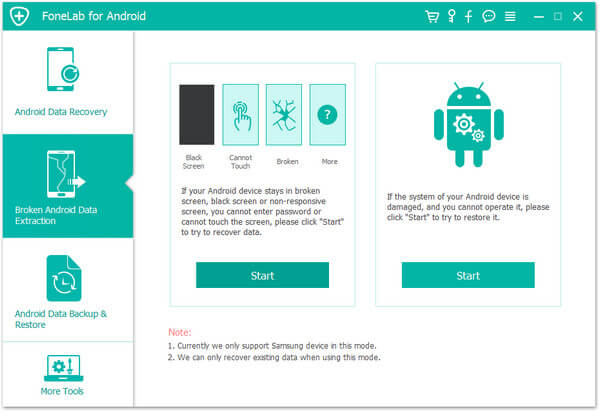
The opening screen, with options for a broken screen and for a damaged system, and a note that this mode supports Samsung devices only.
Features
Get a frozen or black-screen Samsung working again
Aiseesoft Broken Android Data Extraction aims to return a crashed, frozen, black-screen or non-responsive Galaxy to its normal state. Aiseesoft lists virus attacks, system crashes, water damage and forgotten passwords among the causes. Physical damage to the phone's storage is a different problem, and no software fixes that.
Extract data from a phone you can't see
Aiseesoft Broken Android Data Extraction reads internal storage and the SD card once the phone is in the right state, then lets you save contacts, messages, call logs, WhatsApp chats, photos, videos, audio and documents to the PC. It's most useful when the screen is smashed and the phone still powers on.
Model-by-model device selection
Aiseesoft Broken Android Data Extraction asks for your device name and model before it does anything, and a link lets you report a phone that isn't listed. Supported models include the SM-G920 series (Galaxy S6), SM-N920 series (Note 5) and SM-N910 series (Note 4).
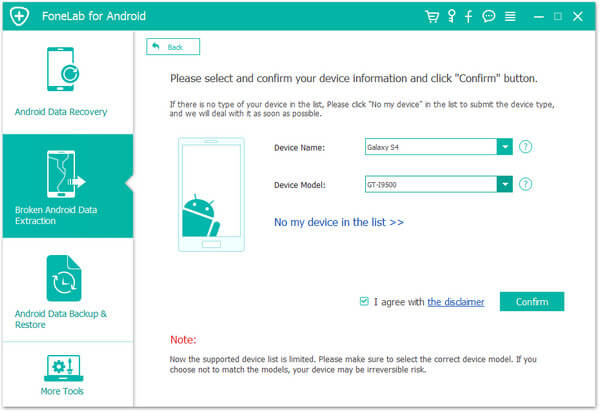
The device selection step, with the warning about choosing the correct model.
Guided Download mode
Aiseesoft Broken Android Data Extraction shows the button sequence for entering Download mode as pictures. The steps assume a phone with a physical Home button, which fits the supported models.
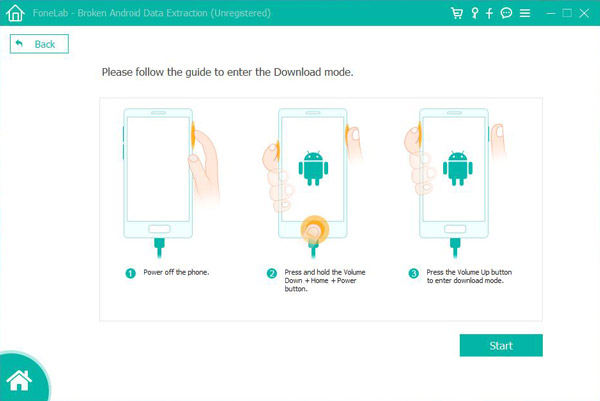
The three-step guide to Download mode: power off, hold Volume Down, Home and Power, then press Volume Up.
Benefits
- One last route to old data. A phone in a drawer with years of photos may still be readable.
- No repair shop. You do the job at home with a USB cable.
- Selective saving. You choose what to export after the scan.
Real-World Uses
- A smashed Galaxy S6 screen. The phone powers on but you can't tap anything, and you want the contacts.
- A Note 5 stuck on a black screen. It responds to buttons but never starts properly.
- A forgotten old phone. A locked Galaxy S5 holds family photos you never backed up.
Who It's For, and Who Should Skip It
This is for one narrow group: people holding a broken Samsung from roughly the Galaxy S4 to S6 and Note 3 to Note 5 era, whose exact model is on Aiseesoft's list.
Skip it if you own a newer Samsung or any other brand. Skip it if the phone won't power on at all or has failed buttons; a repair shop that can swap the screen or test the board is the better bet. If your phone works and you just lost files, look at the regular FoneLab Android Data Recovery instead.
Usage Guide
- Download and install the program on a Windows PC, then open the Broken Android Data Extraction module.
- Connect the phone with a USB cable.
- Click Start on the option that fits your problem.
- Select the exact device name and model, agree to the disclaimer and click Confirm.
- Follow the on-screen steps to enter Download mode, then click Start.
- Wait for the repair and scan to finish, choose your data and save it to the computer.
Where it falls short
- The list hasn't moved past 2015-era Samsung phones on the product page, so most phones in use today are out of scope.
- A user review quoted by other sites says it can't help with phones newer than the Galaxy S6, which matches the list.
- We found no independent, hands-on test of this module. Almost everything online is from the vendor or from rival data recovery companies.
- The money-back promise covers a quality problem. An unsupported phone may not qualify, which is why you should check your model first.
What Users Say
Real reviews of this module are few. The vendor quotes below are the only product-specific ones we could verify, so treat them as testimonials, not evidence.
Testimonials on Aiseesoft's product page (91 reviews)
Sofia: "My Samsung Galaxy S5 gets stuck in blacks screen for some unknown reasons. I download this software to fix it. Within 4 minutes, it really becomes normal and I can use it now."
Freeman: "My Samsung Galaxy Note 5 phone screen is broken. I can press the button, but cannot view the data. After trying this tool, it did detect my phone data, and I extract the data to my computer."
Abel: "My phone screen is broken for my boy's naughty trick. I only need the contacts on my phone, and do not care about unlocking. This software helps me make it. Thanks a lot."
Trustpilot: Aiseesoft Studio as a company (3.8 out of 5, 610 reviews)
These cover all of Aiseesoft's products, not this module.
Jane (August 22, 2026): "Aiseesoft Studio software just works! The customer service is swift, pleasant and competent."
B Hackett (October 22, 2026): "They refused to issue the refund. and have not fixed the haptics"
Comparisons
Broken Android Data Extraction vs FoneLab Android Data Recovery
FoneLab Android Data Recovery is for working phones, finding deleted files across many brands. Broken Android Data Extraction is for a Samsung that won't work normally, and it recovers what still exists rather than what was deleted. They come through the same FoneLab for Android installer, but they're different jobs.
Editions and Pricing
| Plan | Where | Price | Term | PCs |
|---|
| Order page behind our Buy Now button | 2Checkout | $49.95 | Lifetime | 1 |
| Lifetime License | Aiseesoft store | $39.96 (list $49.95) | Lifetime | 1 |
| 1-Month License | Aiseesoft store | $12.45 (list $24.90) | 1 month | 1 |
| Multi-user License | Aiseesoft store | $69.00 (list $86.25) | Lifetime | 3 |
Aiseesoft store prices were read from its product page on November 6, 2026 and move with its promotions. A one-month plan can make sense for a one-off rescue.
FAQs
Does Aiseesoft Broken Android Data Extraction work on a Galaxy S10 or S23?
No. Aiseesoft Broken Android Data Extraction lists no Samsung phone newer than the Galaxy S6 family and Note 5, so a Galaxy S10 or S23 isn't supported.
Does Aiseesoft Broken Android Data Extraction work with Xiaomi or Google Pixel phones?
No. The program itself says this mode supports Samsung devices only.
Can Aiseesoft Broken Android Data Extraction get back deleted photos?
No. In this mode it can only recover existing data, according to the note on its start screen.
Is there a Mac version of Aiseesoft Broken Android Data Extraction?
Aiseesoft presents this module for Windows, and its product page lists Windows versions only.
Can I try Aiseesoft Broken Android Data Extraction before paying?
Yes, it comes through the free FoneLab for Android download, and the trial scans and displays data without letting you save it. We don't know how much of the repair step the trial allows.
Do I need USB debugging on for Aiseesoft Broken Android Data Extraction?
Aiseesoft's steps use Download mode and don't ask you to turn on USB debugging, which is the point for a phone whose screen you can't use.
System Requirements
- Windows 11, 10, 8.1, 8, 7 or XP
- 1 GHz Intel or AMD CPU or faster, 1 GB RAM or more
- 200 MB of free disk space or more
- A USB cable and a supported Samsung phone
Conclusion
Worth trying only if your exact Samsung model is on the list and the data matters. The one reason to buy is a last, cheap shot at photos and contacts on an old broken Galaxy before paying a repair shop. The main reason not to is coverage: it doesn't support phones newer than the S6 and Note 5, and we found no independent proof of how often it works. Check the model, then use the trial's scan first.
Download Free TrialBuy Now