Aiseesoft FoneLab - iOS System Recovery: Fix a Stuck iPhone from Your Windows PC
Aiseesoft FoneLab - iOS System Recovery is a Windows program ($55.96 at checkout for a lifetime license, list price $69.95) that repairs iPhones, iPads and iPods stuck on the Apple logo, in recovery mode, in a restart loop or on a black screen by reinstalling iOS, with a Standard Mode that keeps your data. It's for iPhone owners with a Windows PC who want to try a fix at home before booking a repair.
The phone updated overnight and now shows nothing but the Apple logo. Holding the buttons does nothing, and a full restore through iTunes would wipe the photos you never backed up. This tool's pitch is the middle path: put a fresh copy of iOS on the phone and leave your data where it is.
Quick facts
- Version: 10.8.88 (part of Aiseesoft's FoneLab app)
- Developer: Aiseesoft Studio
- Runs on: Windows 11, 10, 8.1, 8 and 7. A Mac version is sold separately.
- Devices: iPhone 18, 17, 16, 15, 14, 13 and 12 series, iPhone SE, iPad Pro, Air and mini, iPod Touch, on iOS 27 and earlier
- Two repair modes: Standard keeps all data, Advanced fixes severe failures but erases the device
- Price: $55.96 at checkout for a lifetime license, 1 PC and up to 6 iOS devices (list price $69.95)
- Free: the one-click Enter and Exit Recovery Mode tool
- Refunds: 30 days for lifetime licenses, only when there's a technical problem support can't solve. No refunds for a change of mind.
What we checked: the Windows installer from Aiseesoft's site (a 2.4 MB downloader that fetches a 66.6 MB 64-bit setup, both file version 10.8.88) and the price on the order page ($69.95 less a $13.99 discount, $55.96 total, lifetime license), both on October 29, 2026. We didn't repair a device with it.
Before you buy
- Try Apple's free fixes first. A force restart, and the Update option iTunes or the Apple Devices app offers in recovery mode (it reinstalls iOS without erasing), solve many stuck-logo cases at no cost.
- Check that it sees your device. Download it and connect the phone before you pay. The refund policy doesn't cover buying the wrong product, a change of mind or a purchase made at a promotional price, and Aiseesoft keeps a 20% fee if you insist on a refund.
- Back up if you still can. If Standard Mode fails, the next step, Advanced Mode, erases the device.
Download Free Trial
Buy Now
Overview
iOS System Recovery is one of the tools inside Aiseesoft's FoneLab app, next to iPhone Data Recovery, iOS Data Backup & Restore and WhatsApp Transfer for iOS. This license activates the system recovery tool. You connect the device by USB, the program reads its model and iOS version, downloads the matching firmware from Apple and installs it.
Aiseesoft lists more than 50 problems it handles, in four groups: device issues (disabled, won't turn on, restart loop, stuck verifying an update, won't charge, "No Service"), screen issues (Apple logo, frozen, blue, white, black or red screen, unresponsive touch), stuck modes (DFU, recovery, headphone, mute, safe, restore, zoom) and iTunes errors when syncing, backing up, updating or restoring, including 4013, 4014, 3014, 2001 and 1110. The vendor claims a 99% success rate. We have no independent figure to set against it.
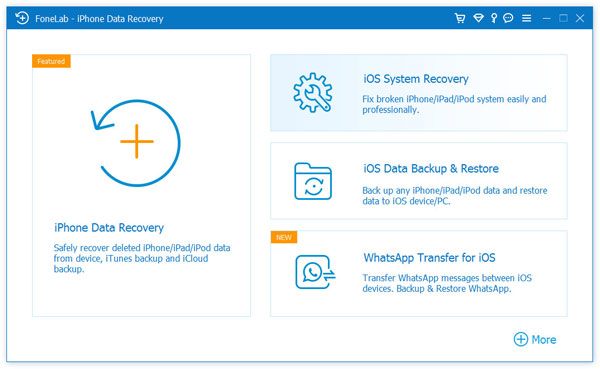
The FoneLab home screen on Windows. The title bar reads "FoneLab - iPhone Data Recovery", and iOS System Recovery is the tile at the top right.
Features
Standard Mode repairs without erasing
Aiseesoft iOS System Recovery's Standard Mode reinstalls iOS while keeping your photos, messages and contacts. It's meant for the common cases: stuck on the Apple logo, stuck in recovery mode after an update, frozen, or looping through restarts.
Advanced Mode for severe failures
Aiseesoft iOS System Recovery's Advanced Mode does a deeper repair for serious system crashes, forgotten passcodes and stubborn errors such as 4013, and erases everything on the device, which starts again like new.
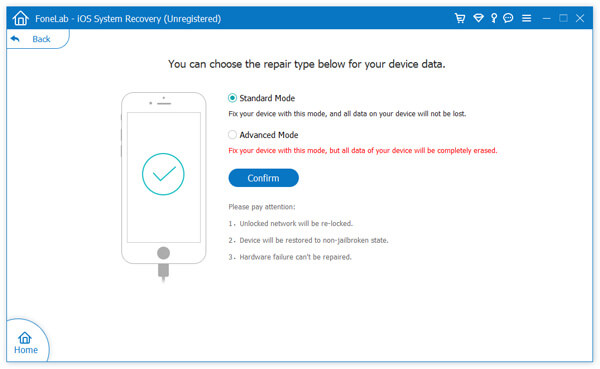
Choosing the repair type: Standard Mode keeps the data, Advanced Mode erases it. The notes below warn that an unlocked network gets re-locked, the device returns to a non-jailbroken state, and hardware failure can't be repaired. Aiseesoft's screenshot of an older Windows version.
Free one-click Recovery Mode
Aiseesoft iOS System Recovery puts an iPhone into Recovery Mode or takes it out with one click, with no button combinations, and this part is free. It helps when the side or home button is broken, or when a phone keeps landing back in recovery mode. A Free Quick Fix link on the device screen also offers a fast fix for common crashes and freezes before you commit to a full repair.
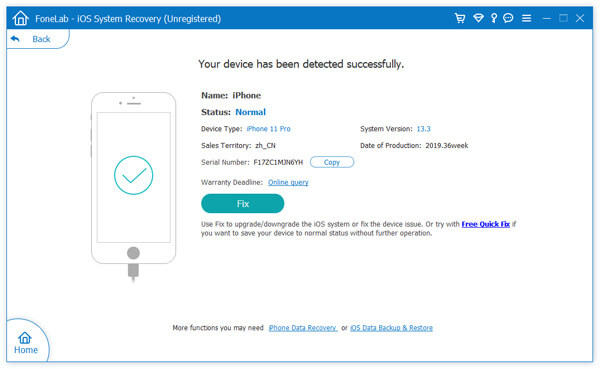
A detected iPhone 11 Pro on iOS 13.3, with its model, serial number and production date, the Fix button and the Free Quick Fix link. Aiseesoft's screenshot of an older Windows version.
iOS updates, downgrades and factory reset
Aiseesoft iOS System Recovery lets you pick the iOS version to install, so you can update or move back to an earlier version that Apple still signs. It can also factory reset a device whose passcode you've forgotten, wiping it so you can set it up again as new.
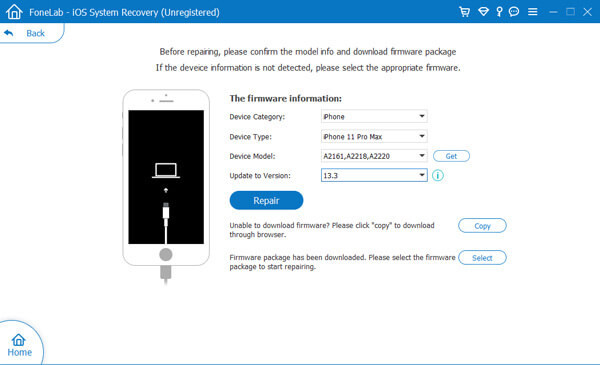
Confirming the firmware: device category, type and model, and the iOS version to install. If the firmware won't download, a Copy button gives you the link for a browser, and Select loads a package you already have. Aiseesoft's screenshot of an older Windows version.
Benefits
The real value is the order of operations. Apple's own restore is all or nothing. This tool gives you a no-erase attempt first, and only then the wipe. If the phone holds the only copy of a year of photos, that first attempt is what you're paying for.
It also saves the button gymnastics. Each iPhone generation enters recovery and DFU mode differently, and the free one-click recovery mode tool removes the guesswork, even with a broken button.
Real-World Uses
- An update gone wrong: the iPhone hangs on the Apple logo after an iOS update. Standard Mode reinstalls iOS and keeps the data.
- iTunes error 4013 during a restore: the restore stops partway and the phone won't boot. The tool installs the firmware itself instead of going through iTunes.
- A broken side button: the free tool takes the phone in and out of recovery mode.
- A beta you regret: go back to the last public iOS release Apple still signs.
- A forgotten passcode on an old iPad: reset it with Advanced Mode, then restore your iCloud backup.
Who It's For, and Who Should Skip It
Aiseesoft iOS System Recovery fits Windows users with an iPhone or iPad stuck in software trouble, especially without a recent backup, who want a guided fix with a no-erase option and don't want to wait for a repair appointment.
Skip it if Apple's free Update in recovery mode already worked, or if you have a fresh iCloud backup and don't mind a full restore, which iTunes does for free. Skip it for hardware faults too: water damage, a dead battery or a broken logic board need a repair shop. If you use a Mac, buy the Mac version instead, since this license is for Windows. And if what you need back is deleted photos or messages rather than a working phone, that's FoneLab's iPhone Data Recovery, a different tool.
Usage Guide
- Install: run the small downloader, which fetches and installs the full program (about 67 MB on 64-bit Windows).
- Open iOS System Recovery: launch FoneLab, click the iOS System Recovery tile, and connect the device with its USB cable. Click Start.
- Check the detected device: the program shows the model and iOS version. Try Free Quick Fix for a simple freeze, or click Fix.
- Choose a mode: start with Standard Mode. Use Advanced Mode only if Standard fails and you accept losing the data.
- Confirm the firmware details and pick the iOS version to install.
- Repair: let it download the firmware (often several GB) and install it. Keep the cable connected until the device restarts.
- Register: enter your license code from the key icon in the title bar when prompted.
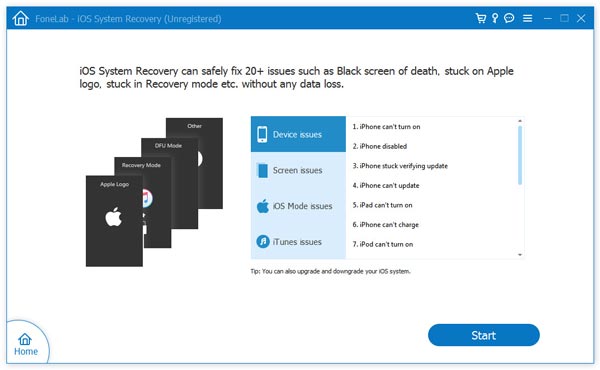
The start screen, with the issues grouped as device, screen, iOS mode and iTunes issues and a Start button. This older Windows version says "20+ issues". Aiseesoft's screenshot.
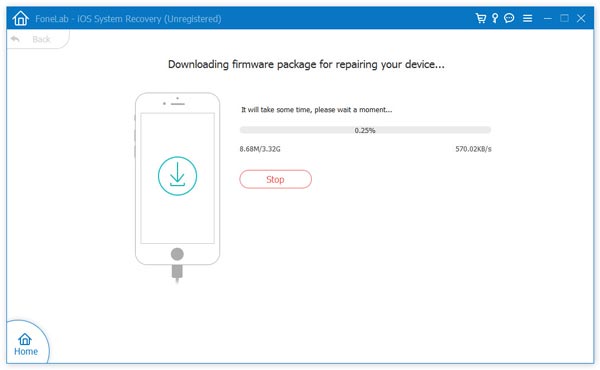
Downloading the 3.32 GB firmware package for the repair. Aiseesoft's screenshot of an older, unregistered Windows version.
Where it falls short
- No guaranteed no-erase fix. Standard Mode doesn't solve every case, and the fallback, Advanced Mode, wipes the device.
- A repair undoes some changes. Aiseesoft's own repair screen warns that a carrier-unlocked iPhone gets re-locked and a jailbroken one returns to stock.
- It can't fix hardware. The same screen says hardware failure can't be repaired.
- Downgrades depend on Apple. It can only install iOS versions Apple still signs, like any such tool.
- Recovery mode can time out. An iPhone leaves recovery mode on its own after a while, and the firmware download can take longer than that, so you may have to put it back before the last step (see Shane_L's review below).
- Little independent testing. The detailed write-ups online come from companies selling competing iPhone repair tools, and the product page's ratings and testimonials are Aiseesoft's own.
What Users Say
Independent reviews of this exact tool are scarce. The detailed "reviews" that rank for it come from vendors of rival iPhone repair tools, so we don't quote them. What's left is Aiseesoft's own testimonials, a few Trustpilot reviews of the company, and the company's overall Trustpilot record.
Testimonials on Aiseesoft's product page (published by the vendor)
The product page shows a 4.8 out of 5 rating and these comments, all chosen by Aiseesoft:
David: "My iPhone 14 got stuck on the Apple logo during an update, and I couldn't get it to start again. I tried Aiseesoft iOS System Recovery using Standard Mode, and it fixed the problem in just a few minutes. I was especially relieved that all of my photos and other data were still there afterward. Definitely worth trying before taking your phone in for repair."
Sam: "My iPhone got stuck in Recovery Mode, and none of the usual button combinations worked. Rather than wait for an appointment at the Apple Store, I gave this software a try. The instructions were easy to follow, it downloaded the firmware automatically, and my phone was back to normal not long after."
Emily: "I'm not very good with tech, so I was nervous about restoring my iPad myself. This tool made the whole process much easier than I expected. I connected my device, selected Standard Mode, and followed the prompts. My iPad, which had been stuck on a black screen, started working again without any trouble."
Mark: "My iPhone 17 was caught in a boot loop after a software issue, and I wasn't sure if it could be fixed without restoring everything. Aiseesoft repaired it smoothly, and the whole process went as expected. I've tried a few iOS repair tools before, and this is one of the easier ones to use."
Alex: "My iPhone froze on the spinning wheel after a photo shoot, and I hadn't backed up any of the pictures yet. I was worried I'd lose everything. Standard Repair got the phone working again, and my photos and messages were still there afterward."
Thomas: "My iPhone is in water for 2 hours and fail to work now. I try this tool, and it surprises me that it can detect my iPhone is in abnormal state, and fix it. The only thing it will takes some time to do that."
On Trustpilot
Shane_L (5 stars, October 5, 2025, "It worked a treat") describes a recovery-mode repair with an Aiseesoft iPhone tool, without naming which one: "It worked a treat. I was very close to leaving a negative review as after first time trying I was convinced it was a scam as it just came up with an error message saying it couldn't be reset.. what I had overlooked is that the iphone automatically turns off recovery mode after a while and as it takes a while for the process to work you must make sure it is back on recovery mode before proceeding with the final step."
Aiseesoft Studio as a whole scores 3.8 out of 5 from 609 reviews, and the reviews are split: 59% five stars, 34% one star, very little in between. Many of the one-star reviews are about refunds refused for other products, mainly the data recovery tools, while the five-star ones often praise the support team. None of the reviews we read names iOS System Recovery.
The recurring themes: people who got a working phone back praise how simple the Standard Mode repair is and that their photos survived. The complaints aimed at Aiseesoft are about refunds, not this tool's repairs. Since refunds are hard to get, connect your phone to the free download and see whether it's detected before you buy.
Comparisons
vs. Apple's own recovery (free)
iTunes or the Apple Devices app on Windows can also update or restore a phone in recovery mode. Update tries to keep your data, Restore erases it. Aiseesoft iOS System Recovery adds the one-click recovery mode tool, the choice of iOS version and the guided Standard and Advanced repairs. If Apple's Update works for you, you don't need this.
vs. FoneLab (All Functions)
The full FoneLab license adds iPhone Data Recovery, iOS Data Backup & Restore, WhatsApp Transfer, iPhone Password Manager, FoneTrans and iPhone Cleaner. On Aiseesoft's store it costs $99.00 for a lifetime license on 1 PC, against $55.96 for System Recovery alone. If you'll also want to pull deleted files off the phone, the bundle is the better buy.
Editions and Pricing
| License |
Price |
Term |
Computers and devices |
| iOS System Recovery, Lifetime (sold here) |
$55.96 (list $69.95) |
Lifetime |
1 PC, 6 iOS devices |
| iOS System Recovery, 1 Month |
$19.90 |
1 month |
1 PC, 6 iOS devices |
| iOS System Recovery, Multi-user |
$89.00 |
Lifetime |
3 PCs, 18 iOS devices |
| FoneLab (All Functions), Lifetime |
$99.00 |
Lifetime |
1 PC, 6 iOS devices |
The $55.96 is the price on the order page for the lifetime license. The other prices are from Aiseesoft's Windows store. Aiseesoft lists free upgrades and tech support with the license.
FAQs
Can I use the Windows license of Aiseesoft iOS System Recovery on a Mac?
No. Aiseesoft sells the Windows and Mac versions as separate products with separate licenses, so buy the edition for the computer you'll connect the phone to.
Is Aiseesoft iOS System Recovery a subscription?
The license sold here is a one-time lifetime license. Aiseesoft also sells a 1 Month license for $19.90 if you only need a single repair, which costs less but ends after a month.
How many iPhones can I fix with one Aiseesoft iOS System Recovery license?
The standard license covers up to 6 iOS devices on 1 PC. The Multi-user license raises that to 18 devices on 3 PCs.
Will Aiseesoft iOS System Recovery keep my iPhone carrier-unlocked or jailbroken?
No. Aiseesoft iOS System Recovery warns on its repair screen that a carrier-unlocked iPhone will be re-locked and a jailbroken one restored to a non-jailbroken state, because it installs stock iOS.
Does Aiseesoft iOS System Recovery work with iOS 27 and the iPhone 18?
Yes, according to Aiseesoft. Its tech specs list iOS 27 and all earlier versions, and the iPhone 18, 17, 16, 15, 14, 13 and 12 series, iPhone SE, iPad Pro, Air and mini, and iPod Touch.
How much disk space and download time does a repair need?
Aiseesoft iOS System Recovery downloads a full iOS firmware package for each repair, often several gigabytes (3.32 GB in Aiseesoft's own example), on top of the program's 67 MB install. Leave room on the drive and use a fast connection. If the download fails in the program, it gives you a link to download the firmware in a browser instead.
Can I get a refund if Aiseesoft iOS System Recovery doesn't fix my phone?
Only in limited cases. Aiseesoft's 30-day guarantee covers lifetime licenses with a technical problem its support team can't solve, and only if you work with support on it. It doesn't cover a change of mind, buying the wrong product or purchases made at a promotional price, and Aiseesoft deducts 20% when a customer insists on a refund.
System Requirements
- Windows 11, 10, 8.1, 8 or 7
- A USB cable for the iPhone, iPad or iPod Touch
- An Internet connection to install the program and download iOS firmware, plus free disk space for the firmware (several GB)
- Devices on iOS 27 or earlier
Conclusion
Aiseesoft FoneLab - iOS System Recovery is worth $55.96 to one kind of buyer: a Windows user whose iPhone is stuck in software trouble, who has photos or messages on it without a backup, and for whom Apple's free Update has already failed. The reason to buy it is the no-erase Standard Mode as a step before a full restore, plus the free one-click recovery mode tool. The reason not to is that refunds are hard to get and independent proof of its success rate is thin, so if you have a current backup, Apple's free restore does the job. Download it, connect the phone, and buy only once it recognizes your device.
Download Free Trial
Buy Now