Aiseesoft Mac FoneLab - iPhone Data Recovery: Find Lost iPhone Data on Your Mac
A message thread you deleted by mistake. Contacts that vanished after an iOS update. Notes from a phone that's now at the bottom of a lake. When iPhone data disappears, Apple's own answer is to restore a whole backup over your phone, wiping everything newer in the process. What you usually want is narrower: look inside the phone or the backup, find the few things you lost, and pull out just those.
Aiseesoft Mac FoneLab - iPhone Data Recovery does that from your Mac. It scans a connected iPhone, iPad or iPod touch, an iTunes backup stored on the Mac, or your iCloud account, shows you what it found, and saves the items you pick as ordinary files on the Mac.
Quick facts
- Version: 10.6.36
- Developer: Aiseesoft Studio
- Runs on: Mac OS X 10.7 or later, with separate builds for Intel and Apple silicon Macs. A Windows version is sold separately.
- Devices: iPhone 4 through the latest iPhone models, every iPad line, and iPod touch 1 to 7
- Recovers from: a connected device, iTunes backups on your Mac, and iCloud
- Price: $79.95 USD for a lifetime license on 1 Mac (the checkout has been taking 20% off, to $63.96)
- Free trial: scans and previews everything, but can't save recovered files until you register
- Guarantee: 30-day money-back guarantee when there is a quality problem
Before you buy: know what's realistic
Modern iPhones make deleted data hard to get back, and Aiseesoft's own technical specifications are candid about it. Scanning an iPhone 4S or newer directly covers nine kinds of text data (contacts, messages, call history, calendar, notes, reminders, Safari bookmarks and history, WhatsApp) but only four kinds of media, and deleted photos come back as thumbnails, not full-size pictures. Your best odds are often an older iTunes or iCloud backup that still holds the data.
Aiseesoft also has a 3.9 out of 5 rating on Trustpilot from about 600 reviews across all its products, and several 1-star reviews of its FoneLab iPhone recovery tools describe the program not recognizing an iPhone and long back-and-forth before a refund. The good news is that the free trial shows you exactly what it can find. Run it with your own iPhone or backup, check that the items you need appear in the preview, and only then buy.
Overview
The app is organized around three recovery modes in its left sidebar: Recover from iOS Device, Recover from iTunes Backup File and Recover from iCloud. A More tools button sits below them. Whichever mode you use, the flow is the same: scan, browse the results by category, preview, tick what you want and click Recover.
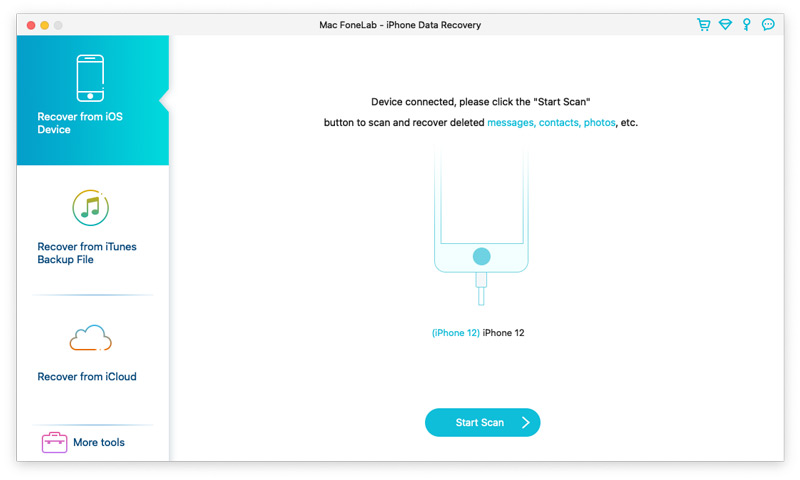
Recover from iOS Device mode with an iPhone 12 connected and the Start Scan button ready. The three recovery modes and More tools are in the sidebar.
The range of data it looks for is wide: contacts, text messages and iMessages, call history, calendars, notes, reminders, Safari bookmarks and history, voice memos, voicemail, message attachments, and chats from WhatsApp, Kik, Line, Viber and Messenger, plus photos, videos and documents stored by apps.
Features
Scan the iPhone itself
Connect the device with a USB cable, wait for its name to appear, and click Start Scan. Results are grouped down the left side under headings like Message & Contacts, Media, and Memos & Others, each with a count. A drop-down lets you show everything or only certain items, there's a search box, and you can switch between thumbnail and list views.
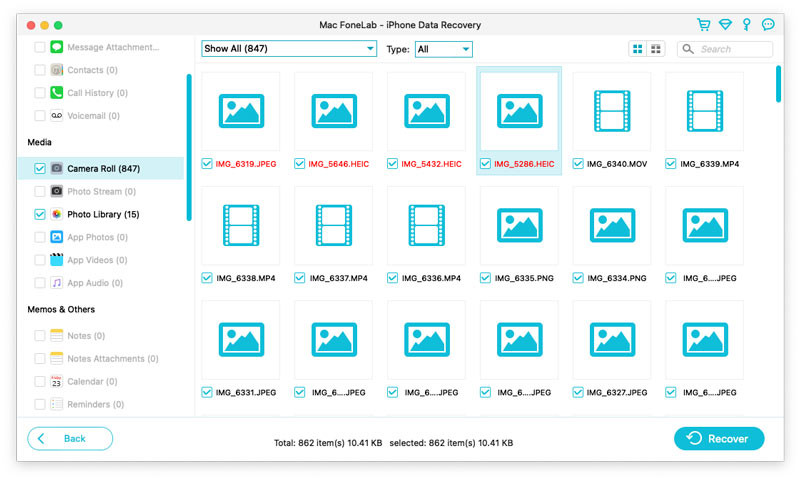
Scan results with Camera Roll (847 items) and Photo Library (15) ticked. Some file names show in red, and the Recover button is at the bottom right.
Open up an iTunes backup without restoring it
If you've ever backed up the phone to your Mac with iTunes, Recover from iTunes Backup File lists every backup it finds with its device name, date and serial number. Pick one and the app scans it so you can take out single items, without overwriting what's on your phone now. Encrypted backups work too, once you enter the backup password. If your backups live somewhere unusual, you can point the app at the right folder.
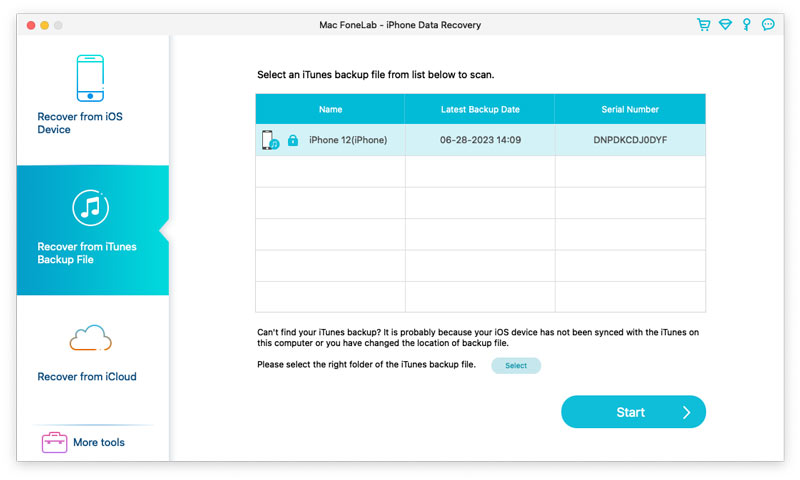
Recover from iTunes Backup File mode, listing an encrypted iPhone 12 backup with its date and serial number, plus a Select button for a backup stored elsewhere.
Recover from iCloud, even without the phone
Sign in to your Apple account inside the app (with a two-factor code if you use it) and you get two choices. Tick Photos, Contacts, Notes & Attachments, Calendar or Reminders to pull what's synced to iCloud, or choose iCloud Backup to download one of your device backups and scan it. This is the mode for a lost, stolen or destroyed phone. Results from iCloud can be saved to the Mac or sent back with a Restore to Device button.
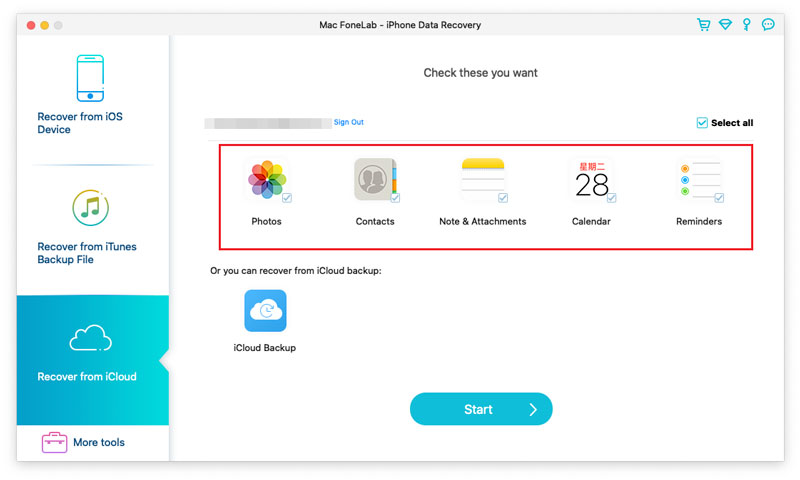
Recover from iCloud after signing in: Photos, Contacts, Note & Attachments, Calendar and Reminders are ticked, with an iCloud Backup option below.
Encrypted scan for call history and Safari
On devices running iOS 13 or later, call history, FaceTime records and Safari history only show up through an encrypted scan. The app asks before doing it and explains what happens: it temporarily sets your device's backup password to 1234, then erases that local backup password after scanning. Click Cancel and it simply skips those three data types.
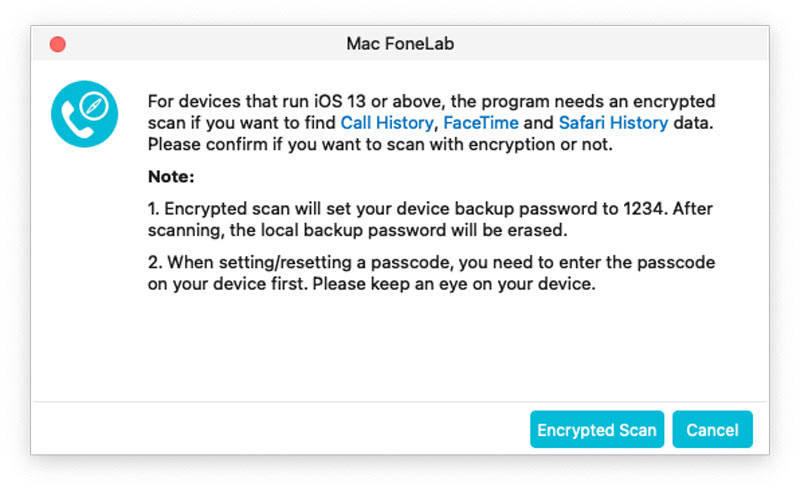
The encrypted scan prompt, explaining the temporary 1234 backup password and offering Encrypted Scan or Cancel.
Deeper scans for very old devices
The iPhone 4, iPhone 3GS, original iPad and iPod touch 4 get a special treatment. After downloading a plug-in, the app walks you through putting the device into a scanning mode with the Power and Home buttons, and can then recover far more: ten kinds of media including Camera Roll, Photo Library, Photo Stream and app videos, as well as text data.
Files you can actually use
Recovered items are saved in standard formats. Contacts come out as CSV, HTML or VCF, messages as CSV or HTML, notes, calendars and call history as HTML, voice memos as M4A, and photos and videos in their usual formats such as JPG, PNG and MOV. That means you can open a recovered chat in a browser, import contacts into another app, or print a conversation.
Benefits
The biggest benefit is selectivity. Restoring a whole backup through Apple replaces everything on the phone. FoneLab lets you reach into that same backup and take out one thread or one contact, leaving the phone as it is.
The second is certainty before payment. Because the free version scans and previews fully, you find out whether your data is recoverable before you spend anything. That matters more than usual here, because recovery from a modern iPhone often depends on whether a backup exists.
And because results are saved as everyday files, the data stays useful after recovery: a CSV of messages for a legal or work record, a VCF of contacts to import anywhere, voice memos you can play on any computer.
Real-World Uses
- The deleted conversation. You deleted a message thread last week, but your Mac backed up the phone before that. Scan the older iTunes backup and save just that thread as HTML.
- The phone that went in the pool. The iPhone won't turn on, but it was backing up to iCloud. Sign in from the app, download the latest iCloud backup and pull out photos and notes.
- The update that ate your contacts. Contacts went missing after an update. Check the iCloud Contacts option and the device scan, and export what you find as a VCF.
- The encrypted backup you forgot about. An encrypted backup from your old iPhone is still on the Mac. Enter its password and browse WhatsApp chats and voice memos from it.
- The family's old iPod touch. An iPod touch 4 in a drawer holds old photos. The special scanning mode for older devices can reach media that newer models don't expose.
Who It's For
This version is for Mac owners with an iPhone, iPad or iPod touch who've lost specific data and want to see what's still retrievable without wiping their device. It's especially useful if you've been backing up to your Mac or iCloud, since backups are where it finds the most. If you're hoping to rescue full-resolution deleted photos straight from a recent iPhone with no backup, this tool (like most in its class) is likely to disappoint. If you use Windows, buy Aiseesoft's Windows FoneLab instead.
Usage Guide
- Install and launch. Open the downloaded installer, which fetches and installs the app, then launch Mac FoneLab.
- Register if you've bought it. Enter the email address from your order and the registration code from your confirmation email. The unregistered version can still scan and preview.
- Choose a mode. Recover from iOS Device for a working phone, Recover from iTunes Backup File for a backup on your Mac, or Recover from iCloud for synced data or iCloud backups.
- Connect or select. Plug in the device and enter its passcode, pick a backup from the list, or sign in to iCloud. Enter a backup password if the backup is encrypted.
- Scan. Click Start Scan (or Start). On iOS 13 or later, decide whether to allow the encrypted scan for call history, FaceTime and Safari history.
- Review and recover. Click each category, preview items, tick the ones you want and click Recover to save them to a folder on your Mac.
Tips
- Stop using the phone as much as you can once you notice data is missing. New data can overwrite what's left of the old.
- Don't restore a backup to the phone first. Restoring replaces the phone's contents and can overwrite what you're trying to find. Scan the backup with FoneLab instead.
- Try every source. If the device scan comes up short, check older iTunes backups and iCloud backups too.
- Keep the phone connected and watch its screen during an encrypted scan, since you may be asked to enter your passcode.
What Users Say
Aiseesoft's product page shows a 4.9 rating from 78 reviews collected on its own site, with short testimonials such as this one from Michelle:
"FoneLab Mac iPhone Data Recovery really saved me when I lost some important contacts and photos. The software was easy to use and worked perfectly on my Mac."
And from Jessica: "The software guided me through the entire process, and within minutes, I had my photos, messages, and contacts back."
Independent feedback is more mixed. On Trustpilot, Aiseesoft Studio scores 3.9 out of 5 overall from about 600 reviews. Among reviews that mention FoneLab iPhone Data Recovery, there are happy customers who got lost files back, and a cluster of 1-star reviews from buyers whose iPhone wasn't recognized or whose recovered data wasn't usable, and who describe repeated troubleshooting requests before a refund. Treat the free scan as your test drive.
Comparisons
Mac FoneLab vs. restoring a backup with Apple's tools
Apple's restore is free and complete, but it's all or nothing: the whole backup replaces your phone's contents. FoneLab costs money but lets you browse inside the backup and take only what you need, saved as files on your Mac.
Mac version vs. Windows version
This listing is the Mac edition. Aiseesoft sells FoneLab for Windows separately, with its own licenses, so buy the one for the computer you'll use.
Mac FoneLab vs. Aiseesoft Data Recovery
Aiseesoft Data Recovery recovers files from Mac and PC drives and memory cards. Mac FoneLab is the one for data on, or backed up from, an iPhone, iPad or iPod touch.
Editions and Pricing
The license sold here is the Lifetime License for 1 Mac at $79.95 USD, a one-time purchase. The checkout has been applying a 20% discount, bringing it to $63.96. Aiseesoft also offers a 1-month license for 1 Mac and a 3-user license for 3 Macs on its own store. Registered users get free upgrades for the life of the license and technical support, and every purchase carries the 30-day money-back guarantee for quality problems.
FAQs
Do I need a backup to recover anything?
No, the device scan works without one. But on recent iPhones the device scan finds fewer kinds of data, so a backup in iTunes or iCloud often gives you more to work with.
Will it change or erase anything on my iPhone?
Scanning reads data and saves recovered items to your Mac. The one change it asks about is the encrypted scan on iOS 13 or later, which temporarily sets a backup password of 1234 and removes it afterwards.
What if my iPhone is locked or broken?
Aiseesoft's route for a locked, smashed or water-damaged phone is its backups: if the device was ever backed up to iTunes on your Mac or to iCloud, you can recover from those backups without the phone itself.
Does it work on Apple silicon Macs?
Yes. Aiseesoft provides separate builds of the app for Intel and Apple silicon Macs.
Can I recover WhatsApp chats?
WhatsApp messages and attachments are among the supported data types, from both device scans and backups, alongside Kik, Line, Viber and Messenger data.
Can I put recovered data back on my iPhone?
Most recovered items are saved to your Mac as files. For data recovered from iCloud, the results screen also offers a Restore to Device button.
What if it can't find my data?
That's exactly what the free trial is for, since it scans and previews without a license. If you buy and hit a technical problem, Aiseesoft offers refunds within 30 days for quality problems.
Does the license work on more than one Mac?
The lifetime license sold here covers 1 Mac. Aiseesoft sells a separate 3-user license if you need it on more computers.
System Requirements
- Operating system: Mac OS X 10.7 or later
- Processor: Intel or Apple silicon
- iTunes: 10.7 or later (the latest version is recommended)
- Disk space: more free space than the storage used on your iPhone
- Devices: iPhone 4 through current models, iPad, iPad mini, iPad Air and iPad Pro, iPod touch 1 to 7
Conclusion
Mac FoneLab - iPhone Data Recovery is at its best as a backup explorer: it opens iTunes and iCloud backups that Apple only lets you restore wholesale, and lets you take out a single conversation, a list of contacts or a set of voice memos. Its direct device scan is a useful extra, with honest limits on recent iPhones.
Go in with clear expectations. Run the free scan first, look for your data in the preview, and if it's there, a one-time lifetime license is a reasonable price for getting it back on your Mac.