Aiseesoft FoneLab Android Data Recovery: Get Back Deleted Messages, Contacts and Photos from an Android Phone
Aiseesoft FoneLab - Android Data Recovery is a Windows program that recovers deleted text messages, contacts, call logs, WhatsApp chats, photos, videos and documents from Android phones and tablets, their SD cards and SIM cards, and from Google Drive backups. A lifetime license for one PC and up to six Android devices costs $49.96, and the free download scans and previews what it finds first.
A deleted conversation, a wiped contact list after a reset, or photos lost when a phone stopped responding: those files often stay on the device until something overwrites them. FoneLab looks for them and shows you what can still be saved.
Quick facts
- Developer: Aiseesoft
- Runs on: Windows 11, 10, 8.1, 8, 7 and XP (a Mac version is sold separately)
- Android: 4.0 and later by USB, 5.0 and later wirelessly, up to Android 17
- Recovers: messages, contacts, call logs, WhatsApp, photos, videos, audio and documents
- Sources: internal memory, SD card, SIM card and Google Drive backups
- Price: $49.96 for a lifetime license, 1 PC and 6 Android devices
- Free trial: scans and previews found data; recovering it needs a license
- Guarantee: 30-day money-back
What we checked: the lifetime license cost $49.96 at checkout on October 13, 2026, and the full Windows package Aiseesoft's installer downloads was version 6.1.56 (dated June 11, 2026) on October 13, 2026.
Before you buy
Run the free scan first: if your files show up in the preview, they can be recovered. No tool can recover data that has already been overwritten, so stop using the phone as soon as you notice the loss. FoneLab needs USB debugging turned on and installs a small helper app, FoneGo, on the phone to read its data.
Download Free TrialBuy Now
Overview
Aiseesoft FoneLab - Android Data Recovery is part of Aiseesoft's FoneLab for Android toolkit, which also includes Broken Android Data Extraction and Android Data Backup & Restore. It handles common loss situations: accidental deletion, problems after an OS update or rooting, a phone that is stuck or not responding, a forgotten password, a system crash or a virus. It supports phones from Samsung, Google Pixel, Xiaomi, Huawei, Motorola, Sony, LG, HTC and ZTE.
Features
Recover messages, contacts and call logs
Aiseesoft FoneLab - Android Data Recovery restores deleted text messages with their attachments, contacts with full details (name, numbers, email, job title, address) and call history. Contacts can be saved as VCF, CSV or HTML, and messages as CSV or HTML.
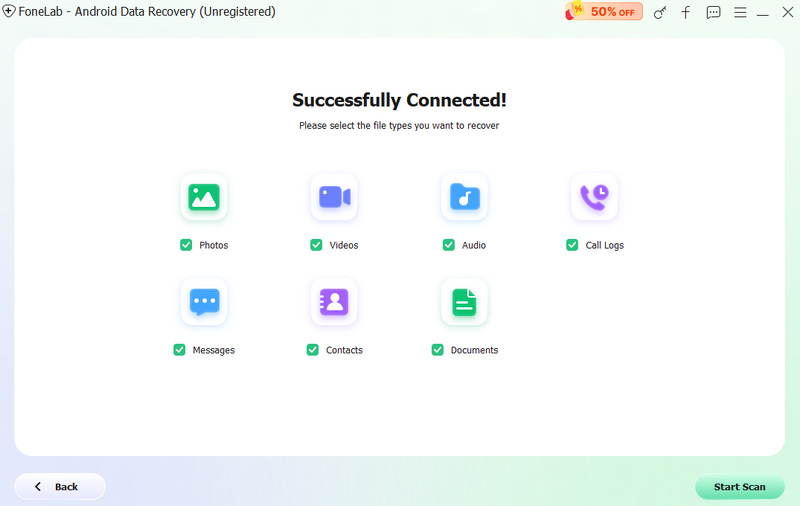
Choosing what to scan for: Photos, Videos, Audio, Call Logs, Messages, Contacts and Documents, with the Start Scan button.
Recover photos, videos, WhatsApp and documents
Aiseesoft FoneLab - Android Data Recovery also finds deleted photos, videos, music, call recordings, WhatsApp chats with their photos and videos, and documents in Word, Excel, PowerPoint, PDF, HTML, ZIP and RAR formats, from the phone or its SD card.
Recover from Google Drive backups
Aiseesoft FoneLab - Android Data Recovery can read your Google Drive backup and restore contacts, Wi-Fi passwords, messages, call history and calendar entries from it, previewing each item first.
Connect by USB or wirelessly
Aiseesoft FoneLab - Android Data Recovery detects a phone connected by USB cable, walks you through turning on USB debugging, and installs its FoneGo helper app on the phone to read the data. Wireless connection works on Android 5.0 and later.
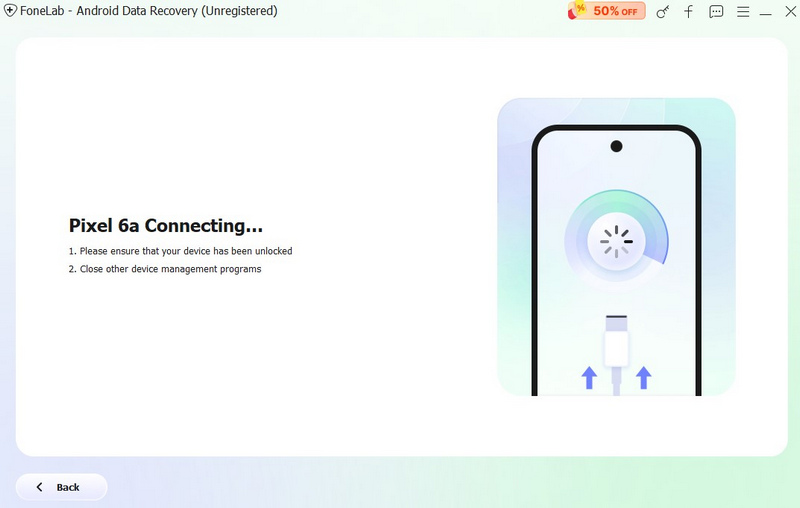
FoneLab connecting to a Samsung phone, reminding you that the phone must not be screen-locked and that other device management programs should be closed.
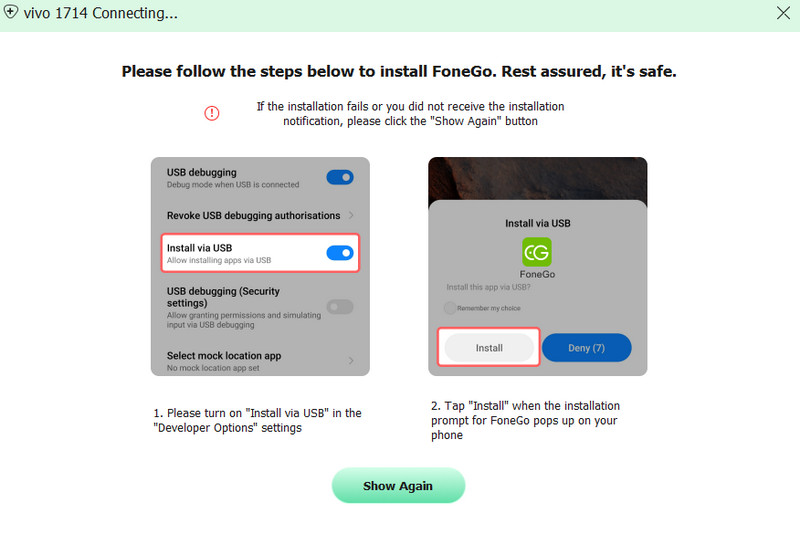
The FoneGo install steps: turn on "Install via USB" in Developer Options, then tap Install when the prompt appears on the phone.
Back up Android data to the computer
Aiseesoft FoneLab - Android Data Recovery can also back up the messages, contacts and WhatsApp data currently on your phone, plus any deleted items it finds, to your computer without rooting the phone.
Benefits
See before you pay. The free scan shows exactly which files can come back.
One tool for most data types. Messages, contacts, media and documents all come from the same scan.
A one-time price. The lifetime license covers six Android devices.
Real-World Uses
- Recovering a text conversation deleted by mistake.
- Getting contacts back after a phone reset or an update gone wrong.
- Rescuing photos from a phone's SD card after accidental deletion.
- Restoring call history and calendar entries from a Google Drive backup.
Who It's For
Aiseesoft FoneLab - Android Data Recovery is for Android users with a Windows PC who have lost messages, contacts or media. Mac users need the Mac version, and a phone with a broken screen may need Aiseesoft's Broken Android Data Extraction instead.
Usage Guide
- Install it. Download and run the installer, which fetches the full program.
- Connect the phone by USB and follow the on-screen steps to turn on USB debugging.
- Install FoneGo on the phone when prompted and allow it access.
- Choose the data types and click Start Scan.
- Preview and recover. Check the found items, buy a license if needed, and click Recover.
What Users Say
Aiseesoft's own review page lists 180 user reviews of the program. They're hosted by the vendor, so read them as such, but they include some balanced ones.
Reviews on Aiseesoft's site
No File Corruption After Recovery: "The software is easy to use and lets you preview files before restoring them, which is helpful. The scan takes some time, and not everything was recoverable, but it still managed to recover most of the data I needed, most importantly, without file corruption" Charlee Anthony, December 2025
Works for SD Card Recovery: "I used FoneLab Android Data Recovery for recovering data from my Android SD card and it recovers most of my data." Amy Dennis, September 2025
Reliable data recovery tool for Android: "I’ve been looking for a reliable data recovery tool for Android, and Aiseesoft FoneLab did not disappoint. It recovered everything from contacts to messages, even files that I thought were permanently lost." Laura, January 2025
Saved my photos: "I dropped my phone in water, and thought my photos were gone forever. FoneLab saved them in the end." Cunningham, August 2023
Excellent: "Helped recover my deleted or lost photos and messages successfully. But you should know that it is not 100% to recover any thing. I think it is the best to read some tutorials from this site before you choose to buy it." oLIVER, December 2017
The recurring themes: users like the preview and the range of data it recovers, including from SD cards and water-damaged phones. The honest caveats are that scans take time and not everything comes back, which is true of any recovery tool and why the free preview matters.
Editions and Pricing
| License | Price | Covers |
|---|
| Lifetime License (sold here) | $49.96 (list $62.45) | 1 PC, 6 Android devices, lifetime |
| 1 Month License | $19.90 | 1 PC, 6 Android devices, one month |
| Multi-user License | $79.00 | 3 PCs, 18 Android devices |
Licenses include free upgrades and tech support and a 30-day money-back guarantee. Aiseesoft also sells the full FoneLab for Android toolkit, which adds Broken Android Data Extraction and Android Data Backup & Restore.
FAQs
Does Aiseesoft FoneLab Android Data Recovery need root access?
No. Aiseesoft FoneLab Android Data Recovery works without rooting the phone: it uses USB debugging and its FoneGo helper app to read the data.
Which Android versions does FoneLab Android Data Recovery support?
Aiseesoft FoneLab Android Data Recovery supports Android 4.0 and later over USB and Android 5.0 and later wirelessly, up to Android 17.
Can FoneLab Android Data Recovery recover deleted WhatsApp messages?
Yes. Aiseesoft FoneLab Android Data Recovery can find deleted WhatsApp chats and their attachments on the phone, though anything already overwritten can't be recovered.
Is there a Mac version of FoneLab Android Data Recovery?
Yes. Aiseesoft sells a separate Mac version. The license sold here is for Windows.
How many phones can I use FoneLab Android Data Recovery with?
The Aiseesoft FoneLab Android Data Recovery lifetime license covers one PC and up to six Android devices. The multi-user license covers three PCs and 18 devices.
Can I get a refund for FoneLab Android Data Recovery?
Yes. Aiseesoft offers a 30-day money-back guarantee if there's a quality problem with the program.
System Requirements
- Windows: 11, 10, 8.1, 8, 7 or XP
- Processor and memory: 1 GHz Intel or AMD CPU, 1 GB RAM
- Disk space: 200 MB free
- Android: 4.0 or later (USB), 5.0 or later (wireless)
Conclusion
Aiseesoft FoneLab - Android Data Recovery covers the data people most often lose on Android, from messages and contacts to photos and WhatsApp, and works without rooting. Like every recovery tool, it can only bring back what hasn't been overwritten.
Run the free scan. If your files appear in the preview, $49.96 once gets them back and covers six devices.
Download Free TrialBuy Now