Aiseesoft Mac FoneLab - iOS System Recovery: Fix a Stuck iPhone from Your Mac
Aiseesoft Mac FoneLab - iOS System Recovery is a Mac app ($55.96 at checkout for a lifetime license, list price $69.95) that repairs iPhones, iPads and iPods stuck on the Apple logo, in recovery mode, in a restart loop or on a black screen by reinstalling iOS, with a Standard Mode that keeps your data. It's for iPhone owners with a Mac who'd rather try a fix at home before a trip to the Apple Store.
The iPhone updated overnight and now shows only the Apple logo. Restarting does nothing, and Finder's own Restore would wipe everything. This tool's pitch is a middle path: reinstall the system, keep the photos.
Quick facts
- Version: part of the Mac FoneLab app, version 10.6.52
- Developer: Aiseesoft Studio
- Runs on: macOS 10.10 or later. A Windows version is sold separately.
- Devices: iPhone (up to the iPhone 18 series), iPad Pro, Air and mini, iPod Touch, running iOS 27 and earlier
- Two repair modes: Standard keeps all data, Advanced fixes severe failures but erases the device
- Price: $55.96 at checkout for a lifetime license, 1 Mac and up to 6 iOS devices (list price $69.95)
- Free: one-click Enter and Exit Recovery Mode. The repair itself needs a license.
- Refunds: 30 days for lifetime licenses, when there's a quality problem
What we checked: the price on the order page ($69.95 less a $13.99 discount, $55.96 total, for the Mac lifetime license) and the full Mac FoneLab app package the installer downloads (version 10.6.52), both on October 29, 2026. We didn't repair a device with it.
Before you buy
- Try Apple's free fixes first. A force restart, and Finder's Update option in recovery mode (which reinstalls iOS without erasing) solve many stuck-logo cases at no cost.
- Back up if you can. If Standard Mode fails, Advanced Mode erases the device, so any data not in iCloud or a Mac backup is gone.
- It can't fix hardware. Water damage, a failing battery or a broken logic board need a repair shop.
Download Free TrialBuy Now
Overview
iOS System Recovery is one of the tools inside Aiseesoft's FoneLab app, next to iPhone Data Recovery, iOS Data Backup & Restore and WhatsApp Transfer. This license activates the system recovery tool. You connect the device by USB, the program identifies it and the problem, downloads the matching iOS firmware, and installs it.
Aiseesoft lists more than 50 problems it handles, grouped into device issues (disabled, won't turn on, restart loop, stuck verifying an update, no service), screen issues (Apple logo, frozen, blue, white, black or red screen, unresponsive touch), stuck modes (DFU, recovery, headphone, safe, restore, zoom) and iTunes or Finder errors such as 4013, 4014, 3014, 2001 and 1110.
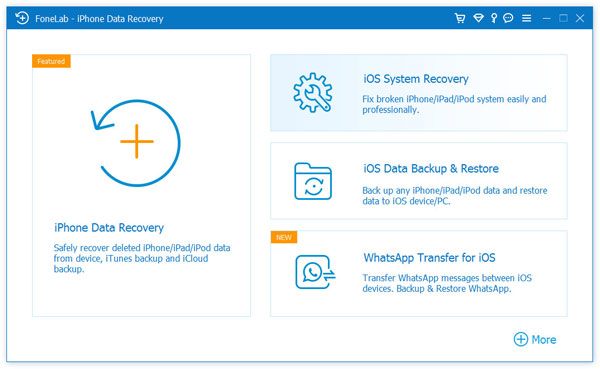
The FoneLab home screen with iOS System Recovery next to iPhone Data Recovery, iOS Data Backup & Restore and WhatsApp Transfer for iOS. Aiseesoft's screenshot shows the Windows interface. The Mac app has the same tools.
Features
Standard Mode repairs without erasing
Aiseesoft iOS System Recovery's Standard Mode reinstalls iOS while keeping your photos, messages and contacts. It's meant for the common cases: stuck on the Apple logo, stuck in recovery mode after an update, frozen or looping. Aiseesoft's product images claim a 95% success rate for it.
Advanced Mode for severe failures
Aiseesoft iOS System Recovery's Advanced Mode does a deep repair for serious system crashes, forgotten passcodes and stubborn errors such as 4013, and erases all data on the device in the process, leaving it like new.
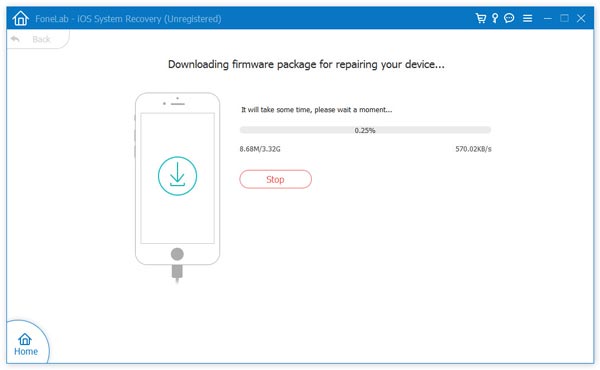
FoneLab - iOS System Recovery downloading the 3.32 GB firmware package for the repair. Aiseesoft's screenshot, taken in the unregistered Windows version.
Free one-click Recovery Mode
Aiseesoft iOS System Recovery puts an iPhone into Recovery Mode or takes it out with one click, with no button combinations, and this part is free. It's handy when the side or home button is broken, or when a phone keeps landing back in recovery mode.
iOS updates, downgrades and factory reset
Aiseesoft iOS System Recovery can install a different iOS version that Apple still signs, to update or downgrade, and can factory reset a device whose passcode you've forgotten, wiping it so you can set it up again.
Real-World Uses
- An update gone wrong: the iPhone hangs on the Apple logo after an iOS update. Standard Mode reinstalls iOS and keeps the data.
- A broken side button: use the free tool to enter and exit recovery mode.
- A beta you regret: go back to the last signed public iOS release.
- A forgotten passcode: reset the device and restore it from your iCloud backup.
Who It's For, and Who Should Skip It
Aiseesoft iOS System Recovery fits Mac users with an iPhone or iPad that's stuck in software trouble, especially without a recent backup, and who want a guided fix with a no-erase option.
Skip it if Apple's free Update in recovery mode already worked, or if you have a fresh iCloud backup and don't mind a full restore, which Finder does for free. Skip it for hardware faults too. And if you need deleted photos or messages back rather than a working phone, that's Aiseesoft's iPhone Data Recovery, a different tool.
Usage Guide
- Install: download the small installer DMG, open it, and let it download and install Mac FoneLab (about 86 MB).
- Open iOS System Recovery: launch FoneLab, choose iOS System Recovery, and connect the device with its USB cable.
- Choose a mode: start with Standard Mode to keep your data. Use Advanced Mode only if Standard fails and you accept losing the data.
- Confirm the device details and the iOS version to install.
- Repair: let it download the firmware (often several GB) and install it. Keep the cable connected until the device restarts.
- Register: enter your license code from the key icon in the title bar when prompted.
Where it falls short
- No guaranteed no-erase fix. Standard Mode doesn't solve every case, and the fallback Advanced Mode wipes the device.
- It reinstalls what Apple signs. Downgrades are limited to iOS versions Apple still signs, like any such tool.
- Little independent testing. Most "reviews" online come from competing iPhone-tool vendors, and the product page's ratings and testimonials are Aiseesoft's own.
- Refunds are conditional. The 30-day refund covers lifetime licenses with a quality problem, not a change of mind.
- The installer is a downloader. The 4 MB DMG fetches the full app, so you need a working Internet connection, and firmware downloads add several more GB.
What Users Say
We found no independent reviews of this tool that we'd quote: the detailed write-ups online come from companies selling competing iPhone repair tools. What remains is the feedback Aiseesoft publishes on its product page, where it shows a 4.8 out of 5 rating.
Testimonials on Aiseesoft's product page (published by the vendor)
David: "My iPhone 14 got stuck on the Apple logo during an update, and I couldn't get it to start again. I tried Aiseesoft iOS System Recovery using Standard Mode, and it fixed the problem in just a few minutes. I was especially relieved that all of my photos and other data were still there afterward."
Sarah: "My iPhone is frozen when I am playing Pokemon Go on my iPhone 16. I tried to turn it off, but it is still frozen. Just now I downloaded this program and it fixed my iPhone 16 from frozen to normal after restarting it."
Thomas: "My iPhone is in water for 2 hours and fail to work now. I try this tool, and it surprises me that it can detect my iPhone is in abnormal state, and fix it. The only thing it will takes some time to do that."
The honest summary: these are hand-picked by the vendor. The free Recovery Mode tool and the trial download are the safest way to see whether it recognizes your device before you pay.
Editions and Pricing
| License |
Price |
Covers |
| 1 Month License | $19.90 (list $39.80) | 1 Mac, 6 devices, one month |
| Lifetime License | $55.96 (list $69.95) | 1 Mac, 6 devices, no expiry |
| Multi-user License | $89.00 (list $111.25) | 3 Macs, 6 devices |
Prices are from Aiseesoft's Mac order page. This page's Buy Now button is the Lifetime License. Aiseesoft also sells the full Mac FoneLab with all its tools.
FAQs
Will Aiseesoft iOS System Recovery erase my iPhone?
Not in Standard Mode, which keeps all data. Advanced Mode erases the device, so use it only after Standard Mode fails and you've accepted losing data that isn't backed up.
Does the Mac license work on Windows?
No. Aiseesoft sells the Windows version of FoneLab - iOS System Recovery separately.
Does Aiseesoft iOS System Recovery support iOS 27?
Yes. Aiseesoft lists iOS 27, iOS 26, iOS 18, iOS 17 and earlier, and iPhones up to the iPhone 18 series.
Can it recover deleted photos?
No. Aiseesoft iOS System Recovery repairs the system. Recovering deleted files is the job of Aiseesoft's iPhone Data Recovery, another FoneLab tool with its own license.
How many iPhones can I fix with one license?
The Aiseesoft iOS System Recovery lifetime license covers up to 6 iOS devices on 1 Mac. The Multi-user License covers 3 Macs.
System Requirements
- Mac: macOS 10.10 or later
- Devices: iPhone, iPad or iPod Touch on iOS 27 or earlier
- Connection: a working USB cable, plus Internet to download the app and iOS firmware
- Disk space: about 86 MB for the app, plus room for firmware files (often 3 GB or more)
Conclusion
Aiseesoft Mac FoneLab - iOS System Recovery is worth about $56 if your iPhone is stuck in software trouble, Apple's free Update option hasn't helped, and you don't have a backup you're happy to restore: its Standard Mode reinstalls iOS while keeping your data, which Finder's Restore can't. The main reasons not to buy it are that a free force restart or Finder update often fixes the same problem, that its claims have little independent testing behind them, and that the fallback mode erases the device. Try Apple's options first, then this.
Download Free TrialBuy Now