Aiseesoft FoneLab - iOS Data Backup & Restore: Selective iPhone Backups on Your Windows PC
Aiseesoft FoneLab - iOS Data Backup & Restore is a Windows program ($37.45 at checkout for a lifetime license) that backs up an iPhone, iPad or iPod to your PC without iTunes, lets you pick which kinds of data to save, keeps every backup instead of overwriting the last one, and lets you open a backup and pull out just the items you need. It's for iPhone owners with a Windows PC who want local, browsable backups rather than one opaque iTunes file.
You want your WhatsApp chats and photos saved before you trade in the phone, but an iTunes backup is all or nothing, you can't look inside it, and the next sync replaces it. This tool's pitch is the opposite: choose the data, keep each backup as its own dated copy, and open it on the PC whenever you need one contact or one note back.
Quick facts
- Version: 10.8.82 (part of Aiseesoft's FoneLab app)
- Developer: Aiseesoft Studio
- Runs on: Windows 11, 10, 8.1, 8 and 7. A Mac version is sold separately.
- Devices: iPhone 4S through the iPhone 17 series, all iPad Pro, Air, mini and iPad models, iPod Touch 4 and 5, on iOS 27 and earlier
- Backup types: Standard, or Encrypted with a password you set
- Data: over 26 types, including messages, contacts, call history, photos, notes, and WhatsApp, LINE, Viber, Kik, WeChat, QQ and Messenger chats
- Storage: backups stay on your PC, with no cloud upload
- Price: $37.45 at checkout for a lifetime license, 1 PC and up to 6 iOS devices
- Refunds: 30 days, only for technical problems support can't solve, wrong or duplicate purchases and missing license codes. No refunds for a change of mind.
What we checked: the Windows installer from Aiseesoft's site (a 2.4 MB downloader that fetches a 66.6 MB 64-bit setup, both file version 10.8.82) and the price on the order page ($37.45, lifetime license, no discount applied), both on October 29, 2026. We didn't back up or restore a device with it, and we didn't test the trial's limits.
Before you buy
- Know what goes back to the phone. Aiseesoft's own restore tutorial says only contacts and notes can be restored to an iOS device. Messages, photos, chats and the rest are exported to the PC instead. If you want to move everything to a new iPhone, Apple's Quick Start or an iCloud or iTunes restore does that for free.
- The trial is limited. According to the same tutorial, the free version can't restore a backup to a device and can export to the PC only 3 times.
- Test before you pay. Download it, back up your phone and open the backup. The refund policy doesn't cover a change of mind, buying the wrong product or a purchase at a promotional price, and Aiseesoft keeps a 20% fee if you insist on a refund.
Download Free Trial
Buy Now
Overview
iOS Data Backup & Restore is one of the tools inside Aiseesoft's FoneLab app, next to iPhone Data Recovery, iOS System Recovery and WhatsApp Transfer for iOS. This license activates the backup tool. It has two halves: iOS Data Backup copies the data you select from a connected device to a folder on your PC, and iOS Data Restore lists the backups on the PC, opens one, and restores or exports the items you tick.
Unlike an iTunes backup, which is a single file you can't browse, each backup here shows up as a list of categories and items you can preview. A new backup doesn't replace the previous one, so you can keep a copy from before an update, a reset or a trade-in.
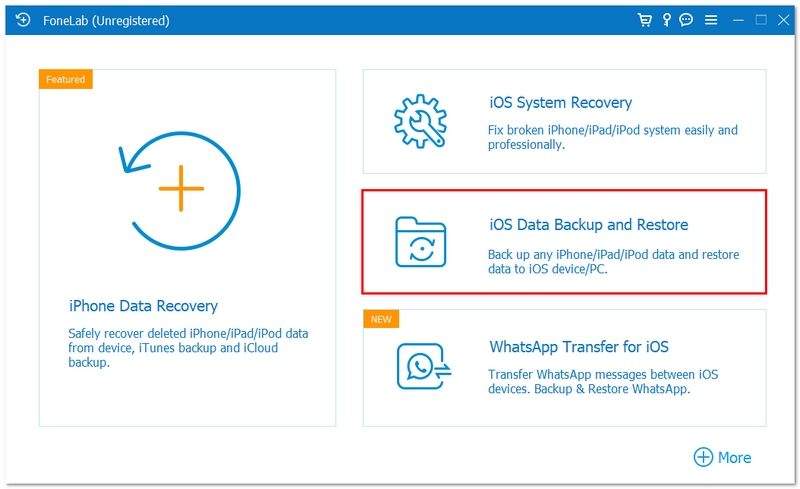
The FoneLab home screen on Windows (unregistered), with the iOS Data Backup and Restore tile marked. Aiseesoft's screenshot.
Features
Pick the data types you back up
Aiseesoft iOS Data Backup & Restore lets you tick the categories to save instead of copying the whole phone: Media (photos, app photos, app videos, app audio), Messages & Contacts (messages and attachments, contacts, call history, voicemail, and WhatsApp, LINE, Viber, Kik, WeChat, QQ and Messenger with their attachments) and Memos & Others (notes, calendar, reminders, voice memos, Safari bookmarks and history, app documents). A backup of only your chats and contacts is much smaller and faster than a full one.
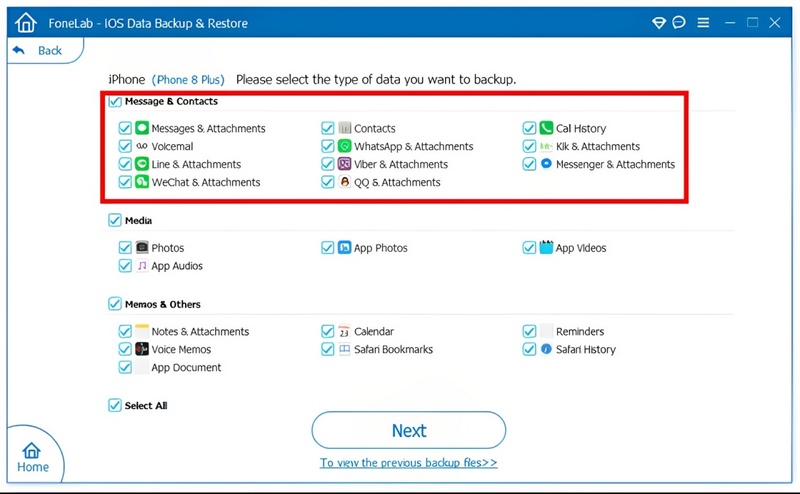
Choosing what to back up from an iPhone 8 Plus: the Message & Contacts group (marked), Media, and Memos & Others, with Select All at the bottom. Aiseesoft's screenshot of the Windows version.
Password-protected encrypted backups
Aiseesoft iOS Data Backup & Restore offers an Encrypted backup next to the Standard one. You set a password before the backup starts, and the same password is needed to open or restore it later, so a backup of your messages sitting on a shared PC can't be browsed by anyone else. Keep the password somewhere safe: without it, the backup is no use to you either.
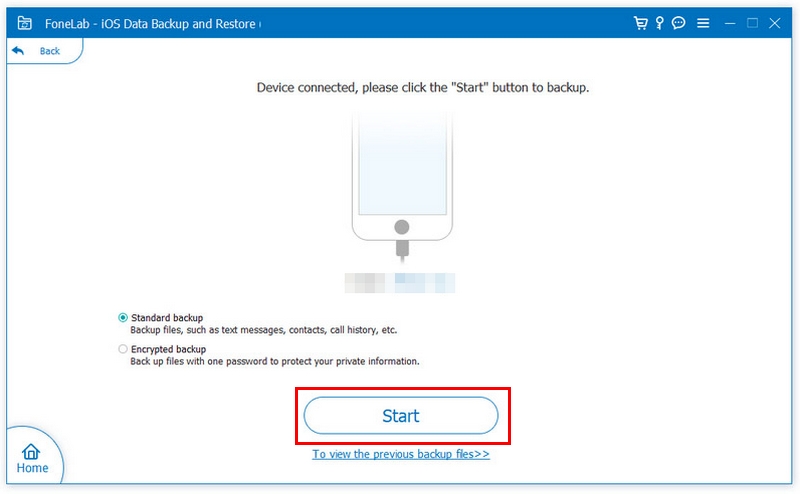
A connected iPhone, with Standard backup selected and Encrypted backup below it, the Start button, and a link to the previous backups. Aiseesoft's screenshot of the Windows version.
Every backup kept, none overwritten
Aiseesoft iOS Data Backup & Restore saves each backup as a separate entry with its device name, iOS version, date, serial number and size, so last month's copy is still there after today's. You can choose the folder before backing up (the default is under Documents\Aiseesoft Studio\FoneLab\Backup), and load a backup from another location with the Select button.
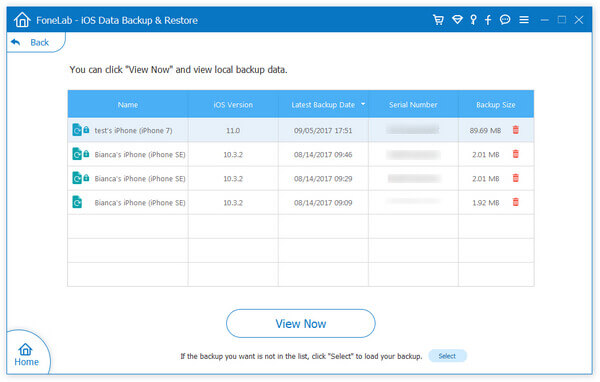
Four backups of two iPhones listed side by side, the locked ones encrypted, with the View Now button. Aiseesoft's screenshot of an older Windows version.
Preview a backup and restore only what you need
Aiseesoft iOS Data Backup & Restore opens a backup into the same categories you backed up, with item counts and previews, so you can check that the photos or chats you wanted are really there. Tick the items and click Restore to PC to save them as files on the computer, or Restore to Device to put them back on an iPhone or iPad without erasing what's on it (contacts and notes, per Aiseesoft's tutorial).
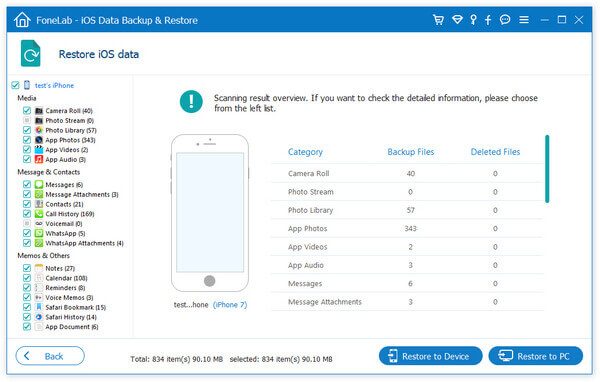
An opened backup: categories on the left with item counts (834 items, 90.10 MB), an overview table, and the Restore to Device and Restore to PC buttons. Aiseesoft's screenshot of an older Windows version.
Benefits
The real gain is being able to see your backup. With iTunes you only find out what a backup holds when you restore a whole phone from it. Here you can open it on the PC, find the one conversation or note you need, and save it, without touching the phone.
Keeping every backup also takes the risk out of backing up. A sync after something has gone wrong can't wipe out your last good copy, which matters most before an iOS update, a factory reset or handing an old phone in.
Real-World Uses
- Before a trade-in: save the old iPhone's photos, messages and WhatsApp chats as a dated backup on the PC, then reset the phone.
- Freeing up space: back up a camera roll that fills the phone, check it in the preview, then delete the photos from the iPhone.
- Keeping a record: export text messages or a chat history to the PC for your files.
- Getting back a deleted contact or note: open last week's backup and restore just that item to the phone.
- Several devices, one PC: keep separate backups for a family's iPhones and iPads (up to 6 devices on the license).
Who It's For, and Who Should Skip It
Aiseesoft iOS Data Backup & Restore fits Windows users who want local backups they can open and search, especially of messages and chat apps, and who like keeping several dated copies on their own computer instead of in iCloud.
Skip it if what you really want is to move everything to a new iPhone: Apple's Quick Start, iCloud or a full iTunes or Apple Devices backup does that for free, while this tool restores only some data types to a device. Skip it too if a full encrypted iTunes backup already meets your needs, since that's free and also includes settings. If you use a Mac, buy the Mac version instead, since this license is for Windows. And if the data is already deleted and not in any backup, you need a recovery tool such as FoneLab's iPhone Data Recovery, not a backup tool.
Usage Guide
- Install: run the small downloader, which fetches and installs the full FoneLab program (about 67 MB on 64-bit Windows).
- Open the tool: launch FoneLab and click the iOS Data Backup and Restore tile (under More, in some versions).
- Connect the device: plug in the iPhone or iPad, unlock it and tap Trust on the phone.
- Back up: click iOS Data Backup, choose Standard or Encrypted backup (set the password for an encrypted one) and click Start.
- Choose the data types, click Next, pick the folder, and keep the cable connected until the backup finishes.
- Restore: click iOS Data Restore, choose a backup from the list, click View Now, tick the items, then click Restore to Device or Restore to PC.
- Register: enter your license code when prompted to remove the trial limits.
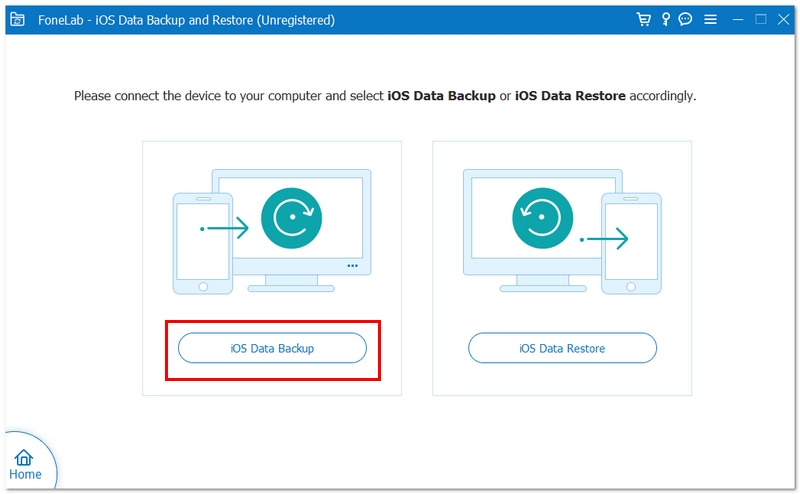
The tool's start screen, asking you to connect the device and choose iOS Data Backup or iOS Data Restore. The title bar shows "(Unregistered)". Aiseesoft's screenshot of the Windows version.
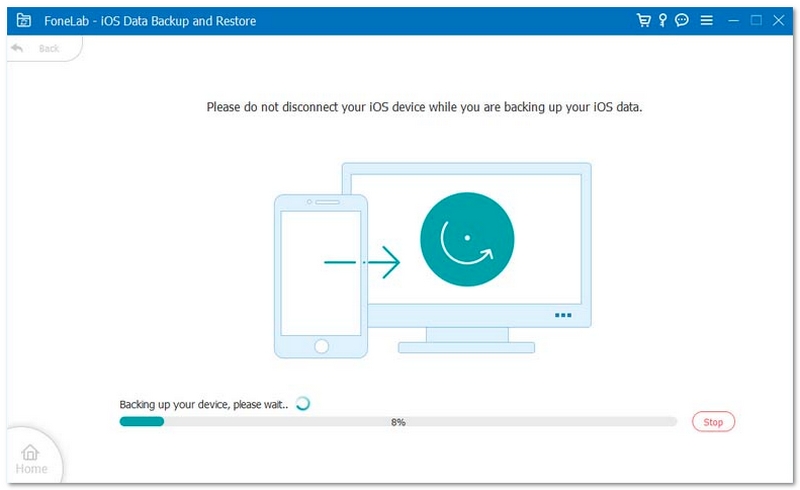
A backup in progress at 8%, with a warning not to disconnect the device and a Stop button. Aiseesoft's screenshot of the Windows version.
Where it falls short
- Not a phone-to-phone transfer. One of the testimonials Aiseesoft itself publishes (Dennis, below) complains that it won't restore messages from one iPhone to another. Plan on reading most restored data on the PC.
- Not a full device backup. It saves data types, not the phone's settings, layout and app setup, so it doesn't replace an iCloud or iTunes backup for setting up a replacement iPhone.
- Manual, over USB. There's no scheduled or wireless backup: you connect the phone and click Start each time.
- Detection depends on Apple's drivers. If the device isn't recognized, Aiseesoft's advice is to unlock it, trust the computer, update iTunes and try another cable or port.
- Little independent testing. The detailed write-ups online come from companies selling competing iPhone tools, and the testimonials and the 4.8 rating on the product page are Aiseesoft's own.
What Users Say
Independent reviews of this exact tool are scarce. The detailed "reviews" that rank for it come from vendors of rival iPhone tools, so we don't quote them. What's left is the testimonials on Aiseesoft's product page, which include a critical one, and the company's overall Trustpilot record.
Testimonials on Aiseesoft's product page (published by the vendor)
Veronica: "I like this tool. It works better than iTunes, and I can select data type to make my iPhone backup."
Andersson: "I have been seeking for one tool that can helps me to backup data and restore data without wiping data on my iPad. I did it. Your software is what I want."
Latoya: "I need to backup my thousands of contacts on iPhone 7, and move them to my new iPhone X. iTunes will overwrite my iPhone X contacts, but this utility does not. How great."
Giddings: "I have many photos stored on my iPhone, and the storage is always full. With this program, it does me a great favor to backup photos to computer easily."
Michael: "This helped me export really important notes from the backup! It helped me so much! Thank you."
And the critical one, Dennis: "Actually, your software is not the best one, because it does not allow me to restore messages from iPhone to my another iPhone. Hope you can make the upgrades to support that."
On Trustpilot
Aiseesoft Studio as a whole scores 3.8 out of 5 from 609 reviews, and the reviews are split: 59% five stars, 34% one star, very little in between. Recent one-star reviews are mostly about refunds refused for other products, such as the data recovery software, while the five-star ones often praise quick email support and license help. None of the reviews we read names iOS Data Backup & Restore.
The recurring themes: people who use it like choosing exactly what to back up, not having iTunes overwrite things, and being able to pull single notes, contacts or photos out of a backup. The real complaint is the one Dennis makes: it's a backup and export tool, not a way to move all your data to another iPhone. And since refunds are hard to get from Aiseesoft, try the free download on your own phone before you pay.
Comparisons
vs. iTunes or the Apple Devices app (free)
Apple's free Windows backup saves the whole device, settings included, and can encrypt it, but each new backup replaces the last one, you can't open it to look inside, and restoring it replaces everything on the phone. Aiseesoft iOS Data Backup & Restore adds data-type selection, several kept backups, previews and item-by-item export. For a full restore onto a new iPhone, Apple's backup is still the one to use.
vs. FoneLab (All Functions)
The full FoneLab license adds iPhone Data Recovery, iOS System Recovery, WhatsApp Transfer for iOS, iPhone Password Manager, FoneTrans and iPhone Cleaner. On Aiseesoft's store it costs $99.00 for a lifetime license on 1 PC. If you'll also want to recover deleted files or repair a stuck phone, the bundle is better value than buying tools one at a time.
Editions and Pricing
| License |
Price |
Term |
Computers and devices |
| iOS Data Backup & Restore, Lifetime (sold here) |
$37.45 at checkout |
Lifetime |
1 PC, 6 iOS devices |
| iOS Data Backup & Restore, 1 Month |
$12.45 (list $24.90) |
1 month |
1 PC, 6 iOS devices |
| iOS Data Backup & Restore, Multi-user |
$59.00 |
Lifetime |
3 PCs, 18 iOS devices |
| FoneLab (All Functions), Lifetime |
$99.00 |
Lifetime |
1 PC, 6 iOS devices |
The $37.45 is the price on the order page for the lifetime license on October 29, 2026. The other prices are from Aiseesoft's Windows store, which on the same day also showed the lifetime license on sale at $29.96. Aiseesoft lists free upgrades and tech support with the license.
FAQs
Can Aiseesoft iOS Data Backup & Restore move my WhatsApp chats to a new iPhone?
Not to the phone itself. Aiseesoft iOS Data Backup & Restore backs up WhatsApp chats and attachments and lets you view and export them on the PC, but its restore-to-device option covers contacts and notes. To move WhatsApp to a new iPhone, Aiseesoft sells a separate tool, WhatsApp Transfer for iOS.
Does Aiseesoft iOS Data Backup & Restore upload my data to the cloud?
No. Aiseesoft iOS Data Backup & Restore saves backups only to a folder on your PC, which you can choose before each backup. If you want an off-site copy too, put that folder in your own cloud or external drive backup.
What happens if I forget the password of an encrypted backup?
Aiseesoft iOS Data Backup & Restore asks for that password whenever you restore from the encrypted backup, so without it you can't use that backup. Make a new backup from the device, and store the password in a password manager.
Is Aiseesoft iOS Data Backup & Restore a subscription?
The license sold here is a one-time lifetime license. Aiseesoft also sells a 1 Month license for $12.45, which costs less but ends after a month.
Can I use the Windows license of Aiseesoft iOS Data Backup & Restore on a Mac?
No. Aiseesoft sells the Windows and Mac versions as separate products with separate licenses. Its refund policy treats buying the wrong platform as an exchange case, not a refund, so pick the edition for the computer you'll use.
How long does a backup with Aiseesoft iOS Data Backup & Restore take?
Aiseesoft says a standard backup of several GB typically takes 5 to 15 minutes, depending on the amount of data, the USB connection and the device. Backing up only the data types you need is the easiest way to make it faster.
Can I get a refund if Aiseesoft iOS Data Backup & Restore doesn't do what I need?
Usually not. Aiseesoft's 30-day guarantee covers technical problems its support team can't solve, duplicate or mistaken purchases and license codes that never arrive. It excludes a change of mind, buying a product that doesn't fit your needs without trying it, and purchases made at a promotional price, and Aiseesoft deducts 20% when a customer insists on a refund.
System Requirements
- Windows 11, 10, 8.1, 8 or 7
- 1 GHz Intel or AMD CPU, 1 GB RAM, 200 MB free disk space, plus room for your backups
- A USB cable for the iPhone, iPad or iPod Touch
- Devices on iOS 27 or earlier, iPadOS 13 to 27
Conclusion
Aiseesoft FoneLab - iOS Data Backup & Restore is worth $37.45 to one kind of buyer: a Windows user who wants to keep browsable, dated copies of an iPhone's messages, chats, photos and notes on the PC and pull single items out of them. The reason to buy it is the control Apple's backup doesn't give you: choose the data, keep every backup, open it and export what you need. The reason not to is that it won't rebuild a new iPhone from a backup, since only contacts and notes go back to a device, and refunds are hard to get. If moving to a new phone is the goal, Apple's free tools do it. Otherwise, download it, back up your phone, open the backup, and buy only if it shows what you need.
Download Free Trial
Buy Now