Short answer
Most iPhones stuck on the Apple logo or in recovery mode can be fixed free, in this order: wait if a progress bar is still moving, force restart, then connect to a computer and choose Update (not Restore) in Finder on a Mac or the Apple Devices app or iTunes on Windows. Update reinstalls iOS and is Apple's option for keeping your data. Restore fixes nearly everything software can fix, but erases the iPhone.
If Update keeps failing and the iPhone holds data you haven't backed up, a repair tool's no-erase mode is the last thing to try before a wipe. On Windows, AnyFix for Windows ($39.99 a year at checkout) has the widest set of tools. Aiseesoft FoneLab - iOS System Recovery and its Mac edition cost $55.96 once and cover 6 devices. Leawo iOSFix and Leawo iOSFix for Mac only list devices up to the iPhone 14 on iOS 16, so they're for older iPhones only.
Every fix, and what it does to your data
| Fix |
Cost |
Your data |
Use it when |
| Wait |
Free |
Kept |
A progress bar is still under the logo; Apple says wait at least an hour |
| Force restart |
Free |
Kept |
The iPhone is frozen on the logo or a black screen |
| Recovery mode, then Update (Finder, Apple Devices app or iTunes) |
Free |
Kept if it succeeds |
Force restart didn't help, or the iPhone shows the "Connect to computer" screen |
| Recovery mode, then Restore |
Free |
✗ Erased |
Update failed and you have a backup, or the data doesn't matter |
| DFU mode restore |
Free |
✗ Erased |
Even recovery mode won't restore; usually a job for an Apple Store or repair shop |
| Repair tool, standard (no-erase) mode |
$39.95 to $55.96 |
Kept if it succeeds |
Update keeps failing and the data isn't backed up |
| Repair tool, advanced mode or reset |
Same license |
✗ Erased |
Same as a Restore, with more guidance |
| Repair shop or Apple |
Varies |
Depends |
The iPhone isn't detected at all, or the fault is hardware |
How we put this guide together
- We took the free steps from Apple's own support pages for an iPhone that freezes on the Apple logo and for one that can't update or restore.
- We read each repair tool's user guide, mode descriptions, device lists, free-version limits and refund rules, and noted exactly which modes erase the device.
- We gathered what buyers and reviewers say, and checked how recently each tool was updated.
- What we checked: the price and term of AnyFix and both Aiseesoft editions on the order page, and Leawo's prices on its product page, on November 17, 2026; the AnyFix version (1.3.3) on iMobie's product page and the Aiseesoft Windows installer's file version (10.8.88) on November 17, 2026; and the vendor screenshots shown here, which we downloaded and looked at.
We didn't repair an iPhone with any of these tools, so success rates are the vendors' claims and buyers' reports, not our own tests. Hardware faults, jailbreaks and Activation Lock aren't covered.
Step 1: wait, then force restart (free, keeps your data)
If a progress bar sits under the Apple logo, the iPhone may still be working. After an update, a restore or a transfer from another iPhone, Apple says the logo and bar can stay on screen for over an hour, and its advice is to make sure the bar hasn't moved for at least one hour before you step in.
If the screen is frozen with no progress, force restart it. On an iPhone 8 or later (including every iPhone SE from the second generation on):
- Press and quickly release the volume up button.
- Press and quickly release the volume down button.
- Press and hold the side button. Keep holding it past the power-off slider until the Apple logo appears, then let go.
On an iPhone 7, hold volume down and the sleep/wake button together. On an iPhone 6s or older, hold the home and sleep/wake buttons together. A force restart doesn't touch your data, so there's no risk in trying it two or three times.
Step 2: recovery mode and Update (free, keeps your data if it works)
If the iPhone still won't start, reinstall iOS from a computer. This is Apple's own fix, and it's the step that solves most stuck-logo and recovery-mode cases.
- Open the right app. On a Mac with macOS Catalina or later, open Finder. On Windows, open the Apple Devices app (or iTunes on older setups). Update the app first if it offers.
- Connect the iPhone with a USB cable.
- Enter recovery mode. On an iPhone 8 or later: press and quickly release volume up, press and quickly release volume down, then press and hold the side button. Keep holding it, even when the Apple logo appears, until the "Connect to computer" screen (a cable pointing at a laptop) shows.
- Choose Update, not Restore. The computer asks whether to update or restore. Update reinstalls iOS and updates it to the latest version. Restore erases the iPhone.
- Wait for the download. If it takes more than 15 minutes, the iPhone leaves recovery mode on its own. Let the download finish, then repeat step 3 and choose Update again.
If you're already looking at the "Connect to computer" screen
An iPhone showing the cable-and-laptop picture is already in recovery mode, usually after a failed update. Skip the button presses: connect it, wait for Finder or the Apple Devices app to offer Update or Restore, and choose Update. Only if Update fails more than once should you think about Restore or a repair tool.
Step 3: Restore, or DFU mode (free, erases everything)
Restore is the same recovery-mode screen with the other button. It reinstalls iOS and erases all your data, and it fixes almost any software fault. If your iPhone backed up to iCloud or to a computer recently, this is the sensible next step: restore it, then put your backup back during setup.
DFU mode (device firmware update) is a deeper state than recovery mode, with a black screen, used when a restore from recovery mode won't go through. A DFU restore always erases the iPhone, and Apple doesn't publish the button steps for owners. If you've reached the point where even Restore fails, an Apple Store or authorized repair shop is the safer route: by then the fault may not be software at all.
After any erase, the iPhone asks for the Apple Account it was signed in to before you can use it again (Activation Lock). Have that password ready. No tool in this guide is meant to get around it.
When a paid repair tool makes sense
Every tool below does what Finder and the Apple Devices app do (put the iPhone in recovery mode, download Apple's firmware, reinstall it) with two additions you may be paying for:
- A no-erase "standard" repair that tries again to reinstall iOS while keeping your data, with its own way of handling the firmware download and the recovery-mode timeout.
- One-click recovery mode, free in all of them, which helps when a button is broken or the timing won't work.
Be realistic. A standard repair attempts the same thing as Apple's Update, so it isn't guaranteed to succeed where Update failed, and when it doesn't, the next step in every tool erases the iPhone just like a Restore. It's worth paying only when Update has failed, there's no backup, and the photos or messages on the phone matter more than the license price. If you have a fresh backup, Apple's Restore is free.
Price at checkout (USD)
Aiseesoft FoneLab - iOS System Recovery, Windows or Mac (lifetime, 1 computer, 6 devices)$55.96
Leawo iOSFix, Windows or Mac (lifetime, 3 PCs, 10 devices)$49.95
AnyFix for Windows (1 year, 1 device, renews)$39.99
Leawo iOSFix, Windows or Mac (1 year, 3 PCs, 5 devices)$39.95
Prices checked on November 17, 2026: AnyFix and Aiseesoft on the order page, Leawo on its product page. Aiseesoft's price is $69.95 less a $13.99 discount.
AnyFix for Windows: most tools in one window
AnyFix for Windows from iMobie
- Price at checkout: $39.99 for 1 year, 1 device, renewing yearly
- Version: 1.3.3; Windows 11, 10, 8, 7 or Vista, with iTunes installed for Apple's device driver
- Repairs: iPhone, iPad, iPod touch and Apple TV; iMobie lists iOS 27 and up to the iPhone 18 Pro Max
- Free version: enters and exits recovery mode, and does a 1-click reset; system repair needs a license
- Best for: a Windows user who wants a guided no-erase attempt, plus fixes for iTunes errors
AnyFix for Windows opens on five jobs: System Repair, Enter/Exit Recovery Mode, Upgrade/Downgrade iOS, Reset Device and iTunes Repair. You pick the problem type (Screen Stuck, Update Issues, iOS Mode Stuck and so on), and AnyFix downloads the firmware for your exact model.
Its repairs come in three levels, and only the first keeps your data:
- Standard Repair keeps your data. Try it first.
- Advanced Repair targets stubborn faults such as a stuck Apple logo or a failed update, and erases the device.
- Ultimate Repair is the last resort for a frozen device, black, white or blue screens and DFU-mode trouble, and also erases it. It doesn't cover Apple TV.
AnyFix's iTunes Repair tackles the PC side: iTunes that won't install or won't see the iPhone, and numbered restore errors such as 4013, 9006 and 3194. Its two reset options, meant for your own device when you've forgotten its passcode, both erase it. iMobie claims more than 150 system issues and 200 iTunes errors; those counts are its own.
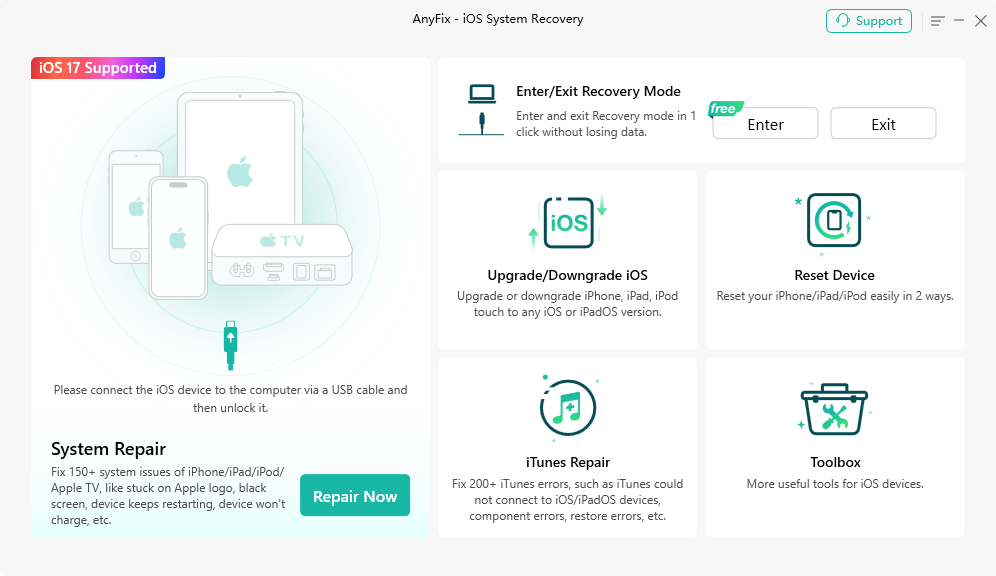
The AnyFix home screen: System Repair on the left, and Enter/Exit Recovery Mode (free), Upgrade/Downgrade iOS, Reset Device, iTunes Repair and Toolbox on the right.

AnyFix System Repair with an iPhone 14 Pro on iOS 17.2.1: problem groups such as Screen Stuck, Update Issues and iOS Mode Stuck, with the issues each one covers.
What we like
- Three repair levels, with the no-erase one first
- iTunes Repair for numbered restore errors
- Covers Apple TV too
- 60-day refund window on the yearly plan, for the cases iMobie lists
Watch out for
- Yearly subscription for 1 device at checkout
- Advanced and Ultimate Repair erase the device
- Free version does no system repair
- Infrequent updates: version 1.3.3 dates from September 2025
What users say
Independent reviews are thin, and most of the praise sits on iMobie's own pages. Samuel Jaworski, in a Trustpilot review shown on iMobie's AnyFix page: "I purchased the AnyFix software because my iPhone was stuck in recovery mode after a failed update (I had just bought it) and iTunes kept showing errors during the recovery process. I'm glad to say that Anyfix worked for me and saved my iPhone 8 plus!"
MacBreeze (4.4 out of 5, reviewing version 1.1.0 on an iPad): "AnyFix is a bit expensive but also effective." It lists "Free Trial is Almost Useless" among the cons. iMobie as a company scores 3.3 out of 5 on Trustpilot from 1,525 reviews across all its products.
Download AnyFix for Windows
Buy AnyFix for Windows
Aiseesoft FoneLab - iOS System Recovery: one-time price, Windows and Mac
Aiseesoft FoneLab - iOS System Recovery (Windows) and Aiseesoft Mac FoneLab - iOS System Recovery
- Price at checkout: $55.96 for a lifetime license ($69.95 less $13.99), for either edition
- Covers: 1 computer and up to 6 iOS devices
- Works with: Windows 11 to 7, macOS 10.10 or later; Aiseesoft lists iOS 27 and the iPhone 18 series
- Free: one-click Enter and Exit Recovery Mode, and a Free Quick Fix for simple freezes
- Best for: anyone who wants to own the tool outright, and Mac users
Aiseesoft FoneLab - iOS System Recovery is one tool inside Aiseesoft's FoneLab app. It reads the iPhone's model and iOS version, lets you pick the iOS version to install (only ones Apple still signs), downloads the firmware and installs it. If the in-app download fails, it gives you a link to fetch the firmware in a browser instead, which helps on slow connections.
It has two modes. Standard Mode keeps your data. Advanced Mode erases everything and is for severe failures, including a forgotten passcode on your own device. The repair screen is upfront about three side effects of installing stock iOS: a carrier-unlocked iPhone gets re-locked, a jailbroken one returns to stock, and hardware failure can't be repaired.
The weak point is refunds. Aiseesoft refunds lifetime licenses within 30 days only for a technical problem support can't solve, not for a change of mind, so connect your iPhone to the free download and check it's detected before you pay.
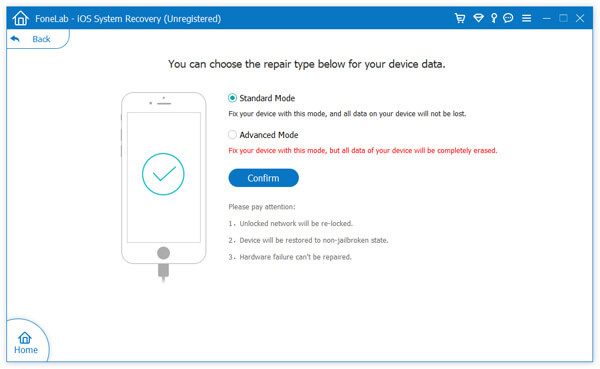
Aiseesoft FoneLab - iOS System Recovery (an older, unregistered Windows version): Standard Mode keeps the data, Advanced Mode erases it, with notes that an unlocked network gets re-locked, the device returns to a non-jailbroken state and hardware failure can't be repaired.
What we like
- One-time $55.96 for 6 devices
- Mac edition at the same price
- Choice of iOS version, and a browser download fallback for firmware
- Free Quick Fix and recovery mode tool before you pay
Watch out for
- Advanced Mode erases the device
- Refunds only for technical problems, within 30 days
- Almost no independent testing of this tool
- No iTunes-error repair or Apple TV support
What users say
Shane_L on Trustpilot (5 stars, October 5, 2025) describes a recovery-mode repair with an Aiseesoft iPhone tool, without naming which one, and a tip worth knowing for any tool: "what I had overlooked is that the iphone automatically turns off recovery mode after a while and as it takes a while for the process to work you must make sure it is back on recovery mode before proceeding with the final step."
Aiseesoft as a company scores 3.8 out of 5 on Trustpilot from 610 reviews, split between five-star and one-star, with most one-star reviews about refunds for its data recovery tools. On Aiseesoft's own page, David writes: "My iPhone 14 got stuck on the Apple logo during an update, and I couldn't get it to start again. I tried Aiseesoft iOS System Recovery using Standard Mode, and it fixed the problem in just a few minutes."
Download for Windows
Buy iOS System Recovery for Windows
Download for Mac
Buy iOS System Recovery for Mac
Leawo iOSFix: only for an iPhone 14 or older
Leawo iOSFix (Windows) and Leawo iOSFix for Mac: $39.95 for 1 year (3 PCs, 5 devices) or $49.95 lifetime (3 PCs, 10 devices) on Leawo's order page. Device list: iPhone 4 to iPhone 14 Pro Max, iOS and tvOS 16 and earlier. Last release: April 2023.
Leawo iOSFix works the same way as the others, with a Standard Mode that "won't cause any data loss" and an Advanced Mode that "would erase your data", in Leawo's words, plus a free recovery mode button and firmware download. Its licenses cover more devices and computers for less money than the other two.
The reason it comes last is age. Leawo hasn't released an update since April 2023, and its own device list stops at the iPhone 14 and iOS 16. If your iPhone is a 15 or newer, or runs iOS 17 or later, assume it won't be supported. For an older iPhone or iPad, test the free part first: if iOSFix can't detect the device or find its firmware, a license won't help. The yearly plan has a 5-day money-back window and the lifetime plan 14 days, for reproducible bugs Leawo can't fix.

Leawo iOSFix's mode choice: Standard Mode ("Repairing iOS system won't cause any data loss") and Advanced Mode ("Repairing iOS system would erase your data").
Leawo iOSFix has almost no published reviews of its own. Leawo as a company scores 4.4 out of 5 on Trustpilot from 151 reviews, mostly about its video tools.
Download Leawo iOSFix
Buy Leawo iOSFix
Download iOSFix for Mac
Buy Leawo iOSFix for Mac
The three repair tools side by side
|
AnyFix for Windows |
Aiseesoft iOS System Recovery |
Leawo iOSFix |
| Price |
$39.99 a year, 1 device |
$55.96 lifetime, 6 devices |
$39.95 a year (5 devices) or $49.95 lifetime (10 devices) |
| Computers |
Windows (iMobie sells a Mac version separately) |
Windows and Mac editions |
Windows and Mac editions |
| Newest devices listed |
iPhone 18 Pro Max, iOS 27 |
iPhone 18 series, iOS 27 |
iPhone 14 Pro Max, iOS 16 |
| No-erase mode |
✓ Standard Repair |
✓ Standard Mode |
✓ Standard Mode |
| Erasing modes |
Advanced, Ultimate, 2 resets |
Advanced Mode |
Advanced Mode |
| Free one-click recovery mode |
✓ |
✓ |
✓ |
| iTunes error repair |
✓ |
✗ |
✗ |
| Apple TV |
✓ |
✗ |
✓ (Apple TV HD and older) |
| Latest release |
1.3.3, September 2025 |
10.8.88 Windows, 10.6.52 Mac (October 2026) |
1.0.0.3 Windows, 1.0.2 Mac (April 2023) |
| Refund window |
60 days on the yearly plan, listed cases |
30 days, technical problems only |
5 days (1 year) or 14 days (lifetime), reproducible bugs |
Which should you use?
| Your situation |
What to do |
Why |
| Progress bar still moving |
Wait at least an hour |
Apple says updates and restores can take that long |
| Frozen on the logo |
Force restart |
Free, no data risk |
| Still stuck, or "Connect to computer" screen |
Recovery mode, then Update |
Apple's free fix that keeps your data |
| Update failed, recent backup exists |
Restore, then restore your backup |
Free, and fixes nearly every software fault |
| Update failed, no backup, Windows PC |
AnyFix for Windows (Standard Repair) |
Guided no-erase attempt plus iTunes error fixes |
| Update failed, no backup, on a Mac, or you want a one-time price |
Aiseesoft FoneLab - iOS System Recovery (Standard Mode) |
$55.96 once, 6 devices |
| iPhone 14 or older, budget matters |
Leawo iOSFix |
Cheapest license, but its list stops at iOS 16 |
| Not detected even in recovery mode, or after water damage |
Apple Store or repair shop |
Likely hardware; no software can fix that |
Who should skip a paid tool: anyone with a fresh iCloud or computer backup (Restore is free), anyone whose iPhone was dropped or got wet (a hardware fault needs a repair shop), and anyone hoping a tool will get around Activation Lock on a device that isn't theirs, which none of these do.
What commonly goes wrong
- Clicking Restore instead of Update. The two buttons sit side by side. Restore erases the iPhone.
- The 15-minute timeout. The iPhone leaves recovery mode if the firmware download takes too long. Let the download finish, then put it back in recovery mode. This catches users of the paid tools too.
- Jumping to the erasing mode. Every tool here has a mode that keeps data and one that doesn't. Always run the no-erase one first.
- Blaming software for a hardware fault. A swollen battery, water damage or a failing board can look like a boot loop. Aiseesoft's and Leawo's own screens say they can't fix hardware.
- A bad cable or port. Try another cable and a USB port directly on the computer before paying for anything.
- Expecting to keep an old iOS version. Repairs and resets install a version Apple still signs, usually the latest.
- Forgetting the renewal. AnyFix and Leawo's yearly plans renew until you cancel.
FAQs
How do I get my iPhone out of recovery mode without losing data?
Connect it to a computer, open Finder or the Apple Devices app, and choose Update when asked, which reinstalls iOS and is Apple's option for keeping your data. AnyFix, Aiseesoft iOS System Recovery and Leawo iOSFix also have a free one-click exit from recovery mode, which works when the iPhone is only stuck in that mode.
Will fixing an iPhone stuck on the Apple logo erase my data?
Not if a force restart or Apple's Update fixes it. A Restore, a DFU restore and the advanced modes of AnyFix, Aiseesoft iOS System Recovery and Leawo iOSFix all erase the iPhone.
Can I fix an iPhone boot loop without a computer?
Only with a force restart. Recovery mode, Update, Restore and every repair tool in this guide need a Mac or Windows PC and a USB cable.
Is AnyFix worth it?
AnyFix for Windows is worth $39.99 when Apple's Update has failed, there's no backup, and you want a guided no-erase attempt or need to clear iTunes restore errors. If you have a backup, Apple's free Restore does the job, and if the no-erase repair fails, AnyFix's next steps erase the iPhone anyway.
Do these tools work with iOS 26 and the iPhone 17?
AnyFix and Aiseesoft iOS System Recovery list iOS 27 and the iPhone 18 series. Leawo iOSFix lists only up to the iPhone 14 and iOS 16, and hasn't been updated since April 2023.
How long does an iPhone system repair take?
Most of the time goes into downloading the firmware, which is several gigabytes (Aiseesoft's own example shows a 3.32 GB package). After that, Leawo's guide shows its repair step taking about 10 minutes. Keep the cable connected until the iPhone restarts.
What is the difference between recovery mode and DFU mode?
Recovery mode shows the "Connect to computer" screen and lets you Update or Restore. DFU mode is a deeper state with a black screen, used when a recovery-mode restore fails, and a DFU restore always erases the iPhone.
Can a repair tool remove Activation Lock?
No. AnyFix, Aiseesoft iOS System Recovery and Leawo iOSFix reinstall iOS, and after any erase the iPhone still asks for the Apple Account it was signed in to.
Conclusion
Start free: wait if the progress bar moves, force restart, then recovery mode and Update. That fixes most stuck iPhones without touching your data. If you have a backup and Update fails, Restore is free and fixes nearly everything else.
A paid tool earns its price in one situation: Update keeps failing, there's no backup, and what's on the phone matters. On Windows, AnyFix for Windows is our pick for its three repair levels and iTunes error fixes; cancel the renewal if it's a one-off. If you'd rather pay once, or you're on a Mac, choose Aiseesoft FoneLab - iOS System Recovery. Whichever you use, run the no-erase mode first.
Download AnyFix for Windows
Buy AnyFix for Windows
We may earn a commission when you buy through some links on this page.
Current Deals

Up to 92% OFFIObit Black Friday Sale: Up to 92% Off + 2 Months Free
Advanced SystemCare, Driver Booster, IObit Uninstaller and 3 more PRO tools for $29.49 together (regularly $349.68), plus 2 extra months. No coupon needed, until January 31, 2027.
Ends January 31, 2027
See the Deal »
50% OFFParallels Desktop for Mac: 50% Off Standard and Pro Until Nov 23
Parallels Desktop Standard $49.99 instead of $99.99 and Pro $59.99 instead of $119.99 for the first year, Business 35% off. Codes PD50 and PD35, new 1-year subscriptions, until November 23, 2026.
Ends November 23, 2026
See the Deal »