Leawo iOSFix: iPhone System Repair for Windows, Frozen at iOS 16
Leawo iOSFix is a Windows tool that repairs an iPhone, iPad, iPod touch or Apple TV stuck on the Apple logo, in a boot loop, in recovery mode or on a black screen by reinstalling Apple's firmware, with a free one-click button to enter or exit recovery mode. It costs $39.95 a year or $49.95 lifetime. Its device list ends at the iPhone 14 and iOS 16, and the program hasn't been updated since April 2023.
The situation it's built for: your iPhone updated overnight and now shows only the Apple logo, or it keeps restarting, and iTunes either can't see it or offers only to erase it. iOSFix tries a repair that keeps your data first, and a full reinstall that erases it only if that fails.
Quick facts
- Current version: 1.0.0.3 for Windows, released April 25, 2023
- Developer: Leawo Software Co., Ltd.
- Runs on: Windows 7, 8, 8.1, 10 and 11 (32-bit or 64-bit); a separate Mac version is sold
- Supported devices: iPhone 4 to iPhone 14 Pro Max, all iPad models up to iPad (9th gen) and iPad mini (6th gen), iPod touch 4 to 6, Apple TV HD and Apple TV 2nd and 3rd gen
- Supported systems: iOS 16 and earlier, tvOS 16 and earlier
- Repair modes: Standard (keeps data) and Advanced (erases the device)
- Free without a license: enter and exit recovery mode, download firmware
- Price: $39.95 for 1 year (3 PCs, 5 devices) or $49.95 lifetime (3 PCs, 10 devices)
What we checked: the Windows installer from Leawo's download page (iosfix_setup.exe, file version 1.0.0.3, 64,016,136 bytes, dated April 25, 2023), Leawo's update feed (no release after 1.0.0.3), and the prices on Leawo's order page ($39.95 for 1 year, $49.95 lifetime) on November 1, 2026. We didn't repair a device with it.
Before you buy
- No update since April 2023. The only change in the last release was letting the program update after a license expires. iOS 17, iOS 18 and iOS 26 have all shipped since, and none of them is on Leawo's list.
- The iPhone 15, 16 and 17 aren't supported. The device list stops at the iPhone 14 family. If your phone is newer, assume iOSFix won't recognize it.
- Test the free part first. The unregistered version detects your device, enters and exits recovery mode and downloads firmware. If it can't find your device or firmware for it, a license won't help.
- Software only. iOSFix's own start screen says it "won't fix hardware issues". A phone that won't turn on because of a dead battery or water damage needs a repair shop.
Download Free TrialBuy Now
Overview
Leawo iOSFix is one of a crowded group of "iOS system repair" tools. They all do the same basic job: put the device into recovery mode, download the matching iOS firmware from Apple, and reinstall it, with a gentler path that keeps your data and a harder one that wipes the phone. iTunes and the Apple Devices app can already do the wiping restore for free; the reason to pay for a tool like this is the data-keeping repair and the hand-holding when the phone isn't recognized.
iOSFix opens on a single screen: a picture of your detected device, a list of the problems it handles, a "Works on" picker showing supported models, the free Enter Recovery Mode button and a Start button. Leawo claims fixes for more than 50 iOS and tvOS problems.
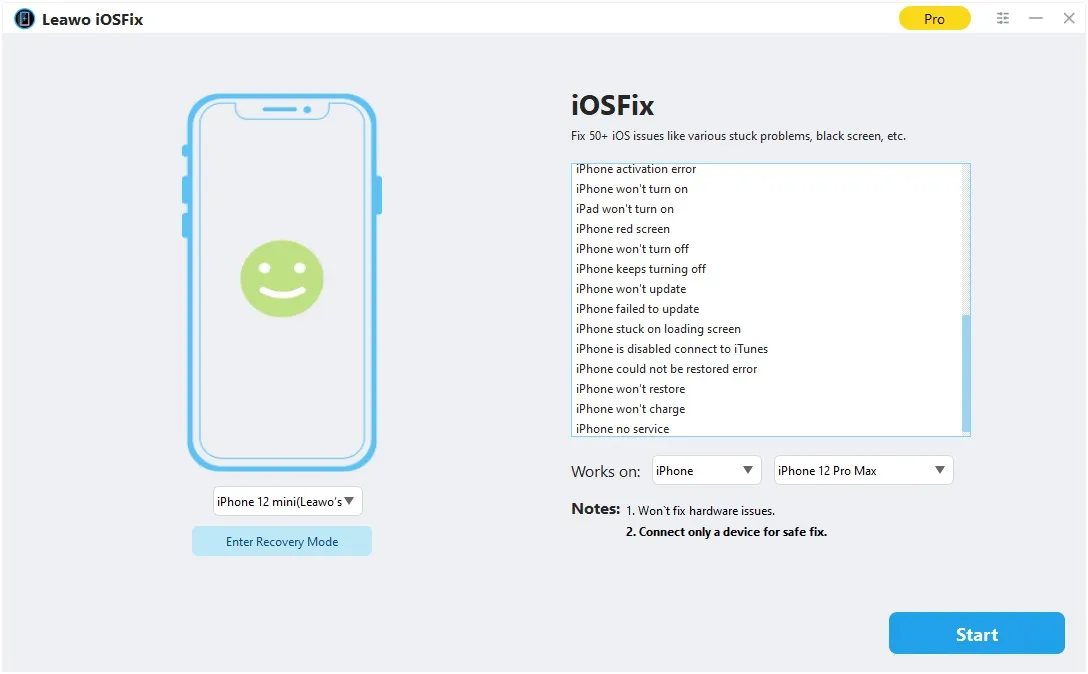
The main window: a detected iPhone 12 mini, the Enter Recovery Mode button under it, the list of issues (activation error, won't turn on, red screen, keeps turning off), the "Works on" model picker and the notes "Won't fix hardware issues" and "Connect only a device for safe fix".
Features
Standard Mode: repair without losing data
Leawo iOSFix's Standard Mode fixes more than 20 common problems, such as the black screen, a phone stuck on the Apple logo or stuck in recovery mode, without erasing what's on the device. It's the mode to try first.
Advanced Mode: a full reinstall that erases the device
Leawo iOSFix's Advanced Mode is for problems Standard Mode can't fix, and Leawo is plain that it "would erase your data". Leawo's guide tells you to back up first, which, on a phone that won't boot, may simply not be possible. Treat it as the last resort before a store visit.
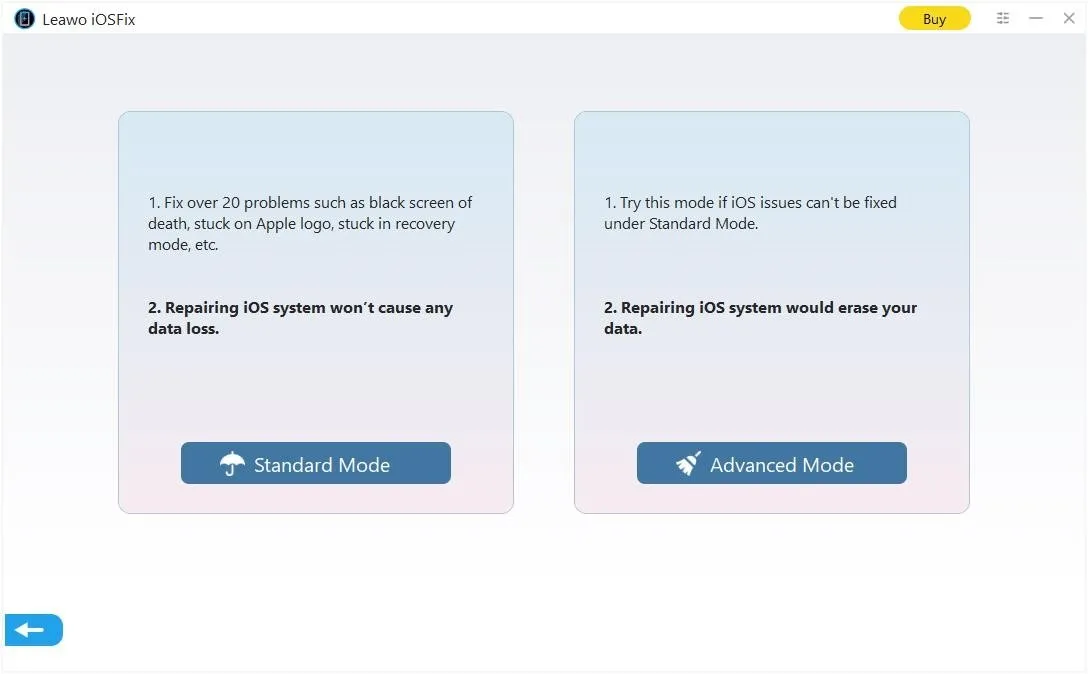
The mode choice: Standard Mode ("Repairing iOS system won't cause any data loss") and Advanced Mode ("Repairing iOS system would erase your data").
Firmware three ways, including upgrade or downgrade
Leawo iOSFix detects the model and offers system versions to download; if the in-app download fails you can fetch the firmware in a browser, or point it at a firmware file already on your PC. Leawo says it can also move a device to the latest version or back from a beta to the previous release, within what Apple still allows.
Free one-click recovery mode
Leawo iOSFix's Enter/Exit Recovery Mode button is free in the unregistered version. If a phone is stuck in recovery mode, one click may be all you need. It works for recovery mode only, not DFU mode.
Apple TV repair
Leawo iOSFix also handles tvOS on the Apple TV HD and the second- and third-generation Apple TV, which few rivals mention. The Apple TV 4K models aren't on the list.
Real-World Uses
- An iPhone 11 stuck on the Apple logo after an update. Standard Mode reinstalls iOS and keeps the photos you never backed up.
- An iPad stuck in recovery mode. The free Exit Recovery Mode button may bring it back without paying anything.
- A family with several older iPhones. The lifetime license covers 10 devices across 3 PCs.
- Leaving an iOS beta. Moving an iPhone 13 back from a beta to the signed public release.
Who It's For, and Who Should Skip It
It's for Windows users with an iPhone 14 or older, an older iPad or an older Apple TV that's stuck in software, who want to try a data-keeping repair before erasing it.
Skip it if your iPhone is a 15, 16 or 17, or runs iOS 17 or later: Leawo doesn't list them, and the program hasn't changed since before they existed. Skip it too if you don't mind erasing the phone, because iTunes or Apple's free Apple Devices app can restore it at no cost, and if the problem is hardware, because no software fixes that.
Usage Guide
- Install iOSFix from the 61 MB installer and connect only the one device you want to fix.
- Try the free button first. If the device is stuck in recovery mode, click Exit Recovery Mode.
- Click Start and choose Standard Mode.
- Confirm the model and system version, then click Download Now (or Download / Select for a browser download or a local file).
- Click Fix Now and leave the device connected. The repair screen says it takes about 10 minutes.
- Only if that fails, run Advanced Mode, knowing it erases the device.
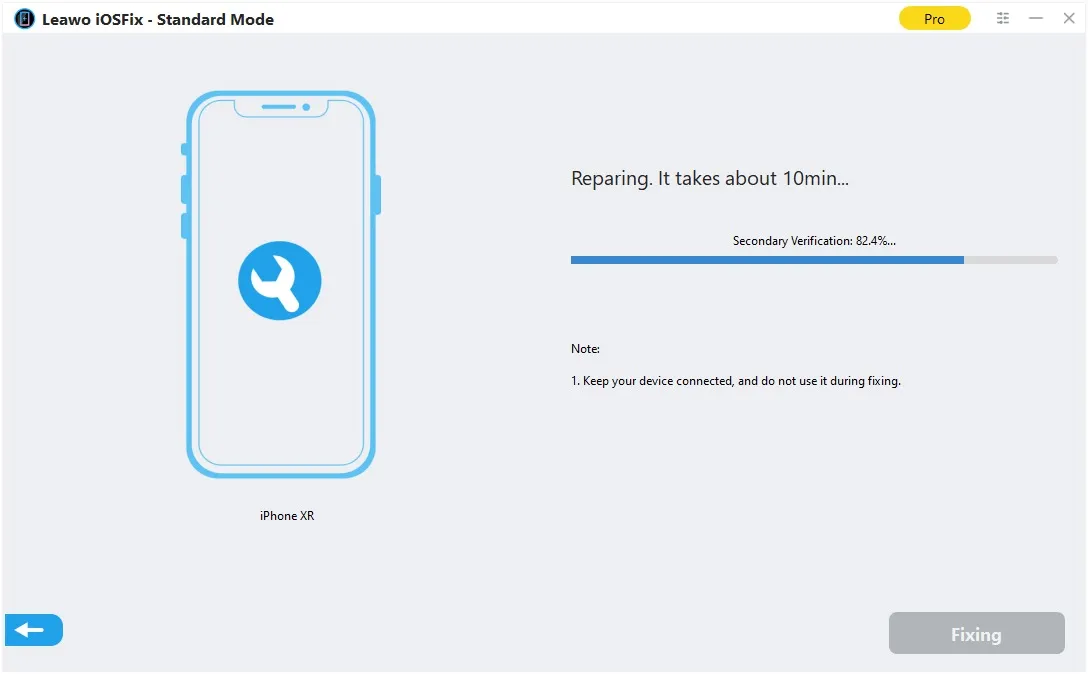
Standard Mode repairing an iPhone XR: "Reparing. It takes about 10min..." with the secondary verification at 82.4% and a note to keep the device connected.
Where it falls short
- Device recognition. Leawo's own troubleshooting page for devices it can't recognize walks you through putting the phone into recovery or DFU mode by hand, with button sequences for each iPhone generation. Expect to need it on a phone that won't boot.
- Firmware downloads. Leawo asks for a stable connection during the download, and offers a browser download for when the in-app one fails.
- Downgrades are limited by Apple. Any tool can install only the iOS versions Apple still signs, so "downgrade" usually means leaving a beta, not going back years.
- No public track record of how often Standard Mode succeeds; see What Users Say.
What Users Say
Leawo iOSFix has almost no reviews anywhere. Leawo's review page for it was empty when we looked, and the other pages that mention it are competitors' sales pages. Leawo's product page shows a 4.9 rating from 117 reviews in its search data, but none of those reviews is published on the page.
Trustpilot (Leawo as a company): 4.4 out of 5 from 151 reviews
The reviews on Leawo's Trustpilot page are about its Blu-ray and video tools rather than iOSFix, but they show how the company treats buyers. 83% are five stars and 9% one star. On support, Shane Short (October 2026) wrote: "Support responded to my issue very quickly and solved it right away." Hans G. (October 2026): "Leawo has done a fantastic job responding to every question and bug report I have submitted!"
On refunds, Nick (November 2024): "Leawo refunded the full amount of my order no problem!" The one-star reviews are mostly about other products not working for the buyer.
With no product reviews to go on, the free recovery-mode button and firmware download are your best test before paying.
Editions and Pricing
| Version | Price | Covers | What it does |
|---|
| Free trial | $0 | Any device | Enter/exit recovery mode, download firmware; no repairs or upgrades |
| 1 Year | $39.95 | 3 PCs, 5 devices | All repairs; auto-renews; 5-day money-back window |
| Lifetime | $49.95 | 3 PCs, 10 devices | All repairs; one-time payment; 14-day money-back window |
Leawo's guide adds a useful detail: when a 1-year license expires, iOSFix keeps all its repair functions and only loses updates and technical support (unless you reinstall a newer build, which turns it back into the trial). With no updates since 2023, the yearly plan is effectively permanent for one-off use. Refunds are limited to reproducible bugs Leawo can't fix, not a change of mind.
FAQs
Does Leawo iOSFix support the iPhone 16 or iOS 18?
Leawo iOSFix lists devices up to the iPhone 14 series and systems up to iOS 16, and its latest release is from April 2023. The iPhone 15, 16 and 17 and iOS 17, 18 and 26 aren't on Leawo's list.
Will Leawo iOSFix delete my photos and messages?
Leawo iOSFix's Standard Mode is designed to repair the system without data loss. Advanced Mode erases the device. Leawo says to use Advanced Mode only after Standard Mode fails.
Is Leawo iOSFix free?
Leawo iOSFix is free for entering and exiting recovery mode and for downloading firmware. Fixing system errors and upgrading iOS need a license.
How many iPhones can I fix with one Leawo iOSFix license?
A Leawo iOSFix 1-year license fixes up to 5 devices and a lifetime license up to 10, across up to 3 registered PCs. The program's registration screen lists every repaired device by name, ID and date.
Can Leawo iOSFix remove an iCloud Activation Lock or a forgotten passcode?
Leawo iOSFix lists "iPhone activation error" and "iPhone is disabled connect to iTunes" among its fixes, but Leawo doesn't claim it bypasses Activation Lock. A reinstall still asks for the Apple ID the device is locked to.
Is there a Mac version of Leawo iOSFix?
Yes. Leawo iOSFix for Mac is sold separately at the same prices, as version 1.0.2 from April 2023, with a separate license.
System Requirements
- Windows 7, 8, 8.1, 10 or 11 (32-bit or 64-bit)
- 1 GHz or faster Intel or AMD processor
- 256 MB RAM (1 GB or more recommended)
- 200 MB of free disk space, plus room for the firmware download
- Installer size: 61.1 MB
Conclusion
Worth trying free, worth buying only for an older device. Leawo iOSFix is cheap, clearly laid out and honest about which mode erases your data, and the free recovery-mode button alone can rescue a stuck iPhone. But it stopped at the iPhone 14 and iOS 16 in April 2023, and there's no public record of how well its repairs work.
If you have an iPhone 14 or older stuck in software and want to keep its data, start with the free version, and buy the $49.95 lifetime license only if it detects your device and downloads the right firmware. On an iPhone 15 or later, look for a repair tool that lists your model.
Download Free TrialBuy Now