Leawo iOSFix for Mac: Fix a Stuck iPhone From Your Mac, if It's an iPhone 14 or Older
Leawo iOSFix for Mac is a $39.95-a-year or $49.95-lifetime Mac app that gets an iPhone, iPad, iPod touch or older Apple TV out of a boot loop, an Apple-logo freeze or recovery mode by reinstalling iOS, with a data-keeping mode tried first. Leawo lists Intel and Apple M1/M2 Macs from macOS 10.10 Yosemite on, but the Mac app itself is version 1.0.2 from April 2023 and its device list stops at the iPhone 14 and iOS 16.
Quick facts
- Mac version: 1.0.2, released April 27, 2023 (no Mac update since)
- Installer: maciosfix_setup.dmg, about 74 MB, one download for both Intel and Apple M1/M2 Macs per Leawo
- Processor: 1 GHz or faster Intel, or Apple M1/M2, per Leawo
- Devices: iPhone 4 to iPhone 14 Pro Max, iPads up to iPad (9th gen) and iPad mini (6th gen), iPod touch 4 to 6, Apple TV HD and 2nd/3rd gen
- Systems repaired: iOS 16 and tvOS 16 and earlier
- Free in the trial: one-click enter/exit recovery mode and firmware downloads
- Price: $39.95 a year (5 devices) or $49.95 lifetime (10 devices), each on up to 3 computers
What we checked: the Mac disk image from Leawo's download page (maciosfix_setup.dmg, 77,523,496 bytes, dated April 27, 2023), Leawo's update feed for the Mac edition (version 1.0.2, April 27, 2023), and the Mac prices on Leawo's order page ($39.95 for 1 year, $49.95 lifetime) on November 1, 2026. We didn't install it on a Mac or repair a device.
Before you buy
- The macOS list is ahead of the app. Leawo's requirements name every macOS from Yosemite to macOS 27, yet the Mac build dates from April 2023, before Sonoma, Sequoia or Tahoe were released. Those newer versions are listed, not something the 2023 app was built against.
- Newer iPhones aren't covered. Leawo lists nothing after the iPhone 14 or iOS 16, so the iPhone 15, 16 and 17 and iOS 17 and later are outside its support.
- Your Mac can already do the erase-and-restore. Finder (or iTunes on macOS 10.14 and earlier) restores a phone in recovery mode for free. iOSFix is worth paying for only for its data-keeping Standard Mode.
- Try the free part on your Mac first. If the trial doesn't detect your device or find firmware for it, don't buy.
Download Free TrialBuy Now
Overview
On a Mac, the free fallback for a broken iPhone is built in: connect it, force it into recovery mode, and Finder offers to Update or Restore. "Restore" wipes the phone. "Update" tries to keep your data but often fails on a phone stuck in a boot loop. Leawo iOSFix for Mac sits between the two: a Standard Mode that reinstalls iOS while trying to keep your data, an Advanced Mode that erases the device, and a free button that puts a device into or takes it out of recovery mode without holding any buttons.
The flow is four screens: device detected, mode chosen, firmware confirmed and downloaded, then Fix Now. Leawo says the repair itself takes about ten minutes, plus the firmware download.
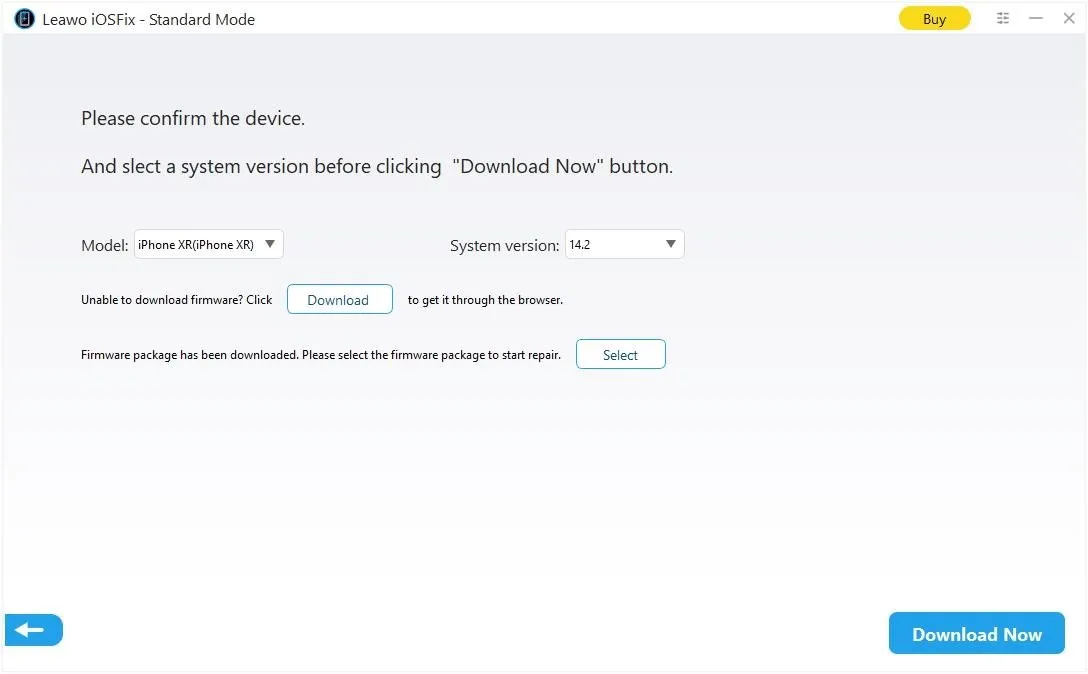
The Standard Mode firmware step: model iPhone XR, system version 14.2, a Download button for getting the firmware through a browser, a Select button for a firmware file already on the computer, and Download Now. Leawo's guide images show the Windows window; the Mac app has the same steps.
What You Get on the Mac
A data-keeping repair Finder doesn't really offer
Leawo iOSFix for Mac's Standard Mode targets more than 20 common faults, including the black screen, the Apple-logo freeze, "stuck on connect to iTunes" and failed updates, while keeping the phone's data. That mode is the reason to buy it over Finder's free restore.
Recovery mode without the button dance
Leawo iOSFix for Mac puts a connected device into recovery mode, or takes it out, with one free click, so you don't need the volume-and-side-button sequence that differs for every iPhone generation. It doesn't handle DFU mode; for that, Leawo's troubleshooting page lists the button sequences per model.
Firmware from the app, a browser or a local file
Leawo iOSFix for Mac downloads the matching firmware itself, or lets you download it in a browser or pick an .ipsw already on the Mac, which helps on a slow or unreliable connection. The Mac version asks for 2 GB of free space, far more than the Windows version's 200 MB, which leaves room for the firmware.
Who It's For, and Who Should Skip It
It suits a Mac owner whose iPhone 14 or older, older iPad or older Apple TV is stuck in software, who has no recent backup and wants to try keeping the data before a full restore.
Skip it if you have a recent backup (Finder's free restore plus that backup gets you the same result), if your iPhone is a 15 or newer, or if the device has a hardware fault, which the app itself says it won't fix.
Using It on a Mac
- Download the trial (a 74 MB .dmg) and install it from the disk image.
- Connect only the device you want to fix, as the app's start screen asks.
- If the device is stuck in recovery mode, click Exit Recovery Mode first. It's free.
- Otherwise click Start, choose Standard Mode, confirm the model and system version and click Download Now.
- Register and click Fix Now. Keep the cable connected and the Mac awake until it finishes.
- Use Advanced Mode only if Standard Mode fails, since it erases the device.
Where it falls short
- No Apple TV 4K. Leawo iOSFix's tvOS repair covers only the Apple TV HD and the second- and third-generation models.
- Downgrades depend on Apple. Like every repair tool, it can install only iOS versions Apple still signs.
- No user track record. Leawo's Mac review page for iOSFix is empty, and we found no independent review of either the Mac or Windows version.
What Users Say
Little to go on
There are no published reviews of Leawo iOSFix for Mac: Leawo's review page for it had none, and searches turn up only competitors' sales pages. For the company itself, Leawo's Trustpilot page showed 4.4 out of 5 from 151 reviews, mostly about its video tools.
On support, Joe Robbins (September 2026) wrote that "the support team worked with me until it was resolved," and several other reviewers mention quick replies. That matters more than usual for a repair tool with no published track record: if the trial can't see your device, ask Leawo before paying.
Mac vs Windows Version
| Mac | Windows |
|---|
| Latest version | 1.0.2 (April 27, 2023) | 1.0.0.3 (April 25, 2023) |
| Installer | 74 MB .dmg | 61 MB .exe |
| System | macOS 10.10 and later; Intel or M1/M2 | Windows 7 to 11 |
| Free disk space | 2 GB | 200 MB |
| Free alternative for a full restore | Finder | iTunes or Apple Devices app |
Both versions repair the same devices, cost the same and have the same iOS 16 limit. Licenses are platform-specific, so a Windows license won't register the Mac app.
Pricing
| Plan | Price | Devices you can fix | Money-back window |
|---|
| 1 Year (auto-renews) | $39.95 | 5 | 5 days |
| Lifetime | $49.95 | 10 | 14 days |
FAQs
Does Leawo iOSFix for Mac run on an M3 or M4 Mac?
Leawo iOSFix for Mac lists Intel and Apple M1/M2 processors. M3 and later chips aren't named, and the app predates them, so run the free version on your Mac before buying.
Do I need iTunes on my Mac to use Leawo iOSFix?
Leawo iOSFix for Mac's requirements don't list iTunes, and the app downloads the firmware itself.
What happens when the Leawo iOSFix 1-year license runs out?
Leawo iOSFix keeps all its repair functions after a 1-year license expires and loses only updates and technical support, according to Leawo's guide. Installing a newer build afterwards turns it back into the trial.
Can Leawo iOSFix for Mac fix an iPad that's disabled?
Leawo iOSFix for Mac lists "iPhone is disabled connect to iTunes" and "iPad bricked" among its fixes. Getting a disabled device working again normally means reinstalling iOS, which erases it, and the device still needs its Apple ID afterwards.
Can I get a refund if Leawo iOSFix doesn't fix my iPhone?
Leawo refunds within 14 days only for a reproducible problem its support confirms and can't solve, and not for features it never advertised, such as a device missing from its list.
System Requirements
- macOS 10.10 Yosemite or later (Leawo lists up to macOS 27)
- 1 GHz or faster Intel processor, or Apple M1/M2
- 512 MB RAM (1 GB or more recommended)
- 2 GB of free disk space
Conclusion
A cheap second try before Finder's erase, for older iPhones only. Leawo iOSFix for Mac gives you a data-keeping repair and a free recovery-mode button in a clear four-step flow, and at $49.95 for life covering ten devices it's inexpensive. Against it: the Mac app hasn't changed since April 2023, it stops at the iPhone 14 and iOS 16, and nobody has published how well it works.
If your stuck device is an iPhone 14 or older and you have no backup, run the free version, and buy only once it has recognized the device and fetched its firmware. With a backup, or a newer iPhone, Finder's free restore is the better first step.
Download Free TrialBuy Now