AppTrans: Move WhatsApp Chats and Apps Between iPhone and Android from a Windows PC
AppTrans is iMobie's $59.99 one-time-purchase Windows program for moving WhatsApp chats between iPhone and Android in either direction, and for transferring, backing up and restoring apps. You connect both phones to your PC, pick WhatsApp or other apps, and AppTrans moves the chats, photos, videos and files, merging them into the conversations already on the new phone.
It's for the switcher who can live without everything else but not without years of WhatsApp history, since WhatsApp's own cloud backups stay on one side: Google Drive for Android, iCloud for iPhone.
Quick facts
- Developer: iMobie
- Version: 2.2.1, released September 28, 2022
- Runs on: Windows 11, 10, 8 and 7, 64-bit only (a Mac version is sold separately)
- Phones: iPhone and iPad (iOS 7 and later), Android 5.0 and later
- Chat apps: WhatsApp across iPhone and Android; LINE, Viber, Kik and other app data between iPhones
- Price: $59.99 one-time for 1 computer and 5 devices, with free updates within version 2.x
- Free version: same-system app transfers, app backups and app installs; cross-system and WhatsApp restores need a license
- Refund period: 60-day money-back guarantee
- Vendor's rating: 4.7 out of 5 from 66 reviews, as shown on iMobie's page
What we checked: the Windows setup file from iMobie (5.8 MB, a small installer that downloads the program, version 1.1.0.5), the version history on iMobie's tech specs page, and an order page price of $59.99 for "AppTrans for Windows - One-Time Purchase", all on November 8, 2026. We didn't move a WhatsApp account with it.
Before you buy
Back up WhatsApp first and read the steps. Moving WhatsApp off an Android phone means making a local chat backup on the phone, turning on "Install via USB", granting permissions and entering a backup password AppTrans gives you. Users of the same WhatsApp transfer in iMobie's AnyTrans have reported a locked WhatsApp account and a "developer" WhatsApp being installed, so don't try it on an account you can't risk.
No updates since 2022. The last version, 2.2.1, added iOS 16 support in September 2022. iMobie's specs list support up to iOS 27, but run the free version's same-system checks with your phones before paying. The one-time license covers updates within version 2.x only.
Download Free TrialBuy Now
Overview
AppTrans has four sections down the left: App Transfer, App Restore, App Backup and App Install. App Transfer opens with two choices, Transfer to Phone and Transfer to Computer, and from there you pick WhatsApp or Other Apps. No jailbreak or root is needed, and backups stay on your own computer or an external drive rather than in a cloud account.
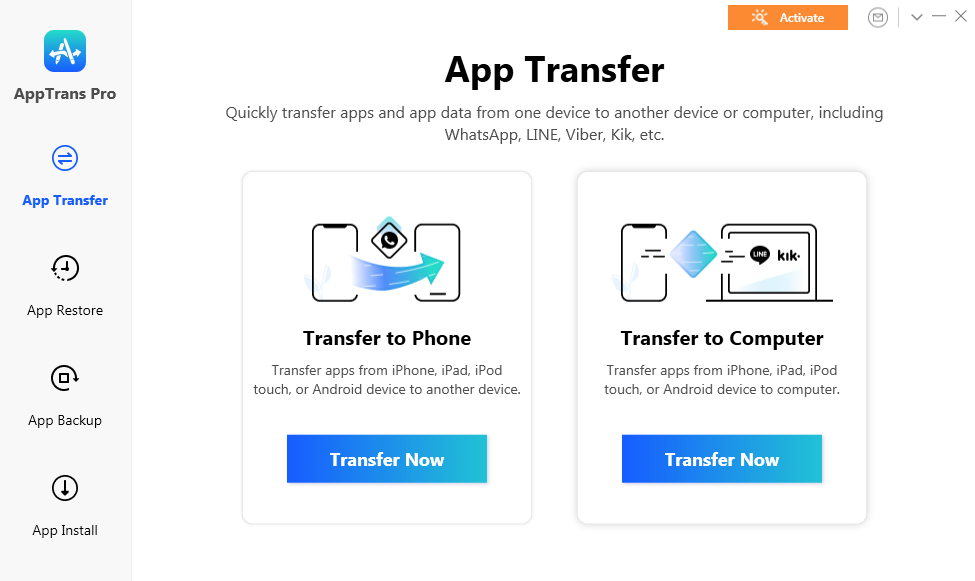
AppTrans's home screen: Transfer to Phone or Transfer to Computer, with Restore, Backup and Install in the sidebar.
Features
WhatsApp from Android to iPhone, or iPhone to Android
AppTrans moves the whole WhatsApp history, including messages, group chats, photos, videos, audio and documents, across iPhone and Android in both directions. Chats are merged into the conversations already on the target phone instead of replacing them, so you can move even after you've started using WhatsApp on the new phone. For an iPhone target, iMobie asks that at least one chat exists there first.

Choosing what to move to an iPhone 12: WhatsApp with its media, or Other Apps (installed without their data across systems).
Apps and their data to a new phone
AppTrans moves apps to a new phone in one batch, so you don't redownload them one by one. Between iPhones it carries the app data too, such as game progress and LINE or Viber chats. Between Android phones, or across systems, other apps move without their data; only WhatsApp data crosses systems.
Restore WhatsApp from Google Drive to an iPhone
AppTrans can sign in to your Google account, list the WhatsApp backups on Google Drive, and restore one to an iPhone, which WhatsApp itself doesn't offer. Messages and calls have to be decrypted first, which needs your Android phone and WhatsApp account. It also restores from iTunes backups and its own backups, lets you preview chats, and exports or prints WhatsApp conversations.

WhatsApp backups found on Google Drive, with their dates and sizes, ready to view or download.
Local app backups and app installs
AppTrans backs up all or selected apps to your PC. On iPhones that includes app data; on Android it covers WhatsApp data. It can also install IPA, APK or XAPK files on a phone, and save apps to the computer in separate folders, which helps if an app has left the store or you want to go back to an older version.
Benefits
- Your chat history survives a platform switch. Cloud backups don't cross systems, and AppTrans works from a backup or a live phone.
- Nothing is overwritten. Merging means a new phone you've already used keeps its chats.
- Backups on your terms. A local copy of WhatsApp on your PC doesn't count against cloud storage limits.
- A household license. The one-time plan covers 5 devices on one computer.
Real-World Uses
- Samsung to iPhone. Move years of family group chats and their photos so nothing is missing on day one.
- iPhone to Pixel. Bring WhatsApp chats to Android, where an iCloud backup can't be restored.
- Lost the old phone. Restore a WhatsApp Google Drive backup onto a new iPhone.
- Before reinstalling WhatsApp. Back up chats to the PC first, so a failed reinstall doesn't cost you the history.
Who It's For, and Who Should Skip It
It suits anyone switching between iPhone and Android who needs WhatsApp history to come along, and iPhone owners who want app data such as game saves moved or backed up locally.
Skip it if you're staying on the same system: WhatsApp's own Google Drive or iCloud restore is free. Skip it too if you need data from apps other than WhatsApp moved across systems, which AppTrans doesn't do, or if you want everything on the phone moved; for contacts, photos and messages, iMobie's PhoneTrans is the broader tool.
Usage Guide
- Install and launch. Run the setup file, which downloads AppTrans, and keep the internet connection stable. iTunes must be installed for iPhones.
- Connect both phones by USB, choose App Transfer, then Transfer to Phone and Transfer Now.
- Pick WhatsApp or Other Apps and click Next.
- From Android: make a local WhatsApp chat backup on the phone, set Google Drive backup to Never, turn on "Install via USB", allow the prompts, and enter the backup password AppTrans shows.
- Transfer. Click Transfer Now and wait for the "App Transfer Succeed" screen. On an iPhone target, have at least one WhatsApp chat there before you start.
- Activate with the account and activation code from your order email to enable the cross-system and WhatsApp features.
Where it falls short
- Slow, and sometimes needs a retry. iGeeksBlog's reviewer found transfers and backups slow and saw a task fail now and then.
- Only WhatsApp crosses systems. Other apps' data moves only between iPhones; Android app data can't be backed up or exported.
- A fiddly Android side. Several manual steps on the phone, and mistakes like a wrong backup password make the backup fail.
- 64-bit Windows only. 32-bit support is listed as "coming soon".
- Updates ended in 2022, and the one-time plan covers version 2.x only.
What Users Say
iGeeksBlog review
Ankur Thakur's review (first published April 2021, since updated) liked the interface: "The moment you launch the app, you will be pleased with its simplicity." His complaints: "AppTrans can improve by cutting down the time it takes to transfer or make backups." and "Secondly, on rare occasions, the task fails." followed by "I have to retry." On price: "For cross-OS app and data transfer, you must buy a pro plan;"
Customers on iMobie's page
iMobie shows 4.7 out of 5 from 66 reviews and quotes customers such as:
- "The program worked like a charm! It managed to transfer my WhatsApp chats and all other apps from Samsung Galaxy S9 to iPhone 12 in only a few minutes."
- "Finally, there's a way that I can restore my WhatsApp from the Google Drive backup to iPhone. It even merged with current chats on my iPhone. Amazing!" (Ella Keith)
The same WhatsApp transfer in AnyTrans, on Trustpilot
iMobie's AnyTrans uses a WhatsApp transfer like AppTrans's, and its Trustpilot page (2.6 out of 5 from 29 reviews) has the clearest warnings. Benjamin (1 star, April 2022) bought it to transfer WhatsApp data and found it "Couldn't have been more difficult". Lewis (1 star, May 2022), switching from Samsung to iPhone, wrote that "my whatsapp account was locked". Adil M (1 star, March 2023) complained "they are installing some developer WhatsApp". Will (2 stars, March 2024) titled his review "Works but Seems Dodgey" after "moving WhatsApp messages from my Android".
The common themes: when it works, people are delighted to see their chats on the new phone, merged with the new ones. The complaints are about the complicated Android side, speed, and the risk to the WhatsApp account. iMobie as a company has a 3.3 TrustScore from 1,517 reviews, with support praised more than the products.
Comparisons
AppTrans vs PhoneTrans
Both are iMobie's. PhoneTrans moves the whole phone (contacts, photos, messages, settings) and moves WhatsApp only to an iPhone. AppTrans focuses on apps and WhatsApp and moves WhatsApp in both directions, including iPhone to Android. If WhatsApp to Android is what you need, AppTrans is the one.
AppTrans vs WhatsApp's own transfer
WhatsApp has its own chat transfer when you set up a new phone, and its cloud backups work within one system for free. AppTrans adds merging into an existing account, restoring a Google Drive backup to an iPhone, local backups on your PC, and printing or exporting chats.
Editions and Pricing
| Plan (Windows) | Price | Term | Covers |
|---|
| One-Time Purchase | $59.99 | Lifetime, updates within 2.x | 1 computer, 5 devices |
| 1-Year Subscription | $29.99 | Renews yearly | 1 computer, 5 devices |
| 3-Month Subscription | $25.99 | Renews quarterly | 1 computer, 2 devices |
For a single phone switch, the yearly plan at $29.99 is half the price of the one-time plan; just cancel it before it renews. The one-time plan pays off if you'll use it again in a couple of years and version 2.x still works then.
FAQs
Does AppTrans erase the WhatsApp chats already on my new phone?
No, when you choose the WhatsApp option. AppTrans merges the old chats into the existing ones. iMobie warns that moving WhatsApp through the Other Apps option instead does erase the chats on the target phone.
Can AppTrans move LINE or Viber chats from iPhone to Android?
No. AppTrans moves other apps' data only between iPhones. Across systems, only WhatsApp data goes along.
Do I need my old Android phone to restore a Google Drive backup to an iPhone?
You need an Android phone with WhatsApp signed in to your account: AppTrans uses it to decrypt messages and calls from the Google Drive backup before restoring them to the iPhone.
Does AppTrans need jailbreak or root?
No. AppTrans works with normal iPhones and Android phones over USB.
Will the one-time license get AppTrans 3?
The AppTrans one-time plan includes free updates to version 2.x. A future major version isn't promised.
Can I print my WhatsApp chats with AppTrans?
Yes, with a license. AppTrans can view, export and print WhatsApp chats from its backups, iTunes backups or Google Drive backups.
System Requirements
- Windows 11, 10, 8 or 7, 64-bit
- 1 GHz CPU, 256 MB RAM (1 GB recommended), 500 MB free disk space, 1024x768 display
- iTunes installed; 800 MB free space on the phone
- iOS 7 or later, iPadOS 13 or later, Android 5.0 or later
Conclusion
AppTrans is worth it if you're switching between iPhone and Android and your WhatsApp history matters to you, especially merging into a phone you already use or putting a Google Drive backup onto an iPhone, which WhatsApp itself won't restore. The one reason to buy it is merging chats across systems without wiping the new phone. The reasons for caution are real: no update since 2022, a fiddly Android side, and user reports of WhatsApp accounts getting locked with this kind of transfer. Back up first, test what the free version allows, and consider the $29.99 yearly plan for a one-time switch.
Download Free TrialBuy Now