PhoneRescue for Android: Get Deleted Messages, Contacts and Photos Back from a PC
PhoneRescue for Android is iMobie's $55.99 one-time-purchase Windows program for finding deleted data on an Android phone or tablet and getting it back: contacts, messages, call logs, calendar, photos, videos, music, WhatsApp and Line. You plug the phone into your PC by USB, scan, preview what it found, and save it to the computer or, for contacts, messages, calendar and call logs, straight back to the phone.
It's for the moment you clear a text thread or wipe a contact by mistake and there's no backup to fall back on. The thing to know up front: finding deleted items needs a rooted phone, and PhoneRescue roots it for you, which can't be undone.
Quick facts
- Developer: iMobie
- Version: 3.8.0, installer dated February 21, 2023
- Runs on: Windows 11, 10, 8, 7, Vista and XP, 32-bit and 64-bit (a Mac version is sold separately)
- Phones: Android 5.0 and later, from any maker
- Recovers: contacts, call logs, messages, calendar, photos, music, videos, app documents, WhatsApp and Line
- Price: $55.99 one-time, for 1 PC and up to 5 Android devices, with lifetime free upgrades
- Free version: scans and previews, but extracting and recovering need a license
- Refund period: 60-day money-back guarantee
- Vendor's rating: 4.6 out of 5 from 60 reviews, as shown on iMobie's page
What we checked: the Windows installer from iMobie (5.4 MB, product version 3.8.0, served with a date of February 21, 2023), and an order page price of $55.99 for "PhoneRescue for Android (Windows) - One-Time Purchase" with no renewal, both on November 8, 2026. We didn't root a phone or run a recovery with it.
Before you buy
Run the free scan first. iMobie's own guide says it plainly: if the trial can't find the data you lost, don't buy the full version. The free scan shows what's there, with personal data partly masked, so you'll know before you pay.
Deleted data means root. The Quick Scan works on a normal phone but only sees what's still stored on it. To dig out deleted items, PhoneRescue's Deep Scan roots the phone first. The app itself warns that this is an irreversible operation. Many newer phones with locked bootloaders can't be rooted this way at all, and when rooting fails, the guide sends you to third-party rooting tools.
It hasn't been updated in a while. Version 3.8.0 dates from February 2023, and when a recovery fails, iMobie's guide now points you to its newer Android toolkit, DroidKit, which also offers a deep recovery mode without root.
Download Free TrialBuy Now
Overview
PhoneRescue for Android runs on your PC, not on the phone. Once the phone is connected with USB debugging switched on, the app installs a small helper on it and shows a ring of data types to pick from. Everything is ticked by default. Click Next and you choose between a Quick Scan, which reads what's currently on the phone, and a Deep Scan, which looks for deleted items after rooting the device. Results open in a three-pane window: data types on the left, items in the middle, a preview on the right.

The start screen with a phone connected: tick the kinds of data to look for, then click Next.
Features
Ten kinds of data, from the phone itself
PhoneRescue for Android scans for contacts, call logs, messages and message attachments, calendar entries, photos, music, videos, app documents, WhatsApp chats and attachments, and Line. It works from the phone directly, so you don't need a Google backup or an SD card. You can scan for just one type, such as messages, to save time.
Deep Scan for deleted items, with built-in rooting
PhoneRescue for Android's Deep Scan is the part that finds what you deleted. It needs root access, and if your phone isn't rooted, the app offers to do it during the scan and restarts the phone along the way. It asks for at least 20% battery first. If the rooting fails, the app suggests free rooting tools such as KingoRoot and iRoot, or lets you fall back to a Quick Scan.
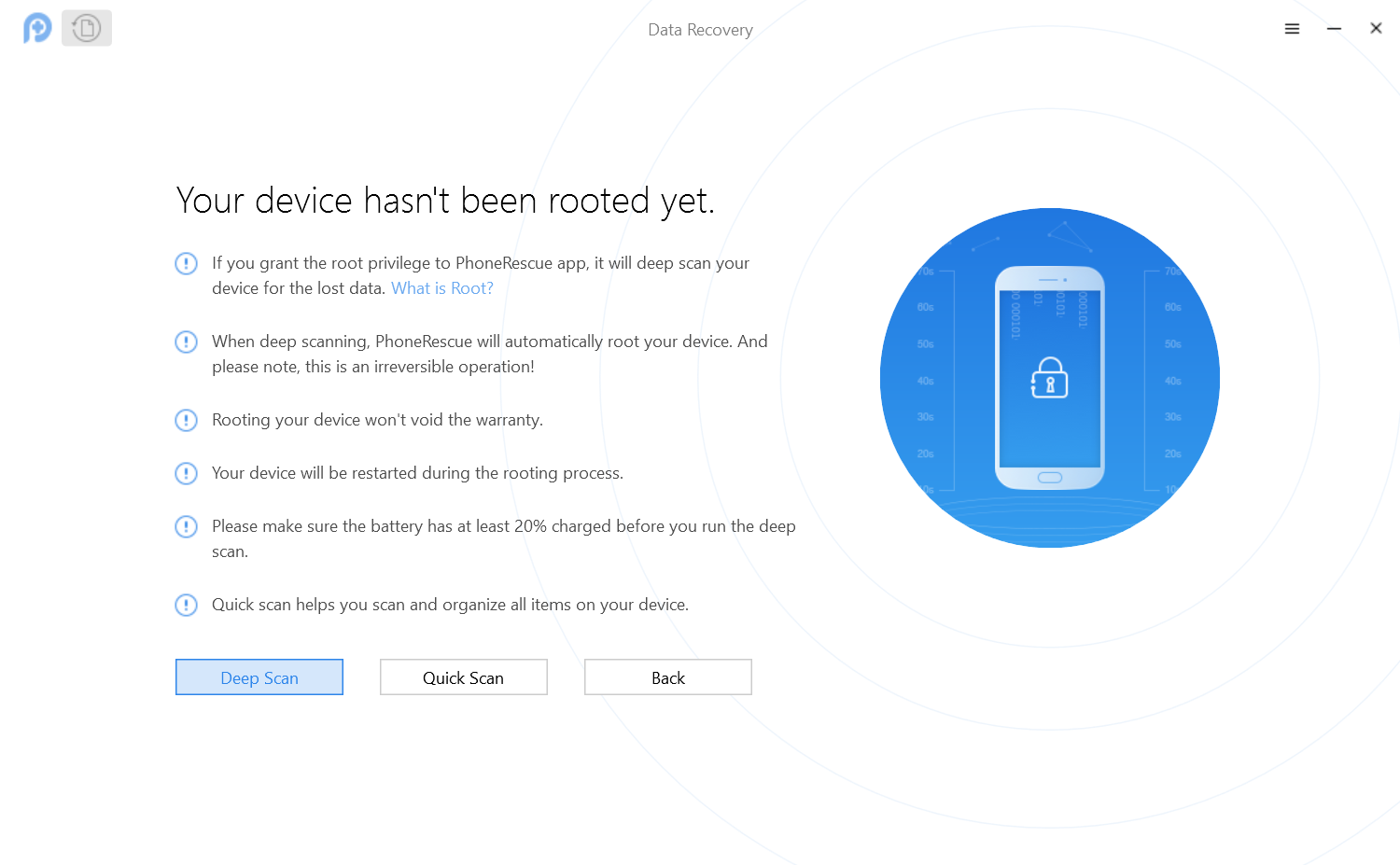
The choice before a scan: Deep Scan roots the phone (the screen warns it's irreversible), Quick Scan doesn't.
Restore straight back to the phone
PhoneRescue for Android can put deleted contacts, messages, calendar entries and call logs back on the phone, where they show up in the normal apps as if they'd never gone. Photos, videos, music, documents and chat data are saved to the computer instead. In the results you can list all items, only the deleted ones, or only the existing ones, and deleted items are shown in red.

Deep Scan results: deleted contacts in red, a filter for deleted or existing items, and buttons for "to device" and "to computer" at the bottom right.
Extract everything on the phone to your PC, no root needed
PhoneRescue for Android's Quick Scan doubles as a backup tool. It lists everything currently stored on the phone by category, and you pick what to copy to the computer. A Settings button sets the output format for each data type and the export folder. The app works with one connected phone at a time and comes in seven languages, including English, German, French, Spanish and Japanese.
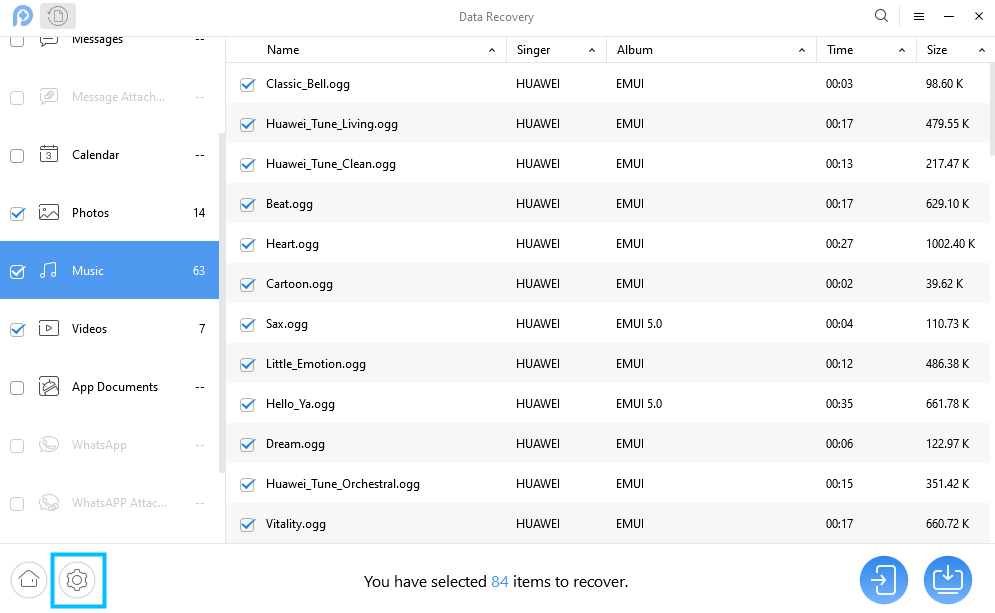
Quick Scan results grouped by data type, with the settings button highlighted at the bottom left.
Benefits
- You see the result before you pay. The free scan shows whether your lost items are still findable, which is the only question that matters in data recovery.
- Contacts and texts go back where they belong. Restoring to the phone saves you from re-entering numbers or reading old messages in a spreadsheet.
- No cloud account needed. Everything happens over the USB cable between your phone and your own PC.
- One payment covers the household. The one-time license covers up to 5 Android devices on one PC and includes future upgrades.
Real-World Uses
- A deleted text thread. You swiped away a conversation with a landlord that you now need. A Deep Scan for Messages only, then restore to the phone.
- A contact you can't get back. A client's number vanished after a sync went wrong. Filter the results to "Only list deleted" and put it back on the phone.
- WhatsApp photos you never saved. Pictures received in chats can be found and saved to the PC, along with the chats themselves.
- Moving off an old phone. Use the Quick Scan to copy all photos, videos and messages from an old Android to your PC before you wipe it, without rooting.
Who It's For, and Who Should Skip It
It suits Windows users with an Android phone who've lost messages, contacts or chat data with no backup, and who either already have a rooted phone or are willing to root it to get the data back. It also suits anyone who just wants a simple way to copy a phone's data to a PC.
Skip it if your phone is a recent model with a locked bootloader you don't want to unlock, if you need the phone to keep passing banking-app or work-profile checks (rooting can break those), or if your data is in a Google account backup that you can simply restore. Owners of iPhones need PhoneRescue for iOS instead. If you want one tool that also fixes a crashed system or removes a screen lock, iMobie's DroidKit covers more ground.
Usage Guide
- Install and launch. Download the installer, run it, and open PhoneRescue for Android. Keep the internet connection stable, which the rooting step needs.
- Turn on USB debugging on the phone (in Developer options) and connect it with a USB cable. On the first connection Windows installs the phone's USB driver, and the app installs a helper app on the phone.
- Pick the data types you want on the start screen and click Next.
- Choose the scan. Quick Scan for what's on the phone now; Deep Scan for deleted items, which roots the phone first if it isn't rooted already.
- Preview and select. Use "Only list deleted" to cut the list down, and tick what you want back.
- Recover. Click "To Device" for contacts, messages, calendar and call logs, or "To Computer" for everything. To activate the full version, click the key-shaped button and enter the email account and activation code from your order.
Where it falls short
- Rooting is the weak link. Deleted items are out of reach without root, and the vendor's own guide plans for rooting to fail, with a screen that sends you to third-party rooting tools.
- Mixed-up results. AndroidGuys' tester found that some "recovered" items had never actually been deleted, and some information was mixed up.
- Slow on big phones. TechJury's tester waited 30 minutes for the app to analyze a Samsung phone holding over 5 GB of audio files.
- Old update history. The last listed update is 3.8.0, and the installer iMobie serves dates from February 2023.
- Support by email form only. TechJury rated customer support 3.5 out of 5 and notes there's no phone or chat line.
What Users Say
Independent reviews
AndroidGuys (Alexandra Arici) tested it on a Samsung phone and liked how much came back: "The app recovered a lot, but a lot of my data!" The same review adds a catch: "The problem is that some of it wasn't actually deleted and still exists on my phone." On setup: "The program is easy to setup and use and even does the rooting for you." Her verdict: "PhoneRescue proved itself to be a very good tool, albeit being riddled with some minor faults (at least the Samsung version)."
TechJury (Dejan Cvetnarevic, updated September 2024) gave ease of use 5 out of 5 and customer support 3.5 out of 5. The editor's summary warns that "its recovery success rate can be inconsistent." On the test phone: "With over 5GB of audio files on the device, it took PhoneRescue exactly 30 minutes to analyze my data." And on rooting: "Then, if you haven't already rooted the phone to your PC, you'll need to do that before recovering your data." Its listed cons are "Somewhat expensive" and "Customer support only through email".
TheSweetBits rates PhoneRescue 4.5 out of 5 across both platforms. Of the Android version: "PhoneRescue for Android packs a simple UI design." and "Nevertheless, we loved how easy it is to recover, restore, or export recovered files using PhoneRescue for Android." Its Quick Scan test was modest: "And we were able to recover a few files", with older deletions not showing up, and it notes: "Deep Scan requires root access, though."
Customers on iMobie's own pages
iMobie's page shows 4.6 out of 5 from 60 reviews. Some of the customer comments it shows:
- "I washed a Galaxy S6 Edge Plus in the washing machine; I took it in to a cell phone repair shop and they said there was nothing on the internal storage of the phone. And my family recommended this app,phonerescue for android, which solves this missing problem. restore some files. best ever!" (Lukas, 5 stars, 2019)
- "I did factory reset on my galaxy S3, android 4.4.2 and files were not backed up. But PhoneRescue for Android has restored some of my data. wonderful!" (Hector, 5 stars, 2019)
- "PhoneRescue for Android is outstanding since it rescued my Samsung s4 from the data loss disaster last week. Nice thanks." (Peter)
Note that these are all older phones, and that "some" files is the honest word two of them use.
iMobie as a company, on Trustpilot
iMobie Inc. has a TrustScore of 3.3 from 1,517 reviews, split between 49% five-star and 34% one-star. None of the recent reviews there are about PhoneRescue for Android. The complaints are mostly about other iMobie tools failing on the newest phones, such as "Do not unlock IOS 27 on iPhone 14 pro Max on AnyUnlock software. Does not do exactly as it said on the website." The praise is mostly for support: "The customer support is excellent. They understood the issue and had a ticket submitted and resolved within hours." (Christopher Montalvo, 5 stars) and "Joanna responded very quickly and resolved the issue by unbinding my previous device." (Lucas Filipe, 5 stars).
The common themes: people like how easy it is and how much it can pull off a phone that's still readable. The complaints are about rooting, uneven results, slow scans of big phones and email-only support. Nearly every success story is about an older phone.
Comparisons
PhoneRescue for Android vs DroidKit
Both are iMobie's. PhoneRescue for Android does one job, data recovery and extraction, and needs root to find deleted items. DroidKit is the newer, broader toolkit: its own recovery mode includes a deep recovery that iMobie offers to users who don't want to root, plus system repair, screen-lock and FRP removal, and recovery from a crashed phone or Google account. iMobie's own PhoneRescue guide points users to DroidKit when a recovery fails. If you only need deleted texts or contacts back from a phone you can root, PhoneRescue costs less.
PhoneRescue for Android vs PhoneRescue for iOS
They're separate products with separate licenses. The iOS version can also recover from iTunes and iCloud backups and repairs iOS problems; the Android version reads only from the connected phone.
Editions and Pricing
| Plan | Price | Term | Covers |
|---|
| Windows, One-Time Purchase | $55.99 | Lifetime, free upgrades | 1 PC, 5 devices |
| Windows, 1-Year Subscription | $39.99 | Renews yearly | 1 PC, 5 devices |
| Mac, One-Time Purchase | $59.99 | Lifetime, free upgrades | 1 Mac, 5 devices |
| Mac, 1-Year Subscription | $45.99 | Renews yearly | 1 Mac, 5 devices |
The one-time plan costs $16 more than a single year of the subscription, so it pays off as soon as you'd keep the program past the first year. Subscribers can upgrade to the one-time plan at 50% off, and iMobie offers 30% off for teachers and students.
FAQs
Can PhoneRescue for Android recover deleted messages without root?
No. PhoneRescue for Android's Quick Scan works without root but only lists what's still on the phone. Finding deleted messages takes the Deep Scan, which needs root access.
Will rooting with PhoneRescue erase my phone?
PhoneRescue for Android's rooting step restarts the phone but isn't meant to wipe it. It is permanent, though: the app warns that rooting is irreversible, and a rooted phone can fail the security checks some banking and work apps run.
Does PhoneRescue for Android work with Samsung phones?
PhoneRescue for Android supports Android phones from any maker running Android 5.0 or later, Samsung included, and the vendor's guide uses Samsung and Huawei phones in its examples. Rooting a recent Samsung is often not possible without unlocking the bootloader, so on newer models expect the Quick Scan only.
Can it recover data from a phone that won't turn on or has a broken screen?
PhoneRescue for Android needs a phone that powers on, connects by USB and has USB debugging turned on. For a crashed phone, iMobie points to DroidKit's extraction from a system-crashed device instead.
Can I recover data from an SD card or a Google backup?
PhoneRescue for Android reads the phone itself. Recovery from an SD card or a Google account is a DroidKit feature, according to iMobie's guide.
Can I get a refund if it doesn't find my data?
PhoneRescue for Android comes with a 60-day money-back guarantee. Still, run the free scan first: iMobie tells you not to buy if the trial can't find what you lost, so a missed scan isn't something to buy your way past.
Can I use one license on several phones?
Yes. The PhoneRescue for Android one-time license covers 1 computer and up to 5 Android devices. Only one phone can be connected at a time.
System Requirements
- Windows 11, 10, 8, 7, Vista or XP, 32-bit or 64-bit
- Pentium IV 2.4 GHz or faster, 512 MB RAM, 100 MB free disk space
- USB and ADB drivers, a USB cable, and USB debugging turned on
- An Android phone or tablet with Android 5.0 or later
Conclusion
PhoneRescue for Android is worth $55.99 if you have a phone you can root, or one that's already rooted, and you need deleted texts, contacts or chat data back without a backup. Restoring contacts and messages straight to the phone is the one reason to pick it. The reason to hesitate is that it hasn't been updated since early 2023 and its whole deleted-data promise rests on rooting, which many current phones won't allow. Run the free scan: if your lost items show up, buy it; if they don't, look at DroidKit or leave it.
Download Free TrialBuy Now