Best iPhone Data Recovery Software for Windows and Mac: What Works

Best iPhone Data Recovery Software for Windows and Mac: What Works

Updated November 17, 2026

Short answer

On a modern iPhone, no program can reliably undelete photos or videos straight from the phone. What these tools do well is narrower: get back deleted messages and contacts that iOS hasn't cleaned out yet, and open an iTunes, Finder or iCloud backup so you can copy out single items without wiping your phone. So check Apple's free Recently Deleted folders first, and buy software only when the free scan shows the exact items you lost.

Our pick is Aiseesoft FoneLab iPhone Data Recovery on Windows and Aiseesoft Mac FoneLab - iPhone Data Recovery on a Mac ($63.96 once at checkout). Note that the Windows license at checkout is $53.80 for one month and renews monthly, so untick renewal for a one-off rescue. For a one-time price that covers every iPhone in the house and also repairs a stuck iPhone, choose PhoneRescue for iOS (Windows) or PhoneRescue for iOS (Mac) at $69.99, but expect weak results on items deleted from the phone itself. Coolmuster iPhone Data Recovery (and its Mac edition) is the most upfront about what it can't do, at $49.95 a year. If all you have is a backup on your PC, Coolmuster iPhone Backup Extractor reads it for $19.95, and Coolmuster iCloud Backup Recovery ($19.95) copies what's in iCloud to a Windows PC.

At a glance

Aiseesoft FoneLab PhoneRescue for iOS Coolmuster iPhone Data Recovery Coolmuster Backup Extractor / iCloud Backup Recovery
Price at checkout Windows $53.80 a month (renews monthly); Mac $63.96 one-time $69.99 one-time (Windows or Mac) $49.95 a year (Windows or Mac), renews $19.95 a year each, renews
Computers and devices 1 PC or Mac, 6 iOS devices 1 computer, unlimited devices 1 computer, 5 devices 1 PC
Scans the iPhone itself ✓ ✓ ✓ ✗
Reads iTunes / Finder backups ✓ (encrypted with password) ✓ (encrypted with password) ✓ (encrypted with password) Backup Extractor only
Reads iCloud ✓ ✓ ✓ iCloud Backup Recovery only
Deleted data from a direct phone scan Text data; photos only as thumbnails on iPhone 4S and later Lists deleted items; tests found little Contacts and messages only Not applicable
Puts items back on the iPhone ✗ (to computer; Mac iCloud results can be restored) ✓ messages, contacts, notes, photos ✗ ✗
Repairs a stuck iPhone Separate product ✓ included ✗ ✗
Free version Scan and preview Scan and preview Scan and preview Scan and preview
Latest version Windows 10.9.8 (November 2026) 4.3.0 (November 2024) Windows 6.0.64 (September 2026) 4.0.4 / 2.0.15

How we picked and what we checked

  1. We looked at every iPhone recovery tool on our site that is current and sold through a checkout we could read, and kept the three main programs plus Coolmuster's two single-purpose tools.
  2. We read each vendor's own list of what a direct phone scan can recover when deleted, because that list decides whether a tool can help you at all.
  3. We read every price and renewal term on the order page, and compared trial limits, device counts and refund rules.
  4. We gathered independent tests and user reviews, including the bad ones.
  5. What we checked: checkout prices and renewal terms for all eight editions on November 17, 2026; the Windows FoneLab installer, whose file version read 10.9.8 on November 17, 2026; and the vendor screenshots shown here, which we downloaded and looked at.

We compared features, prices and trial limits and didn't run a recovery on an iPhone ourselves. Recovery from a broken phone's chip, jailbreak tools and Android phones aren't covered here.

What you can really recover from a modern iPhone

The honest answer is less than the product pages suggest. An iPhone encrypts every file with its own key, and when a file is deleted and its space is reused, that data is gone for good. That's why every vendor in this article, read closely, says the same thing in different words:

  • Coolmuster's own scan screen splits data into two groups: contacts and messages under "Deleted & Existing Data", and everything else (photos, notes, WhatsApp, voice memos) under "Existing Data Only (Unable to recover deleted data)".
  • Aiseesoft's specifications say deleted photos scanned from an iPhone 4S or later come back as thumbnails, not full-size pictures.
  • PhoneRescue recovered only two of six deliberately deleted items in Data Rescue Tools' test, and PocketPCmag scored it 4.8 out of 10 for the same reason.

What still works well is anything inside a backup. A backup made before you deleted something holds the full photo, the whole chat and the note as they were. Apple will only restore a backup over the whole phone. These programs open it like a folder and let you copy out the one thread you need, which is their real value.

Coolmuster iPhone Data Recovery data type screen with Deleted and Existing Data and Existing Data Only groups

Coolmuster iPhone Data Recovery's scan screen: only Contacts and Messages sit under "Deleted & Existing Data". Notes, Photos, WhatsApp and the rest are under "Existing Data Only (Unable to recover deleted data)".

Try Apple's free routes first

Before you install anything, spend five minutes on the places Apple keeps deleted items. They cost nothing and recover full-quality data.

  1. Photos: open Photos, scroll to Recently Deleted under Utilities, unlock it with Face ID or Touch ID and tap Recover. Deleted photos and videos stay there for 30 days.
  2. Messages: on iOS 16 or later, open Messages, tap Edit or Filters, then Recently Deleted. Apple keeps deleted conversations for 30 to 40 days. Messages deleted before you updated to iOS 16 can't be recovered this way.
  3. Notes: the Recently Deleted folder in Notes keeps notes for 30 days, and notes stored in iCloud can also be recovered on iCloud.com.
  4. Contacts, calendars and Safari bookmarks: sign in to iCloud.com and use Data Recovery to restore an earlier archived version. Restoring replaces the current version on all your devices, though iCloud saves the current one first.
  5. A full backup: if an iCloud or computer backup from before the loss exists, Apple's way is to erase the iPhone and restore that backup during setup, or to restore it with Finder on a Mac or the Apple Devices app (or iTunes) on Windows. It's free and complete, but everything added since that backup is lost. That trade is exactly where the paid tools earn their price.

Do this now if you've just lost something

  • Stop using the iPhone as much as you can. New photos, messages and app updates are what overwrite deleted data.
  • Don't make a new backup yet. A fresh iCloud or computer backup can replace the older one that still holds your data.
  • Don't restore a backup over the phone until you've scanned it with a free trial, or you'll lose everything newer.

Aiseesoft FoneLab iPhone Data Recovery (Windows and Mac): best overall

Aiseesoft FoneLab iPhone Data Recovery (Windows) and Aiseesoft Mac FoneLab - iPhone Data Recovery

  • Price at checkout: Windows $53.80 for a one-month license that renews every month; Mac $63.96 one-time ($79.95 less $15.99)
  • Covers: 1 computer and up to 6 iOS devices
  • Works with: iPhone, iPad and iPod touch up to iOS 27; Windows 11 to 7, macOS 10.7 or later (Intel and Apple silicon)
  • Best for: pulling messages, contacts, chats and photos out of a backup without touching your phone

Aiseesoft FoneLab is the most complete of the three main programs. It scans the phone, any iTunes or Finder backup on the computer (encrypted ones too, with the password) and an iCloud backup it downloads after you sign in. Results come up by category, with a Show Deleted Only filter and a preview, and you save the items you tick as normal files: contacts as CSV, HTML or VCF, messages as CSV or HTML, photos as JPG or PNG.

Its list of data types is the widest here: messages and iMessages, contacts, call history, calendar, notes, reminders, Safari data, voice memos and WhatsApp chats, plus Kik, Line, Viber and Messenger on the Mac edition. On iOS 13 and later the Mac edition finds call history, FaceTime and Safari history only through an encrypted scan, which sets your device's backup password to 1234 for the scan and erases it afterwards. It asks first, and you can say no.

The Windows edition is current: the installer we downloaded on November 17, 2026 reads version 10.9.8, with a program package dated November 4, 2026.

Aiseesoft FoneLab iPhone Data Recovery scan results with the Show Deleted Only filter

Aiseesoft FoneLab iPhone Data Recovery on Windows: scan results by category, the Show All / Show Deleted Only / Show Existed Only menu, and the Recover button.

Aiseesoft Mac FoneLab encrypted scan prompt explaining the temporary 1234 backup password

Mac FoneLab's encrypted scan prompt for iOS 13 and later: it sets the device backup password to 1234 for the scan and erases it afterwards.

What we like

  • Reads the phone, computer backups and iCloud from one window
  • Widest range of data types, including WhatsApp and other chat apps
  • Mac license is a one-time $63.96
  • Windows build updated in November 2026

Watch out for

  • Windows license at checkout is one month at $53.80, renewing monthly
  • Deleted photos from the phone come back only as thumbnails
  • One computer per license; a second PC shows an error until support resets it
  • Refunds only for "a quality problem" within 30 days

What users say

Lloyd Coombes tested the Mac edition for Macworld (November 27, 2024, 4 out of 5): "An option that won’t break the bank, FoneLab has a whole host of features for under $70 that can suit families." His listed con: "User complaints note it can’t recover all it says it can."

On Trustpilot, Aiseesoft scores 3.8 out of 5 from 610 reviews, split between five-star and one-star. William C Johnson (1 star, March 2021): "The data recovered was undecipherable and did me no good."

Aiseesoft's own page shows 4.8 out of 5 from 203 reviews for the Windows edition. Keanu: "I needed to retrieve some call history that got lost during a recent iOS update. This iPhone Data recovery tool helped me to recover most of the call logs, which was a huge relief."

Download FoneLab for Windows Buy FoneLab for Windows

Download Mac FoneLab Buy Mac FoneLab

PhoneRescue for iOS (Windows and Mac): best one-time license, plus repair

PhoneRescue for iOS (Windows) and PhoneRescue for iOS (Mac)

  • Price at checkout: $69.99 one-time for either edition, with lifetime upgrades
  • Covers: 1 computer, unlimited iOS devices
  • Works with: Windows 11 to Vista (64-bit), macOS 10.13 to macOS 27; iOS 5 to iOS 27
  • Best for: a household that wants one tool for recovery and for fixing a stuck iPhone

PhoneRescue for iOS from iMobie puts two jobs on one home screen. Data Recovery scans the device, a computer backup or iCloud. Device Rescuer repairs an iPhone stuck on the Apple logo, in a boot loop or in recovery mode, and also recovers a forgotten Screen Time passcode. It has a lock screen removal tool too, which erases the iPhone and is meant for your own device, with proof of purchase.

The results screen can list only deleted items, and PhoneRescue is the only program here that sends messages, contacts, notes and photos back to the iPhone rather than only to the computer. The license is the best value on paper: one payment, every iPhone and iPad in the family.

The weak spot is results. Independent testers found it reads backups and existing data well but brings back little that was deleted from the phone itself, and its public update history stops at version 4.3.0 from November 2024, even though iMobie's spec sheet lists support up to iOS 27.

PhoneRescue for iOS contacts results with the List all items, Only list deleted and Only list existed filter

PhoneRescue for iOS (Windows build): contact results filtered to show 504 items in total, 10 deleted and 494 existing, with buttons to send items to the device or the computer.

What we like

  • One-time $69.99 for unlimited devices on one computer
  • Restores messages, contacts, notes and photos to the iPhone
  • iOS system repair included
  • 60-day money-back guarantee on the one-time plan, under iMobie's refund conditions

Watch out for

  • Weak results on items deleted from the phone in independent tests
  • No new release in its public history since November 2024
  • iMobie scores 3.3 out of 5 on Trustpilot, with complaints about slow refunds

What users say

PocketPCmag (4.8 out of 10, tested on a Mac): "PhoneRescue found plenty of existing records, yet recovered too little of our deliberately deleted test data."

Adrian Try, Data Rescue Tools: "it was only able to recover two of the six items I deleted"

JP Zhang, SoftwareHow (4 out of 5 for effectiveness): "During my test of PhoneRescue for iOS (Mac), the full version did recover many kinds of files."

On Trustpilot, iMobie as a company scores 3.3 out of 5 from 1,525 reviews across all its products.

Download PhoneRescue for Windows Buy PhoneRescue for Windows

Download PhoneRescue for Mac Buy PhoneRescue for Mac

Coolmuster iPhone Data Recovery (Windows and Mac): most honest about its limits

Coolmuster iPhone Data Recovery (Windows) and Coolmuster iPhone Data Recovery for Mac

  • Price at checkout: $49.95 for one year (1 computer, 5 devices), renewing yearly
  • Works with: Windows 11 to 7, macOS 10.10 or later (an Intel build that runs through Rosetta 2 on Apple silicon); iOS 5 to iOS 27
  • Best for: deleted texts and contacts, and copying existing data off the phone, from iTunes or from iCloud

Coolmuster iPhone Data Recovery does the same three jobs as the others (phone, computer backup, iCloud) and tells you on its own scan screen which data it can actually undelete: contacts and messages. Everything else is copied only if it still exists. From an iTunes backup, SMS attachments join that list, and anything in a backup made before the deletion is there in full.

That candour is useful. You know before the scan that this isn't the tool for last month's deleted photos, and the free scan then shows whether your texts are still there. The Windows edition was updated to 6.0.64 in September 2026, with a fix for iCloud sign-in. The Mac edition is 6.0.52 from March 2026.

The catch is the refund policy. Coolmuster's product page shows a 30-day guarantee, but its refund policy says refund requests for recovery products will not be approved, because data recovery products may recover only part of the lost data. Treat the free scan as your only test.

Coolmuster iPhone Data Recovery for Mac message preview with the Only display the deleted items switch

Coolmuster iPhone Data Recovery for Mac: data categories with counts, the message list and the selected conversation, with the "Only display the deleted item(s)" switch at the top.

What we like

  • Clear about what can and can't be undeleted
  • Cheapest of the three full programs at $49.95 a year
  • Five devices per license
  • Windows edition updated in September 2026

Watch out for

  • Direct scans undelete only contacts and messages
  • Refund requests for recovery products aren't approved
  • Yearly plan renews automatically
  • Mac app is Intel-only

What users say

Independent reviews are scarce, and Coolmuster gives free licenses for reviews on its own site, so its page is a friendly sample. Even there the complaints are specific. David Miller (April 3, 2026): "Found most of my deleted contacts, but missed a few." Mason Reed (May 29, 2026): "Worked well for my iPhone 16, but video recovery needs improvement."

On Trustpilot, Coolmuster scores 4.6 out of 5 from 223 reviews, most of them about support rather than one product.

Download Coolmuster for Windows Buy Coolmuster for Windows

Download Coolmuster for Mac Buy Coolmuster for Mac

Coolmuster iPhone Backup Extractor: cheapest way to read a PC backup

Coolmuster iPhone Backup Extractor: $19.95 for one year on 1 PC at checkout, renewing yearly. Windows 11 to 7. Best for: a dead, lost or replaced iPhone whose iTunes backup is still on your PC.

Coolmuster iPhone Backup Extractor is the iTunes-backup mode of Coolmuster's full program sold on its own for $30 less a year. It finds the backups on your PC, lists each with its date, size, iOS version and model, and lets you copy out contacts, messages, photos, notes and WhatsApp chats as files. Encrypted backups open with their password. It never connects to the phone and has no iCloud option, so if you never backed up to a PC it has nothing to read. The same refund rule for recovery products applies.
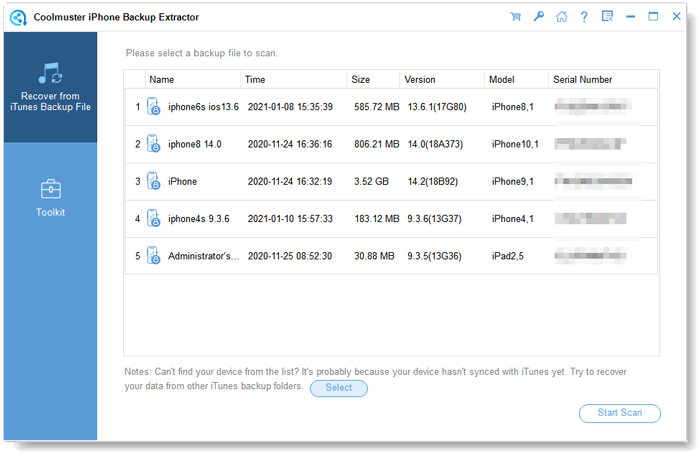
Coolmuster iPhone Backup Extractor backup list with date, size, iOS version and model

Coolmuster iPhone Backup Extractor lists every backup on the PC with its date, size, iOS version and model, so you can pick the one made before the loss.

Mark Wilson on Coolmuster's review page (September 4, 2026): "I only needed a few photos, so the preview-and-select feature was super handy." David Miller (April 3, 2026): "Found most contacts, but why didn't it detect all backups?"

Download Backup Extractor Buy Coolmuster iPhone Backup Extractor

Coolmuster iCloud Backup Recovery: iCloud data to a PC, not an undelete tool

Coolmuster iCloud Backup Recovery: $19.95 for one year on 1 PC at checkout, renewing yearly. Windows 11 to 7. Best for: saving a lost or broken iPhone's iCloud contacts, photos and notes to a Windows PC in one go.

Coolmuster iCloud Backup Recovery signs in to your Apple account and copies six kinds of data to the PC: contacts, photos, notes, note attachments, calendars and reminders. Its own data-type screen is headed "Existing Data Only (Unable to recover deleted data)", so it exports what iCloud holds now. It doesn't read messages, WhatsApp or app data.

Be clear on what you're paying for. Most of these six types can also be viewed or downloaded free on iCloud.com. What this tool adds is doing it in bulk to a Windows folder, with a preview, without resetting the phone. Daniel Hughes on Coolmuster's review page (May 9, 2026): "Easy to use and didn't overwrite my current iPhone data. Could support more file types."
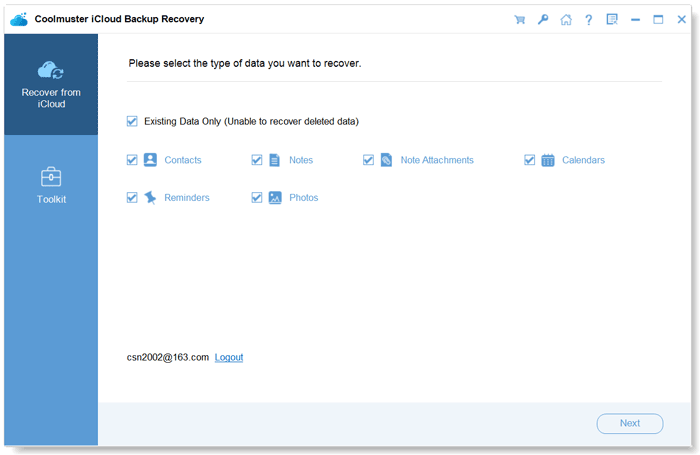
Coolmuster iCloud Backup Recovery data type screen labelled Existing Data Only

Coolmuster iCloud Backup Recovery after signing in: six data types, all under "Existing Data Only (Unable to recover deleted data)".

Download iCloud Backup Recovery Buy Coolmuster iCloud Backup Recovery

Prices and ratings compared

Prices below are what the order page charged on November 17, 2026, in USD before tax. The terms differ, so each bar says what you get for the money.

Price at checkout (USD)

PhoneRescue for iOS, Windows or Mac (one-time, unlimited devices)$69.99
Aiseesoft Mac FoneLab (one-time, 1 Mac)$63.96
Aiseesoft FoneLab for Windows (one month, renews monthly)$53.80
Coolmuster iPhone Data Recovery, Windows or Mac (one year)$49.95
Coolmuster iPhone Backup Extractor (one year)$19.95
Coolmuster iCloud Backup Recovery (one year)$19.95

Checkout prices checked on November 17, 2026. Keeping the Windows FoneLab license for a year at $53.80 a month would cost $645.60, so untick renewal if you need it once.

Trustpilot score for each company (out of 5)

Coolmuster (223 reviews)4.6
Aiseesoft (610 reviews)3.8
iMobie, maker of PhoneRescue (1,525 reviews)3.3

Company-wide scores covering all of each vendor's products, read on November 17, 2026. They say more about support and refunds than about recovery results.

Which should you choose?

Your situation Pick Why
You deleted texts or contacts, no backup Coolmuster iPhone Data Recovery (or FoneLab) Messages and contacts are the data a direct scan can still find; run the free scan first
You have an iTunes or Finder backup from before the loss, on Windows Aiseesoft FoneLab iPhone Data Recovery Widest range of data types from backups; buy one month and untick renewal
Same, on a Mac Aiseesoft Mac FoneLab - iPhone Data Recovery One-time $63.96, native Apple silicon build
Only a PC backup, and price matters Coolmuster iPhone Backup Extractor $19.95 reads the backup without the extra modes
Phone lost or broken, data in iCloud, Windows PC Coolmuster iCloud Backup Recovery (or FoneLab's iCloud mode) Saves contacts, photos and notes to the PC without resetting anything
Several iPhones in the family, and one also needs repairs PhoneRescue for iOS One-time license for unlimited devices, repair tools included
Deleted photos, no backup None of them Check Recently Deleted in Photos; tools return thumbnails at best

Who should skip each one: skip FoneLab for Windows if you'd forget to cancel a monthly renewal. Skip PhoneRescue if your only hope is items deleted from the phone itself, where it tested worst. Skip Coolmuster iPhone Data Recovery if you're after deleted photos or WhatsApp chats without a backup, and on a Mac if you want a native Apple silicon app. Skip Backup Extractor if you never backed up to a PC, and iCloud Backup Recovery if you need messages or deleted items from iCloud.

What commonly goes wrong

  • Restoring a backup to "look for" the data. A restore replaces everything on the phone. Scan the backup with a free trial instead.
  • Buying before the preview. If an item isn't in the free scan's preview, paying won't make it appear. Every vendor here says so, and refunds for "it didn't find my data" are hard to get.
  • Making a new backup after the loss. It can overwrite the older backup that still held your data.
  • A forgotten backup password. None of these tools gets around it. Without the password an encrypted backup stays closed.
  • Expecting full-size photos from the phone. On any recent iPhone, deleted photos come back as thumbnails or not at all.
  • Not unticking renewal. FoneLab for Windows renews monthly, and Coolmuster's plans yearly, until you cancel.

FAQs

Can I recover deleted iPhone photos without a backup?

Usually not at full size. Aiseesoft FoneLab returns deleted photos from an iPhone 4S or later as thumbnails, and Coolmuster iPhone Data Recovery lists photos as existing data only. Check the Recently Deleted album in Photos first, which keeps deleted photos for 30 days, and any iCloud or computer backup made before the deletion.

Can I recover deleted text messages from my iPhone for free?

Yes, if they were deleted in the last 30 to 40 days on iOS 16 or later: open Recently Deleted in Messages and tap Recover. After that, Coolmuster iPhone Data Recovery or Aiseesoft FoneLab can scan the phone or a backup for older threads, and the free scan shows whether they're there.

Can I get one thing out of an iCloud backup without resetting my iPhone?

Yes. Aiseesoft FoneLab, PhoneRescue for iOS and Coolmuster iPhone Data Recovery can download an iCloud backup or iCloud data to the computer and let you copy single items, while Apple's own route is to erase the iPhone and restore the whole backup.

Which iPhone data recovery software has a one-time price?

PhoneRescue for iOS ($69.99, unlimited devices on one computer) and Aiseesoft Mac FoneLab ($63.96, one Mac) are one-time purchases at checkout. Aiseesoft FoneLab for Windows is sold there as a monthly license at $53.80, and Coolmuster's tools as yearly plans.

Do these programs work with iOS 26 and iOS 27?

Aiseesoft, iMobie and Coolmuster all list support up to iOS 27. PhoneRescue's public update history hasn't moved since version 4.3.0 in November 2024, so test it on your phone with the free scan before buying.

Can I get a refund if the software doesn't find my data?

Rarely. Coolmuster's refund policy says refund requests for recovery products will not be approved. Aiseesoft refunds within 30 days only for a quality problem, and iMobie's 60-day guarantee on PhoneRescue's one-time plan applies under its listed conditions. Use the free scan as your test.

Can these tools recover data from an iPhone that won't turn on?

Not from the phone itself. If it can't connect, Aiseesoft FoneLab, PhoneRescue or Coolmuster can still read its iTunes, Finder or iCloud backup. If the phone is stuck on the Apple logo, PhoneRescue's Device Rescuer may get it running first.

Do I need iTunes installed on Windows?

Yes for Aiseesoft FoneLab and PhoneRescue for iOS on Windows, which use it for the Apple device driver. Keep iTunes closed while you scan so it doesn't sync and overwrite anything.

Conclusion

Start free: Recently Deleted in Photos, Messages and Notes, and iCloud.com's Data Recovery. If that fails, Aiseesoft FoneLab iPhone Data Recovery is the tool most likely to find your data, mainly because it opens computer and iCloud backups item by item and reads the widest range of data types. On a Mac it's a fair one-time $63.96. On Windows it's $53.80 for a month, which suits a single rescue as long as you untick renewal.

Pick PhoneRescue for its one-time family license and repair tools, Coolmuster for honest limits and a lower price, and Coolmuster's $19.95 tools when you only need a PC backup or iCloud read. With any of them, pay only after the free scan shows the exact items you lost.

Download FoneLab for Windows Buy FoneLab for Windows Download Mac FoneLab Buy Mac FoneLab

Ivertech Editorial Team
Reviewed by Tony Iverson
The Ivertech Editorial Team
Tony checks every guide against the vendors' own sites before it goes live. How we write and check articles
Updated November 17, 2026
We may earn a commission when you buy through some links on this page.

Software in This Article
Aiseesoft FoneLab iPhone Data Recovery

Published By:
Aiseesoft Studio

Description:
Aiseesoft FoneLab iPhone Data Recovery is a Windows program that scans an iPhone, iPad or iPod touch, or its iTunes or iCloud backup, for deleted messages, contacts, call history, notes, WhatsApp chats and other data, and saves what it finds to your PC. It sells for $53.80 for a one-month license at checkout, covering one PC and up to six iOS devices, and the free trial lets you scan and preview before you pay. You cleared a message thread by...

Aiseesoft Mac FoneLab - iPhone Data Recovery

Published By:
Aiseesoft Studio

Description:
A message thread you deleted by mistake. Contacts that vanished after an iOS update. Notes from a phone that's now at the bottom of a lake. When iPhone data disappears, Apple's own answer is to restore a whole backup over your phone, wiping everything newer in the process. What you usually want is narrower: look inside the phone or the backup, find the few things you lost, and pull out just those. Aiseesoft Mac FoneLab - iPhone Data Recovery does...

PhoneRescue for iOS (Windows)

Published By:
iMobie Inc

Description:
Your iPhone froze on the Apple logo during an update. Or you cleared out a message thread you meant to keep, or you finally replaced a cracked phone and realized the old one held photos that never made it to iCloud. If your computer is a Windows PC, Apple's own tools give you two options: restore everything from a backup, or nothing at all. PhoneRescue for iOS from iMobie takes a more surgical approach. It looks inside your iPhone, your iTunes...

PhoneRescue for iOS (Mac)

Published By:
iMobie Inc

Description:
PhoneRescue for iOS (Mac) is a $69.99 one-time-purchase Mac program from iMobie that scans an iPhone, a computer backup or iCloud for lost data and also repairs stuck iPhones. It suits Mac owners who want to pull selected items out of a backup. Don't count on it to bring back items deleted from the phone itself: recent tests found it recovered very little of that. The good news is that the free download shows you what it can find before you pay...

Coolmuster iPhone Data Recovery

Published By:
Coolmuster

Description:
Coolmuster iPhone Data Recovery is a $49.95-a-year Windows program that scans an iPhone, iPad or iPod touch, its iTunes backups or an iCloud backup, and copies chosen data to your PC. Deleted contacts and messages can come back, while photos, notes, WhatsApp and most other types can only be exported if they still exist. That distinction is easy to miss on the sales page and it's the most important thing to know before paying. Its scan screen...

Coolmuster iPhone Data Recovery for Mac

Published By:
Coolmuster

Description:
Coolmuster iPhone Data Recovery for Mac is a $49.95-a-year macOS app that scans an iPhone, iPad or iPod touch over USB, an iTunes or Finder backup on your Mac, or your iCloud account, and saves the items you pick to a folder on the Mac. It can bring back deleted contacts and messages; photos, notes, WhatsApp and the other types are copied only if they still exist. That split matters more than anything else on this page. If you're hoping to...

Coolmuster iPhone Backup Extractor

Published By:
Coolmuster

Description:
Coolmuster iPhone Backup Extractor is a $19.95-a-year Windows program that opens the iTunes backups already stored on your PC and copies chosen items out of them, such as contacts, messages, photos and WhatsApp chats, without connecting the iPhone. It's for people who have a backup but no longer have the phone, or who don't want a full restore to overwrite what's on the phone now. If you've ever found a folder of iTunes backup files and tried to...

Coolmuster iCloud Backup Recovery

Published By:
Coolmuster

Description:
Coolmuster iCloud Backup Recovery is a $19.95-a-year Windows program that signs in to your iCloud account and copies contacts, photos, notes, note attachments, calendars and reminders to your PC, without the iPhone connected and without resetting it. It exports what's in iCloud now; it doesn't undelete anything, and it doesn't read messages or app data. The name promises more than the program does, so read that sentence twice. If you need your...

Copyright © 2026, Ivertech. All rights reserved.