Coolmuster iPhone Backup Extractor: Pull Messages, Contacts and Photos Out of an iTunes Backup
Coolmuster iPhone Backup Extractor is a $19.95-a-year Windows program that opens the iTunes backups already stored on your PC and copies chosen items out of them, such as contacts, messages, photos and WhatsApp chats, without connecting the iPhone. It's for people who have a backup but no longer have the phone, or who don't want a full restore to overwrite what's on the phone now.
If you've ever found a folder of iTunes backup files and tried to read them, you know the problem: they're database files, not photos and messages. This tool turns them back into something you can browse.
Quick facts
- Version: 4.0.4 for Windows, released December 29, 2025
- Developer: Coolmuster
- Works with: iTunes backups of iPhone, iPad and iPod touch, iOS 5 through iOS 27, including encrypted backups if you know the password
- Price: $19.95 for one year on one PC, $29.95 lifetime
- Trial: free download that scans and previews your backup. Saving recovered items needs a license
- What we checked: Windows version 4.0.4 in the vendor release notes, 38 MB installer from the vendor (file dated January 29, 2026), checkout price $19.95 on November 10, 2026. We worked from the vendor manual and its screenshots and did not run an extraction on a backup of our own.
Before you buy
- It reads iTunes backups on a PC only. There is no direct phone scan and no iCloud option. If you never backed up to a PC, this tool has nothing to work on.
- Only contacts, messages and SMS attachments can come back as deleted items. The scan screen files everything else, including photos, notes and WhatsApp, under "Existing Data Only".
- Recovered data goes to your computer, not back to the iPhone.
- The one-year plan renews automatically until you cancel it, and the refund terms for recovery tools are narrow (see FAQs).
Download Free Trial Buy Now
Overview
iPhone Backup Extractor finds the backup records on your PC by itself and lists each one with its date, size, iOS version, model and serial number. You pick a backup, tick the data types, and it scans and shows the contents by category in a three-pane window, with deleted contacts and messages marked in red.
It's a narrow tool and that's its appeal. Coolmuster's larger iPhone Data Recovery also scans the phone and iCloud, and costs $30 more per year. If your only source is a PC backup, this is the cheaper way to read it.
Features
Coolmuster iPhone Backup Extractor finds your backups automatically
The program lists every iTunes backup in the default folder, with backup time, size, iOS version and device model, so you can tell an old iPhone's backup from your current one. A Select button imports a backup stored somewhere else, such as an external drive. If the backup is encrypted it asks for the password, and it can't proceed without it.
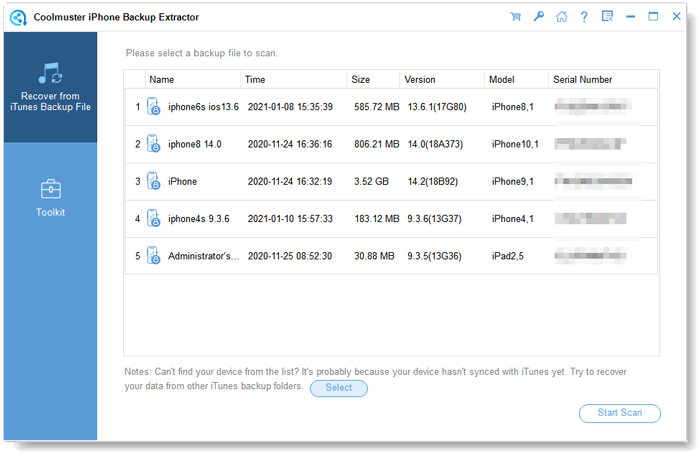
The backup list shows each record with date, size, iOS version and model (from the vendor manual).
You choose exactly which data types to scan
iPhone Backup Extractor splits data into two groups on the scan screen: contacts, messages and SMS attachments, which include deleted items, and a longer list of existing-only types such as call logs, notes, Safari bookmarks and history, calendars, voice memos, photos, albums and WhatsApp with attachments.
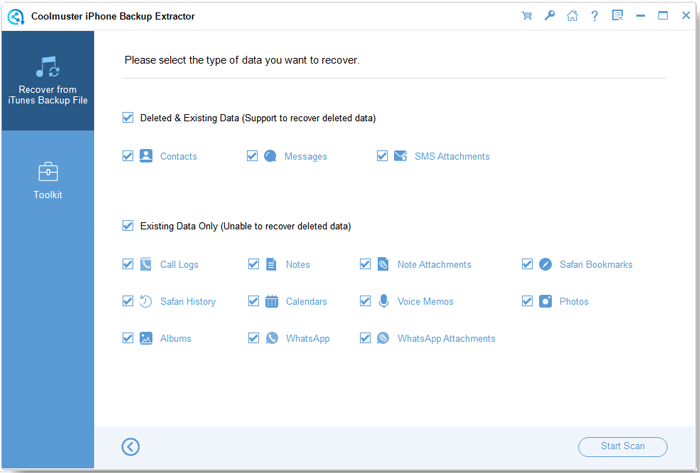
The scan screen separates data it can recover when deleted from data it can only export if it still exists in the backup.
Preview everything before you save it
iPhone Backup Extractor shows text items in tables and media as thumbnails, and an "Only display the deleted item(s)" switch filters the list down to deleted entries. Text is saved as readable HTML, and media keeps its original format and quality, according to the vendor.
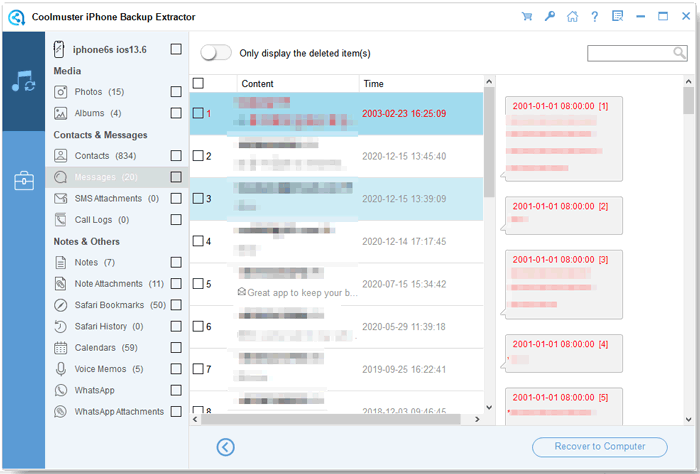
Message preview: deleted conversations appear in red, and the text shows in the right-hand pane.
Works without the phone and without iTunes open
iPhone Backup Extractor needs only the backup files. The iPhone can be lost, broken or sold, and the vendor says iTunes doesn't have to be running.
Benefits
- You get specific items back without the full restore that would overwrite the phone.
- A broken or lost iPhone stops being the end of the story if a PC backup exists.
- An old backup becomes a searchable archive of chats and contacts.
- It costs less than a tool that also scans phones and iCloud, which you don't need if the backup is all you have.
Real-World Uses
- Your iPhone was stolen and you need the contacts from last month's backup on the family PC.
- A court case or insurance claim needs an old text thread saved as a file you can print.
- You restored a new phone and later noticed one conversation didn't come across.
- You want photos from an old iPhone 6 backup without restoring that backup to anything.
Who It's For, and Who Should Skip It
It suits anyone who already has an iTunes backup on a Windows PC and wants a few things out of it. Buy it for that one job and it does the job at a low price.
Skip it if you only back up to iCloud, or never backed up at all: iPhone Data Recovery covers those cases better. Skip it too if you're hoping to get back photos that were deleted before the backup was made, since photos appear only as existing data. Mac users need the separate Mac edition.
Usage Guide
- Download and install the trial on the Windows PC that holds your iTunes backups, then launch it.
- Select the right backup from the list, or click Select to import one from another folder. Enter the password if it's encrypted.
- Tick the data types you want and click Start Scan.
- Browse by category on the left. Use the deleted-items switch if you only want deleted contacts or messages.
- Tick the items and click Recover to Computer, then choose a folder. This step needs a license.
Where it falls short
- Deleted items are limited to contacts, messages and SMS attachments. Everything else must still exist in the backup.
- It can't put data back on the iPhone. One customer on the vendor's site calls that "not very convenient".
- There's no iCloud or direct phone scan in this edition.
- One customer reports it didn't detect all backups. The Select button is the fallback, so point it at the backup folder by hand.
- Update history is slower than Coolmuster's other iPhone tools: the latest release notes are from December 2025.
What Users Say
Independent coverage of this product is thin and mostly old, so the quotes below are labeled by where they came from. Coolmuster runs a write-a-review-to-win-a-free-license promotion, so read the praise on its own site, and on small blogs, with that in mind.
On Coolmuster's product and review pages (89 reviews shown)
These appear on the vendor's own site.
"This software is cool. It helped me to recover data like photos, contacts, calendars, SMS, reminders, call history, and WhatsApp from my iTunes backup to my computer. I even can preview and choose the data I want before restoring. It just recovered data to a computer, so I needed to transfer them to my iPhone later. It's not very convenient."
Will Lee, vendor product page
"I only needed a few photos, so the preview-and-select feature was super handy."
Mark Wilson, September 4, 2026, vendor review page
"Found most contacts, but why didn't it detect all backups?"
David Miller, April 3, 2026, vendor review page
"My old backup finally became useful for something. Wish I'd found this tool sooner."
Ethan Parker, October 19, 2026, vendor review page
Technected (independent blog, January 28, 2015)
An old review from an earlier version of the program. The site doesn't mark it as sponsored and lists no drawbacks.
"With just one click you can recover lost files without having to compromise on the quality of the original files."
Editorial Team, Technected
Trustpilot, for the Coolmuster company overall
Coolmuster scores 4.6 out of 5 from 223 Trustpilot reviews, read through a page summarizer. Almost all are about customer support, not this product.
"Although the software did not meet me needs there support was responsive and prompt."
Chris Rotella, October 2, 2025, Trustpilot (excerpt)
The recurring themes are simple: people like the preview and selective export, and complain when a backup isn't found or when items come back only to the computer. We found no recent independent test of this version.
Comparisons
iPhone Backup Extractor vs Coolmuster iPhone Data Recovery
iPhone Data Recovery ($49.95 a year) adds direct scanning of the phone and iCloud backups on top of iTunes backup extraction, and is licensed for five devices. If your data exists only on a PC backup, Backup Extractor at $19.95 does the same extraction for much less.
iPhone Backup Extractor vs Coolmuster iPhone SMS + Contacts Recovery
SMS + Contacts Recovery ($35.95 a year) scans the phone directly but covers only contacts, messages and attachments. Backup Extractor reads more data types, but only from a computer backup.
iPhone Backup Extractor vs a full iTunes restore
A restore through iTunes or Finder is free, but it replaces everything on the phone. This tool costs money and doesn't touch the phone at all, which is the point.
Editions and Pricing
| Plan | Price | Term | Covers |
|---|
| 1 Year, 1 PC | $19.95 | 1 year, renews automatically | All features on 1 PC |
| Lifetime, 1 PC | $29.95 | One payment, lifetime updates | All features on 1 PC |
| 1 Year, 5 PCs | $29.95 | 1 year, renews automatically | 5 PCs |
| Lifetime, 5 PCs | $49.95 | One payment, lifetime updates | 5 PCs |
| 1 Year, 10 PCs | $39.95 | 1 year, renews automatically | 10 PCs |
| Lifetime, 10 PCs | $89.95 | One payment, lifetime updates | 10 PCs |
For a one-time rescue job the one-year plan is enough, but remember to cancel it. If you'd keep the tool around, the lifetime license costs only $10 more than a single year.
FAQs
Can Coolmuster iPhone Backup Extractor open an encrypted iTunes backup?
Yes. Coolmuster iPhone Backup Extractor asks for the backup password and then scans it normally, but it can't recover a forgotten password.
Does Coolmuster iPhone Backup Extractor work with iCloud backups?
No. Coolmuster iPhone Backup Extractor reads local iTunes backups only. iCloud backups need Coolmuster iPhone Data Recovery.
Can I recover deleted WhatsApp chats from an iPhone backup with this tool?
Coolmuster iPhone Backup Extractor lists WhatsApp under existing data only, so it exports chats that are still in the backup but doesn't promise deleted ones.
Does the iPhone Backup Extractor need the iPhone to be connected?
No. Coolmuster iPhone Backup Extractor works entirely from the backup files on the PC.
Can I get a refund on iPhone Backup Extractor if it doesn't find my data?
Don't count on it. Coolmuster's product page advertises a 30-day guarantee, but its refund policy puts iPhone Backup Extractor under a 7-day guarantee and says refund requests for recovery products will not be approved because of the nature of the software. Its advice is that if the trial can scan the data, the full version can recover it, so run the trial first.
How do I stop the iPhone Backup Extractor subscription from renewing?
Cancel the auto-renewal through the order system before the year ends. Coolmuster says 2Checkout emails a reminder seven days before renewal, and an automatic renewal charge is non-refundable.
System Requirements
- Windows 11, 10, 8 or 7 (a separate Mac edition exists)
- iOS 5 and later, up to iOS 27, for the backed-up device
- 750 MHz or faster CPU, 512 MB RAM
- 1 GB or more free disk space
Conclusion
Worth it if you have an iTunes backup and need specific things out of it. At $19.95, with a free scan that shows exactly what it can see, it's an easy buy for that one job.
The main reason not to buy is expecting more than backup extraction: it recovers deleted contacts and messages only, and it never sees your phone or your iCloud account.
Download Free Trial Buy Now