Coolmuster PDF Merger: Combine a Stack of PDFs into One File, Offline on Windows
Coolmuster PDF Merger is a $15.95-a-year Windows program that joins several PDF files into a single PDF on your own PC, with no upload and no Adobe Acrobat. It does one job: add files, tick the ones you want, pick a folder, click Start. Five-PC and ten-PC lifetime licenses are also sold.
You know the situation: a scanned contract in four parts, a month of invoices, chapter files from a co-author, and someone who wants "one PDF, please". Free web tools do this too, but they mean uploading the files to someone else's server, and that's exactly what you don't want with a contract or a payslip.
Quick facts
- Version: 3.3.1, released April 30, 2026 (added bookmark preservation during merging)
- Developer: Coolmuster
- Runs on: Windows 11, 10, 8 and 7. There's no Mac version
- Input and output: PDF in, one PDF out
- Price: $15.95 for one year on one PC, $9.95 for one month; lifetime from $35.95 for 5 PCs
- Guarantee: 30 days on the yearly and lifetime licenses, 7 days on the monthly one
- What we checked: the 57.6 MB installer from the vendor (file dated April 30, 2026, digitally signed by Shenzhen Qixingshi Technology Co., Ltd), version 3.3.1 in the vendor's release notes, checkout price $15.95 for the one-year plan and $25.95 for lifetime on November 11, 2026. We didn't run a merge ourselves; the workflow below comes from the vendor's manual and screenshots.
Before you buy
- It only merges. No page editing, no splitting, no conversion. Splitting is a separate product, Coolmuster PDF Splitter.
- The yearly and monthly licenses renew automatically, and Coolmuster's refund policy refuses refunds on automatic renewals. Cancel before the renewal date if you only need it once.
- Password-protected PDFs merge only after you type their password.
Download Free Trial Buy Now
Overview
The window is split in two. On the left is a file list with name, size, total pages, mode and date for every PDF you add, each with a checkbox. On the right is a page viewer with page-turn buttons, the output folder and a big Start button. Only the ticked files go into the merged PDF, so you can load a whole folder and leave a few out without deleting them from the list.
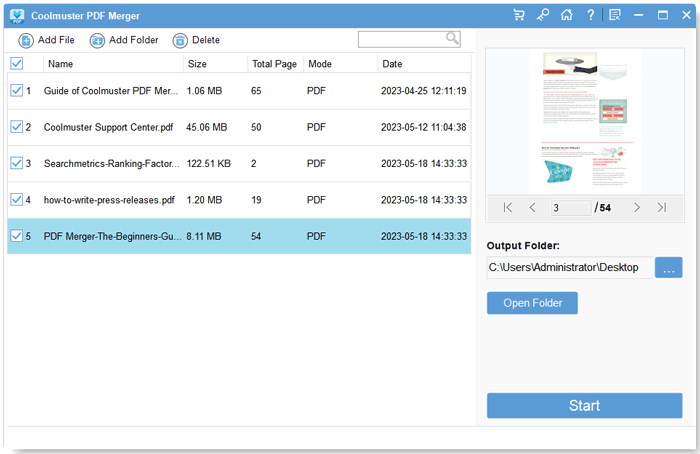
Five PDFs loaded, all ticked, with page 3 of a 54-page file in the viewer on the right.
Features
Merge any number of PDFs in one pass
Coolmuster PDF Merger has no fixed limit on how many files go into one merge; the vendor says only that very large or complex files depend on your PC's speed. Add files with Add File, a whole folder with Add Folder, or drag them onto the window, and the vendor says you can arrange them in the order you want before merging.
The original pages, links and bookmarks stay intact
Coolmuster PDF Merger copies pages as they are, so text, images, tables, hyperlinks and layout come through unchanged, according to the vendor. Version 3.3.1 added keeping bookmarks during the merge, which matters when you join chapters that each have their own outline.
A page viewer to check what you're joining
Coolmuster PDF Merger shows the selected file in a built-in viewer with first, previous, next and last page buttons and a page number box, so you can make sure "scan_04.pdf" really is the signature page before it lands in the middle of the contract.
Works on your PC alone
Coolmuster PDF Merger is a stand-alone desktop program. It doesn't need Acrobat or any other PDF software installed, and the files never leave your computer.
Benefits
- Private files stay private. Contracts, medical records and HR paperwork don't go to a web service.
- Less clicking for repeat jobs. Loading a folder and unticking a few files beats dragging twenty files into a browser tab one at a time.
- Nothing to learn. Three buttons across the top, one Start button. If you can attach a file to an email, you can use it.
Real-World Uses
- Month-end paperwork: drop a folder of 30 invoice PDFs in and produce one file for the accountant.
- Scanned documents: a scanner that saves each page as its own PDF leaves you with page_001 to page_012; merge them back into one document.
- Job applications: cover letter, CV, certificates and references as the single PDF an online form asks for.
- Course material: join lecture handouts or book chapters into one file for a tablet, keeping each chapter's bookmarks.
Who It's For, and Who Should Skip It
It's for Windows users who merge PDFs often enough to want a desktop tool, and who'd rather not upload documents to a website.
Skip it if you're on a Mac (macOS Preview already combines PDFs by dragging thumbnails), if you also need to delete, rotate, edit or reorder individual pages (a full PDF editor or a free toolkit like PDFsam Basic does more), or if you merge a PDF twice a year, when a browser tool for non-sensitive files is enough.
Usage Guide
- Install and open it. Run the downloaded installer and start Coolmuster PDF Merger from the desktop icon.
- Add the PDFs. Click Add File or Add Folder, or drag files onto the window.
- Pick and check. Tick the files to merge, untick the rest, and look through any file in the viewer on the right.
- Choose the output folder with the "..." button under Output Folder.
- Click Start. A Notice box shows progress, then Finished with a Show in folder button.
- Register the full version by clicking Register in the program and entering the licensed email and license code from your order email.
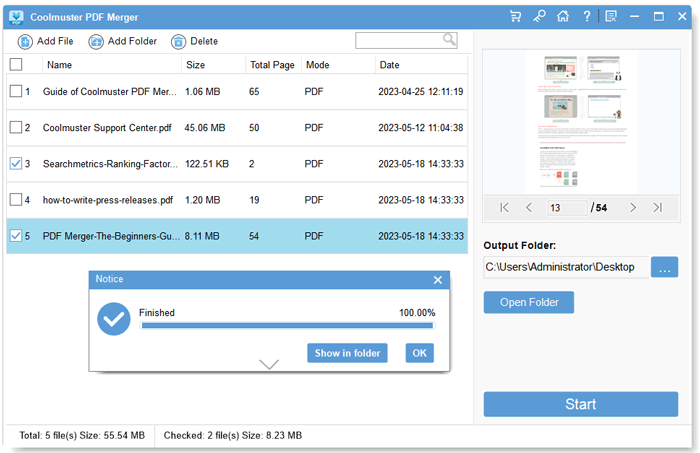
Two of five files ticked and merged: the Notice box reports Finished at 100% with Show in folder and OK buttons, and the status bar counts checked files and their size.
Where It Falls Short
- No page-level control in the window. The interface works with whole files. If you need pages 3 to 7 of one file and page 1 of another, you'll need a splitter or editor first.
- The trial is limited. Coolmuster doesn't publish the exact trial limits; one user on its review page wrote that the trial "only supports 3 items".
- A big download for a small job. The installer is 57.6 MB, large for a tool that does one thing.
- No page-level conversion or OCR. A scanned PDF stays a scanned image after merging; nothing becomes searchable text.
What Users Say
The user reviews of Coolmuster PDF Merger are the seven on Coolmuster's own review page, which the product page shows as 4.5 out of 5. Three of them, posted the same day in May 2023 under handles like "JaneDoe91", read like marketing copy, so the more specific ones are below.
From Coolmuster's review page
"Coolmuster PDF Merger is a lifesaver! Merging multiple PDFs into one file was quick and easy. The interface is straightforward, and I love that I can rearrange the order of the documents before merging."
Juggler, "Simple and Efficient", January 7, 2025
"Coolmuster PDF Merger helps me to combine multiple PDF documents into a single file with just a few clicks. ... The software supports merging a wide range of PDF formats without compromising the original quality of the files. Although its trial version only supports 3 items."
Logan Abbott, "It combines multiple PDF files into one.", June 12, 2023
"I need to check a lot of PDF files in my daily work. It's really inconvenient to check one by one. And this software helps me a lot. with its help, I can combine multiple PDF files into a single document."
Parul Mishra, "It's convenient to make multiple PDF files into one.", August 17, 2023
The themes are the ones you'd expect from a one-job tool: people like that it's quick and simple, and the only complaint in writing is the limited trial. There's no long-term record of bugs or support problems either way.
Comparisons
Coolmuster PDF Merger vs. online PDF mergers
Browser tools are free and need no install, but your files go to their servers and free tiers often cap file size or count. Coolmuster PDF Merger costs money and only runs on Windows, and in return the files stay on your PC and there's no upload wait for large scans.
Coolmuster PDF Merger vs. Coolmuster PDF Splitter
They're mirror images at the same price: the Merger joins files, the Splitter cuts them apart by page count, into equal parts or by page range. If you need both, you buy both; neither does the other's job.
Editions and Pricing
There's one edition. You choose the term and the number of PCs; prices are on the order page on November 11, 2026, before tax.
| License term | 1 PC | 5 PCs | 10 PCs |
|---|
| 1 month (auto-renews) | $9.95 | $19.95 | $29.95 |
| 1 year (auto-renews) | $15.95 | $25.95 | $35.95 |
| Lifetime | $25.95 | $35.95 | $45.95 |
For a single PC, the yearly plan is the one to buy. The one-PC lifetime license ($25.95 at checkout) isn't offered on Coolmuster's own order page, where one-PC buyers choose the monthly or yearly plan and lifetime appears only for 5 or 10 PCs. If you take the yearly plan for a one-off job, cancel the renewal afterwards.
FAQs
Can Coolmuster PDF Merger merge password-protected PDFs?
Coolmuster PDF Merger can merge a password-protected PDF once you enter its password. It doesn't remove or crack passwords you don't have.
Does Coolmuster PDF Merger work on a Mac?
Coolmuster PDF Merger is Windows-only (11, 10, 8 and 7). On a Mac, Preview's sidebar can combine PDFs without extra software.
Do I get updates with the one-year license?
Coolmuster PDF Merger updates are free while the license is valid; the program's "Check for Updates" menu installs them, and the same license code keeps working on the new version.
Can I get a refund if it doesn't suit me?
Coolmuster PDF Merger has a 30-day money-back guarantee on yearly and lifetime licenses and 7 days on monthly ones, but only for set reasons such as a technical problem support can't fix or features that don't match the product page. Change of mind and automatic renewals aren't refunded.
Can I edit pages or add a cover page with it?
Coolmuster PDF Merger doesn't edit content. You can add a cover page by saving it as its own PDF and merging it first, but changing text or images needs a PDF editor.
How do I get the license after buying?
Coolmuster PDF Merger license codes arrive by email within minutes of the order. You register the trial you already installed with the licensed email and code, then restart it.
System Requirements
- Windows 11, 10, 8 or 7
- Intel or AMD processor above 750 MHz
- 512 MB of RAM or more
- 1 GB of free disk space
Conclusion
Coolmuster PDF Merger is worth it for one kind of buyer: someone on Windows who merges PDFs regularly and wants it done locally, in three clicks, with bookmarks kept. At $15.95 a year it's cheap, but cancel the renewal if you only need it once. The reason to pass is its narrowness: if you also need to pick pages, rotate, edit or split, a fuller PDF tool gives you more for similar money, and occasional mergers of non-sensitive files can stick with free tools.
Download Free Trial Buy Now