Systweak PDF Editor Pro: An Offline PDF Editor for Windows
Systweak PDF Editor Pro is a Windows PDF editor that edits, converts, OCRs, merges, compares, signs and password-protects PDF files entirely on your PC, for $48.96 a year with the 30% code applied at checkout, or $69.96 once for a lifetime license. It's aimed at home and office users who handle contracts, invoices, forms and scans, want the everyday Acrobat-style tools, and don't want to upload their documents to an online converter.
The typical moment: a client sends a scanned contract you need to fix, a form you need to sign, and a 40 MB PDF your e-mail won't accept. Online tools would do each job, but that means sending private files to someone else's server. Systweak PDF Editor does all three on your own machine.
Quick facts
- Developer: Systweak Software (Jaipur, India)
- Version: 1.0.0.11389
- Platform: Windows 11, 10, 8.1, 8 and 7 SP1 (32-bit and 64-bit). Systweak also has separate Mac, Android and iOS apps.
- Price: Yearly Plan $69.95, or $48.96 a year with code 30per-glb (applied automatically by our Buy button), renewing automatically. Lifetime Plan $99.95, or $69.96 with the same code.
- Free trial: 7 days; merging is limited to 3 files and conversion to the first 3 pages, and text editing, OCR and batch processing need the Pro version
- Works offline: documents are processed on your PC and not uploaded
- Guarantee: 60-day money-back guarantee
- Installer: 47.2 MB, digitally signed by Systweak Software
- What we checked: installer version 1.0.0.11389 (47.2 MB, valid Systweak signature) downloaded from the vendor on November 19, 2026, and order page prices of $69.95 a year ($48.96 with code 30per-glb, renewing at $48.96) and $99.95 lifetime ($69.96 with the code) on November 19, 2026. We didn't test OCR accuracy or conversion quality on our own documents.
Before you buy
- The yearly plan renews automatically at the discounted $48.96. Systweak e-mails you before the renewal and lets you cancel at any time through support@systweak.com. If you'll use it for years, the lifetime plan pays for itself in about a year and a half.
- The code is part of the link. Our Buy buttons open the order page with 30per-glb already applied; if you see $69.95 or $99.95 without a discount line, the code didn't load.
- Windows only. This license covers the Windows program. The Mac, Android and iOS apps are sold separately.
- Systweak's reputation with security tools is mixed. Malwarebytes classifies a family of Systweak programs as potentially unwanted (PUP.Optional.Systweak), a detection that started with the RegClean Pro registry cleaner (Malwarebytes detection page). The PDF editor is a different kind of product and the installer we downloaded carries a valid Systweak signature, but some security tools look harder at Systweak software.
Download Free TrialBuy Yearly Plan ($48.96)Buy Lifetime Plan ($69.96)
Overview
Systweak PDF Editor uses a ribbon layout that will feel familiar from Office: tabs for Edit, Comment, Convert, View, Page, Secure, Forms and Tools, a page thumbnail panel on the left, and dialogs for the bigger jobs such as merging, batch converting and comparing. It opens PDFs for reading as well as editing, with single-page, scrolling, fit-width and side-by-side views.
The selling point Systweak leans on is that everything happens offline. Conversion, OCR, compression, signing and redaction all run on your PC, so a bank statement or an HR file never leaves it. That's the main difference from the free web converters most people try first.

The Batch Convert dialog with a list of PDFs, page counts and sizes, the output format set to Word, and the Convert To Word button.
Features
Edit text and images in place
Systweak PDF Editor lets you change existing text and images while keeping the original font, size and color, add new text, images, callouts and watermarks, and use search and replace for quick fixes. After OCR, it can also edit text in scanned documents. Headers, footers, backgrounds and page cropping are in the Page tools.
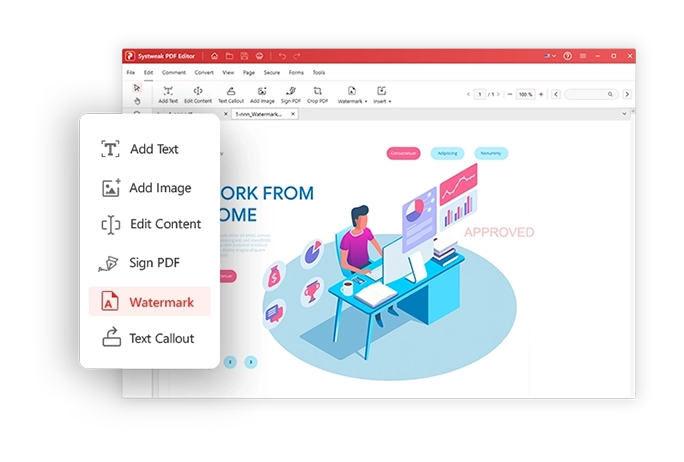
The Edit tools: Add Text, Add Image, Edit Content, Sign PDF, Watermark and Text Callout, shown over an open document.
Convert to and from Office formats
Systweak PDF Editor converts PDFs to Word, Excel, PowerPoint, JPG and PNG, HTML, EPUB, SVG and PDF/A, and creates PDFs from Office files, images, text files, web pages, CAD files and e-books. It can also scan paper straight to PDF from a connected scanner. Conversions run in batches: drop a folder in, pick the output format and folder, and convert them all.
OCR for scanned documents
Systweak PDF Editor's OCR turns scanned PDFs and images into searchable, selectable text, or into editable Word, Excel and PowerPoint files. You can OCR a whole folder at once, choose page ranges, and pick a speed or accuracy mode; it detects page orientation and tries to keep tables and formatting.
Merge, split and organize pages
Systweak PDF Editor combines several PDFs (or chosen pages from each) into one file in the order you set, splits large files, extracts pages, and lets you drag pages into a new order, rotate, duplicate, insert, replace and delete them. It also repairs damaged PDF files.
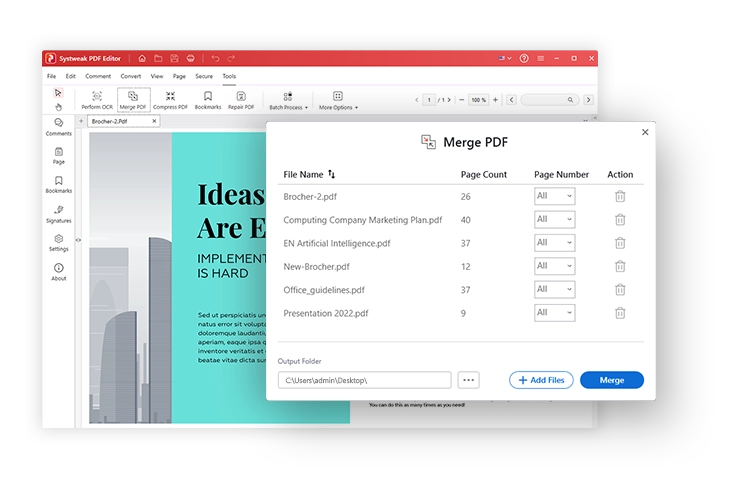
The Merge PDF dialog: six files with their page counts, a page-range choice for each, the output folder and the Merge button.
Compare two versions of a document
Systweak PDF Editor's Compare tool sets an old and a new PDF side by side and color-codes inserted, deleted and replaced content. It offers a content comparison and an overlay comparison, and you can compare all pages, odd or even pages, or a page range, which helps when a contract comes back "with a few small changes".
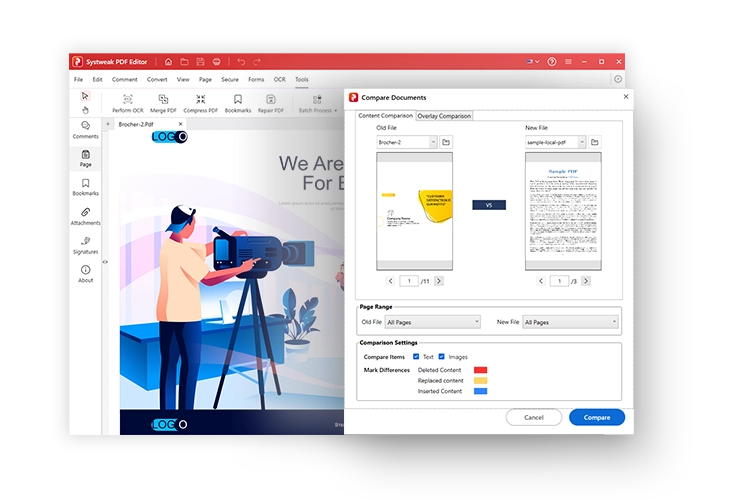
Compare Documents: old and new file side by side, the page range settings, and the colors used for deleted, replaced and inserted content.
Sign, protect and redact
Systweak PDF Editor adds drawn, typed or image signatures and certificate-based digital signatures (.pfx and .p12 files or the Windows Certificate Store), with options to restrict changes after signing. It encrypts files with user and owner passwords, controls printing, copying and editing permissions, removes metadata, and permanently redacts marked text or areas, including search-based redaction for removing every instance of a name or account number.
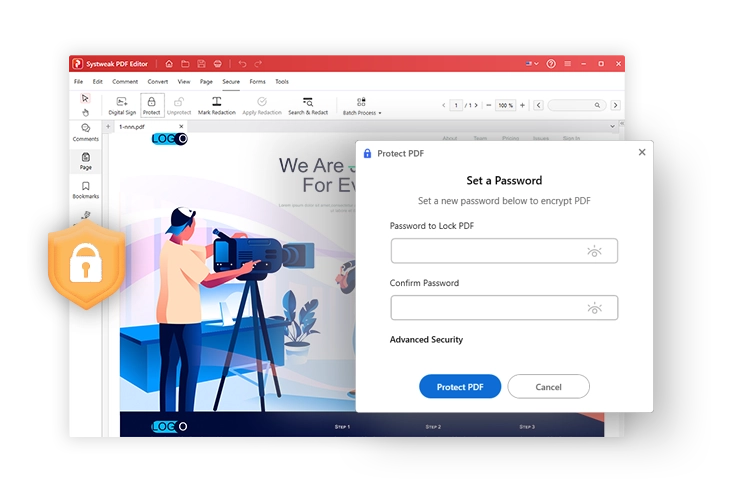
The Protect PDF dialog for setting and confirming a password, with the Advanced Security options link.
Compress and annotate
Systweak PDF Editor compresses files at high, medium or low settings (or image-based compression for scan-heavy files), one at a time or whole folders including subfolders. For review work, it highlights, underlines and strikes out text, adds notes, shapes, freehand lines and stamps, and fills in PDF forms.
Benefits
- Private by default. Nothing is uploaded, which matters for financial, legal, medical and HR documents.
- One program instead of five web tools. Converting, merging, compressing, signing and protecting all happen in the same window with the same file.
- Batch work saves real time. Converting, compressing or OCR-ing a folder of 50 files is one job, not 50.
- No subscription required. The lifetime plan is a single payment, so you can stop paying for a PDF tool altogether.
Real-World Uses
- Fixing a typo in a signed-off PDF. Edit the line in place instead of hunting for the original Word file.
- Turning scanned receipts into a searchable archive. Batch OCR a folder of scans so you can search them by vendor or amount.
- Sending a large report by e-mail. Compress it at medium quality to get under the attachment limit.
- Checking a returned contract. Compare the version you sent with the one that came back to see every edit highlighted.
- Sharing a statement safely. Redact account numbers, then password-protect the file before sending it.
Who It's For, and Who Should Skip It
It's for Windows users who edit, convert and sign PDFs every week, small offices that don't want documents passing through web services, and anyone who wants Acrobat-style tools without Adobe's monthly fee.
Skip it if you only read and occasionally sign PDFs: the free readers already do that. Skip it if you need to share one license between a Windows PC and a Mac, if your organization requires Acrobat for compatibility with its workflows, or if you need advanced prepress or accessibility tagging tools, which it doesn't advertise.
Usage Guide
- Download the installer, run it, and follow the setup wizard. The trial starts on first launch and runs for 7 days.
- To register, enter the license key from your order e-mail in the program (an internet connection is needed to activate).
- Open a PDF from the File menu or by dragging it into the window. Use the Edit tab to change text and images, or the Comment tab to annotate.
- For multi-file jobs (merge, batch convert, compress, OCR), open the tool from its tab, add files or folders, choose the output folder and settings, and run it.
- Before sending a sensitive file, use the Secure tab to redact, set a password and permissions, or sign it with a certificate.
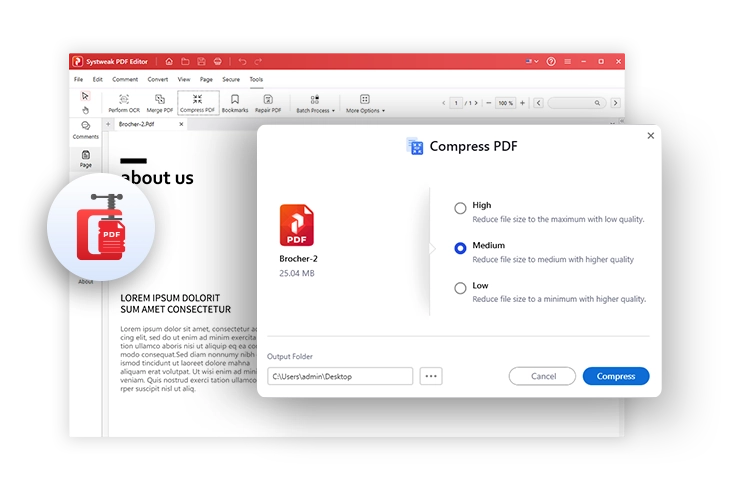
The Compress PDF dialog with High, Medium and Low settings and the output folder.
Where it falls short
- The trial isn't the full program. Systweak calls it "7 days fully functional", but its own comparison table limits merging to 3 files and conversion to the first 3 pages, and keeps text editing, OCR, digital signatures and batch processing for the Pro version. Test conversion quality on a short file.
- Little independent testing. Most published reviews are short user ratings; we found no lab-style test of its OCR or Word conversion accuracy against Acrobat or ABBYY.
- Billing complaints follow the company. Systweak's Trustpilot profile includes one-star reviews about renewals and being asked to pay again after buying. Keep your order e-mail and license key.
- Separate licenses per platform. The Windows license doesn't cover the Mac or mobile apps.
What Users Say
Trustpilot: praise for the PDF editor
Systweak's company profile on Trustpilot has a TrustScore of 3.9 from 279 reviews, covering all its products. The PDF editor reviews there are mostly positive:
Dishank Sharma, 5 stars, February 2024, "Systweak PDF Editor is a GEM": "Recently used Systweak PDF Editor to edit and recreate a resume using a template and it works like a gem."
This Is Nitin., 5 stars, October 2025, "Works well and easy to use UI": "I brought systweak pdf editor by systweak software for business purposes and it does the job nicely."
David Morrison, 5 stars, October 2024, "Systweak PDF Editor - makes changes to pdf": "It was a wonderful idea to purchase Systweak PDF Editor and make multiple changes on my PDF"
Ankit, 5 stars, April 2025, "PDF converting is easy now": "I discovered that Systweak PDF Editor is a great tool for handling all my PDF-related tasks."
Ritesh Pawar, 5 stars, January 2026, "Fantastic Systweak PDF Editor": "The remote admin tool is special for us so we can transfer licenses in and out easily"
Trustpilot: the complaints
About a quarter of Systweak's Trustpilot reviews are one-star, and they center on billing and support rather than on the PDF tools:
Jens Rasmussen, 1 star, March 2024: "I just paid for it and when i try to use it you want me to pay thesame amount AGEN ..."
Brian Ponder, 2 stars, July 2026, "Mediocre Software with Deceptive Subscription Practices": "I was secretly enrolled in an automatic annual subscription that charged me a year later without my consent."
John Scoggins, 1 star, February 2026, "Systweak’s “Support” Is Just Cancellation Disguised as Help": "The moment you raise a real issue, they won't fix it—they'll just cancel you and call it a resolution."
Other sites
On Product Hunt, its single review (5.0) calls it "an excellent all-in-one solution for managing PDFs efficiently" and asks for "more advanced OCR accuracy for scanned PDFs". Techjockey shows 4.3 out of 5 from one video review.
The pattern: people who use it for everyday editing, conversion and resumes are happy with how easy it is. Requests for better OCR accuracy and the billing complaints aimed at Systweak as a company are the recurring negatives. The volume of independent reviews is small for a product Systweak says is "trusted by millions".
Comparisons
Systweak PDF Editor vs Adobe Acrobat Pro
Acrobat Pro is the reference: the most compatible editing, forms, accessibility and cloud workflows, sold only as a subscription. Systweak PDF Editor covers the common jobs (edit, convert, OCR, merge, compare, sign, redact) offline, with a one-time lifetime option. If you need what Acrobat is known for in large organizations, stay with Acrobat; for personal and small-office work, Systweak costs far less.
Systweak PDF Editor vs free online converters
Free web tools convert or compress one file at a time and need an upload. Systweak PDF Editor does the same jobs in batches without your files leaving the PC, and adds editing, redaction and certificate signatures. For a one-off conversion of a non-sensitive file, a web tool is fine.
Editions and Pricing
| Plan | List price | With code 30per-glb | Term |
|---|
| Free trial | $0 | - | 7 days, limited merging and conversion |
| Yearly Plan | $69.95 | $48.96 | 1 year, renews automatically at $48.96 |
| Lifetime Plan | $99.95 | $69.96 | One-time payment |
Both plans include the same features; only the billing differs. Sales tax is added at checkout in some countries.
Buy Yearly Plan ($48.96)Buy Lifetime Plan ($69.96)
FAQs
Does Systweak PDF Editor upload my files?
No. Systweak PDF Editor processes PDFs on your computer, including conversion, OCR, signing and redaction, and doesn't upload or store your files online. It needs the internet only to download, activate and update.
Should I buy the Yearly or the Lifetime plan?
Systweak PDF Editor's Lifetime plan costs $69.96 once with the code, against $48.96 a year for the Yearly plan, so lifetime is cheaper from the second year on. Choose the yearly plan only if you need it for a single project.
Can Systweak PDF Editor convert a scanned PDF to Word?
Yes. Systweak PDF Editor runs OCR on the scan and can output an editable Word, Excel or PowerPoint file or a searchable PDF. OCR is a Pro feature, so the trial won't show it fully.
Can I sign a PDF with my digital certificate?
Yes. Systweak PDF Editor signs with certificate files (.pfx, .p12) or certificates from the Windows Certificate Store, and can lock the document against changes after signing. It also supports drawn, typed and image signatures.
Does the license work on my Mac?
No. This Systweak PDF Editor license is for the Windows program. Systweak sells the Mac version and the Android and iOS apps separately.
How do I get a refund for Systweak PDF Editor?
Systweak PDF Editor has a 60-day money-back guarantee. E-mail support@systweak.com with your name, order number, product name, purchase date and e-mail address; the refund reaches your payment method in 5-7 business days after it's processed.
Does Systweak PDF Editor run on Windows 7?
Yes. Systweak PDF Editor supports Windows 7 SP1 as well as Windows 8, 8.1, 10 and 11, in both 32-bit and 64-bit editions.
System Requirements
- Windows 11, 10, 8.1, 8 or 7 SP1 (32-bit or 64-bit)
- About 50 MB for the installer download, plus space for the installed program
- Internet connection to download, activate and update
Conclusion
Systweak PDF Editor Pro is a good buy for Windows users who want the everyday Acrobat jobs (editing, conversion, OCR, merging, comparing, signing and redaction) offline and without a monthly bill. The lifetime plan at $69.96 with the code is the better value for anyone who works with PDFs regularly. The reasons to hesitate are the thin independent testing of its OCR and conversion quality and Systweak's billing complaints, so use the trial on a short document first and keep your order details.
Download Free TrialBuy Yearly Plan ($48.96)Buy Lifetime Plan ($69.96)