Advanced Disk Recovery: Simple Undelete for Windows Drives, USB Sticks and Memory Cards
Advanced Disk Recovery is a Windows data recovery tool from Systweak Software that finds deleted, emptied-from-the-Recycle-Bin and formatted files on hard drives, SSDs, USB drives and memory cards, with a quick MFT scan and a slower sector-by-sector Deep Scan. It runs on Windows 11 back to XP and costs $39.95 a year for one PC on the order page, renewing automatically; the free trial recovers up to 5 files.
The moment you realize a folder of photos is gone, the most important thing is to stop writing to that drive. The second is a tool that can read what's still there before it's overwritten. Advanced Disk Recovery is one of the simpler options: a five-step wizard that ends in a list of deleted files you tick and restore.
Quick facts
- Developer: Systweak Software, Jaipur, India
- Latest version: 2.9.1300.18693 (installer dated August 1, 2025)
- Platform: Windows 11, 10, 8.1, 8, 7, Vista and XP, 32-bit and 64-bit
- Supports: internal hard drives and SSDs, USB drives, external disks, memory cards, CD/DVD and partitions; NTFS and FAT file systems
- Price: $39.95 per year for one PC (Systweak lists $69.95 as the regular price)
- License: one-year subscription that renews automatically every 12 months
- Free trial: scans and recovers up to 5 deleted files
- Guarantee: 60-day money-back guarantee
- What we checked: the installer from cdn.systweak.com (6.3 MB, file version 2.9.1300.18693, digitally signed by Systweak Software), the feature and trial details on systweak.com, and the order page price of $39.95 with automatic yearly renewal on November 19, 2026. We didn't run a recovery on a test drive.
Before you buy
- Scan first, pay later. Run the free scan on the affected drive. If your files show up in the results with their real names and sizes, the license is worth considering; if they don't, a license won't change that.
- Don't install it on the drive you're recovering. Installing or saving recovered files to the same drive can overwrite exactly the data you're after. Use another drive or a USB stick.
- It's a subscription. Most people need recovery once, but the license renews every 12 months. If you only need it once, cancel the renewal by emailing support@systweak.com after your recovery.
- The "today only" price isn't. Systweak's price page says the $39.95 offer ends the next day, every day.
Download Free TrialBuy Now ($39.95/year)
Overview
Advanced Disk Recovery is built as a wizard with five steps down the left side: Welcome, Scanning, Scan Results, Recover and Finish. On the Welcome screen you choose what to scan (Hard Drive, CD/DVD, Removable or Partitions) and which drive, then click Start Scan Now. A dialog asks for the scan type, and the results come back as a file tree with each file's name, extension, location, size and last-modified date.
It's a compact program, a 6.3 MB installer, and the interface hasn't changed much in years. That simplicity is its appeal for people who just want their files back and don't want to learn partition tables.

The Welcome step (version 2.8 shown): choose Hard Drive, CD/DVD, Removable or Partitions, pick the drive, and start the scan.
Features
Quick Scan and Deep Scan
Advanced Disk Recovery's Quick Scan reads the NTFS Master File Table, where Windows keeps a record of every file, so recently deleted files come back with their names and folders in about a minute. Deep Scan searches the whole disk sector by sector and recognizes files by their signatures, which finds older deletions and files on formatted drives but takes much longer and may not recover original file names.

The scan type dialog: Quick Scan uses the MFT, Deep Scan performs a sector-wide search for deleted files.
Internal and external drives, cards and partitions
Advanced Disk Recovery scans internal hard drives and SSDs, USB flash drives, external hard disks, camera memory cards, CDs and DVDs, and individual partitions. It works with NTFS and FAT file systems and recovers photos, video, audio, documents and other file types.
Filters and preview
Advanced Disk Recovery's results can be filtered by time, file size and empty files, which matters when a scan turns up thousands of deleted items. You can preview a found file before restoring it, and the Recover step saves the selected files to a location you choose, which should be a different drive from the one scanned.

Scan results on a 223 GB system drive: 8,387 deleted files, shown as a folder tree with size and last-modified date, and Filter Options, Preview and Recover buttons.
Benefits
- Easy to follow under stress. The five-step wizard keeps you on track when you're worried about lost files.
- A free look before paying. The scan is free, so you see what's recoverable first, and up to 5 files can be restored without a license.
- Light and old-PC friendly. A small installer that still supports Windows 7, Vista and XP, useful for rescuing data from an old machine.
Real-World Uses
- An emptied Recycle Bin. A Quick Scan of the drive usually lists recently deleted documents with their original names.
- A camera card formatted by mistake. Put the card in a reader and run Deep Scan on it as a removable drive.
- Files lost from a USB stick. Removable drives get no Recycle Bin, so a deletion there goes straight to a recovery tool like this.
- A handful of files. If you need only one to five files back, the free trial may be all you need.
Who It's For, and Who Should Skip It
Advanced Disk Recovery suits home users who deleted something by accident and want a simple, guided way to get it back from a Windows PC, USB stick or memory card.
Skip it for anything more serious: a drive that clicks, isn't detected or has bad sectors needs a professional service or a tool that images the disk first, and failed RAID arrays, NAS boxes, Linux and Mac file systems (ext4, APFS, HFS+) are outside what Systweak lists. Skip it, too, if a yearly subscription for a one-time job bothers you; several recovery tools sell lifetime licenses. And it doesn't run on a Mac.
Usage Guide
- Stop using the drive that lost the files. Download the installer with the Download button on a different drive (or another PC) and install it there.
- Launch Advanced Disk Recovery. Choose Hard Drive, Removable, CD/DVD or Partitions, select the drive, and click Start Scan Now.
- Pick Quick Scan for recent deletions. If your files don't appear, run Deep Scan, which can take a long time on a large drive.
- In Scan Results, use Filter Options to narrow the list by date or size, and Preview the files you want.
- Tick the files, click Recover, and save them to a different drive from the one you scanned.
- To recover more than 5 files, register with the key from your order email and run the recovery again.
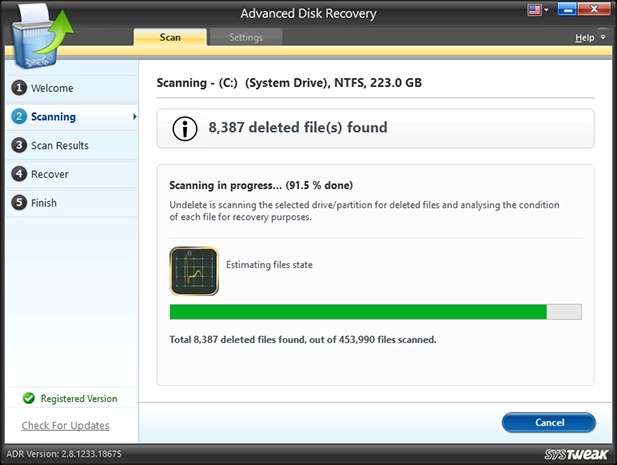
Scanning in progress at 91.5%: 8,387 deleted files found among 453,990 files scanned.
Where it falls short
- Large files. In TechRadar's 2021 test, it "certainly struggles to recover large files, to the point of causing the system to hang."
- Hot-plugged drives. The same test found an external drive plugged in while the program was running stayed undetected; connect the drive before you launch it.
- Overwritten files can't come back. A file listed in the results may already be partly overwritten. One Trustpilot reviewer paid and was then told the file had been overwritten; preview before you buy whenever you can.
- Slow development. The current build dates from August 2025 and the interface looks as it did a decade ago. TechRadar called it "software intended for an older operating system."
- SSDs with TRIM. On most modern SSDs, Windows erases deleted blocks soon after deletion, so no recovery tool gets much back from an internal SSD after a while.
What Users Say
The one detailed independent review is critical; user reviews on Trustpilot are mostly happy recoveries of photos and documents, with a few billing complaints.
TechRadar
Christian Cawley reviewed Advanced Disk Recovery in June 2021. His pros: "Easy to use" and "Plenty of filter options". His cons: "Looks and performs like software intended for an older operating system" and "Preview doesn't work on the free version".
On speed: "The standard scan completed within a minute, whereas the "Deep Scan" lasted around 10 minutes." On the free version: "both preview and recovery options do not work in the evaluation version." (Systweak's current feature table says the free trial recovers up to 5 files.)
His verdict was blunt: "A disappointing tool that seems to have been produced for Windows 7 and has outstayed its welcome."
Trustpilot: positive
Systweak's company page had a TrustScore of 3.9 from 279 reviews in November 2026 (65% 5-star, 24% 1-star), covering all its products. Reviews that mention Advanced Disk Recovery or recovering deleted files:
- Komal Mangal (5 stars, October 2026): "Advance Disk Recovery is helpful when looking for other lost or deleted files."
- Komal Mangal (5 stars, December 2025): "it successfully recovered files that were accidentally deleted and not available in the recycle bin."
- This Is Nitin. (5 stars, August 2023), "It's worth the money you pay.": "I found this software Advanced Disk Recovery from Systweak software and voila, My photos are back."
- Charlene Shumaker (5 stars, October 2022): "The program works great at recovering lost photos and even recovers them in a large size"
- Srishti Sisodia (5 stars, August 2019), "Systweak Advanced Disk Recovery Did A Wonderful Job": "The tool did a wonderful job and recovered all the lost pictures."
Trustpilot: critical
- Dhiraj (1 star, February 2021), "Unhappy with product of Systweak Software": "Once I paid, your software told me that the file has been overwritten."
- Carl Ryton (1 star, December 2024): "Does not work at all just scans and charges my bank account over and over."
- Mike van Vlerken (1 star, October 2025): "Payment done, no key or reply to email."
Recurring themes
Users who got their photos and documents back found it easy and quick. The complaints are about files that turned out to be overwritten after paying, a dated program that struggles with big files, and Systweak's billing and key delivery. Scanning before buying and keeping the 60-day refund in mind covers most of the risk.
Comparisons
Advanced Disk Recovery vs Advanced System Optimizer's Undelete
Systweak's Advanced System Optimizer ($49.95 a year) includes an Undelete tool for internal and removable drives along with 24 cleanup and maintenance tools. Advanced Disk Recovery is the dedicated recovery program, with the Quick/Deep Scan choice and filters, for $10 less.
Advanced Disk Recovery vs free recovery tools
Free tools such as Recuva and the open-source PhotoRec also undelete files from Windows drives and cards. Advanced Disk Recovery's advantages are its guided wizard and support from Systweak; the free tools cost nothing and are worth trying first if you're comfortable with a more technical interface.
Editions and Pricing
| Edition |
Price on the order page |
Term |
Recovery |
| Free trial |
$0 |
Scanning included |
Up to 5 files |
| Registered, 1 PC |
$39.95 per year (regular $69.95) |
1 year, renews automatically |
Unlimited files and data, priority email support |
Sales tax may be added at checkout depending on where you live. Systweak refunds purchases within 60 days.
FAQs
Can Advanced Disk Recovery recover files deleted from the Recycle Bin?
Yes. Advanced Disk Recovery is built for files emptied from the Recycle Bin or deleted with Shift+Delete, as long as the space they used hasn't been overwritten by new data.
Does Advanced Disk Recovery work on SD cards and USB drives?
Yes. Advanced Disk Recovery scans removable drives, including USB flash drives, external hard disks and camera memory cards. Connect the device before you launch the program.
How long does an Advanced Disk Recovery scan take?
An Advanced Disk Recovery Quick Scan of a system drive usually takes about a minute. A Deep Scan reads the whole disk and can take from minutes to hours depending on the drive's size and speed.
Do I need to keep paying for Advanced Disk Recovery after I recover my files?
No. The Advanced Disk Recovery license renews every year unless you cancel; if you only needed one recovery, email support@systweak.com to stop the renewal.
Can Advanced Disk Recovery fix a drive that isn't detected?
No. Advanced Disk Recovery reads drives that Windows can see. A drive that isn't detected, clicks or shows hardware errors needs professional data recovery; running software on it can make things worse.
Is there a Mac version of Advanced Disk Recovery?
No. Advanced Disk Recovery is Windows only.
What if Advanced Disk Recovery doesn't get my files back?
Systweak offers a full refund within 60 days of purchase. Open a ticket at systweak.com/contact-us with your order number, purchase date and email address.
System Requirements
- Windows 11, 10, 8.1, 8, 7, Vista or XP, 32-bit or 64-bit
- About 7 MB for the installer
- A second drive, partition or USB stick to save recovered files to
Conclusion
Advanced Disk Recovery is a basic, easy undelete tool for Windows. Its best case is the common one: you emptied the Recycle Bin or wiped a USB stick or memory card and want the files back without a learning curve, and the free scan shows them before you pay. The main reasons not to buy are its age and TechRadar's poor results with large files, and a yearly subscription for what is usually a one-time job. Run the free scan; if your files appear and preview correctly, $39.95 is a fair price for getting them back, and remember to cancel the renewal afterwards if you won't need it again.
Download Free TrialBuy Now ($39.95/year)