Duplicate Photos Fixer Pro: Find and Delete Duplicate and Similar Photos on Windows
Duplicate Photos Fixer Pro is a $39.95-a-year Windows tool from Systweak Software that finds exact copies and near-identical shots in your photo folders, external drives, Dropbox, Google Drive, Lightroom Classic and Picasa libraries, then marks the extra copies for deletion by rules you choose. It suits anyone whose picture library has grown through phone backups, camera imports and copied folders, and who wants the clutter gone without comparing thousands of files by hand.
The usual story: you imported the same SD card twice, your phone backed up to two places, and every burst shot left eight versions of the same moment. Windows can't tell you which files are the same picture. Duplicate Photos Fixer Pro compares the images themselves, not just file names, so it also catches resized, re-saved, rotated and flipped copies.
Quick facts
- Developer: Systweak Software (Jaipur, India)
- Version: 1.3.1086.2815
- Platform: Windows 11, 10, 8.1, 8 and 7 (32-bit and 64-bit). Systweak also sells separate Mac, iOS and Android apps.
- Price: $39.95 per year for one PC, renewing automatically each year (sales tax added for some countries)
- Free trial: scans everything, but deletes only 15 duplicates
- Scan sources: PC folders, external and removable drives, Dropbox, Google Drive, Lightroom Classic, Picasa, and Systweak's Photo Organizer
- Guarantee: 60-day money-back guarantee
- Installer: 14.8 MB, digitally signed by Systweak Software
- What we checked: installer version 1.3.1086.2815 (14.8 MB, valid Systweak signature) downloaded from the vendor on November 19, 2026, and the order page price of $39.95 per year with automatic renewal on November 19, 2026. We didn't run a full cleanup of a real photo library.
Before you buy
- It's a subscription. The $39.95 license lasts one year and renews automatically at the same price. Systweak says it emails you before each renewal, and you cancel by writing to support@systweak.com. Several Trustpilot complaints are about renewals people didn't expect, so note the date.
- The order page adds extras. It includes a free copy of Systweak Photo Organizer and offers Duplicate Files Fixer for $9.99 more. You can leave the add-on unticked.
- Refunds go through support. The 60-day guarantee is handled by email with your order number; refunds take 5-7 business days once approved.
- Systweak's reputation with security tools is mixed. Malwarebytes classifies a family of Systweak programs as potentially unwanted (PUP.Optional.Systweak), a detection that started with the RegClean Pro registry cleaner (Malwarebytes detection page). Duplicate Photos Fixer Pro is a different kind of tool, and the installer we downloaded carries a valid Systweak signature, but if you run Malwarebytes, expect it to look closely at Systweak software.
Download Free TrialBuy Now
Overview
Duplicate Photos Fixer Pro works in three steps: add the folders or sources you want checked, pick a comparison method, and press Scan for Duplicates. The results come back in groups, one group per picture, with a large preview and the file's metadata beside it. You can mark the copies yourself, or let Auto Mark pick them using the rules in the Selection Assistant, then press Delete Marked.
There are two comparison methods. Exact Match finds files that are the same picture, byte for byte or near enough. Similar Match finds shots that look alike, such as a burst sequence or the same scene taken seconds apart, and you tune it with sliders for matching level, bitmap size, time interval and GPS distance.
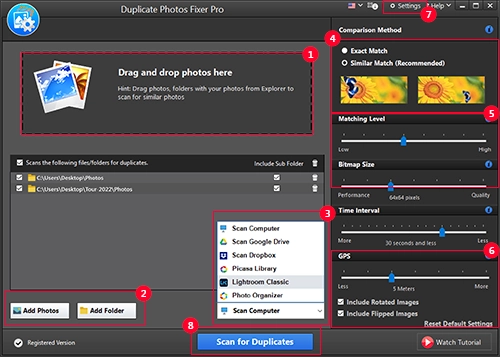
The main window, with numbered callouts from Systweak's guide: the drop area, Add Photos and Add Folder, the scan source menu (Computer, Google Drive, Dropbox, Picasa, Lightroom Classic, Photo Organizer), the comparison method and the similarity sliders.
Features
Exact and similar matching you can tune
Duplicate Photos Fixer Pro offers Exact Match for true copies and Similar Match for look-alikes. In Similar Match you set how close two pictures must be (matching level), the bitmap size used for comparison (speed versus quality), the time gap between shots and the GPS distance between where they were taken. A strict setting finds only near-identical frames; a loose one also groups pictures that merely look alike, which is where you need to review before deleting.
Auto Mark with rules you choose
Duplicate Photos Fixer Pro's Auto Mark selects the extra copies in every group in one click. The Selection Assistant decides which copy to keep by an ordered list of rules: mark the one with the smaller resolution, smaller file size, earlier capture date, no metadata, smaller dimensions, or the one in a lower-priority folder. You can reorder the rules, switch some off, set file-format and folder priorities, and protect folders so nothing in them is ever marked.
Rotated and flipped copies
Duplicate Photos Fixer Pro can include rotated and flipped images in the scan, so a portrait photo that was turned sideways in an editor, or mirrored by a front camera, still lands in the same group as the original. Both options are checkboxes under the scan settings.
Cloud and library scans
Duplicate Photos Fixer Pro scans Dropbox and Google Drive after you sign in through the browser and grant access, without downloading the whole library to your PC first. It also reads Lightroom Classic catalogs and Picasa libraries, so duplicates are removed from the catalog you actually work in, and it can scan the photo library of Systweak's Photo Organizer.
Review view with preview and metadata
Duplicate Photos Fixer Pro shows results as thumbnails (Image View) or as a list with file names and paths (Detailed View). A preview pane and a metadata panel (file size, dates, folder, image size, DPI, bit depth) help you decide which copy is the keeper. A matching-level slider on the results screen lets you tighten or loosen the grouping without scanning again.
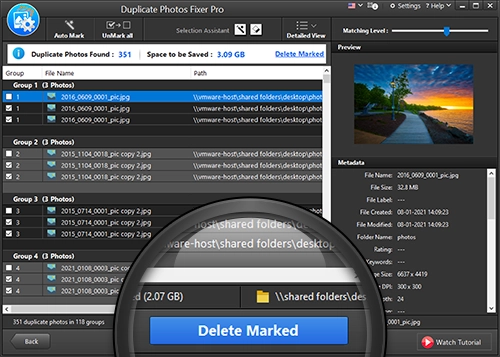
Results in Detailed View: 351 duplicates in 118 groups with 3.09 GB to be saved, marked copies ticked, the preview and metadata on the right, and Delete Marked at the bottom.
Benefits
- Disk space back without guesswork. The scan summary tells you how many duplicates it found and how much space deleting them frees, before you commit.
- A safer default for mistakes. Photos deleted from your PC go to the Recycle Bin, so a wrong pick can be restored.
- Less manual sorting. The rule-based Auto Mark keeps the highest-resolution, best-tagged copy in each group, which is the copy most people want.
- Cleaner catalogs. Removing duplicates inside Lightroom Classic or Picasa keeps the library you browse tidy, not just the folders underneath it.
Real-World Uses
- Merging old backups. You copied "Photos", "Photos backup" and "Phone 2021" onto a new drive. An Exact Match scan of all three finds every file that exists more than once.
- Trimming burst shots. A day at a kids' football match produced 600 frames. Similar Match with a short time interval groups each burst so you keep one or two of each.
- Cleaning a Lightroom catalog. After importing the same card twice, scan the Lightroom Classic library and remove the second set from the catalog.
- Freeing Dropbox or Google Drive space. Scan the cloud folder directly when you're near your storage limit, without syncing it all to the PC.
- Tidying an external drive. Point it at a USB disk of family pictures. Note that files deleted on an external drive skip the Recycle Bin.
Who It's For, and Who Should Skip It
It's for home users and hobby photographers on Windows with tens of thousands of pictures spread over folders, drives and cloud storage, who want a guided cleanup with sensible auto-selection.
Skip it if you only need to remove exact copies once: free duplicate-file finders do byte-for-byte matching without a subscription. Skip it if you dislike yearly billing for a tool you might use twice a year, if you're on a Mac (Systweak sells a separate Mac app through the App Store), or if your photos live mainly in Google Photos rather than Google Drive or a folder on disk.
Usage Guide
- Download the installer, run it, accept the UAC prompt and click Install. The program opens when setup finishes.
- To register, click the orange Upgrade Now button (or Help > Enter Registration Key) and paste the license key from your order e-mail. Registration needs an internet connection.
- Drag photos or folders into the drop area, or use Add Photos / Add Folder. For Dropbox, Google Drive, Lightroom Classic or Picasa, choose the source from the drop-down next to the scan button and follow the sign-in steps.
- Choose Exact Match or Similar Match, adjust the sliders if needed, and tick Include Rotated / Flipped Images if you want those caught.
- Click Scan for Duplicates. Large libraries take a while; a second scan of the same folders is faster.
- Review the groups, use Auto Mark (or open the Selection Assistant to change the rules), check the marked copies, then click Delete Marked.
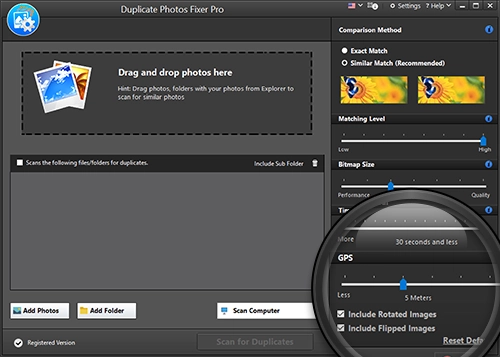
The scan settings, zoomed on the GPS distance slider and the Include Rotated Images and Include Flipped Images checkboxes.
Where it falls short
- Loose settings group pictures that aren't duplicates. At a low matching level, Similar Match puts merely similar photos together. Auto Mark then marks some of them, so review groups before deleting.
- External-drive deletions are permanent. Only files on your PC go to the Recycle Bin; duplicates deleted on an external drive are removed directly.
- The trial is narrow. It deletes 15 photos, and Systweak allows one trial per user, which is enough to see the results but not to test a big cleanup.
- Google Photos isn't a scan source. One Trustpilot reviewer bought it for a large Google Photos cache and couldn't get it to work there; it reads Google Drive, not the Google Photos service.
- No background monitoring. It cleans when you run a scan; there's no alert when new duplicates arrive.
What Users Say
Trustpilot (Systweak Software, all products)
Systweak's company profile has a TrustScore of 3.9 from 279 reviews: 65% five-star and 24% one-star, a split that shows up in the Duplicate Photos Fixer reviews too.
Mann Mohan sharma, 5 stars, March 2026, "Duplicate Photos Fixer Pro is very effective for removing duplicates photos from my system": "this one provide all the duplicate photos and similar photos also in one shot"
John Merchant, 5 stars, December 2024, "Duplicate photo fixer working well for me": "I bought the same product, But I had no problem with it. It is working well for me."
Preet S, 5 stars, January 2024, "Getting rid of duplicates becomes easy": "some do the job ok-ish while others like Duplicate Photos Fixer and Systweak PDF Editor are excellent products"
Richard Eicker, 1 star, February 2025: "I purchased the Systweak Duplicate Photo Fixer for $40.00" ... "Multiple times each day Systweak's software spammed my PC."
Mrs Eleanor Thain, 1 star, November 2024, "Money back - not guaranteed!": "Having bought the paid version to use on my huge Google Photos cache, I tried for hours to make it work."
Brian Ponder, 2 stars, July 2026, "Mediocre Software with Deceptive Subscription Practices": "I was secretly enrolled in an automatic annual subscription that charged me a year later without my consent."
Review sites
FixThePhoto (Ann Young and Tetiana Kostylieva) rates it 4.5 out of 5 and calls it "a user-oriented and simple picture duplicate cleaner." Its listed downsides: "A free trial version can only remove up to 15 duplicates" and it "Doesn't feature any auto alert for duplicate photos".
On Product Hunt it has a 5.0 rating from just 2 reviews, both praising the preview before deletion and the similar-photo detection. Independent long-form tests of the current Windows version are scarce.
The pattern
People who used it on ordinary folders say it finds both exact and similar copies quickly and the grouped preview makes choosing easy. The complaints are rarely about the scan itself: they're about the automatic yearly renewal, promotional pop-ups from other Systweak products, and refund requests that took effort. Buy it knowing the renewal date, and cancel by e-mail if you only need one cleanup.
Comparisons
Duplicate Photos Fixer Pro vs Duplicate Files Fixer
Both are Systweak products. Duplicate Photos Fixer Pro compares picture content, so it catches resized, re-saved and similar-looking shots. Duplicate Files Fixer handles every file type (documents, music, video, photos) but matches duplicates as files. If your clutter is mostly pictures, the photo tool is the better fit; the order page offers Duplicate Files Fixer as a $9.99 add-on if you want both.
Duplicate Photos Fixer Pro vs free duplicate finders
Free tools that match by checksum find exact copies well and cost nothing. What Duplicate Photos Fixer Pro adds is similar-photo grouping, rotated and flipped matching, rule-based auto-marking, and direct scans of Dropbox, Google Drive and Lightroom Classic. If you only have exact copies, a free tool is enough.
Editions and Pricing
| Edition | Price | Term | What you get |
|---|
| Free trial | $0 | One trial per user | Full scan and results, deletes up to 15 duplicates |
| Duplicate Photos Fixer Pro (Windows) | $39.95 | 1 year, renews automatically | Unlimited cleaning on one PC, plus a free Systweak Photo Organizer license |
Systweak's store lists $69.95 as the regular price and sells the yearly license at $39.95, the same price the order page charges and renews at.
FAQs
Does Duplicate Photos Fixer Pro delete photos permanently?
Duplicate Photos Fixer Pro sends photos deleted from your PC to the Recycle Bin, so you can restore a wrong pick. Photos deleted from an external drive are removed directly, so review those groups carefully.
Can Duplicate Photos Fixer Pro clean Google Photos?
Duplicate Photos Fixer Pro scans Google Drive, Dropbox, Lightroom Classic and Picasa, not the Google Photos service itself. To clean Google Photos you'd need to download the pictures to a folder first.
Does Duplicate Photos Fixer Pro need an internet connection?
Duplicate Photos Fixer Pro scans local folders offline. It needs a connection to install, activate the license, get updates and scan Dropbox or Google Drive.
How do I stop the yearly renewal?
Duplicate Photos Fixer Pro's license renews automatically every 12 months at $39.95. Systweak says it e-mails you before each renewal and that you can cancel at any time by writing to support@systweak.com.
Can I use one Duplicate Photos Fixer Pro license on my Mac too?
No. This license is for the Windows program on one PC. The Mac version of Duplicate Photos Fixer Pro is a separate purchase through Apple's App Store.
How do I get a refund for Duplicate Photos Fixer Pro?
Duplicate Photos Fixer Pro has a 60-day money-back guarantee. Send a refund request through the vendor's contact page with your name, order number, product name, purchase date and e-mail address; refunds arrive in 5-7 business days after processing.
Will Duplicate Photos Fixer Pro run on an old PC?
Duplicate Photos Fixer Pro runs on Windows 7 and later with an 800 MHz processor, 512 MB of RAM and 50 MB of free disk space. Scans of very large libraries simply take longer on slower machines.
System Requirements
- Windows 11, 10, 8.1, 8 or 7 (32-bit or 64-bit)
- 800 MHz or faster processor
- 512 MB RAM or more
- 50 MB free disk space
- Internet connection to download, install, activate and update
Conclusion
Duplicate Photos Fixer Pro is worth $39.95 if you have a large, messy Windows photo library and want similar shots, rotated copies and cloud folders handled in one guided pass, with sensible auto-marking and a Recycle Bin safety net. The main reason to hesitate is the yearly auto-renewal for a job many people do once: if that's you, run the cleanup, then cancel the renewal by e-mail. If your library only has exact copies, a free duplicate finder will do.
Download Free TrialBuy Now