Coolmuster HEIC Converter for Mac: A Simple Batch HEIC-to-JPG Tool, and When You Don't Need One
Coolmuster HEIC Converter for Mac is a $9.95-a-year macOS app that converts HEIC and HEIF photos to JPG or PNG in batches, with a quality setting and a switch to keep or strip EXIF data. It's a 3 MB, single-window utility for photos already on your Mac.
Be clear about the competition first: macOS can already do this. Preview and Photos both export HEIC as JPEG or PNG for free. What this app adds is a dedicated batch list with thumbnails, dimensions and dates, a one-click EXIF switch, and a progress window, which is handy when you deal with hundreds of files at a time.
Quick facts
- Version: 3.3.25 for Mac, released October 21, 2025
- Developer: Coolmuster
- Runs on: macOS 10.13 or later. Intel build, so Apple silicon Macs run it through Rosetta 2
- Converts: HEIC and HEIF to JPG/JPEG or PNG
- Price: $9.95 for one year on one Mac, $19.95 lifetime
- Trial: converts three images free
- What we checked: Mac version 3.3.25 in the vendor release notes and in the downloaded app's Info.plist, the 3.2 MB disk image from the vendor (file dated October 21, 2025) with Intel-only program files, checkout price $9.95 on November 11, 2026. We didn't convert our own photos with it.
Before you buy
- Try the free route first: in Preview, File > Export lets you pick JPEG or PNG, and selecting many images in Preview's sidebar exports them together.
- Coolmuster's tech spec mentions M1, but the app contains Intel code only and relies on Rosetta 2.
- Coolmuster gives a 30-day money-back guarantee on one-year and lifetime licenses of non-recovery products. The yearly plan renews automatically.
Download Free Trial Buy Now
Overview
The Mac app is one window. On the left, a file list with tick boxes, thumbnails, file type, size, pixel dimensions and date, plus Add File, Add Folder, Delete and a search box. On the right: Output Format (JPEG/JPG or PNG), Keep Exif Data, Quality, Output Folder, Open Folder and Convert. The October 2025 release was a bug-fix update.
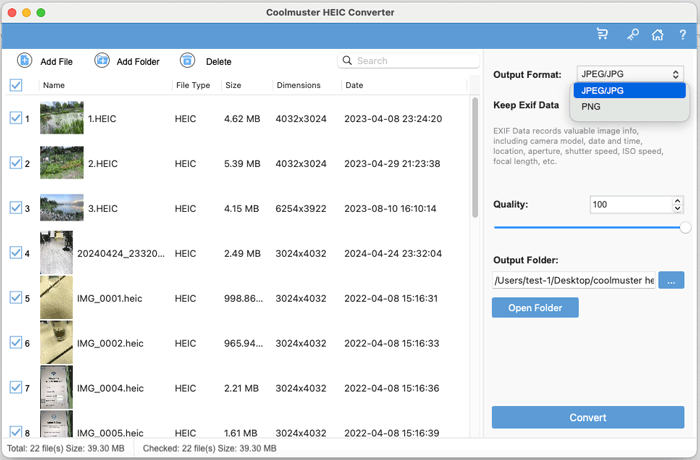
22 HEIC photos (39.3 MB) queued, with the JPEG/JPG and PNG output choices open.
Features
Coolmuster HEIC Converter for Mac batch-converts folders
Coolmuster HEIC Converter for Mac adds single photos, a whole folder, or whatever you drag onto the window, and converts every ticked file in one run. The bottom bar totals the number and size of files loaded and checked.
EXIF on or off with one switch
Coolmuster HEIC Converter for Mac keeps the camera model, date, location, aperture, shutter speed, ISO and focal length in JPG output when Keep Exif Data is on, and drops them when it's off, a quick way to remove GPS data before sharing.
Quality setting and a Show in Finder button
Coolmuster HEIC Converter for Mac lets you set JPG quality up to 100, writes into the folder you choose, and finishes with a Notice window offering Show in Finder.
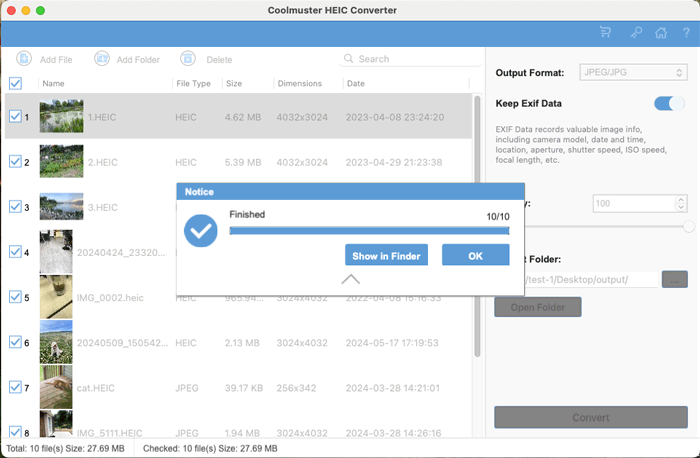
A finished batch of ten photos, with Show in Finder and OK.
Who It's For, and Who Should Skip It
It suits Mac users who convert large HEIC batches often, such as photographers' assistants, estate agents or support staff receiving iPhone photos, and who want a list view and an EXIF switch rather than Preview's export dialog.
Skip it if you convert now and then: Preview and Photos do it free. Skip it for your own iPhone's future photos too; the iPhone's Most Compatible camera setting shoots JPG in the first place.
Usage Guide
- Open the .dmg, drag the app into Applications and launch it (Rosetta 2 may install first on Apple silicon).
- Copy the HEIC photos to the Mac, then click Add File or Add Folder, or drag them into the window.
- Pick JPEG/JPG or PNG, set Keep Exif Data and Quality, and choose the output folder.
- Click Convert, then Show in Finder.
Where it falls short
- It duplicates what macOS already does for free.
- JPG and PNG only, no resizing, renaming or other formats.
- Intel code only.
- A yearly subscription for a converter; the $19.95 lifetime license is the sensible choice if you buy.
What Users Say
We found no independent review of the Mac edition. Coolmuster's review page lists 107 reviews for both editions, but the recent ones are short, generic and posted under novelty usernames, so we don't rely on them. One older testimonial on the product page is specific:
From Coolmuster's product page
"I found this HEIC converter by chance since I need to convert a bunch of HEIF photos. I tried it and then I realized it was worthy and it worked perfectly on my computer. I like it!"
BenBang
Coolmuster as a company has 4.6 out of 5 from 223 Trustpilot reviews (read through a page summarizer), mostly for support replies.
Comparisons
Coolmuster HEIC Converter for Mac vs Preview
Preview is free and exports HEIC to JPEG or PNG with a quality slider. Coolmuster's app adds a sortable batch list, a single EXIF switch and progress reporting. For occasional use, Preview wins.
Editions and Pricing
| Macs | 1 Year (renews) | Lifetime |
|---|
| 1 | $9.95 | $19.95 |
| 5 | $19.95 | $29.95 |
| 10 | $29.95 | $39.95 |
FAQs
Does Coolmuster HEIC Converter for Mac run on macOS 10.12 Sierra?
No. Coolmuster HEIC Converter for Mac needs macOS 10.13 High Sierra or later.
Can Coolmuster HEIC Converter for Mac convert photos straight from the iPhone?
No. Copy the photos to the Mac first; Coolmuster HEIC Converter for Mac works on files and folders on the computer.
Does a Mac license of Coolmuster HEIC Converter cover Windows?
No. The Windows edition is a separate product with its own license at the same prices.
System Requirements
- macOS 10.13 or later (Intel, or Apple silicon with Rosetta 2)
- 512 MB RAM, 1 GB free disk space
Conclusion
Worth the $19.95 lifetime license only if you batch-convert HEIC photos often and want a list view with an EXIF switch. It's tidy and does what it says.
For most Mac owners, though, Preview's free export is enough, and that's the main reason not to buy.
Download Free Trial Buy Now