Coolmuster Android Backup Manager for Mac: A Local Copy of Your Android Phone on Your Mac
Coolmuster Android Backup Manager for Mac is a $19.95-a-year macOS app that backs up an Android phone's contacts, messages, call logs, photos, music, videos, documents and apps to a folder on your Mac, and restores them to the same phone or a new one. No root needed; a lifetime license costs $29.95.
Macs and Android phones don't talk to each other well. There's no Finder backup like an iPhone gets, and Google's cloud backup doesn't give you a copy you can hold. This app fills that gap: one window, tick the data types, click Back Up.
Quick facts
- Version: 3.5.44 for Mac, released July 3, 2026
- Developer: Coolmuster
- Runs on: macOS 10.10 or later. Intel build, so Apple silicon Macs use Rosetta 2
- Phones: Android 6.0 and later, by USB or Wi-Fi
- Backs up: contacts, messages, call logs, photos, music, videos, documents, user apps
- Price: $19.95 for one year on one Mac, $29.95 lifetime
- Guarantee: 30 days on yearly and lifetime licenses
- What we checked: Mac version 3.5.44 in the vendor's release notes and inside the downloaded app's Info.plist, the 10.3 MB disk image from the vendor (file dated July 3, 2026) with Intel-only program files and a macOS 10.10 minimum, checkout price $19.95 for one year and $29.95 for lifetime on November 11, 2026. We didn't back up a phone with it; the workflow below comes from the vendor's Mac manual and screenshots.
Before you buy
- The Mac edition trails the Windows one: Mac 3.5.44 against Windows 4.0.11, which got an updated companion app and better progress display in October 2026.
- WhatsApp, app data and logins aren't on the list. Apps are backed up as installable apps, not with their saved data.
- It installs Coolmuster's Android Assistant app on your phone to make the connection.
- The yearly license renews automatically, and Coolmuster doesn't refund automatic renewals.
Download Free Trial Buy Now
Overview
The app opens on a launcher with tiles for Coolmuster's other tools (Android Assistant, Mobile Transfer, iOS Assistant and two recovery apps); you click Android Backup & Restore, which is what this license covers. Once your phone is connected, the module offers two buttons, Backup and Restore, and a Super Toolkit tab. The phone's model shows in the top-left corner, with a menu to switch between several connected devices.
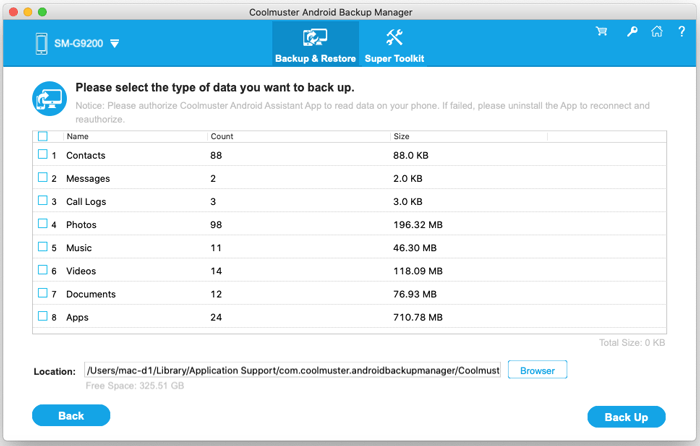
Choosing what to back up from a Samsung SM-G9200: eight data types with item counts and sizes, and the backup location on the Mac with a Browser button to change it.
Features
Back up eight kinds of phone data in one pass
Coolmuster Android Backup Manager for Mac lists contacts, messages, call logs, photos, music, videos, documents and apps with a count and size for each, so you see that the backup will be 1.2 GB before you start. Tick everything or just the types you care about, and pick where the backup goes, an external drive included.
Restore selectively, to any Android phone
Coolmuster Android Backup Manager for Mac lists every backup it has made by phone model, size and date. Pick one, tick the data types to put back, and restore to whichever phone is connected. A "Clear data before restoring" box wipes those types on the phone first, and Add Backup Folder finds backups stored elsewhere.
USB or Wi-Fi connection
Coolmuster Android Backup Manager for Mac connects over USB, the vendor's recommended route, after you turn on USB debugging; or over Wi-Fi, by opening the companion app on the phone and scanning a QR code on the Mac. Both need the Coolmuster Android Assistant app on the phone, which the program installs.
No root, no cloud
Coolmuster Android Backup Manager for Mac reads the phone's internal storage without rooting it and writes the backup to your own disk, so nothing passes through a cloud service.
Benefits
- A copy you control. The backup sits on your Mac or external drive, not in a Google account with a storage limit.
- Texts and call logs too. Photo sync apps skip these; this backs them up with everything else.
- Easy phone moves. Back up the old phone, restore to the new one, even across brands.
Real-World Uses
- Before a factory reset or update: back up the whole phone to the Mac, reset, restore.
- Switching from Samsung to Pixel: restore contacts, messages and photos from the Samsung's backup to the Pixel.
- Freeing phone storage: back up 100 GB of videos to an external drive, then delete them from the phone.
- Keeping a parent's messages: archive an old phone's text history before it's handed on.
Who It's For, and Who Should Skip It
It's for Mac owners with an Android phone who want a full, local backup they can restore in one go, without fiddling with file managers.
Skip it if you need WhatsApp chats or app data backed up (use WhatsApp's own Google Drive backup), if Google's free automatic backup already covers you, or if you also want to edit contacts and send texts from the Mac, in which case Coolmuster Android Assistant for Mac does backup plus management.
Usage Guide
- Install it. Open the disk image, agree to the license, and drag the app to Applications.
- Open the module. Start the app and click Android Backup & Restore on the launcher.
- Connect the phone. By USB: plug it in, turn on USB debugging when prompted, tap Allow on the phone, and confirm the companion app's permissions. By Wi-Fi: click the Wi-Fi icon and scan the QR code with the companion app.
- Back up. Click Backup, tick the data types, change the location with Browser if you like, and click Back Up.
- Restore later. Click Restore, pick the backup and data types, decide on "Clear data before restoring", and click Restore.
- Register. Click the key icon at the top right, then Register, and enter the licensed email and code from your order email.
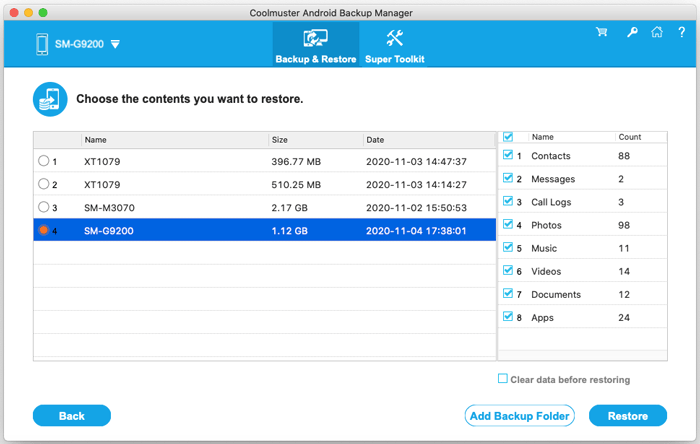
The restore screen: four saved backups from three phones with size and date, the data types to restore on the right, and the Clear data before restoring and Add Backup Folder options.
Where It Falls Short
- Apps may not all come back. A Trustpilot reviewer found that some app APKs wouldn't restore after buying Backup Manager.
- Manual, not scheduled. There's no automatic or scheduled backup; you run it each time.
- Connection hoops. USB debugging and a companion app are needed, and some phones need the "Show Again" authorization step repeated.
- Old-looking Mac build. The Mac manual's screenshots date from 2020, and the app is still Intel-only.
What Users Say
There's no independent review of the Mac edition. The product page and its review page (151 reviews) cover Windows and Mac together, and Coolmuster scores 4.6 out of 5 from 223 reviews on Trustpilot, read through a page summarizer.
On Trustpilot
"After purchase of Backup Manager I found that some app apks wouldn't restore."
Nigel Hunt, January 31, 2026, 4 stars (excerpt)
"...it was agreed that a full refund would be provided."
Nigel Hunt, same review (excerpt)
"helped me back up my android wirelessly."
Bert, July 30, 2026, 5 stars (excerpt)
On Coolmuster's review page
"I can back up my Android data to my computer without dealing with complicated settings. Restoring a saved backup is also convenient."
Daniel Cooper, "Simple backup management", November 6, 2026
"I use it to keep an extra copy of my Android data on my computer. The backup process is quick and reassuring."
William Brooks, "Peace of mind", September 3, 2026
The recent reviews on Coolmuster's own page are short and similar to each other, so give the Trustpilot ones more weight. The pattern is consistent: easy to use, with apps the weak spot on restore, and support that did refund a buyer whose apps didn't come back.
Comparisons
Backup Manager for Mac vs. the Windows edition
Same job, same data types and the same price. The Windows edition is a major version ahead (4.0.11, October 2026). Each license covers one platform only.
Backup Manager for Mac vs. Google's backup
Google's backup is free, automatic and restores during phone setup, but it lives in your Google storage and you can't browse it as files. Coolmuster's tool gives you a local copy you run by hand, including call logs and texts, on your own disk.
Editions and Pricing
One edition, priced by term and number of Macs, before tax, on November 11, 2026.
| License term | 1 Mac | 5 Macs | 10 Macs |
|---|
| 1 year (auto-renews) | $19.95 | $29.95 | $39.95 |
| Lifetime | $29.95 | $49.95 | $89.95 |
Backups are a repeat job, so the lifetime license, $10 more than one year, is the better value for most people.
FAQs
Does Coolmuster Android Backup Manager for Mac run on Apple silicon Macs?
Coolmuster Android Backup Manager for Mac runs on M-series Macs through Rosetta 2; the app itself is built for Intel only. macOS installs Rosetta the first time you open it.
Does it back up WhatsApp?
Coolmuster Android Backup Manager for Mac doesn't list WhatsApp among its data types. Coolmuster sells a separate Android WhatsApp Recovery tool.
Can I use one license on my Windows PC too?
Coolmuster Android Backup Manager for Mac licenses cover the Mac edition only. The Windows edition is a separate purchase at the same price.
Can I restore a backup to a different brand of phone?
Coolmuster Android Backup Manager for Mac restores to any connected Android device, so a Samsung backup can go onto a Pixel or Xiaomi.
What's the refund policy?
Coolmuster Android Backup Manager for Mac has a 30-day money-back guarantee, for reasons like a phone that won't connect after support has tried, or a missing advertised feature. Change of mind and automatic renewals aren't refunded, so test your phone with the trial.
Which Android versions are supported?
Coolmuster Android Backup Manager for Mac supports Android 6.0 and later, and the vendor names Samsung Galaxy, Google Pixel, Motorola, Xiaomi, OnePlus, vivo, OPPO, Honor, TECNO and Infinix among the supported brands.
System Requirements
- macOS 10.10 or later; Intel Mac, or Apple silicon with Rosetta 2
- 512 MB of RAM or more
- 200 MB of free disk space, plus room for the backups
- Android 6.0 or later, connected by USB cable or on the same Wi-Fi network
Conclusion
Coolmuster Android Backup Manager for Mac is worth the $29.95 lifetime license if you're a Mac user with an Android phone and want a complete, browsable backup of texts, call logs, contacts and media on your own disk, ready to restore to a new phone. The reason to hesitate is the Mac edition's age: it lags the Windows version, it's Intel-only, and it doesn't keep app data or WhatsApp, so it complements Google's backup rather than replacing it.
Download Free Trial Buy Now