DearMob iPhone Manager for Windows: Back Up and Manage an iPhone on a PC Without iTunes
DearMob iPhone Manager is a Windows 7 to 11 program from Digiarty Software that backs up, restores and manages an iPhone, iPad or iPod touch without iTunes: photos, music, videos, contacts, messages, apps and more, over a cable or Wi-Fi. The license sold through our Buy Now button covers one PC for one year and costs $39.95 at checkout with the discount code applied, and the free version lets you try every tool with a daily allowance.
On Windows, Apple gives you iTunes or the Apple Devices app, and both think in terms of whole-library syncs and one big backup you can't look inside. DearMob shows you what's on the phone, category by category, and lets you copy, add or delete individual items, or restore just the contacts from last month's backup instead of the whole phone.
Quick facts
- Version: 6.20, released September 29, 2026 (fixes for ringtone sync and iOS 27 battery info)
- Developer: Digiarty Software, Inc., whose DearMob and 5KPlayer brands share the 5kplayer.com site
- Runs on: Windows 11, 10, 8.1, 8 and 7
- Devices: iPhone 4 through the iPhone 18 line, iPads and iPod touch 3 to 7, on iOS 7 to iOS 27
- Connection: USB cable or Wi-Fi. iTunes doesn't have to be installed
- Price: $59.95 list for the one-year license on one PC, $39.95 at checkout with the code our button applies. It's a single payment that doesn't renew by itself
- Free version: 100 Credit Points a day to try every feature
- Refunds: 30 days, when a problem can't be fixed by support
- What we checked: the Windows installer (version 6.20.0.0, 61 MB, digitally signed by Digiarty Software, Inc.) downloaded from the vendor on November 4, 2026, and the order page, which showed $59.95 less a $20.00 discount for the one-year, one-PC license on November 4, 2026. We didn't back up or restore a real iPhone with it
Before you buy
Know which license you're getting. The Buy Now button below opens the one-year license for one PC at $39.95. Digiarty's own store also sells a lifetime license for one PC at $79.95 list (often discounted with a store coupon), a Premium 365 plan for three PCs that renews every year, and a lifetime Family license for up to five PCs. If you'll still be managing an iPhone from this PC in two years, compare the lifetime price on the day you buy.
Use the free version first: 100 Credit Points a day is enough to connect your phone, browse it and move a few files, and that's the best check that DearMob reads your device and your iOS version properly.
Download Free TrialBuy Now
Overview
DearMob's main window is a dashboard. Across the top sits the connected device with its free space and iOS version; below are five large tiles (Photo Transfer, Music Manager, Video & Movie, Backup & Restore and Files) and a row of ten smaller ones: Data Security, Contact, Podcast, Book, Voice, App, SMS, Calendar, Bookmark and Flash Drive. The gear menu holds Settings, Register and the interface language (English, Japanese, German, French or Chinese).
Inside each manager, edits are staged. The bottom bar counts items added and deleted, and you can undo them all before pressing Sync. That's the main safety net compared with iTunes: nothing on the phone changes until you've seen the list.

The Windows main screen with an iPhone X on iOS 13.1 connected, the fifteen tools, and the gear menu open on Settings, Register and the language list. The screenshot is from an older build of the trial.
Features
Full, incremental and selective iPhone backups on your PC
DearMob iPhone Manager backs up an iPhone or iPad to the PC or an external drive in three ways: a full backup, an incremental one that only keeps the latest copy and saves new changes, or a selective backup of the data types you tick. Backups can be encrypted with the device's backup password, and you can move the backup folder off the C: drive, which matters when the phone holds 200 GB and the system drive doesn't.

The Backup tab: "Backup your iPhone iPad data to this computer", with Encrypt your Backup ticked and the Back Up Now button.
Restore a backup, with or without app data
DearMob iPhone Manager lists every backup it holds with the device name, iOS version, size and date, and restores the one you pick. A checkbox decides whether apps and app data come back too, which is how DearMob says it keeps WhatsApp chat history and game progress when you move to a new phone. Two rules to know: a restore replaces what's on the device now, and a backup from a newer iOS can't go onto a device running an older one.

Restore backup files: three backups (an iPhone X on iOS 13.0, an iPod touch and another iPhone X) with the Restore App and App data option and the warning that restoring erases current data.
Photo export at full resolution, with HEIC to JPG
DearMob iPhone Manager exports Camera Roll photos, Selfies, Live Photos, Screenshots, hidden photos and your own albums to Windows at full resolution with EXIF data kept. Pick Export to keep the originals or Export HEIC to JPG for files any Windows app opens. Digiarty quotes 100 4K photos in about 8 seconds and says it handles libraries of 10,000+ photos without freezing. Apple ProRAW pictures are supported, and you can bulk-delete what you've saved to free space.
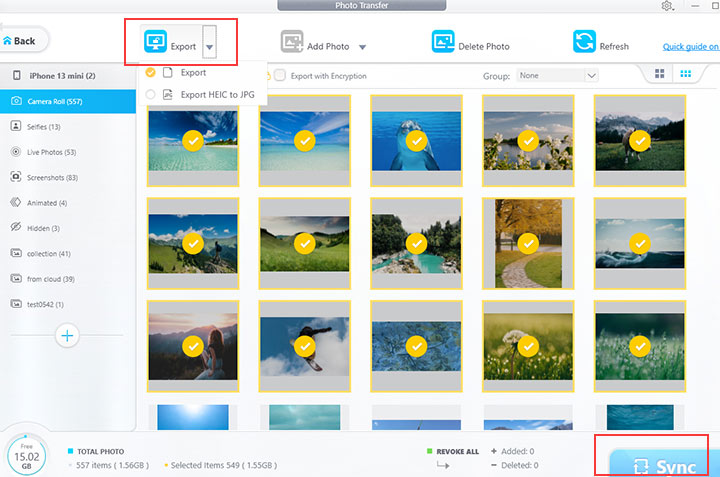
Photo Transfer with an iPhone 13 mini: 549 of 557 Camera Roll photos selected and the Export menu offering Export or Export HEIC to JPG.
Contacts, messages and calendars on a bigger screen
DearMob iPhone Manager goes beyond media. It backs up and exports iMessages and texts (to PDF, with the photos and videos inside conversations), edits contact cards on the PC, finds and merges duplicate contacts in one click and exports them as VCF, PDF, TXT or HTML, and adds or edits calendar events. Safari bookmarks can be moved or imported from other browsers. These are the items iTunes on Windows only handles inside a full backup.
Music and video that just play
DearMob iPhone Manager adds music from any folder to the iPhone without wiping the existing library, and converts OGG, FLAC, WMA and WAV to MP3 or AAC on the way. Videos in MKV, AVI, WMV, FLV, WebM and other formats are converted to MP4 or MOV during the sync, sideways clips are rotated, and GPU acceleration speeds up large 4K and 8K transfers. Ringtones can be cut from any song and sent to the phone without iTunes.
Apps, files and a password vault
DearMob iPhone Manager installs, deletes and backs up apps, and opens the documents stored by apps that support file sharing, such as Keynote, Pages or drawing apps' brush files. The Data Security tool password-protects backups, photos, videos and the contact list; Digiarty names 256-bit AES, 1024-bit RSA, PBKDF2 and Argon2. There's also a Flash Drive mode for carrying any file on the iPhone, and a device panel that shows battery health, charge cycles, serial number and IMEI.
Benefits
- You can see inside your backup. Restoring three contacts or one chat history doesn't mean rolling the whole phone back.
- No iTunes on the PC. Fewer Apple services running in the background, and no automatic sync that erases songs the phone got elsewhere.
- Your files leave the Apple formats behind. JPG, MP4, MP3, VCF and PDF open on any Windows machine, or on an Android phone later.
- Backups land where you want them. An external drive or a bigger partition instead of a hidden folder on C:.
Real-World Uses
- Switching to a new iPhone when iCloud is full: back the old phone up to the PC, then restore it, with app data, to the new one.
- Keeping a text-message record, such as a conversation with a landlord or a contractor, as a PDF with its photos included.
- Cleaning up contacts after years of merged accounts: let DearMob find the duplicates and fix the rest with a keyboard instead of a thumb.
- Freeing space before an iOS update by moving 4K videos and Live Photos to an external drive.
- Loading a road-trip playlist of FLAC files from a Windows music folder onto an iPhone that never touched iTunes.
Who It's For, and Who Should Skip It
It's for Windows users with an iPhone or iPad who want real backups on their own drive, who need contacts and messages out of the phone in readable formats, or who just want photos and music to move without an iTunes sync.
Skip it if you're on a Mac (that's DearMob iPhone Manager for Mac, a separate download and license), if iCloud Backup and iCloud Photos already cover you, or if you need to recover data that was deleted before any backup existed; DearMob manages and backs up what's on the device, it isn't a data-recovery scanner. If you only ever copy photos, Windows' own Photos app import is free and good enough.
Usage Guide
- Install. Run dearmob-iphone-manager.exe, accept the license agreement and click Install. Custom Installation lets you change the folder and the desktop shortcut.
- Connect. Plug the iPhone in (or pair over Wi-Fi), unlock it and tap Trust. The device name, free space and iOS version appear at the top.
- Back up first. Open Backup & Restore, decide on encryption and click Back Up Now before you start deleting anything.
- Move files. Open a manager, tick items and click Export, or click Add, check the counters and click Sync.
- Adjust Settings. Set the export folder, HEIC-to-JPG conversion, video conversion with hardware acceleration and music format (MP3 or AAC).
- Register. Gear menu, Register, then paste the license code from your order email.
Where it falls short
- A restore overwrites the device. DearMob warns about it, but it's still the step where people lose data. Back up the current state first.
- No downgrades. A backup made on a newer iOS version can't be restored to a device on an older one.
- Forgotten passwords are final. Encrypted backups and files can't be opened without the password, and DearMob can't recover it for you.
- Ringtone and music sync needed fixes. The release notes for 6.20 (September 2026) and 6.7 fix ringtone sync problems, and 6.9 fixed music that couldn't be read on iOS 26.4. Updates follow new iOS versions, so keep the app current.
- The license wording is confusing. Digiarty sells one-year, yearly-renewing and lifetime licenses side by side; check which one is in your cart.
What Users Say
Reviews of DearMob iPhone Manager are plentiful but mostly from tech blogs that were paid for the post, so read them for what was tested rather than for the verdict. Trustpilot's profile for 5kplayer.com is about the free 5KPlayer media player, not DearMob.
Beebom (Rachit Agarwal, February 2018, sponsored by DearMob)
Agarwal liked the interface and the backups: "DearMob features a minimalist user interface with all its features getting a different icon for themselves." His pros list includes "Works every time" and "Awesome backup and restore feature."
His criticism was the pricing of that time: "The single license is priced in a way that it forces user to buy the more pricier lifetime license."
TechWiser (partner content, sponsored by DearMob)
TechWiser was open about what it didn't verify: "We haven't tested the encryption level as such but if a paid application worth $60 claims so." It also flagged the downside of strong encryption: "The encryption is so strong that if you forget the password, DearMob has no way to recover it for you." On videos, it noted "there are no album creations."
It praised the Flash Drive feature: "Never ever has an application offered this feature for iPhone like the android phones."
Taken together, reviewers agree on a clean, Apple-like interface, dependable backups and restores, and a wider tool set than iTunes. The repeated cautions are the price structure, the unrecoverable encryption password and the fact that most coverage is sponsored. These quotes reached us through a page summarizer rather than a direct copy.
Comparisons
DearMob iPhone Manager vs iTunes and Apple Devices on Windows
Apple's free apps make complete, encrypted backups and sync your media libraries, and that's all many people need. They don't let you browse a backup, restore one category, export messages as PDF, merge duplicate contacts or pull arbitrary music off the phone. DearMob is worth paying for when you need those; Apple's tools are fine when one full backup is the whole plan.
DearMob iPhone Manager vs WinX MediaTrans
Both come from Digiarty and share the fast photo export, music manager, video conversion and flash drive. WinX MediaTrans stops at media and files. DearMob adds full and selective backup and restore, phone-to-phone migration, contacts, messages, calendars, bookmarks and app management, so choose DearMob if backups or personal data are part of the job.
Editions and Pricing
| License |
List price (USD) |
Term |
PCs |
| 1 Year License (our Buy Now button) |
$59.95, $39.95 with the code applied |
One year, paid once, no auto-renewal |
1 |
| Premium 365 |
$59.95 a year |
Renews yearly until cancelled |
3 |
| Lifetime License |
$79.95 |
Never expires, free upgrades |
1 |
| Family License |
$107.95 |
Never expires, free upgrades |
3 to 5 |
List prices are the order page's prices on November 4, 2026. Digiarty's store usually runs a coupon that roughly halves its prices (on that day the lifetime license was $39.95 there with its coupon), so the store is worth a look if you want the lifetime license. Sales tax may be added depending on your country.
FAQs
Does DearMob iPhone Manager need iTunes installed on Windows?
No. DearMob iPhone Manager talks to the iPhone without iTunes, and Digiarty's tech specs say so outright. It runs on Windows 7 through Windows 11.
Can DearMob iPhone Manager connect over Wi-Fi?
Yes. DearMob iPhone Manager offers a cable connection and a Wi-Fi connection; the user guide walks through both.
What happens when the DearMob one-year license ends?
The DearMob one-year license is a single payment, so nothing renews or charges your card automatically. Digiarty describes its one-year plans as a year of access to full features and updates, so plan on buying again after the year, or choose the lifetime license from the start.
Can I move my DearMob license to a new PC?
Yes. Digiarty says the PC count is how many computers can be registered at the same time; when you change computers, you remove the license code from the old one and register it on the new one.
Does DearMob iPhone Manager work with the newest iPhones and iOS?
Yes. DearMob iPhone Manager 6.20 supports iOS 7 through iOS 27 and lists the iPhone 18 Pro, 18 Pro Max and Duo among supported models. New iOS releases usually need an update to DearMob too.
Does a DearMob license also cover the Mac version?
No. DearMob iPhone Manager for Windows and for Mac are sold as separate licenses, each for its own platform.
What is DearMob's refund policy?
DearMob refunds within 30 days of purchase when the program can't work normally and support can neither fix the problem in reasonable time nor offer a workaround. Contact support@dearmob.com first.
System Requirements
- Windows 11, 10, 8.1, 8 or 7
- Pentium IV 2.4 GHz or faster, 1 GB RAM, 200 MB of disk space for the program
- Free space for backups and exports (a full backup can be as large as the data on the phone)
- iPhone, iPad or iPod touch on iOS 7 to iOS 27, with a USB cable or the same Wi-Fi network
Conclusion
DearMob iPhone Manager is the more complete of Digiarty's two iPhone tools for Windows, and at $39.95 it's good value if you want backups you can open, restore selectively and store where you like, plus control over contacts and messages. The one reason to buy it is that mix of backup and day-to-day file management in one window, with no iTunes. The main reason to hesitate is that the license through our button runs for one year; if you expect to use it for years, check the lifetime price first. Either way, try the free version on your own iPhone before paying.
Download Free TrialBuy Now