DearMob iPhone Manager for Mac: Selective iPhone Backup and Transfer Instead of Finder Sync
DearMob iPhone Manager for Mac is an iPhone and iPad manager from Digiarty Software that runs natively on Apple Silicon and on Macs as old as OS X 10.9 Mavericks. It does what Finder won't: browse a backup, restore one kind of data, export messages and contacts, and copy single photos, songs or videos either way. Through our Buy Now button a one-year license for one Mac is $39.95, and a free version with a daily allowance lets you test it first.
Since macOS Catalina, iPhone syncing lives in Finder. It's free and reliable for one thing: a complete backup, and library syncs that make the phone mirror the Mac. Ask it for last Tuesday's text thread, or to copy one album of 4K clips to an external SSD, and it has no answer. That gap is what DearMob fills.
Quick facts
- Version: 6.20 for Mac, September 29, 2026. Native Apple Silicon support arrived in 6.10 (July 2026)
- Maker: Digiarty Software, Inc. (also behind MacX DVD Ripper and 5KPlayer)
- macOS: 26 Tahoe back to OS X 10.9 Mavericks
- iOS: 7 through 27, from the iPhone 4 to the iPhone 18 Pro, Pro Max and Duo, plus iPads and iPod touch
- Links by: cable or Wi-Fi
- Cost: $39.95 at checkout for the one-year, one-Mac license (list price $59.95, less a $20 code our button adds), paid once with no automatic renewal
- Try it: the free version gets 100 Credit Points every day
- Money back: within 30 days if a fault can't be fixed
- What we checked: the Mac installer on Digiarty's server (dearmob-iphone-manager.dmg, 68 MB, dated September 29, 2026, matching the 6.20 release note) and the order page, which took $20.00 off the $59.95 one-year, one-Mac license on November 4, 2026. We didn't install it on a Mac or restore a device with it
Before you buy
The $39.95 license lasts a year. Digiarty also sells a lifetime license for one Mac ($79.95 list, frequently on sale in its own store), a renewing three-Mac Premium 365 plan and a lifetime Family license for up to five Macs. For a Mac you plan to keep for years, price the lifetime license on the day you buy.
Finder backups and DearMob can coexist. You don't have to give up Apple's encrypted backup to use DearMob; plenty of people keep a Finder backup as the safety net and use DearMob for everything they want to pick out by hand.
Download Free TrialBuy Now
Overview
The Mac app looks like it belongs on macOS: a white home screen with the phone's name, storage and iOS version at the top, five big icons (Photo, Music, Video & Movie, Backup & Restore, Files) and ten smaller ones for Data Security, Contact, Podcast, Book, Voice, App, SMS, Calendar, Bookmark and Flash Drive. Preferences, Register and Check for Updates sit in the DearMob menu in the Mac menu bar, where you'd expect them.
Work happens in a two-pane window per category. Exports go straight to the folder you set; additions and deletions wait in a counter at the bottom ("Add: 0, Delete: 0") with an Undo All link, and only reach the phone when you press Sync.
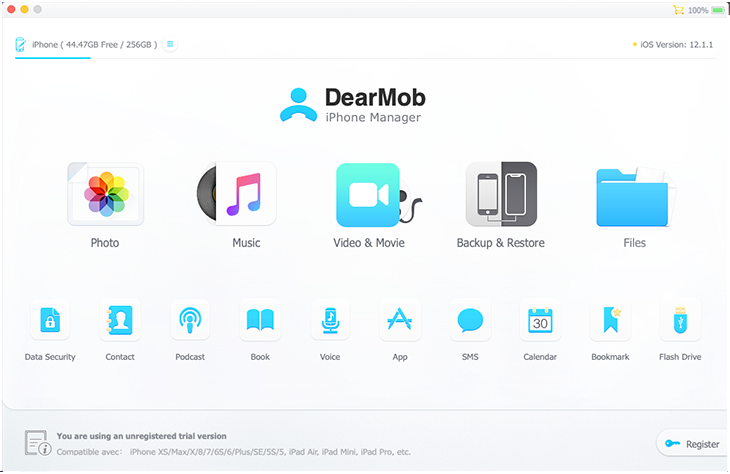
The Mac home screen with a 256 GB iPhone on iOS 12.1.1 (44.47 GB free) and the "unregistered trial version" notice at the bottom. It's from an older build; the layout is the one Digiarty's current guide uses.
Features
Backups you can store anywhere and restore in part
DearMob iPhone Manager for Mac writes full, incremental or selective iOS backups, optionally encrypted, to any folder, including an external drive. On a MacBook with a 256 GB internal SSD that's the practical difference: Finder always puts backups in your user Library on the internal disk. When it's time to restore, you can bring back everything or just chosen data types, and decide whether apps and their data are included.
Moving to a new iPhone without iCloud
DearMob iPhone Manager for Mac clones content from an old iPhone or iPad to a new one through the Mac, so a full iCloud account isn't a roadblock. Version 6.8 added transfers to the iPhone 17 family and iPhone Air from older devices or computers. The restore screen shows each saved backup with its device, iOS version, size and date, and a tick box for restoring app data.

The Mac restore tab: a 20.21 GB iPhone X backup selected, the note that a restore replaces the device's current data, and Restore App and App data highlighted.
Photo export grouped by year, month or day
DearMob iPhone Manager for Mac shows the phone's photo albums (Selfies, Live Photos, Portrait, Long Exposure, Panoramas, Bursts, Screenshots and your own albums) and groups them by year, month or day, so you can tick August and export it. It keeps HEIC or converts to JPG, exports DNG for Apple ProRAW shots, keeps EXIF data, and can export with encryption. A separate option strips location data from photos you're about to share.
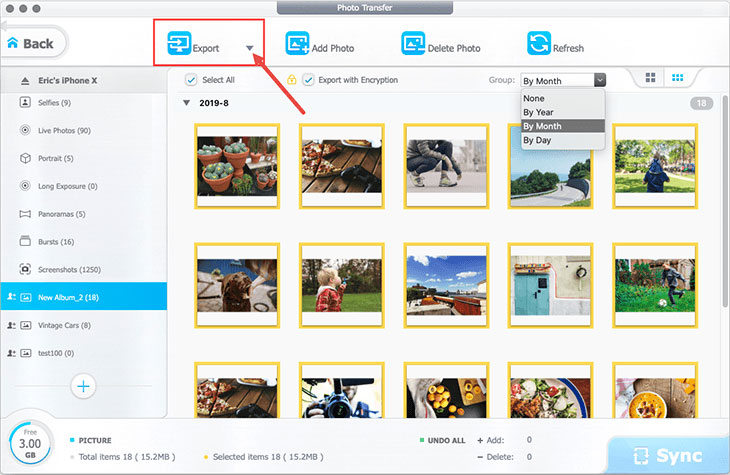
Photo Transfer on a Mac: an 18-photo album grouped by month, the Group menu (None, By Year, By Month, By Day) open, and Export with Encryption ticked.
Messages, contacts and calendars you can actually read
DearMob iPhone Manager for Mac exports iMessage and SMS threads as PDF with their attachments, which Finder backups keep locked away in a database. Contacts can be edited, de-duplicated and saved as VCF, PDF, TXT or HTML; calendar events and Safari bookmarks can be edited and moved between devices; podcasts, iTunes U courses and voice memos can be copied off the phone.
Conversion built into every transfer
DearMob iPhone Manager for Mac converts as it copies, according to Preferences: videos to MP4 (H.264) with hardware acceleration and optional auto-rotation, music to MP3 or AAC, HEIC to JPG, and books from EPUB to PDF, TXT or HTML for a Kindle. A Mac folder of FLAC albums or MKV films goes onto the iPhone in a playable form without a separate converter.
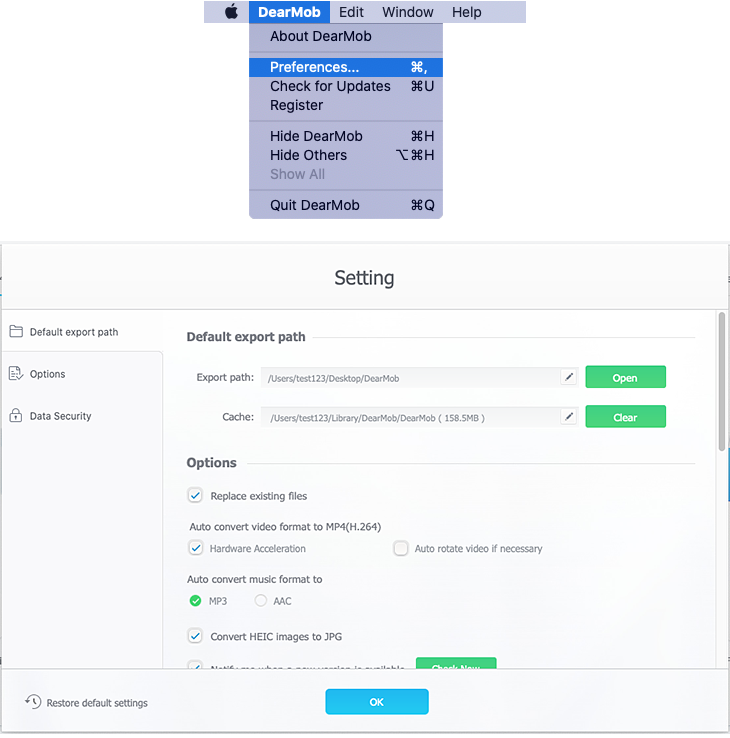
The DearMob menu (Preferences, Check for Updates, Register) and the Setting window: export and cache folders, Replace existing files, MP4 conversion with Hardware Acceleration, MP3/AAC and Convert HEIC images to JPG.
App files, encryption and a pocket flash drive
DearMob iPhone Manager for Mac reaches the documents inside file-sharing apps (handy for moving a drawing app's brushes or project files), installs and removes apps, and backs up app data. Its Data Security tool puts a password on backups, photos, videos and the address book, and Flash Drive mode stores any Mac file on the phone. A device panel lets you rename the iPhone and read its battery capacity, charge cycles, serial number, UUID and IMEI.
Benefits
- Your internal SSD stays free. Backups and exports can live on an external drive you choose.
- Finder stops being all or nothing. Pick one album, one thread, one contact group.
- Old Macs aren't left out. Support back to Mavericks means a 2013 iMac can still manage a new iPhone, while M-series Macs run it natively.
- Personal data comes out in open formats. PDF, VCF, JPG and MP4 outlive any one app.
Real-World Uses
- A MacBook Air with a small SSD backing up a 256 GB iPhone straight to an external drive.
- A family photo archive: export each month's pictures as JPG into dated folders on a NAS.
- Keeping evidence: save a message thread with its photos as a PDF for an insurance claim.
- Handing down an iPhone: move your data to the new phone, then check the old one's battery cycle count before passing it on.
- Getting music off an old iPod touch into a Mac folder before the device finally dies.
Who It's For, and Who Should Skip It
It's for Mac owners who've outgrown Finder's sync: anyone with a small internal drive and a big iPhone, people who want messages and contacts out of their phone in readable files, and families who move photos and music between several Apple devices by hand.
Skip it if iCloud Backup and iCloud Photos already handle everything and you never need a file outside Apple's apps; if you use Windows (the Windows edition is a separate license); or if you're trying to get back files deleted before any backup, which needs a data-recovery tool rather than a manager. If all you want is photos on the Mac, the Photos app and Image Capture are free.
Usage Guide
- Install. Open dearmob-iphone-manager.dmg and drag DearMob iPhone Manager into Applications.
- Launch and connect. Open the app, plug in the iPhone or connect over Wi-Fi, unlock it and trust the Mac.
- Set Preferences. DearMob menu, Preferences: pick the export folder and the conversion options you want.
- Make a backup. Backup & Restore, choose encryption, then back up to the folder or drive you set.
- Work by category. Open Photo, Music, SMS or any other tile, tick items, then Export, or Add and Sync.
- Register. DearMob menu, Register, and paste the code from your order email.
Where it falls short
- Restores replace what's on the device. Back up the current state before you restore anything older.
- Newer-to-older restores don't work. A backup taken on a later iOS can't go onto a device on an earlier one.
- Each iOS release needs a DearMob update. 6.9 fixed music that couldn't be read on iOS 26.4, and 6.20 fixed ringtone sync and iOS 27 battery info, so expect a short wait after Apple's big releases.
- Lost passwords can't be recovered. Encrypted backups and files stay locked without the password you set.
- Apple Silicon support is recent. Native M-series builds only arrived with 6.10, so older reviews may describe it running under Rosetta.
What Users Say
Most published reviews of DearMob were commissioned or carry shopping links, and we found no large user-rating profile for the Mac app. Here are two from Mac-focused outlets.
Macworld (Pete Bartolik, May 2019)
Bartolik's opinion piece framed DearMob as a fix for opaque syncing: "Many iOS users have little or no visibility into what is actually going on when they transfer or sync their devices." His verdict on ease of use: "It's so easy and safe to use you may not fully realize the power that DearMob iPhone Manager puts at your control." Macworld notes it may earn commissions through links in the article.
MacUpdate (editorial review, November 2022)
MacUpdate's editor listed speed, strong security, wide file-type support and a user-friendly interface as pros. The one con was updating: the app couldn't update itself, so new versions had to be downloaded from the website. The current Mac app has a Check for Updates item in its menu, but it's worth confirming after you install.
The common thread across reviews of both editions is a clean interface, a far wider tool set than Finder, and backups that work, against a license structure that confuses buyers. Treat these as hands-on impressions, not independent lab tests. The quotes reached us through a page summarizer.
Comparisons
DearMob iPhone Manager for Mac vs Finder
Finder is free, built in and makes a complete encrypted backup Apple fully supports. DearMob costs money but lets you choose where backups go, restore parts of them, read messages and contacts as files, and move individual items both ways with format conversion. Keep Finder for the safety-net backup; use DearMob for the jobs Finder can't do.
DearMob iPhone Manager for Mac vs MacX MediaTrans
MacX MediaTrans, also from Digiarty, covers photos, music, video, books, ringtones and the flash drive, and its lifetime license is cheaper. DearMob adds backup and restore, phone migration, contacts, messages, calendars, bookmarks and apps. If you only shuffle media, MediaTrans is enough; if your personal data matters, DearMob is the one.
Editions and Pricing
| License for Mac |
Price on the order page (USD) |
How long |
Macs |
| 1 Year License (our Buy Now button) |
$39.95 after the $20 code ($59.95 list) |
One year, single payment |
1 |
| Premium 365 |
$59.95 per year |
Auto-renews yearly |
3 |
| Lifetime |
$79.95 |
Permanent, with upgrades |
1 |
| Family |
$107.95 |
Permanent, with upgrades |
3 to 5 |
Prices are from the order page on November 4, 2026, before any sales tax. Digiarty's store frequently shows a coupon price well below list (the Mac lifetime license was $39.95 there that day), so compare before you choose a one-year license.
FAQs
Does DearMob iPhone Manager run natively on M1, M2, M3 and M4 Macs?
Yes. DearMob iPhone Manager for Mac has had native Apple Silicon support since version 6.10, released in July 2026, and the tech specs list macOS 26 Tahoe.
Will DearMob iPhone Manager work on an old Mac?
Probably. DearMob iPhone Manager for Mac supports macOS versions back to OS X 10.9 Mavericks and asks for 1 GB of RAM and 200 MB of disk space.
Can DearMob back up an iPhone to an external drive on a Mac?
Yes. DearMob iPhone Manager for Mac lets you change the backup location to any folder, so an external SSD or a network share works as the target.
Does DearMob iPhone Manager for Mac need iTunes or the Music app?
No. DearMob iPhone Manager for Mac reads and writes the iPhone directly; Digiarty's tech specs state "No iTunes needed", and none of its transfers go through the Music app.
How many Macs can use one DearMob license, and can I move it?
DearMob's one-year license covers one Mac at a time. Digiarty says you can remove the code from the old Mac and register it on a new one when you switch.
What counts as a Credit Point in the free DearMob version?
DearMob's free version gives you 100 Credit Points a day to spend on any feature; Digiarty's buy page describes the trial as "Limited files per day". The full version removes the limit.
System Requirements
- macOS 26 Tahoe, 15 Sequoia, 14 Sonoma, 13 Ventura, 12 Monterey, 11 Big Sur, or 10.15 down to OS X 10.9
- Apple Silicon (native) or Intel Mac, 1 GB RAM, 1280×800 display
- 200 MB for the app, plus room for backups and exports
- iPhone, iPad or iPod touch on iOS 7 to iOS 27, by cable or Wi-Fi
Conclusion
For a Mac owner who needs more than Finder offers, DearMob iPhone Manager for Mac is a strong, well-maintained choice, and $39.95 for a year is fair if you have a migration or a cleanup job to do now. Buy it for the selective backups on a drive of your choice and for getting messages and contacts out as real files. Hesitate if you'll want it for years, since the button's license is a one-year term and a lifetime license may cost little more in Digiarty's store. Start with the free daily allowance on your own iPhone.
Download Free TrialBuy Now