Coolmuster Android WhatsApp Recovery: Copy Android WhatsApp Chats and Media to a Windows PC
Coolmuster Android WhatsApp Recovery is a $35.95-a-year Windows program that pulls WhatsApp chats and attachments off an Android phone over USB, keeps them as a backup on your PC, and exports the chats you pick as HTML or CSV files with their photos, videos and documents. It reads what WhatsApp still holds on the phone; it's an offline backup and export tool more than an undelete tool.
The one step that surprises people: to read the chats, the program has you turn on WhatsApp's end-to-end encrypted backup with a 64-digit key, then reads that key from the phone. If you're comfortable with that, it gives you a readable copy of your WhatsApp history that doesn't depend on Google Drive.
Quick facts
- Version: 2.1.13 for Windows, released April 29, 2025
- Developer: Coolmuster
- Runs on: Windows 11, 10, 8 and 7. No Mac version
- Phones: Android 6.0 through Android 17, from Samsung, Xiaomi, Google Pixel, OnePlus, Motorola and many others
- Exports: chats as HTML or CSV, attachments as files
- Price: $35.95 for one year (1 PC, 3 devices), $45.95 lifetime
- Trial: free download that scans and previews. Saving needs a license
- What we checked: Windows version 2.1.13 in the vendor release notes, the 30.9 MB installer from the vendor (file dated February 6, 2026), checkout price $35.95 on November 11, 2026, and the vendor's step-by-step manual with its screenshots, including the 64-digit key step. We didn't connect a phone.
Before you buy
- The phone needs USB debugging turned on, and WhatsApp's end-to-end encrypted backup switched on with a 64-digit key. The manual says to turn the feature off and on again if it's already enabled.
- That key also protects your Google Drive chat backup. Store it somewhere safe; WhatsApp can't recover it for you.
- It works on a phone that turns on and connects. A buyer on the vendor's page reports trouble with a badly damaged phone.
- Coolmuster says refund requests for recovery products, this one included, will not be approved. The yearly plan renews automatically.
Download Free Trial Buy Now
Overview
The program has two working tabs, Recover from Android Device and Recover from Backup File, plus Toolkit. The device tab extracts WhatsApp from a connected phone and saves that extraction as a backup on the PC; the backup tab reopens those saved extractions later, listed by phone model, brand, date, size, Android version and WhatsApp version. Either way you end with two categories, WhatsApp and WhatsApp Attachments, and a Recover to Computer button.
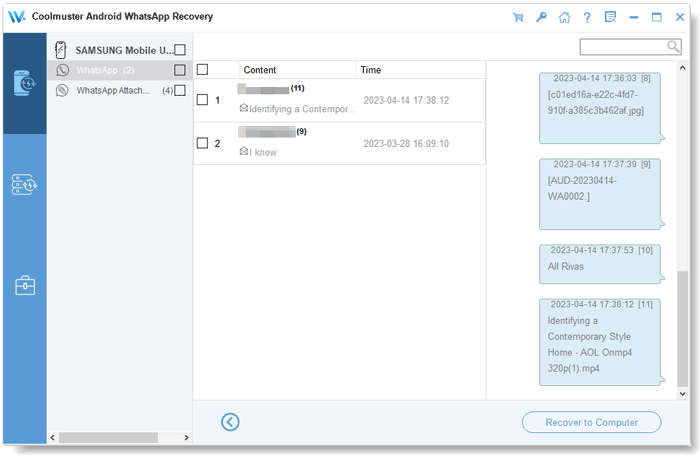
WhatsApp chats extracted from a Samsung phone, with attachment file names shown inside the conversation.
Features
Coolmuster Android WhatsApp Recovery reads WhatsApp through its encrypted backup
Coolmuster Android WhatsApp Recovery shows an on-screen guide to WhatsApp's Settings > Chats > Chat backup > End-to-end encrypted backup, has you choose "Use 64-digit encryption key instead" and generate the key, then reads the key from the phone and fills it in. It asks you to stay on the key page until it confirms.
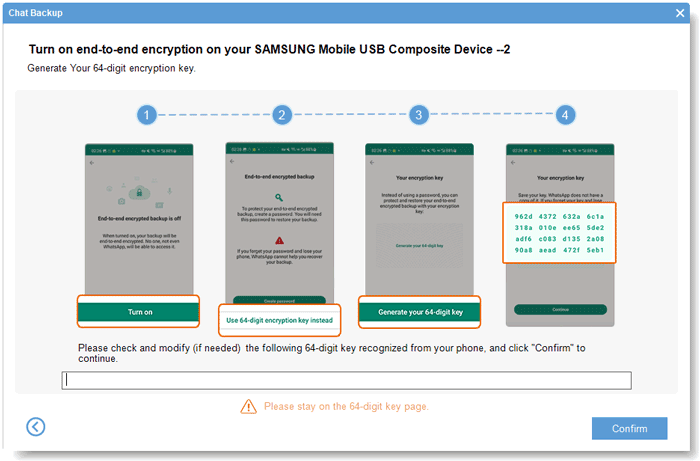
The four-step guide to turning on end-to-end encrypted backup with a 64-digit key, which the program then reads from the phone.
Exports readable chats and every kind of attachment
Coolmuster Android WhatsApp Recovery saves chats as HTML, which opens in any browser, or CSV for spreadsheets, and copies photos, videos, stickers, voice notes and documents as files. You can tick single conversations or attachments rather than exporting everything.
Keeps a local backup you can reopen later
Coolmuster Android WhatsApp Recovery stores each extraction on the PC and lists it under Recover from Backup File, so you can export more chats months later even if the phone is gone. A Select button opens backups from another folder.

Saved backups listed with model, brand, date, size, Android version and WhatsApp version.
Benefits
- A WhatsApp archive on your own PC, independent of Google Drive's single backup slot.
- Chats in HTML are easy to search, print or hand to a lawyer or accountant.
- Several phones can be connected at once, and the base license covers three devices.
Real-World Uses
- Saving a business's customer conversations before a staff phone is replaced.
- Pulling hundreds of WhatsApp video clips off a Samsung to free space, as one reviewer did.
- Keeping an offline record of a family group chat that holds years of photos.
Who It's For, and Who Should Skip It
It's for Android users on Windows who want WhatsApp chats and media saved on the PC in readable form, outside WhatsApp's own cloud backup.
Skip it if you only want to move WhatsApp to a new Android phone: WhatsApp's own Google Drive backup or its chat transfer does that free, and this program doesn't restore chats to a phone. Skip it too for a phone that won't power on, or if you use an iPhone, where Coolmuster sells iPhone WhatsApp Recovery instead. Mac users have no version of this product.
Usage Guide
- Install the program and connect the Android phone by USB. Pick the device and click Next.
- Turn on USB debugging when the program asks.
- Follow the on-screen guide to turn on WhatsApp's end-to-end encrypted backup with a 64-digit key, stay on the key page, and click Confirm once the key appears.
- When the scan finishes, click View It, then tick chats under WhatsApp and files under WhatsApp Attachments.
- Click Recover to Computer (licensed copies only).
Where it falls short
- The encrypted-backup and 64-digit key steps are fiddly, and the manual admits the key sometimes needs re-entering.
- No restore to another phone, a gap one buyer points out on the product page.
- Reviewers mention slow runs and first-connection hiccups fixed by a restart.
- The last listed release is April 2025, with no Mac edition.
What Users Say
We found no independent review of this product. The comments come from Coolmuster's review page (50 reviews) and product page; Coolmuster rewards reviews with free licenses, so treat them as a friendly sample.
Positive
"I have hundreds of video clips in WhatsApp, and want to extract them to my computer for backup. WhatsApp Recovery saves me a lot of time."
Allen, Coolmuster product page (excerpt)
"Successfully detected all my WhatsApp messages, attachments, etc.. Even some old business chats have been successfully restored"
Sterling GOGO, April 10, 2026
"Can quickly recognize my pixel phone (Android 16.0.1)"
Stasia M., June 15, 2026
Mixed and critical
"Initially, it didn't seem to work very well when I tested it on another badly damaged phone. But for phones that can be turned on normally, this tool is really useful."
usseine qasir, September 7, 2026
"worked, though a bit slowly."
Smi Lysses, October 20, 2026
"I ran into a few issues during the initial connection, but everything worked fine after restarting my computer."
GrePeny, November 3, 2026
"It can easily copy my WhatsApp data to my PC for backup. If the backups can be restored to another Android device, that will be great."
Emma, Coolmuster product page
Coolmuster as a company holds 4.6 out of 5 from 223 Trustpilot reviews (read through a page summarizer), mostly praising support. For this product the picture is consistent: good for backing up a working phone, slow at times, no restore.
Comparisons
Android WhatsApp Recovery vs WhatsApp's own Google Drive backup
Google Drive backup is free and restores to a new phone, but you can't read the chats outside WhatsApp. This program gives you browsable HTML files and attachments on the PC, but can't restore to a phone.
Android WhatsApp Recovery vs WhatsApp's Export chat
WhatsApp's built-in Export chat is free and sends one conversation at a time as a text file. This program exports many conversations and all attachments in one pass.
Editions and Pricing
| Covers | 1 Year (renews) | Lifetime |
|---|
| 1 PC, 3 devices | $35.95 | $45.95 |
| 3 PCs, 9 devices | $65.95 | $75.95 |
| 1 PC, 30 devices | $189.95 | $289.95 |
Lifetime is $10 more than a year for the basic license, the better buy if you'll back up regularly.
FAQs
Can Coolmuster Android WhatsApp Recovery restore chats to a new Android phone?
No. Coolmuster Android WhatsApp Recovery saves chats to the PC as HTML or CSV and attachments as files. Use WhatsApp's own backup to move chats to a new phone.
Does Coolmuster Android WhatsApp Recovery need root?
Coolmuster's manual for Android WhatsApp Recovery asks for USB debugging and WhatsApp's end-to-end encrypted backup, and doesn't mention rooting.
Does turning on end-to-end encrypted backup affect my Google Drive backup?
Yes. WhatsApp encrypts your cloud backup with the 64-digit key from then on, so you'll need that key to restore it. Keep a copy of the key.
Does Coolmuster Android WhatsApp Recovery work with WhatsApp Business?
Coolmuster doesn't say. Run the free scan on your phone to check before buying.
Is there a Mac version of Coolmuster Android WhatsApp Recovery?
No. Coolmuster lists Android WhatsApp Recovery for Windows only.
System Requirements
- Windows 11, 10, 8 or 7
- 750 MHz or faster CPU, 512 MB RAM, 1 GB free disk space
- USB cable, Android 6.0 through Android 17 with WhatsApp
Conclusion
Worth it if you want a readable, offline archive of an Android phone's WhatsApp chats and media on your Windows PC. The HTML export and reusable local backups are the real value, and the free scan lets you confirm it works with your phone.
The reasons not to buy: it can't put chats back on a phone, it needs the encrypted-backup key routine, and it won't rescue a dead phone.
Download Free Trial Buy Now