Light Image Resizer 7 Pro: Batch Resize, Convert and Watermark Photos on Windows
Light Image Resizer 7 Pro is a $24.99 Windows program from ObviousIdea that resizes, compresses, converts and watermarks photos one at a time or hundreds at once, straight from the Explorer right-click menu. It's for anyone who regularly has to shrink pictures for email, a website, a client gallery or an upload form, and it's a one-time license for version 7, not a subscription.
You know the routine: a folder of 24-megapixel camera shots, an upload form that refuses anything over 2 MB, and a photo editor that makes you open, resize and save each file by hand. Light Image Resizer turns that into "right-click, pick a profile, done". It used to be called VSO Image Resizer, so if you remember that name, this is the same program, renamed when it moved to ObviousIdea.
Quick facts
- Version: 7.6.8.183, released October 28, 2026
- Developer: ObviousIdea (France), formerly sold as VSO Image Resizer
- Platform: Windows 11, 10 and 8.1, 64-bit or 32-bit. No Mac version
- Price: $24.99 for the Pro license (plus VAT where it applies), a perpetual license for version 7.x
- Activations: one user, on up to two of your own computers (for example a desktop and a laptop)
- Formats: JPEG, PNG, GIF, TIFF, WebP, HEIC, JPEG XL, JPEG 2000, PDF, PSD, ICO, SVG, camera RAW and more
- Installer: 46.3 MB, digitally signed by ObviousIdea
- What we checked: installer file version 7.6.8.183 (48,595,008 bytes, signed by ObviousIdea) downloaded from the vendor on November 2, 2026, and the price of $24.99 for Light Image Resizer 7 Pro on the order page on November 2, 2026. We didn't run the unlicensed trial to measure its limits.
Before you buy
- Pro doesn't include OCR or AI Vision. The program's OCR tab and the AI captioning features (ChatGPT, Gemini, OpenRouter, Ollama) are part of the Corporate edition. If you want to make photos searchable by their text or auto-describe them with AI, Pro is the wrong license.
- Test it before paying. ObviousIdea's refund policy covers duplicate orders and technical problems its support team confirms it can't solve. It doesn't cover a change of mind, so run the free download on your own photos first.
- The license is tied to version 7. All 7.x updates are free. Version 8, when it comes, will be a paid upgrade at a discount, free only if you bought less than six months before its release.
Download Free TrialBuy Now
Overview
Light Image Resizer is built around profiles: saved recipes that say how big the output should be, which format, what quality, where the files go and what happens to the names. Version 7 ships with plain ones like 1K, 2K and 4K, an Email profile, and file-size targets such as 256 KB, 1 MB or 2 MB. You add images or a whole folder, pick a profile, and press Process. The same profiles appear in the Windows right-click menu, including the new Windows 11 context menu, so most jobs never need the main window at all.
Around that core sit the extras that make it more than a resizer: text and image watermarks, borders and simple effects, renaming, PDF creation, collages, metadata control, and since version 7 a separate Light Image Editor for screenshots and quick annotations. The program is under steady development: ObviousIdea shipped ten releases between February and October 2026, the latest (7.6.8.183) updating a compression library for a security fix.

The Images page: nine photos loaded with the Files and Folder buttons, with Sort and View options above the thumbnails.
Features
Resize hundreds of photos in one pass
Light Image Resizer resizes a single picture or a whole folder tree with the same settings. You set the width and height, choose a mode such as Fit, keep the aspect ratio, and decide whether to create copies or overwrite the originals. When it does overwrite, it keeps a .bak backup by default, which you can turn off. An "Adjust resolution for portrait" option stops tall photos coming out too small when your profile was written for landscape shots.
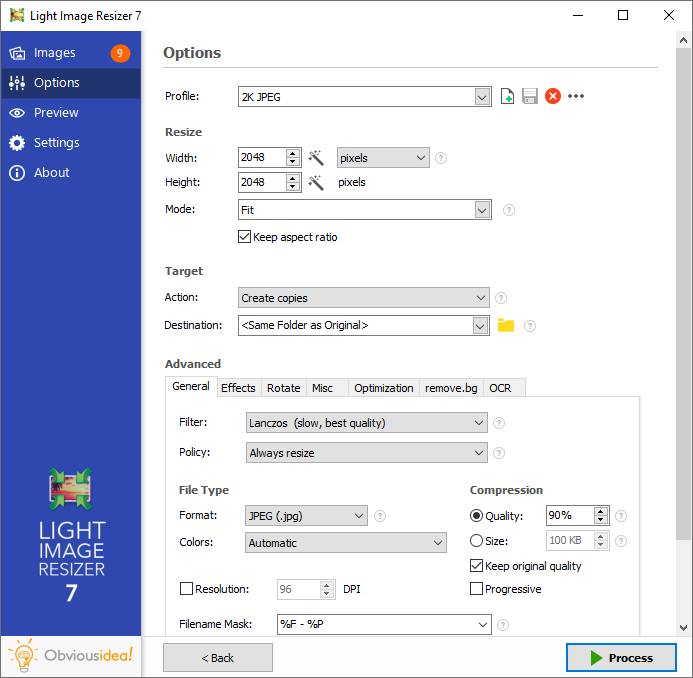
The Options page with the 2K JPEG profile: 2048 x 2048 pixels in Fit mode, copies saved next to the originals, Lanczos filter and 90% JPEG quality.
Convert between more than 20 image formats
Light Image Resizer converts as well as resizes: pick the "Original Resolution" profile and change the file type, and it becomes a batch converter. It reads and writes JPEG, PNG (with transparency), GIF (including animated GIFs), BMP, TIFF, JPEG 2000, JPEG XL, JPEG XR, WebP (with a lossless option), PSD, ICO, PDF and HEIC, and it reads camera RAW files from Canon, Nikon, Sony, Fuji, Olympus, Panasonic, Pentax and Samsung, plus Adobe DNG. Reading HEIC may need Microsoft's free extension from the Microsoft Store, and AVIF needs a free ImageMagick plugin. Output can also be packed into a ZIP file.
Hit a file-size target, not just a pixel size
Light Image Resizer can compress to a target file size instead of a quality number, which is what upload forms and email servers actually care about. The version 7 profiles include 256 KB, 1 MB and 2 MB targets, and you can set your own. For PNG output it runs Oxipng for extra lossless optimization (it replaced OptiPNG in September 2026).
Watermarks with text tags and transparency
Light Image Resizer stamps a text or image watermark on every photo in the batch. Text watermarks take HTML-like formatting, an opacity slider, rotation, one of nine positions and a font size that scales with the image. Version 7 adds text tags for the original file size, extension and dimensions, so the same feature works for captions and contact sheets, and the installer includes a sample transparent watermark to start from.

The Watermark dialog: "John Doe Photography" in Arial 48, 70% opacity, placed bottom-left.

A sample output from the vendor: a landscape photo with a semi-transparent "John Doe Photography" watermark in the lower-left corner.
Effects, borders and quick fixes
Light Image Resizer's Effects tab covers the simple adjustments people usually open an editor for: grayscale, sepia, invert, auto enhance, brightness and contrast sliders, rounded corners and a border that extends the canvas. A live preview shows the result before you process the batch.

The Effects tab: watermark, invert, grayscale, sepia, border, round edges, auto enhance and brightness/contrast controls.
Keep or strip metadata, keep the original dates
Light Image Resizer lets you choose which metadata survives the resize: EXIF, IPTC, XMP and the ICC color profile, each with its own checkbox. It can keep the original file date, decide what happens on a name conflict, and write text into metadata fields (append or overwrite), including a photo description in the title or EXIF comment.

The Misc tab: portrait adjustment, keep original file date, name-conflict handling, metadata checkboxes, Send by email and Split into parts.
PDFs, email and collages
Light Image Resizer turns a batch of images into a PDF (JPG to PDF, one file per image or all in one), and can split a very long image across several PDF pages. The publish function attaches the resized photos to an email, singly or as a ZIP, kept under the size mail servers accept. The collage tool arranges several pictures in a template layout for social media or a blog post.
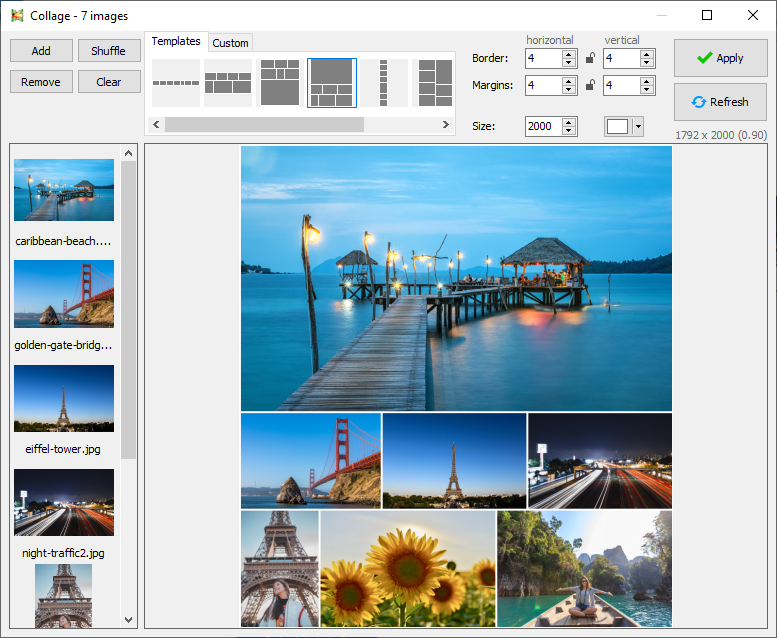
The Collage window (shown in version 6): seven photos in a template layout with border, margin and size settings.
Light Image Editor for screenshots and markup
Light Image Resizer 7 includes the Light Image Editor, a small companion app for taking screenshots and doing quick edits: adding text, highlights, blur and shapes. Its screenshot list has a search box (F3) that understands Windows Advanced Query Syntax when the folder is indexed.
Profiles that follow you, plus command-line and silent install
Light Image Resizer 7 stores each profile as its own file in your Documents folder, which OneDrive syncs, so the same profiles appear on your desktop and laptop. Typing the first letters filters the profile list. For IT staff, the installer accepts /silent and /verysilent for unattended deployment, and the program has documented command-line parameters for scripted jobs.
Benefits
- Minutes back on every batch. The job you repeat weekly (shrink, rename, watermark, save somewhere else) becomes one right-click, because the whole recipe lives in a profile.
- No more rejected uploads. File-size targets mean you aim for "under 1 MB" directly instead of guessing at quality percentages.
- Your originals stay safe. Copies are the default, and overwriting keeps a backup unless you say otherwise.
- Pay once. $24.99 covers every 7.x release, and there's no account or subscription to keep up.
Real-World Uses
- A wedding or event photographer delivering client galleries: a profile that makes 2K JPEG copies with a corner watermark and the original capture date kept, run on each shoot's folder.
- An online seller preparing product photos: convert iPhone HEIC shots to JPEG or WebP at the marketplace's pixel size, with a border to square them up.
- A school newsletter editor collecting photos from parents of every size and format, and turning them into email-friendly 1K copies in one pass.
- Someone filling in a government or job portal that wants a scan under 256 KB as a PDF: one profile for the size, the PDF action for the file.
- An office IT admin rolling it out silently to staff PCs so everyone resizes images the same way from the right-click menu.
Who It's For, and Who Should Skip It
It's a good buy for Windows users who resize or convert photos often enough that opening an editor each time has become a chore: photographers, bloggers, small shops, school and club volunteers, and offices that send a lot of pictures by email. It's especially handy if you want the job done from Explorer without learning a full editor.
Skip it if:
- you're on a Mac. There's no Mac version, and running it in Parallels is a workaround, not a native app.
- you resize a few pictures a year. The Windows Photos app or a free online resizer does that without a license.
- you need OCR or AI-written captions. Those need the Corporate edition, and a dedicated OCR tool may serve you better.
- you want real photo editing (layers, retouching, selective adjustments). Light Image Resizer only does whole-image fixes, so a photo editor such as Affinity Photo or GIMP is the right tool.
- you're buying for a business. The Corporate edition is the one licensed for corporate use.
Usage Guide
- Install it. Run
light_image_resizer7_setup_7.6.8.183.exe (46.3 MB) and follow the wizard. If Windows Security's Ransomware Protection is on, add Light Image Resizer to the allowed apps, or saving into protected folders fails with "Unable to write in folder".
- Add your photos. Start the program and use Files or Folder on the Images page, or right-click images or a folder in Explorer and choose Light Image Resizer.
- Pick a profile. On the Options page, choose one such as 2K JPEG or a 1 MB target. Change the width, height, mode and destination if you need to.
- Add extras. Use the Advanced tabs for the format and quality (General), a watermark or border (Effects), and metadata and file dates (Misc).
- Check and process. Look at the Preview page, then click Process. Save the settings as a new profile with the save icon if you'll do this again.
- Unlock it after buying. Click Unlock in the program and paste the email address and license key from your order confirmation.
Tips
- To convert without resizing, use the <Original Resolution> profile and change only the file type.
- To put the output in a subfolder next to each original, type just the folder name (for example
Resized) as the destination.
- Export your profiles from Settings > Advanced before reinstalling or moving to a new PC.
- Right-click a profile to copy or rename it instead of building a new one from scratch.
- Save your license email: the vendor can't promise to resend keys indefinitely.
Where it falls short
- The "Recreate folder structure" option trips people up. With it on, the destination must be a full path, and processing won't start otherwise.
- The license key is version-specific. A version 7 key won't unlock an older installed version, and an old key won't unlock version 7, which is the most common unlock error in the vendor's FAQ.
- No current portable version. The only portable build is the old version 5.
- Linux only through Wine (1.8.2 or newer), unsupported and with some features limited.
- The unlicensed version nags. A 2010 review of VSO Image Resizer complained about a reminder screen on every start, and FileHorse lists "Watermarking in Free Version" among its cons.
- Some formats need add-ons. AVIF needs the ImageMagick plugin and HEIC may need Microsoft's extension.
What Users Say
Light Image Resizer has been around since its VSO days, so most user feedback is spread across download sites rather than one big review platform. There are no Trustpilot, Capterra or G2 pages for it. Here's what we could find, old and new, good and bad.
Ratings on download sites
Clubic, the French download site, shows an average of 3.8 out of 5 from 703 user ratings. FileHorse's editor Sophia Jones lists its pros as an easy interface, batch processing, wide format support, customizable resize options and quick performance, and its cons as limited advanced editing tools, "Watermarking in Free Version", occasional output quality issues and no cloud integration. FileHorse also notes the demo version is limited to 100 images. MajorGeeks lists it as shareware at $24.99, and Neowin posts each new release.
Customers on the vendor's testimonials page
These were sent to ObviousIdea in 2011 and 2012, when the product was moving from the VSO name, so they describe older versions.
A photography business owner, by email, April 2012: "It's about the quickest and simplest tool I've used for image resizing and compression. We are a photography business, and as such each photo shoot is uploaded to personal galleries for our clients. Light Image Resizer is already saving us over 8-10 minutes per job over our previous workflow." - Grant, Operations Manager, Angela Hawkey Photography, Brisbane, Australia
A school publisher, February 2012: "The light image resizer has been a valuable tool for over 200 Schoolzine clients. We required a program that could process batches of images easily to specific dimensions with out compromising the images quality. The user friendly interface allows our users with minimal computer knowledge to process large amounts of images with a few simple clicks." - Nick Aitkin, Head of production, Schoolzine, Australia
By email, February 2012: "a nice tool to re-size multiple images quick and easily with multiple options for deciding the final output from the defaults built in and being able manually adjust the sizes as required in either percent, pixels, or inches. makes the task of resizing photos for email quick and painless task." - John O. S, Cork, Ireland
On Facebook, December 2011: "i like the image resizer….the last years i worked with fotosizer….now i deleted fotosizer….thanks….." - Ulf Gruber
Criticism
On AlternativeTo, where the program has 18 likes, the one written review (January 2010, about VSO Image Resizer) explains why the reviewer left: "Descent program although it had to much features for me, I only need the resize/rename part." and "But the main reason to switch was the nag-screen every time you start VSO image resizer." - Bas Steenbeeke
FileHorse's cons above point the same way on editing: anyone wanting more than simple effects will find it thin.
The recurring themes: people like how quickly it gets a batch done and how little there is to learn, and businesses that resize photos daily say it saves real time per job. The complaints are about the unlicensed version's reminders, a feature set some find bigger than they need, and the limited editing. Most of the written reviews are years old, so treat them as a picture of the program's character rather than of version 7's details.
Comparisons
Light Image Resizer vs. the Windows Photos app
The Photos app that comes with Windows can resize a picture you've opened, one at a time, with a few preset sizes. Light Image Resizer does whole folders, hits file-size targets, converts formats, watermarks, renames and keeps metadata the way you choose. If you resize one photo a month, Photos is enough. If you resize a folder a week, Light Image Resizer pays for itself quickly.
Light Image Resizer vs. a full photo editor
Editors like Photoshop, Affinity Photo or GIMP can batch-resize too, through actions or scripts, but setting that up takes effort and the editor is the wrong tool for a quick right-click job. Light Image Resizer is the opposite: no retouching, but the batch work is ready in seconds.
Editions and Pricing
| Edition |
Price |
License |
Support |
What it adds |
| Pro |
$24.99 |
Perpetual for 7.x, one user, two PCs |
Email support for 12 months |
Full version, minor updates included |
| Corporate |
$167.00 on the vendor's shop page |
Perpetual for 7.x, licensed for corporate use |
Unlimited email support |
Text recognition (OCR), AI Vision via ChatGPT, Gemini or Ollama |
Prices are before VAT. On November 2, 2026 the order page for Pro also offered Corporate as an upgrade at $83.50. AI Vision with ChatGPT or Gemini needs your own account with that service and is billed by it. Volume licenses are quoted on request.
FAQs
Is Light Image Resizer the same as VSO Image Resizer?
Yes. Light Image Resizer is the program previously sold as VSO Image Resizer, renamed when it moved to ObviousIdea. Profiles from version 6 carry over, renamed with an LIR6_ prefix.
Can I use one Light Image Resizer license on my desktop and my laptop?
Yes. A Light Image Resizer single-user license can be activated on up to two computers you own. If a new PC or a repair uses up your activations, ObviousIdea resets them when you send proof of purchase, which can take several days.
Will my Light Image Resizer 7 license work with version 8?
No. A Light Image Resizer license covers the major version you bought and all its minor updates (every 7.x release). A new major version is a discounted paid upgrade, or free if you bought within six months before it came out.
Can I get a refund on Light Image Resizer if I don't like it?
Not for a change of mind. ObviousIdea refunds duplicate orders and technical problems its support team confirms can't be fixed in a reasonable time, and a refunded key stops working. Try the free download on your own photos before buying.
Does Light Image Resizer run on a Mac or Linux?
Light Image Resizer is Windows-only. On a Mac you can run it in Windows emulation such as Parallels Desktop, and on Linux it runs unofficially under Wine 1.8.2 or newer with some features limited.
Can Light Image Resizer convert iPhone HEIC photos to JPG?
Yes. Light Image Resizer reads and writes HEIC, so it can turn iPhone photos into JPEG (or JPEG into HEIC). Reading HEIC may need Microsoft's free HEIF extension from the Microsoft Store.
How fast do I get my Light Image Resizer license key?
Usually within minutes. Light Image Resizer keys are emailed once the payment is confirmed, which is quick for cards and PayPal and slower for wire transfers. If nothing arrives after 15 minutes, check spam and then contact ObviousIdea.
Can I deploy Light Image Resizer to many PCs without clicking through the installer?
Yes. The Light Image Resizer installer takes /silent (progress shown) or /verysilent (nothing shown). For a company rollout, the Corporate edition is the license meant for business use, and volume licenses are available on request.
System Requirements
- Windows 11, 10 or 8.1 (64-bit or 32-bit)
- 2.0 GHz processor
- 4 GB of RAM
- 500 MB of free hard drive space
Conclusion
Light Image Resizer 7 Pro is worth $24.99 if you batch-resize photos on Windows more than occasionally. The one reason to buy it is the profile system: a whole routine of resizing, converting, watermarking and renaming becomes a single right-click, and the file-size targets solve the "too big to upload" problem directly. It's actively maintained, with several releases in 2026, and the license is a one-time payment for all of version 7.
The main reason not to: the refunds don't cover a change of mind, and the Pro license leaves out the OCR and AI captioning the product page advertises. Download it, run it on a real folder of your photos, and buy only if it fits how you work.
Download Free TrialBuy Now