GreenCloud Printer Pro: Preview and Trim Print Jobs Before They Waste Paper
GreenCloud Printer Pro is a $24.99 one-time Windows printer driver that shows every print job in a preview first, so you can delete pages, fit 2 or 4 pages on a sheet, reduce ink use and save PDFs. It's for home offices and small businesses that print from many programs and want one simple print screen for all of them.
Print a web page and you often get a final sheet holding two lines of footer. GreenCloud sits between your programs and your real printer and catches that sheet before it comes out.
Quick facts
- Version: 7.9.4.0, released February 2, 2024
- Developer: ObviousIdea
- Platform: Windows 7, 8, 10 and 11
- Price: $24.99 one-time
- License: 1 user, up to 2 of your own computers, valid for all 7.x updates
- Free version: limited pages, with a small notice added to pages
- Works with: any printer, as a virtual driver
What we checked: installer file version 7.9.4.0 (17.4 MB) with a valid digital signature, read from the vendor's download file, and the price of $24.99 with no renewal on the order page, on November 5, 2026. We didn't install it or measure its ink savings.
Before you buy
- The last update was in February 2024. It's still sold and listed for Windows 11, but it isn't being updated often.
- The 60% saving is the vendor's best case. ObviousIdea says "up to 60%", and its test panels show an average of 35% of paper saved by merging pages. We found no independent test of those numbers.
- Some antivirus tools object. ObviousIdea has a help page for blocked downloads, and its FAQ says an antivirus can stop the printer driver from installing.
- Try the free version first. It shows whether GreenCloud works with your printer and your programs.
Download Free TrialBuy Now
Overview
After you install it, GreenCloud appears as a printer, and you can make it your default. When you print from Word, a browser or a PDF reader, its window opens instead of the document going straight to paper. You see thumbnails of each page and make your choices there, and then it passes the job to your real printer or saves a PDF.
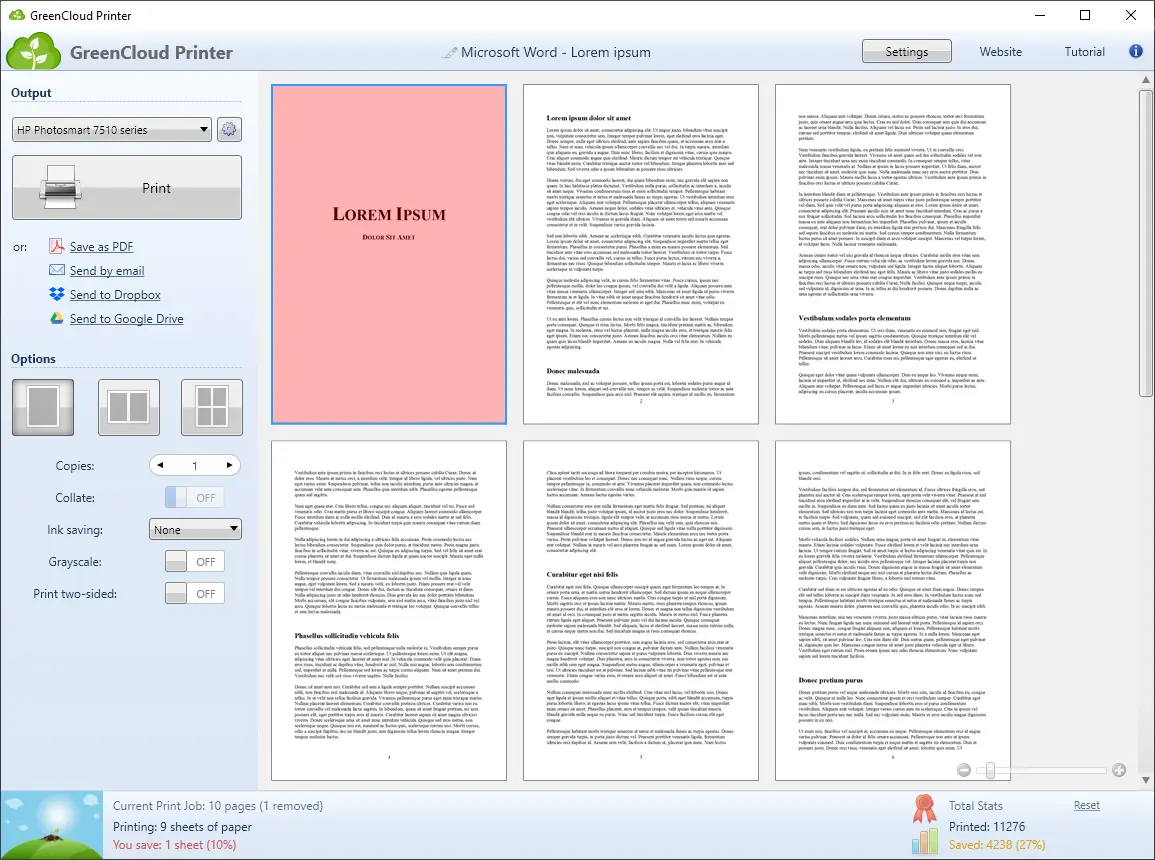
The preview window: pages as thumbnails with one removed (in red), output and ink options on the left, and paper saved for this job at the bottom.
Features
Remove pages before they print
GreenCloud Printer shows every page of a job, and you click to remove the ones you don't need, such as a blank last page. An option can also remove pages with little content automatically.
Fit 1, 2 or 4 pages on a sheet
GreenCloud Printer merges pages with one click, which is where most of the paper saving comes from. Double-sided printing and grayscale are one-click switches as well, for printers that support them.
Use less ink with three saving levels
GreenCloud Printer has three ink-saving levels, and it can turn black text dark gray so it uses less toner or ink.
Print to PDF, email or the cloud
GreenCloud Printer works as a PDF creator from any program that can print, so it can also turn a Word document into a PDF. You can email the result or send it to Dropbox or Google Drive, where it's stored as a PDF.
See what you've saved with Pro
GreenCloud Printer Pro removes the page limit and notice, and adds statistics that show your paper use and cost by day, week or month. The free version has no statistics. Badges reward you for saving paper, and companies can ask about company-wide statistics.
Benefits
- The same print screen everywhere. Every program uses one simple window instead of each printer's own dialog.
- Fewer wasted sheets. You catch unwanted pages before they're printed, not after.
- One tool replaces a PDF printer. You may not need a separate PDF creator.
Real-World Uses
- A home office prints long web articles at 2 pages per sheet and drops the last page of adverts.
- A student makes draft copies at 4 pages per sheet to read on the train.
- A small business tracks monthly printing cost in the Pro statistics.
- An office manager rolls it out with the installer's /silent option across several PCs.
Who It's For, and Who Should Skip It
GreenCloud Printer Pro fits Windows users who print often enough to care about paper and toner.
Skip it if you rarely print, since it won't save much. Skip it if your printer's own driver or your PDF reader already gives you page selection and n-up printing and you don't mind setting them each time. CBS's reviewer made that point in 2012: it adds convenience, not new abilities. It also doesn't suit Mac or Linux users.
Usage Guide
- Download the installer, close your programs and run it.
- Set GreenCloud as your default printer if you want it used every time.
- Print from any program and choose GreenCloud.
- In its window, choose your real printer under Output.
- Remove pages, then pick pages per sheet and ink-saving options.
- Click Print, or Save as PDF, Send by email, or send to Dropbox or Google Drive.
- For Pro, click Unlock and enter the email address and license key from your order.
Where it falls short
- Print options don't apply to PDFs. Copies, grayscale and similar settings only take effect on paper.
- Options can reset. If grayscale or two-sided settings reset each time, turn off Respect printer's default settings in GreenCloud's Settings.
- Sometimes nothing happens. The FAQ's fix is the troubleshooter in GreenCloud Control Panel, then checking the VPDAgent service and printer properties.
- Some programs print wrong characters. This can happen with embedded fonts in PDFs, and the FAQ suggests updating or using another PDF viewer.
- Don't rename the printer. GreenCloud needs its printer name unchanged.
- Major upgrades cost extra. Your license covers 7.x only. A future 8.x would be a discounted upgrade.
What Users Say
CBS News MoneyWatch
Dave Johnson, February 10, 2012, on an older version. His limit: "GreenCloud doesn't really deliver anything you couldn't do, with effort, already." His praise: it "brings together so many options in a convenient form", and "you'd have to truly hate money and loathe trees not to see immediate benefits with GreenCloud."
AlternativeTo: 20 likes
These are older comments, and they're mostly about the free version.
- "The "free" version is just a limited demo that adds a shareware note to output and won't print more than 10 pages." kAlvaro, September 24, 2015
- "the "free" version only allow 10 pages now (was 20). It is very limited." Truc, May 25, 2014
- "Now including the option to edit the settings of the selected printer. Great." jcoppo, January 3, 2012
Testimonials on ObviousIdea's site
These are from the vendor's own page.
- "The Green cloud interface is quick and easy to use and has cut our printing costs considerably by reducing the amount of paper and ink we use when printing documents from outlook and the web." Nick Aitkin, Head of Production, Schoolzine
- "Simple to use navigation offers one click elimination of pages that are part of the file but don't need to be printed on the paper." Tom Logar, President, Toothguard Dental Instruments
The pattern: people like the convenience and the simple page removal. The complaint is the small free allowance, which is what Pro pays for. Most reviews are old, so we can't say much about how it behaves on a current Windows 11 PC.
Comparisons
GreenCloud Printer vs your printer's own driver
Your printer's driver usually offers duplex and pages per sheet, but it differs by printer and takes more clicks. It usually doesn't show thumbnails where you can delete single pages, or report what you've saved. GreenCloud gives you those in the same window for every printer.
GreenCloud Printer vs Microsoft Print to PDF
Microsoft Print to PDF comes with Windows and is enough for plain PDFs. GreenCloud adds page removal and merging, plus sending to email or cloud storage in one step.
FAQs
How many computers can I use GreenCloud Printer Pro on?
A single-user GreenCloud Printer Pro license works on up to two computers you own, such as a desktop and a laptop.
Does GreenCloud Printer Pro expire?
No. GreenCloud Printer Pro licenses stay valid for the major version you bought and all its minor updates. Moving to a new major version is a paid, discounted upgrade.
Does GreenCloud Printer work with my printer?
GreenCloud Printer works as a virtual driver in front of your existing printer, and ObviousIdea says it supports all printers.
Can I install GreenCloud Printer silently on many PCs?
Yes. Run the installer with /silent or /verysilent for unattended deployment.
Is GreenCloud Printer free?
GreenCloud Printer has a free version with a limited number of pages and a small notice on them. Older user reports put the limit at 10 pages, and ObviousIdea doesn't state it on the product page.
Can I get a refund for GreenCloud Printer Pro?
ObviousIdea has a Refund Policy linked from its licensing FAQ, so read it before you buy. Use the free version to confirm that it works for you first.
System Requirements
- Windows 7, 8, 10 or 11
- A printer, if you want paper output (none needed for PDFs)
- About 17 MB for the installer
Conclusion
GreenCloud Printer Pro is worth $24.99 if you print regularly from many programs and tend to throw sheets away. The one reason to buy it is having a single preview window that removes pages and merges them with a click. The main reason not to is that it hasn't been updated since February 2024, and your printer's driver may already do enough if you only print now and then. Try the free version first.
Download Free TrialBuy Now