Coolmuster iCloud Backup Recovery: Save Your iCloud Contacts, Photos and Notes to a Windows PC
Coolmuster iCloud Backup Recovery is a $19.95-a-year Windows program that signs in to your iCloud account and copies contacts, photos, notes, note attachments, calendars and reminders to your PC, without the iPhone connected and without resetting it. It exports what's in iCloud now; it doesn't undelete anything, and it doesn't read messages or app data.
The name promises more than the program does, so read that sentence twice. If you need your iPhone's contacts and photos on a Windows computer because the phone is lost, broken or being replaced, it's a simple way to do it. If you're after deleted texts or WhatsApp chats from an iCloud backup, this isn't the tool.
Quick facts
- Version: 2.0.15 for Windows, released September 23, 2026
- Developer: Coolmuster
- Runs on: Windows 11, 10, 8 and 7 (a separate Mac edition is sold)
- Reads: contacts, photos, notes, note attachments, calendars and reminders from iCloud
- Sign-in: Apple ID and password inside the program, with the two-factor code from your iPhone
- Price: $19.95 for one year on one PC, $29.95 lifetime
- Trial: free download that signs in, scans and previews. Saving needs a license
- What we checked: Windows version 2.0.15 in the vendor release notes, the 31.9 MB installer from the vendor (file dated September 23, 2026), checkout price $19.95 on November 11, 2026. We worked from the vendor's manual and screenshots and didn't sign in to an iCloud account with it.
Before you buy
- The data-type screen is headed "Existing Data Only (Unable to recover deleted data)". It exports what iCloud holds; it isn't an undelete tool.
- Six data types only. Messages, WhatsApp, call history, app data and device settings aren't available.
- You type your Apple ID password into the program. Coolmuster says it reads in a read-only mode and never stores the account details.
- Coolmuster lists iCloud Backup Recovery among its recovery products, whose refund requests it says will not be approved. Check the free preview first. The yearly plan renews automatically.
Download Free Trial Buy Now
Overview
The program is small and single-purpose. Its sidebar shows Recover from iCloud and Toolkit, and the whole job is sign in, tick data types, preview, and click Recover to Computer. It's the iCloud mode of Coolmuster iPhone Data Recovery sold on its own, at less than half the price.
The September 2026 release fixed delivery of the iCloud verification code and added a prompt to accept Apple's iCloud terms before scanning, the kind of change Apple's sign-in process forces on every tool of this type.
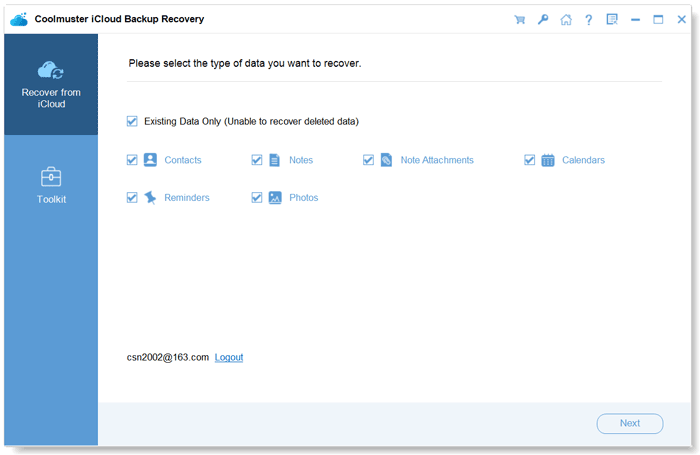
The six data types, all under "Existing Data Only (Unable to recover deleted data)".
Features
Coolmuster iCloud Backup Recovery signs in to iCloud from the PC
Coolmuster iCloud Backup Recovery asks for your Apple ID and password on its first screen and, with two-factor authentication on, for the code that appears on your iPhone or iPad. The sign-in screen advises not to connect the device to the computer during recovery, so iCloud data isn't changed mid-download.
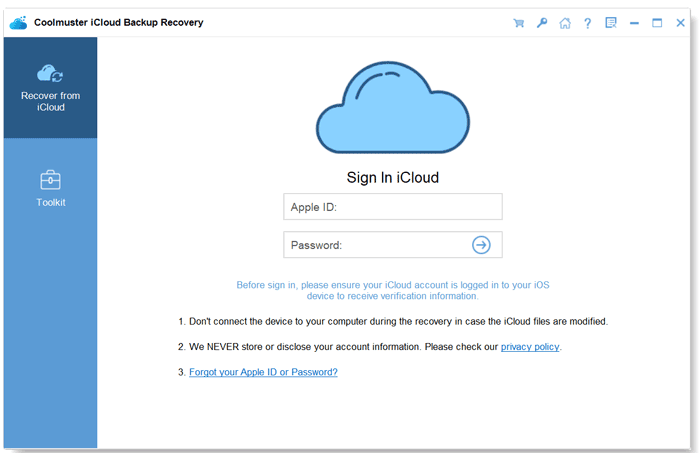
The Windows sign-in screen, with its notes about keeping the device disconnected and account privacy.
Previews contacts, photos, notes, calendars and reminders by category
Coolmuster iCloud Backup Recovery lists each category with a count, shows photos as thumbnails and text items as lists, and lets you tick single entries. The scan reads what iCloud holds at that moment.
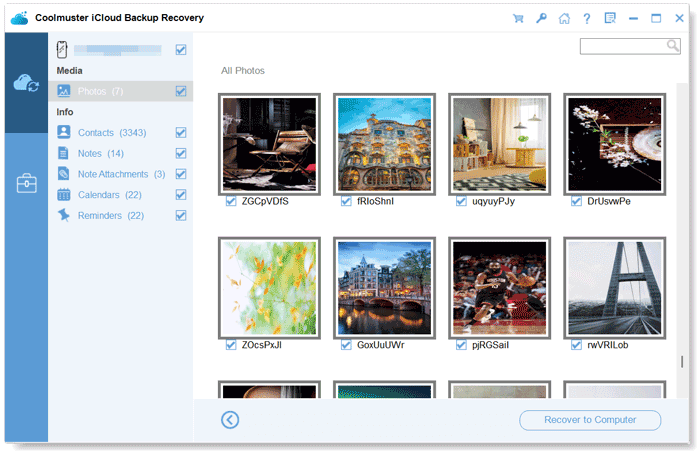
Photo thumbnails, with contacts, notes, note attachments, calendars and reminders counted in the left column.
Saves in formats Windows can open
Coolmuster iCloud Backup Recovery writes contacts and text items to files such as VCF, CSV and HTML, and photos in their own formats (HEIC, JPG, PNG, GIF and others), so you can open them without an Apple app.
Benefits
- You get a local copy of your iCloud contacts and notes without restoring or resetting an iPhone.
- It works when the phone is gone: all it needs is the Apple ID and a trusted device or number for the code.
- It's cheap for a one-off move from Apple's cloud to a Windows PC.
Real-World Uses
- You're switching from iPhone to Android and want your contacts as a VCF file on the PC.
- The iPhone is broken, but its notes and calendars synced to iCloud and you need them for work today.
- You want an offline archive of iCloud photos and reminders before cancelling a paid iCloud plan.
- A family member's contacts list lives only in iCloud and you want a copy on the home PC.
Who It's For, and Who Should Skip It
It suits Windows users who want their iCloud contacts, photos, notes, calendars and reminders saved as ordinary files, quickly and without touching the phone.
Skip it if you need deleted data, messages or WhatsApp: Coolmuster iPhone Data Recovery scans the device and local backups as well, and iPhone WhatsApp Recovery handles WhatsApp. Skip it too if you're comfortable with the free iCloud.com website, which already lets you export contacts and download photos one batch at a time.
Usage Guide
- Install the program from the .exe and launch it. Click Trial in the registration window, or register with your licensed email and code.
- Type your Apple ID and password and click the arrow. Enter the two-factor code from your iPhone and click Verify.
- Tick the data types you want and click Next to scan.
- Preview each category and tick the items to keep.
- Click Recover to Computer and choose a folder. This step needs a license.
Where it falls short
- No messages, WhatsApp, call logs or app data, a gap one buyer points out on the product page.
- Coolmuster's own users report that large accounts take time to load and ask for clearer instructions.
- Apple's sign-in changes can break tools like this until the vendor patches them, as the iCloud login and verification-code fixes in 2026 show.
- Recovered data goes to the PC only.
What Users Say
We found no independent hands-on review of the current version. The comments below come from Coolmuster's product and review pages and Trustpilot's company page. Coolmuster gives free licenses for reviews, so treat its own page as a friendly sample.
Coolmuster's review page (58 reviews)
"Saved me from digging through endless iCloud backups."
Jessica Miller, September 4, 2026
"The preview feature is useful. I could select exactly what I needed before recovery."
Daniel Mitchell, July 17, 2026
"Easy to use and didn't overwrite my current iPhone data. Could support more file types."
Daniel Hughes, May 9, 2026
"Saved my notes after accidental deletion."
Daniel Walker, February 28, 2026
"Works as advertised for iCloud backups."
Eric Nelson, February 2, 2026
The doubts on the same pages
"This software can help me selectively restore data from iCloud backup, I don't need to restore all data. But the data type is incomplete, only contacts, photos, note attachments, reminders, and calendars are supported. App data, device settings, etc. can not be found. Anyway, it's easy to use, and it's good."
Zdeněk Dvořák, Coolmuster product page
"Can it recover WhatsApp data from the iCloud backup?"
David Wilson, June 18, 2026
"Scan speed is okay, but large backups take time to load."
Matthew Lewis, May 29, 2026
"Please make the recovery instructions easier to follow. The feature itself looks promising."
Grace Collins, October 19, 2026
Trustpilot, for Coolmuster as a company
Coolmuster holds a 4.6 out of 5 TrustScore from 223 reviews (read through a page summarizer). Reviewers mostly praise quick support replies; none of the recent ones we read named this product.
The theme is clear: the preview and selective export work and people like that the phone isn't touched, while the limited list of data types is the recurring complaint.
Comparisons
iCloud Backup Recovery vs Coolmuster iPhone Data Recovery
iPhone Data Recovery ($49.95 a year) has the same iCloud mode and adds the device scan and iTunes backups, where deleted messages and contacts can be found. If iCloud data is all you need, iCloud Backup Recovery costs $30 less.
iCloud Backup Recovery vs iCloud.com in a browser
iCloud.com is free and exports contacts as vCards and downloads photos. This program puts all six types in one list with a single save step, which is quicker for large libraries and for notes and reminders.
Editions and Pricing
| Plan (Windows) | Price | Term | PCs |
|---|
| 1 Year | $19.95 | 1 year, renews automatically | 1 |
| Lifetime | $29.95 | One payment, lifetime updates | 1 |
| 1 Year | $29.95 | 1 year, renews automatically | 5 |
| Lifetime | $49.95 | One payment, lifetime updates | 5 |
| 1 Year | $39.95 | 1 year, renews automatically | 10 |
| Lifetime | $89.95 | One payment, lifetime updates | 10 |
For a one-time export, the yearly plan with the renewal cancelled is enough. Lifetime is $10 more if you want to repeat the export now and then.
FAQs
Can Coolmuster iCloud Backup Recovery get deleted messages from an iCloud backup?
No. Coolmuster iCloud Backup Recovery reads contacts, photos, notes, note attachments, calendars and reminders only, and labels them all as existing data.
Does Coolmuster iCloud Backup Recovery need my iPhone?
Not connected. Coolmuster iCloud Backup Recovery works from your Apple ID, but with two-factor authentication you need a trusted device or phone number to receive the verification code.
Will Coolmuster iCloud Backup Recovery change anything on my iPhone or in iCloud?
Coolmuster says iCloud Backup Recovery works in a read-only mode, and it saves to the PC only, so the phone and the account are left as they are.
Is Coolmuster iCloud Backup Recovery available for Mac?
Yes, as a separate product, Coolmuster iCloud Backup Recovery for Mac, with its own license at the same prices.
Can I get a refund for Coolmuster iCloud Backup Recovery if it doesn't show my data?
Unlikely. Coolmuster puts iCloud Backup Recovery under its 7-day guarantee for recovery products but adds that refund requests for recovery products will not be approved, so let the free preview decide.
System Requirements
- Windows 11, 10, 8 or 7
- 750 MHz or faster CPU, 512 MB RAM, 1 GB free disk space
- An internet connection and an Apple ID with iCloud data (iOS 5 through iOS 27 devices)
Conclusion
Worth it if you want your iCloud contacts, photos, notes, calendars and reminders saved to a Windows PC in one pass, without touching the phone. It's cheap, quick, and honest in its own interface about exporting existing data only.
The reason not to buy is expecting a recovery tool: there's no undelete, no messages and no WhatsApp. For those, look at Coolmuster iPhone Data Recovery instead.
Download Free Trial Buy Now