Aiseesoft FoneLab iPhone Data Recovery: Get Deleted Messages, Contacts and Chats Off an iPhone and Onto Your PC
Aiseesoft FoneLab iPhone Data Recovery is a Windows program that scans an iPhone, iPad or iPod touch, or its iTunes or iCloud backup, for deleted messages, contacts, call history, notes, WhatsApp chats and other data, and saves what it finds to your PC. It sells for $53.80 for a one-month license at checkout, covering one PC and up to six iOS devices, and the free trial lets you scan and preview before you pay.
You cleared a message thread by mistake, an iOS update wiped your notes, or the phone that held your contacts is now in a drawer with a cracked screen. Apple's own answer is to restore a whole backup over the phone and hope the item is in it. FoneLab's answer is to open that backup, or the phone itself, show you the individual items, and let you copy out only the ones you want.
Quick facts
- Version: 10.8.86 (program package dated August 4, 2026)
- Developer: Aiseesoft Studio
- Runs on: Windows 11, 10, 8.1, 8 and 7, with iTunes installed. There's a separate Mac edition
- Works with: iPhone (from the 3GS to the iPhone 18 series), iPad and iPod touch, iOS 5 through iOS 27
- Recovery modes: directly from the device over USB, from an iTunes backup on the PC, from an iCloud backup
- Price: $53.80 for a one-month license (1 PC, 6 iOS devices). Aiseesoft also lists a lifetime license at $79.95
- Trial: free download that scans and previews but doesn't recover files
- Guarantee: 30-day money-back guarantee for quality problems
What we checked: on October 18, 2026 we downloaded the Windows installer from Aiseesoft (a 2.4 MB online installer) and the 66.6 MB 64-bit program package it fetches, and read version 10.8.86 from both. The same day we confirmed the $53.80 one-month price on the order page and saw that its auto-renewal box is ticked by default. We didn't run a scan on an iPhone.
Before you buy
- Run the free scan first. The trial shows exactly what FoneLab can find on your device or backup. If the message or contact you need isn't in the preview, paying won't make it appear.
- The license at checkout lasts one month and renews. The order page sells a one-month license with automatic renewal ticked. Untick it if you only need a one-off rescue. If you expect to use it again, Aiseesoft's lifetime license lists at $79.95, only $26.15 more.
- Refunds are for "a quality problem". Aiseesoft's 30-day guarantee covers software that doesn't work, not a change of mind, and refund disputes are the most common complaint in its Trustpilot reviews.
- iTunes has to be installed on the PC, even if you only recover from the phone or iCloud.
Download Free TrialBuy Now
Overview
FoneLab opens on a plain two-pane window. Down the left side are the three ways in: Recover from iOS Device, Recover from iTunes Backup File and Recover from iCloud. A More tools button at the bottom leads to Aiseesoft's other FoneLab modules (iOS System Recovery, iOS Data Backup & Restore and WhatsApp Transfer), which share the same program but are licensed separately.
Whichever mode you pick, the flow is the same: scan, browse the results by category, tick what you want, and click Recover to save it to a folder on your PC. Nothing is written back to the phone, which is the point. Your current data stays as it is.
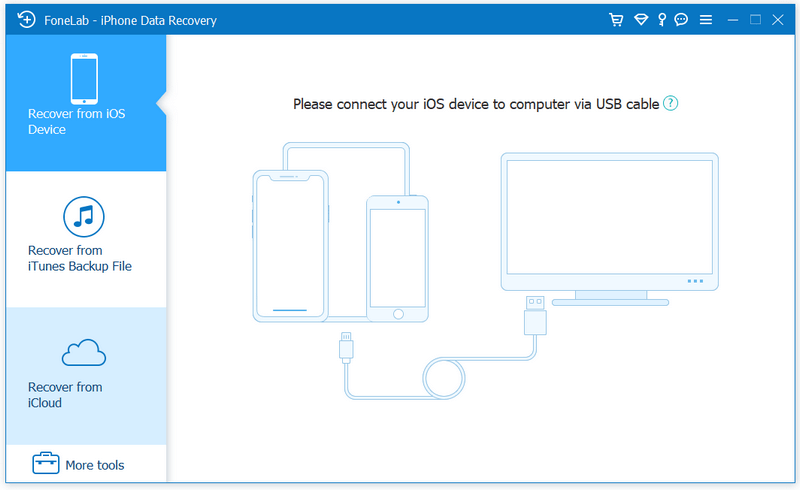
The start window: Recover from iOS Device is selected and waiting for a USB connection, with the iTunes and iCloud modes and More tools below it.
Features
Scans the iPhone itself when there's no backup
Aiseesoft FoneLab iPhone Data Recovery reads deleted items straight from a connected iPhone, iPad or iPod touch. On current devices it finds contacts, text messages and iMessages, call history, calendar, notes, reminders, Safari bookmarks and history and WhatsApp chats, plus Camera Roll, Photo Library, Photo Stream and voice memos. The results screen marks deleted items and has a Show Deleted Only filter, so a thread you erased doesn't drown among the thousands you kept.
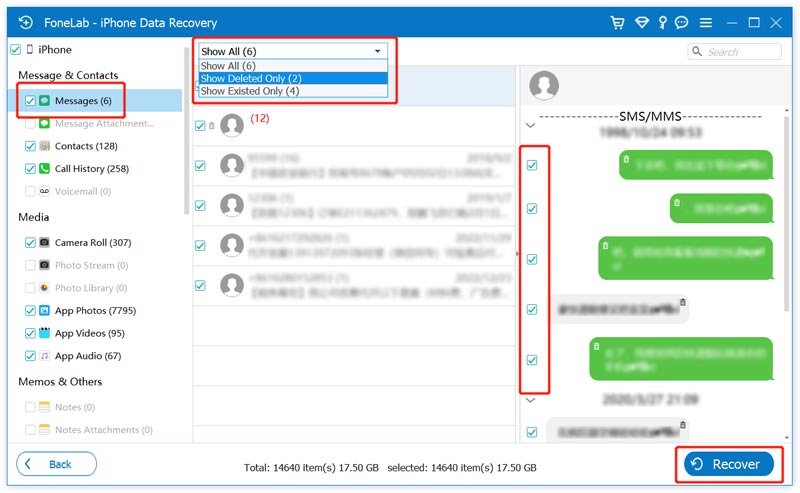
Scan results for an iPhone: categories on the left (Messages, Contacts, Call History, Camera Roll, App Photos and more, each with a count), the message list with the Show All / Show Deleted Only / Show Existed Only menu, the selected thread on the right, and the Recover button.
Opens iTunes backups item by item, including encrypted ones
Aiseesoft FoneLab iPhone Data Recovery lists every iTunes backup on the PC by device name, date and serial number and scans the one you pick without restoring it to a phone. Encrypted backups work too, as long as you type the backup password. This is the mode for a lost, stolen, reset or dead phone, and it's also the one that recovers the widest range of data, since a backup holds full files rather than leftovers in the phone's database. If your backups live somewhere else, a Select button points FoneLab at the right folder.
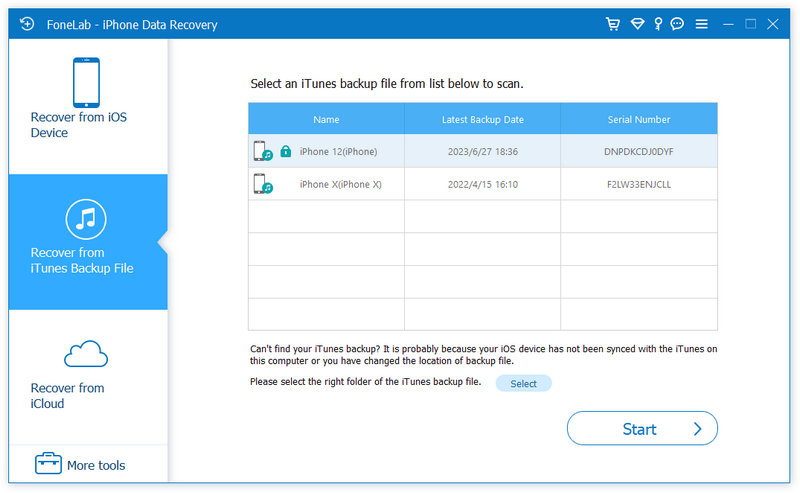
Recover from iTunes Backup File: two backups (an iPhone 12 with a lock icon and an iPhone X) with their latest backup dates and serial numbers, and the Start button.
Pulls single items out of an iCloud backup without resetting the phone
Aiseesoft FoneLab iPhone Data Recovery signs in to your iCloud account, downloads a backup and scans it on the PC. Apple's own way to use an iCloud backup is to erase the phone and restore the whole thing during setup. FoneLab skips that: you see the contacts, messages, call history, WhatsApp chats and notes inside the backup, tick the few you need, and save them to the computer while your phone stays untouched.
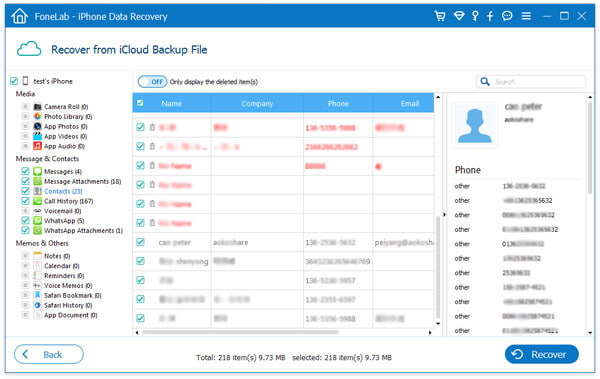
Recover from iCloud Backup File in an older version of the program: 23 contacts from the backup, deleted ones shown in red, with the contact's phone numbers in the detail pane and a toggle to show only deleted items.
Saves recovered data in formats your PC can open
Aiseesoft FoneLab iPhone Data Recovery exports each data type to a standard file. Contacts come out as CSV, HTML or VCF (ready to import into Outlook or Google Contacts), messages as CSV or HTML, notes, call history, reminders and Safari bookmarks as HTML, photos as JPG, PNG and similar image files, and app documents in their own formats such as PDF or DOCX. It saves to the computer only. To put recovered items back on a phone you need a transfer tool, such as Aiseesoft's FoneTrans.
Benefits
- Your phone stays as it is. Recovering one old conversation doesn't cost you the photos you took since your last backup, which is the trade Apple's full restore forces on you.
- Backups become browsable. An iTunes or iCloud backup is normally a sealed box. FoneLab turns it into folders of messages and contacts you can read on the PC.
Real-World Uses
- Getting a deleted thread back for a dispute. You need a landlord's messages from last spring. Scan the phone or last month's iTunes backup, filter to deleted messages, and export the thread as HTML to print or forward.
- Rescuing contacts from a phone that won't start. The old iPhone is dead, but the PC still has its iTunes backup. Open it, tick Contacts and save them as a VCF for the new phone.
Who It's For, and Who Should Skip It
It's a good fit if you've lost text-based data, such as messages, contacts, notes, call history or WhatsApp chats, and you have either the phone or a backup to scan. It's also a fair pick for anyone who regularly backs up to a Windows PC through iTunes and wants a way to read those backups.
Skip it, or think twice, if:
- You're after deleted full-size photos with no backup. On iPhone 4S and later, photos read straight from the device come back as thumbnails, according to Aiseesoft's own spec page. Check the Photos app's Recently Deleted album first. It keeps items for 30 days for free.
- You use a Mac. This license is for Windows. Aiseesoft sells Mac FoneLab separately.
- You only need contacts, messages, call history or notes. Aiseesoft's Free iPhone Data Recovery covers those four types at no cost. Try it before buying.
- The data was deleted long ago on a busy phone. Deleted items get overwritten as you keep using the device, and no tool can recover them after that.
Usage Guide
- Install iTunes, then FoneLab. Download the trial (a small online installer that fetches the full 64-bit or 32-bit program), run it, and launch FoneLab. Keep iTunes closed while you recover, so it doesn't sync and overwrite anything.
- Pick a mode. For data still on the phone, choose Recover from iOS Device and connect it by USB. Unlock it and tap Trust if asked.
- Click Start Scan and wait. A full phone can take a while, and the categories fill in as it goes.
- Browse and filter. Click a category on the left, set the filter to Show Deleted Only, and open items to read them in the right pane.
- Tick and recover. Select the items you want, click Recover, choose a folder, and FoneLab writes them to the PC. In the trial, this is where it asks you to register.
- No luck on the device? Go back and try Recover from iTunes Backup File or Recover from iCloud, choosing the backup made closest to before the loss.
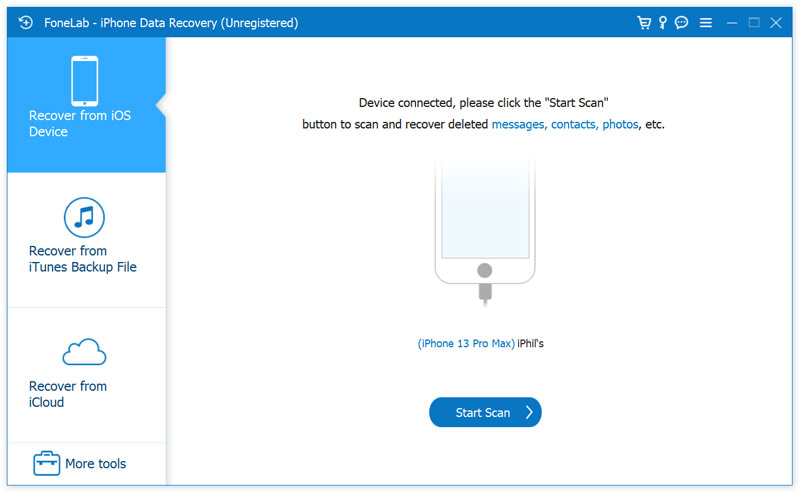
An unregistered copy with an iPhone 13 Pro Max connected, ready for Start Scan.
Tips for a better chance
- Stop using the phone as soon as you notice the loss. New photos, messages and app updates are what overwrite deleted data.
- Don't sync with iTunes before scanning. A new backup can replace the older one that still holds your data.
- Write down your backup password. Without it, FoneLab can't open an encrypted iTunes backup.
Where It Falls Short
- Photos from the device come back small. On iPhone 4S and later, Aiseesoft lists deleted photos scanned from the device as recoverable as thumbnails. Full-size images need an iTunes or iCloud backup. Macworld's reviewer also noted "enough mentions of the lack of photo recoveries" from other users.
- Overwritten data is gone. iOS keeps deleted records in a small database that reuses its space, so items deleted long ago, or before heavy use, often aren't found at all.
- The license is tied to one PC. A registration code works on one computer. After reinstalling Windows or moving to a new PC, you have to ask support to reset it.
- Six devices, then pay again. The license records each iPhone or backup you recover from, and stops at six different devices. Recovering repeatedly from the same device is unlimited.
- Some users get unreadable results or slow scans. One Trustpilot reviewer found recovered messages "undecipherable", and Macworld saw scans "slow to a crawl" on the Mac edition.
What Users Say
Macworld (independent review of the Mac edition)
Lloyd Coombes reviewed FoneLab for Macworld on November 27, 2024 and gave it 4 out of 5. He tested the Mac edition, which works the same way as the Windows program. His verdict:
"An option that won’t break the bank, FoneLab has a whole host of features for under $70 that can suit families."
On results, he wrote that "within around 45 minutes I could see a whole host of images I thought were lost to time, including deleted product shots from old reviews and duplicate pet photos." He listed "Really easy to use" and "Scanning is relatively swift" as pros.
His cons were "Some performance issues" and "User complaints note it can’t recover all it says it can." On his M3 MacBook Air he "ran into a couple of occasions per scan where performance would slow to a crawl," though it picked up again each time without needing to stop the scan.
Trustpilot (reviews of Aiseesoft as a company)
Aiseesoft has a TrustScore of 3.8 from 604 reviews, split sharply: 59% five-star and 34% one-star. Reviews that name FoneLab iPhone Data Recovery lean negative and center on results and refunds:
- Mac (Canada, 1 star, updated July 2026): "The software never worked for its intended purpose." After the review went up: "Aiseesoft contacted me and ultimately processed an 80% refund."
- William C Johnson (US, 1 star, March 2021): "The data recovered was undecipherable and did me no good." He adds that support "would not honor the 30-Day Money Back Guarantee" and "I had to get my Bank involved to refund the money."
- Nova (5 stars, August 2020): "I have been using Aiseesoft products and trusted this brand for years." and "I can get all my lost files back finally."
These are short excerpts from longer reviews.
Aiseesoft's own reviews page (chosen by the vendor)
Aiseesoft shows a 4.8/5 rating on its product page and lists 203 user reviews for this program. They're all positive, as you'd expect from the seller's site, but a few are specific:
- Eugene: "I have backed up all my messages, contacts, music, and videos into iTunes on my Windows 10 computer. … Thank you for your software, and it lets me view the iTunes backup in details."
- Keanu: "I needed to retrieve some call history that got lost during a recent iOS update. This iPhone Data recovery tool helped me to recover most of the call logs, which was a huge relief."
- Milton: "It effortlessly recovered my lost messages and contacts. The scanning process took a bit longer than I expected. But overall, I'm happy with the results."
- Erica: "Aiseesoft iPhone Data Recovery helped me recover lost WhatsApp attachments, including photos and videos."
- Howard: "After trying FoneLab, I found all the photos from iPhone directly, even without backup."
The pattern: people who get their data back praise how simple the scan-preview-recover flow is, and backup browsing gets the most specific praise. The complaints are about data that never showed up or came back unusable, and about refunds when that happens. That's why the free scan matters. If your item is visible in the preview, you have a good chance of getting it back. If it isn't, don't buy expecting the paid version to find more.
Comparisons
FoneLab vs. Apple's own restore
Apple's free route restores a whole iTunes or iCloud backup over the phone, replacing everything on it with the backup's contents. FoneLab reads the same backup and copies out individual items to the PC, leaving the phone alone. If the backup is recent and you've lost little since, Apple's way costs nothing. If you'd lose weeks of newer photos and messages to get one old thread back, FoneLab is the safer choice.
FoneLab vs. Aiseesoft Free iPhone Data Recovery
Aiseesoft's free program recovers contacts, messages, call history and notes from the device, iTunes or iCloud, at no cost. FoneLab adds photos, WhatsApp, voice memos, calendar, Safari data and app files. Start with the free one if you only need those four types.
Windows vs. Mac FoneLab
Mac FoneLab - iPhone Data Recovery is a separate product with its own license. Buy the edition that matches the computer you'll run it on.
Editions and Pricing
| License |
Price |
Term |
Covers |
| 1 Month License (sold at checkout here) |
$53.80 |
One month, auto-renewal ticked by default |
1 PC, 6 iOS devices |
| Lifetime License |
$79.95 list |
Lifetime |
1 PC, 6 iOS devices |
| Lifetime License, multi-PC |
$239.85 list |
Lifetime |
3 PCs, 18 iOS devices |
The two lifetime licenses are list prices from Aiseesoft's own store. Each covers iPhone Data Recovery only. The other FoneLab modules under More tools, such as iOS System Recovery, are sold separately.
FAQs
Can Aiseesoft FoneLab recover full-size photos deleted from a recent iPhone without a backup?
Usually not. Aiseesoft FoneLab iPhone Data Recovery lists deleted photos scanned straight from an iPhone 4S or later as recoverable as thumbnails. For full-size images, scan an iTunes or iCloud backup made before you deleted them.
Does FoneLab work with an encrypted iTunes backup?
Yes. Aiseesoft FoneLab iPhone Data Recovery opens an encrypted iTunes backup once you enter the backup password you set. Without the password, it can't read it.
Can I use one FoneLab license on two computers?
No. An Aiseesoft FoneLab registration code works on one computer, and using it on a second shows Error 4104. If you replace or reinstall your PC, Aiseesoft's support can reset the code, after which it stops working on the old machine. The multi-PC lifetime license covers three computers.
How many iPhones can I recover with one license?
Six. Aiseesoft FoneLab records each device you recover from, and a standard license stops after six different iPhones, iPads or iPod touches (or their iTunes or iCloud backups). You can recover from the same device as often as you like.
Can FoneLab put recovered messages back on my iPhone?
No. Aiseesoft FoneLab iPhone Data Recovery saves recovered items to your computer as files, such as HTML or CSV for messages and VCF for contacts. Getting them back onto a phone takes a separate transfer tool. Aiseesoft points users to its FoneTrans for that.
Will the FoneLab license renew automatically?
It can. The one-month Aiseesoft FoneLab license on the order page has automatic renewal ticked by default. Untick the box at checkout if you want a single month, or turn renewal off later before it renews.
Can FoneLab get data off an iPhone I can't unlock?
Sometimes. Aiseesoft FoneLab's device mode asks for the passcode if the iPhone has never been connected to that computer's iTunes. If it has, it may scan without one. Otherwise, recover from an iTunes or iCloud backup instead, which doesn't need the phone at all.
System Requirements
- Windows: 11, 10, 8.1, 8 or 7
- Processor: 1 GHz Intel or AMD or faster
- Memory: 1 GB RAM or more
- iTunes: version 10.7 or later installed (the latest is recommended)
- Disk space: more free space than the storage used on the iPhone you're scanning
- Devices: iPhone, iPad and iPod touch on iOS or iPadOS 5 through 27, connected by USB cable
Conclusion
Aiseesoft FoneLab iPhone Data Recovery is worth it for one job done well: getting messages, contacts, notes and chats out of an iPhone or its backups without wiping anything. The best reason to buy is backup browsing. It turns an iTunes or iCloud backup into readable items you can save one by one, which Apple's tools won't do.
The main reason not to buy is if you're chasing deleted full-size photos with no backup, where it can only return thumbnails. A recurring complaint from buyers is that it didn't find their data, or that what it found was unreadable. Run the free scan first. If your item shows up in the preview, $53.80 for a month is a fair price to get it back. If you'll use it again, the lifetime license is the better deal.
Download Free TrialBuy Now