Coolmuster iPhone Data Recovery: Scan an iPhone, iTunes Backup or iCloud From One Windows Program
Coolmuster iPhone Data Recovery is a $49.95-a-year Windows program that scans an iPhone, iPad or iPod touch, its iTunes backups or an iCloud backup, and copies chosen data to your PC. Deleted contacts and messages can come back, while photos, notes, WhatsApp and most other types can only be exported if they still exist.
That distinction is easy to miss on the sales page and it's the most important thing to know before paying. Its scan screen spells it out, in two groups.
Quick facts
- Version: 6.0.64 for Windows, released September 23, 2026
- Developer: Coolmuster
- Works with: iPhone, iPad and iPod touch, iOS 5 through iOS 27
- Sources: the device over USB, iTunes backups including encrypted ones, iCloud
- Price: $49.95 for one year (1 PC, 5 devices), $69.95 lifetime
- Trial: free download for scanning and previewing
- What we checked: Windows version 6.0.64 in the vendor release notes, 32 MB installer from the vendor (file dated September 23, 2026), checkout price $49.95 on November 10, 2026. We worked from the vendor manual and its screenshots and did not attempt a recovery on an iPhone.
Before you buy
- On a direct phone scan, only contacts and messages can be recovered when deleted. The scan screen labels the rest "Existing Data Only (Unable to recover deleted data)".
- From an iTunes backup, SMS attachments join the deleted-data list, and only if the backup was made before the deletion will the item be in it at all.
- Coolmuster's refund policy says refund requests for recovery products will not be approved, even though the product page advertises a 30-day guarantee.
- The one-year plan renews automatically until you cancel it. Recovered data goes to the PC, not to the phone.
Download Free Trial Buy Now
Overview
Coolmuster iPhone Data Recovery has a sidebar with three sources: Recover from iOS Device, Recover from iTunes Backup File and Recover from iCloud. Each one leads to a checklist of data types and then a three-pane preview showing counts by category. A "Only display the deleted item(s)" switch filters the list.
This is the product that used to be sold as Coolmuster Data Recovery for iPhone iPad iPod, and Coolmuster's old address for that product now leads to this page. The current version has kept up with new iPhones and iOS releases, and the latest update fixed iCloud sign-in problems.
Features
Coolmuster iPhone Data Recovery scans the phone without a backup
Connect the iPhone by USB, tap Trust, unlock it, and choose data types. Contacts and messages are searched as deleted and existing data. Notes, Safari bookmarks, calendars, voice memos, photos, albums, music, videos, books and WhatsApp are exported only if they're still on the phone.
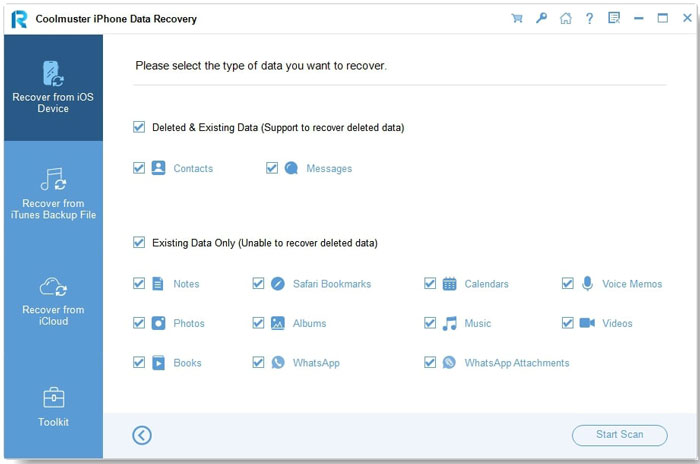
The scan screen divides data into recoverable-when-deleted and existing-only groups (from the vendor manual).
Selective extraction from iTunes backups
Coolmuster iPhone Data Recovery reads backups stored on the PC, including encrypted ones if you enter the password, and lets you copy specific items rather than restoring the whole backup over your phone. The vendor notes that call history and Safari history can be extracted only for iOS 9 and earlier.
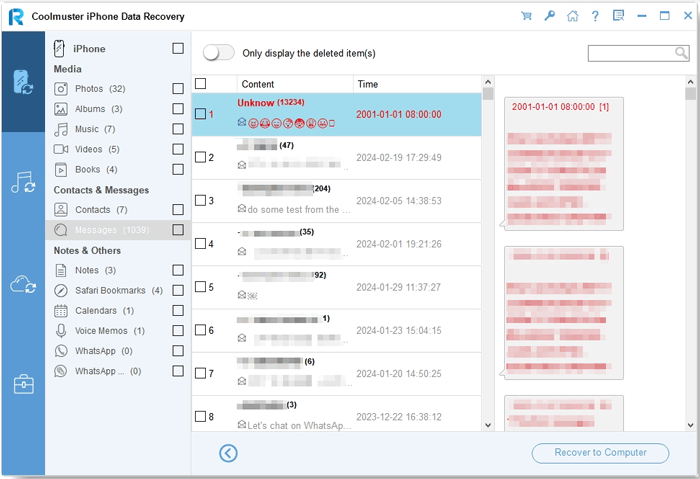
Message preview with deleted items shown in red.
Downloads what's in iCloud to your PC
Coolmuster iPhone Data Recovery signs in to iCloud and lists contacts, notes and attachments, albums, calendars and reminders to save locally. The September 2026 update fixed verification code delivery and added a prompt to accept iCloud terms before scanning.
Previews each category before you save
Coolmuster iPhone Data Recovery shows photos as thumbnails and text as tables, with counts per category, so you can see what's there before you pay. Unlocking the phone is required again when you select messages, notes, voice memos and WhatsApp items.
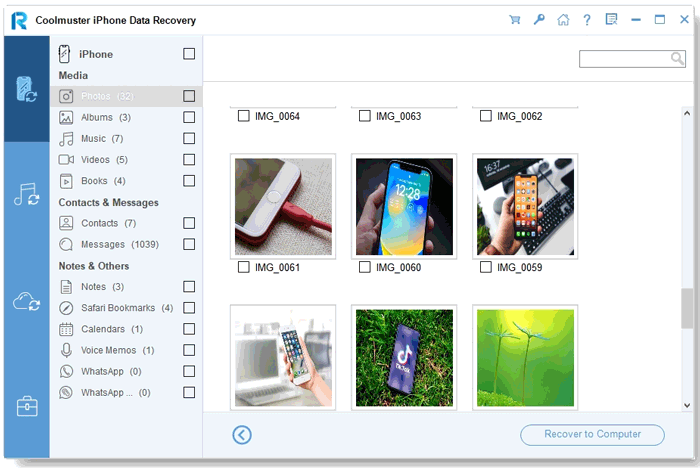
Camera roll preview, with thumbnails you can tick individually.
Benefits
- One purchase covers the phone, iTunes backups and iCloud, so you can try all three.
- It's an easy way to copy existing photos, notes and chats to a PC without iTunes syncing.
- You don't have to overwrite the phone to get at one item in an old backup.
- The five-device license covers a family's phones on one PC.
Real-World Uses
- You deleted a thread of texts and don't have a recent backup, so a direct scan is your only chance.
- Your phone is dead, but an old iTunes backup holds the WhatsApp chats you need.
- You want your notes and voice memos on the PC before trading in the phone.
- You need one contact from an iCloud backup without resetting your phone.
Who It's For, and Who Should Skip It
It suits iPhone owners who've lost messages or contacts, or who want a local copy of existing data from a phone, iTunes or iCloud.
Skip it if your goal is deleted photos or videos on a direct scan, because the program doesn't offer that. Skip it too if you have only an iTunes backup and want the lowest price: Coolmuster iPhone Backup Extractor at $19.95 reads those. Mac users need the separate Mac edition.
Usage Guide
- Install and launch the program on Windows, then connect the iPhone by USB and unlock it.
- Tap Trust on the phone, or choose the iTunes or iCloud tab if you're working from a backup.
- Tick the data types you want and click Start Scan.
- Preview each category, and turn on the deleted-items switch if that's all you need.
- Tick the items and click Recover to Computer. This step needs a license.
Where it falls short
- No direct-scan recovery of deleted photos, videos, notes or WhatsApp.
- Customers report partial results, such as "missed a few" contacts and weak video recovery.
- Recovered items don't go back to the iPhone.
- Older blog reviews say the trial recovers only a few items. Plan on needing a license to save your data.
What Users Say
There's more coverage of this product than Coolmuster's others, though some of it dates from 2015. Coolmuster runs a write-a-review-to-win-a-free-license promotion, so read the praise on its own site, and on small blogs, with that in mind.
On Coolmuster's product and review pages (74 reviews shown)
These appear on the vendor's own site.
"I got a free 1-Year license key for this Coolmuster iPhone Data Recovery from the Giveoftheday site on April 21, 2023. I did not use it until my contacts were deleted by mistake. Then I tried this software to help me recover them back."
Jakub Pawlak, vendor product page
"Found most of my deleted contacts, but missed a few."
David Miller, April 3, 2026, vendor review page
"Worked well for my iPhone 16, but video recovery needs improvement."
Mason Reed, May 29, 2026, vendor review page
"Saved important contacts after accidental deletion. A cleaner recovery guide would help beginners."
Sophia Mitchell, July 17, 2026, vendor review page
TheTechHacker (independent blog review of the older product, March 28, 2015)
By Rahul Vithala, about the earlier version sold as Data Recovery for iPhone iPad iPod.
"a pretty simple program to recover all lost data from an iTunes backup file."
Rahul Vithala, TheTechHacker
"In a trial period, you'll able to recover only first three items in the list."
Rahul Vithala, TheTechHacker
Trustpilot, for the Coolmuster company overall
Coolmuster scores 4.6 out of 5 from 223 Trustpilot reviews, read through a page summarizer. Most comment on customer support.
"I had a a presales problem. After contacting them, their response was quick, helpful and clear."
Bill Cooke, December 17, 2025, Trustpilot (excerpt)
People like getting messages and contacts back and reaching old iTunes backups. They grumble about partial results and that the guide could be clearer for beginners.
Comparisons
iPhone Data Recovery vs Coolmuster iPhone Backup Extractor
Backup Extractor is $30 cheaper per year but reads iTunes backups only. Choose iPhone Data Recovery if you need the direct phone scan or iCloud.
iPhone Data Recovery vs Coolmuster iPhone SMS + Contacts Recovery
SMS + Contacts Recovery is $14 cheaper but covers only messages, contacts and SMS attachments. iPhone Data Recovery adds export of photos, notes, WhatsApp, music and more.
iPhone Data Recovery vs restoring in iTunes or Finder
A restore is free but replaces what's on the phone. This tool costs money and leaves the phone as it is.
Editions and Pricing
| Plan | Price | Term | Covers |
|---|
| 1 Year, 1 PC, 5 devices | $49.95 | 1 year, renews automatically | 5 devices |
| Lifetime, 1 PC, 5 devices | $69.95 | One payment, lifetime updates | 5 devices |
| 1 Year, 3 PCs, 9 devices | $59.95 | 1 year, renews automatically | 9 devices |
| Lifetime, 3 PCs, 9 devices | $109.95 | One payment, lifetime updates | 9 devices |
| 1 Year, 1 PC, 30 devices | $199.95 | 1 year, renews automatically | 30 devices |
| Lifetime, 1 PC, 30 devices | $309.95 | One payment, lifetime updates | 30 devices |
For one recovery the one-year plan suffices if you cancel the renewal. If you'd like to keep using it as an export tool, the lifetime plan is $20 more.
FAQs
Can Coolmuster iPhone Data Recovery recover deleted photos from an iPhone without a backup?
No, not on a direct scan. Coolmuster iPhone Data Recovery lists photos under existing data only, so it exports photos that are still on the phone.
Can Coolmuster iPhone Data Recovery read encrypted iTunes backups?
Yes, if you enter the backup's password. Coolmuster iPhone Data Recovery can't get around a forgotten password.
Does Coolmuster iPhone Data Recovery need a jailbreak?
Coolmuster's manual for iPhone Data Recovery uses the normal Trust prompt and doesn't mention a jailbreak.
Which iOS versions does Coolmuster iPhone Data Recovery support?
Coolmuster iPhone Data Recovery supports iOS 5 through iOS 27 and lists models up to the iPhone 18 series.
Is Coolmuster iPhone Data Recovery the same as Coolmuster Data Recovery for iPhone iPad iPod?
Yes. Coolmuster's old page for Data Recovery for iPhone iPad iPod now redirects to iPhone Data Recovery.
Can I get my money back from Coolmuster iPhone Data Recovery if nothing is found?
Probably not. Coolmuster's refund policy lists iPhone Data Recovery under a 7-day guarantee and says refund requests for recovery products will not be approved, so run the free scan first.
System Requirements
- Windows 11, 10, 8 or 7 (a separate Mac edition exists)
- iOS 5 or later, up to iOS 27
- 750 MHz or faster CPU, 512 MB RAM
- 1 GB or more free disk space, USB cable
Conclusion
Worth it if the free scan finds the messages or contacts you've lost, or if you want a single tool to export from a phone, iTunes and iCloud. The free scan makes it low-risk, and the five-device license is good value for a family.
The main reason not to buy is expecting miracles on deleted photos: this product recovers deleted contacts and messages, and treats nearly everything else as data that still has to exist.
Download Free Trial Buy Now