MobiKin Eraser for iOS (Mac): Wipe an iPhone From Your Mac for a One-Time $39.95
MobiKin Eraser for iOS (Mac Version) is a $39.95 one-time Mac program that erases an iPhone, iPad or iPod touch over USB and, at its higher levels, overwrites the storage afterwards. It's for Mac owners who want an extra overwrite before a device changes hands. Most people don't need one, because Apple's reset is free.
Think before you buy: the Mac version was last updated in October 2025 and trails the Windows version by a full release. The trial can't erase, the license covers 3 devices, and the refund window is 7 days.
Quick facts
- Version: 2.0.14, released October 15, 2025
- Developer: MobiKin
- Runs on: Mac OS X 10.10 or later, on an Intel Core 1 GHz or faster according to the spec sheet
- Erases: iPhone, iPad and iPod touch, by USB
- Price: $39.95 one time for 3 devices on 1 PC
- Trial: doesn't erase, so it only tests the connection
- Guarantee: 7 days, with listed exceptions
What we checked: the 3.4 MB disk image, which holds the full Intel-only app rather than a downloader, the 7-day term on MobiKin's order and refund pages, and the order page, which showed a one-time $39.95 lifetime license with no renewal, on November 6, 2026. We didn't erase a device or try to recover data afterwards, so the erasure claims here are the vendor's.
Download Free TrialBuy Now
Overview
You connect the device with a USB cable, tap Trust, click Erase, choose a level and type "delete". The program erases the device and reboots it. At Low, you're done and can set it up. At Medium or High, it continues by overwriting the erased storage.
This is the older way of working. The Windows version changed in October 2026 to a reset you run yourself, plus a saved report. The Mac version's guide still shows the automatic flow, with no report.
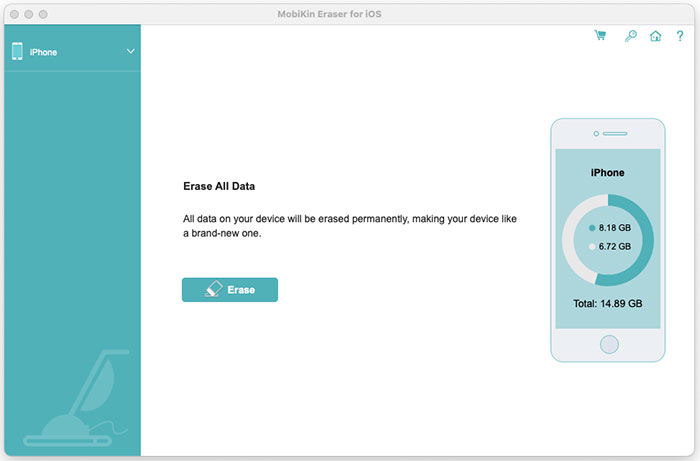
The Mac main window with an iPhone connected and an Erase button.
Features
Three erasing levels
MobiKin Eraser for iOS (Mac) offers Low, Medium and High. Low is the quick erase. Medium overwrites once and is the recommended default, and High overwrites twice. MobiKin suggests High for devices that held banking records or passwords.
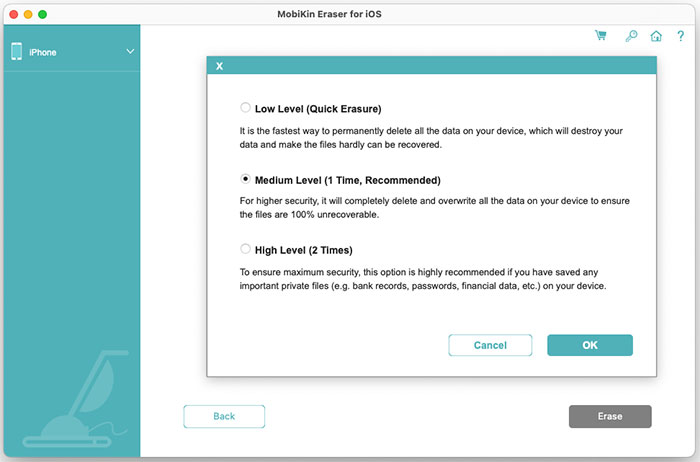
The security level dialog.
Erases accounts, messages and media
MobiKin Eraser for iOS (Mac) targets contacts, messages, photos, videos, emails, Safari history, notes and reminders. MobiKin also claims it clears data from 10 or more social apps, including WhatsApp, LINE and WeChat, as part of a full wipe.
A separate overwrite stage
MobiKin Eraser for iOS (Mac) reboots the device after erasing, then writes over the storage at Medium or High. Your device may show a "Storage Almost Full" alert. Tap Done and leave it plugged in.
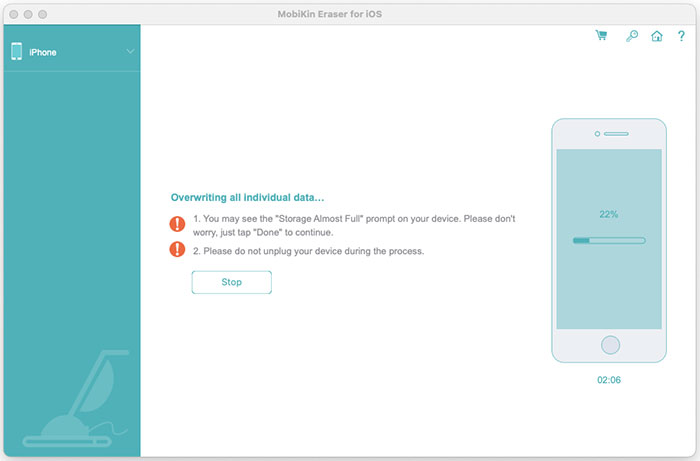
The overwrite stage at 22%, with the warning about the storage alert.
Fourteen interface languages
MobiKin Eraser for iOS (Mac) version 2.0.14 runs in languages including Simplified Chinese, French, German, Spanish, Japanese, Korean and Russian, which helps if you're setting up devices outside an English-speaking office.
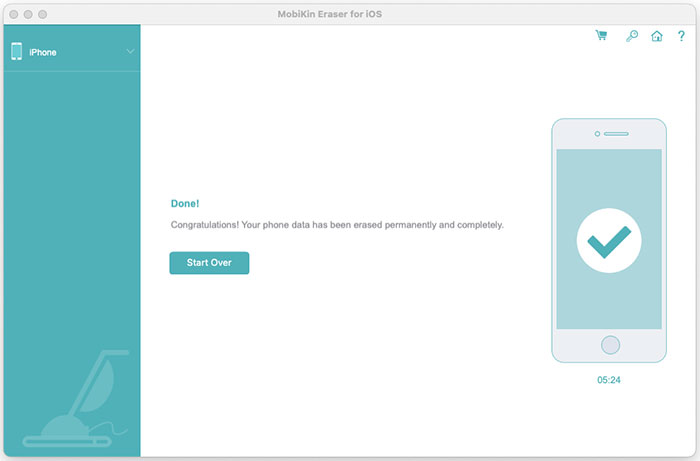
The finished screen. There's a Start Over button, but no Save Report button as on Windows.
Benefits
- No PC needed. It runs on the Mac you already own, with a tiny download.
- An extra step for sensitive devices. The overwrite may reassure you if the device held banking or client data.
- One payment. There's no subscription on the Lifetime license.
Real-World Uses
- Selling an iPhone that held work data: add an overwrite if your own policy calls for one.
- Clearing a family iPad: wipe it before it goes to a relative.
- Retiring old iPods: MobiKin lists iPod touch models back to the third generation, which still hold old photos and messages.
Who It's For, and Who Should Skip It
Buy it if you only have a Mac, you want an overwrite on top of a wipe, and you've confirmed in the trial that your Mac and device connect.
Skip it if you just want to sell your own iPhone. iPhones encrypt their storage, and Erase All Content and Settings wipes the keys, leaving the old data unreadable. It's free. Skip it too if you need a report for your records, because that's only in the Windows version, or if you have a very recent device or iOS release and can't afford a failed run. Anyone with access to a Windows PC should buy the Windows version instead.
Usage Guide
- Back up anything you want to keep. Erased data can't be brought back.
- Install the program and open it.
- Connect the device by USB, unlock it and tap Trust, then click Continue.
- Click Erase, click Medium next to Security Level, choose your level and click OK.
- Type "delete", click Erase and confirm with OK.
- Keep the device connected while it erases, reboots and overwrites.
- When you see the Done screen, set the device up or power it off for its new owner.
Before you buy
- Check the release date. The product page lists iOS 27, but the last Mac update, in October 2025, mentions iOS 26. Test your device in the trial before relying on that list.
- Expect Rosetta on a newer Mac. The app inside the disk image is built for Intel only, so an Apple silicon Mac has to run it through Apple's Rosetta 2, which Apple plans to phase out in later macOS releases. Install the trial before paying.
- Take the 7-day limit seriously. The product page shows a 30-day badge, but the order page and refund policy both give 7 days for Eraser for iOS and reject change-of-mind requests.
- Sign out first. Turn off Find My and sign out of your Apple account before you start, so the next owner isn't stopped by Activation Lock.
Where it falls short
- It's behind the Windows version. Windows is at 3.0.9 with a guided reset, a report and added overwriting. The Mac version has one entry in its version history, from October 2025.
- No erasure report. You get a Done screen, with nothing to file.
- The 100% claim is the vendor's own. We found no independent lab test of its erasure.
- All or nothing in practice. The product page describes selective erasing, but the guide only shows Erase All Data, and users ask for more control.
- Thin evidence. We found only 17 reviews on the vendor's page, and no outside test of the Mac version.
What Users Say
We found no independent review of the Mac version, and Product Hunt had none for the product. Rival vendors' blogs are left out, so this section is short.
On MobiKin's page
The product page shows 4.5 out of 5 from 17 reviews. These are vendor-hosted comments that we can't verify:
"MobiKin Eraser for iOS is a gift! Without it I would spend hours wiping my iPhone." - Abraham
"The deep erase mode took time, but it felt more secure." - Amanda Hughes
"Useful for privacy protection. I wish there was a trial to test full erase features." - Daniel Foster
"Perfect for wiping everything off my old device. However, I'd like to see more options for partial data erasure." - James Scott
"Erased everything from my iPad, but I wish it could erase app data without affecting other files." - David Lee
MobiKin on Trustpilot
The company page shows 3.6 out of 5 from 48 reviews, read through a page summarizer. None that we read covers this eraser, but refund handling matters with a 7-day window:
"I got my refund back with no hassle." - Harris Karagiaouris, September 12, 2025
"But, I cannot re-activate the Mobikin that I already paid for." - Joseph C Gravina, February 4, 2026
The pattern: people treat it as a simple full wipe, and the requests are for partial erasing and a way to try it first. Nobody we could verify has tested whether wiped data can be recovered.
Comparisons
MobiKin Eraser for iOS (Mac) vs Erase All Content and Settings
Apple's reset is free, quick and already on the device, and needs no Mac at all. MobiKin Eraser for iOS (Mac) costs $39.95 and adds an overwrite. It gives you no report, so its only advantage is the extra pass, and that adds little to a device with encrypted storage.
Mac version vs Windows version
The price is the same. The Windows version has a newer release from October 2026, a guided reset, a PDF report and a longer list of updates. Each is a separate product with its own license code, so a Windows license won't unlock the Mac version.
Editions and Pricing
| License | Term | Devices and PCs | Price |
|---|
| Lifetime (this listing) | One time | 3 devices, 1 PC | $39.95 |
| Lifetime | One time | 9 devices, 3 PCs | $59.95 |
| Lifetime | One time | 30 devices, 1 PC | $259.95 |
| 1 Year | Auto-renews | 3 devices, 1 PC | $29.95 |
| 1 Year | Auto-renews | 9 devices, 3 PCs | $49.95 |
| 1 Year | Auto-renews | 30 devices, 1 PC | $249.95 |
FAQs
Can I try MobiKin Eraser for iOS (Mac) for free before buying?
Only partly. MobiKin Eraser for iOS's FAQ says the free trial covers updates and technical support, and erasing needs the full version.
Does the MobiKin Eraser for iOS (Mac) Lifetime license ever renew?
No. The Lifetime license was a one-time $39.95 on the order page, with the renewal term shown as lifetime. Only the 1-Year licenses renew automatically.
How long does MobiKin Eraser for iOS (Mac) take?
It depends on storage size and level. MobiKin's sample finish screen shows 05:24 on an iPhone with about 15 GB of storage. Users often say it takes longer than they expected.
Will MobiKin Eraser for iOS (Mac) remove an Apple ID?
MobiKin doesn't list that as a feature. Sign out of your Apple account on the device before erasing.
Does MobiKin Eraser for iOS (Mac) work with iPads?
Yes. MobiKin lists iPad, iPad Air, iPad mini and iPad Pro models, including 2025 releases, along with iPhones and iPod touch.
Does MobiKin Eraser for iOS (Mac) get free updates?
Yes. MobiKin says updates are free and the license code stays valid, although the Mac version hasn't had one since October 2025.
System Requirements
- Mac OS X 10.10 or later
- Intel Core 1 GHz or faster
- 1 GB or more of free disk space
- An iPhone, iPad or iPod touch connected by USB cable
Conclusion
MobiKin Eraser for iOS (Mac) is hard to recommend at $39.95 unless you specifically want an overwrite and only have a Mac. The reason to buy is that extra pass on a device that held sensitive data. The main reason not to is that Apple's free reset protects most sellers, while this version is over a year old, has no report and can't be tested before you pay. If you can use a PC, choose the Windows version.
Download Free TrialBuy Now