MobiKin Eraser for iOS: Overwrite an iPhone From Your PC for a One-Time $39.95
MobiKin Eraser for iOS is a $39.95 one-time Windows program that overwrites an iPhone, iPad or iPod touch after you reset it, then saves a PDF report as a record. It's for small shops, offices and cautious sellers who want a report on file. For most people, Apple's free Erase All Content and Settings is enough.
Think before you buy: this license covers 3 devices, the trial can't erase anything, and the refund window is 7 days. There's also no independent test of its erasure claims.
Quick facts
- Version: 3.0.9, released October 13, 2026
- Developer: MobiKin
- Runs on: Windows 11, 10, 8 and 7, with the latest iTunes installed. A separate Mac version exists
- Erases: iPhone, iPad and iPod touch, listed up to iOS 27 and iPhone 18
- Connection: USB cable
- Price: $39.95 one time for 3 devices on 1 PC
- Trial: connects your device but doesn't erase, so it only tests compatibility
- Guarantee: 7 days, with listed exceptions
What we checked: the installer (31 MB, digitally signed by Shenzhen Qixingshi Technology Co., Ltd), the 7-day term on MobiKin's order and refund pages, and the order page, which showed a one-time $39.95 lifetime license with no renewal, on November 6, 2026. We didn't erase a device or try to recover data afterwards, so the erasure claims here are the vendor's.
Download Free TrialBuy Now
Overview
You connect the device by USB, unlock it and tap Trust. The program asks you to turn off Find My and close iTunes syncing, then you choose a level and type "delete".
Version 3.0.9 changed how the job works. The program used to reset the device itself. Now you run Erase All Content and Settings on the device, finish the setup screens, reconnect, and only then does the program start overwriting. It's a longer job, with more for you to do.
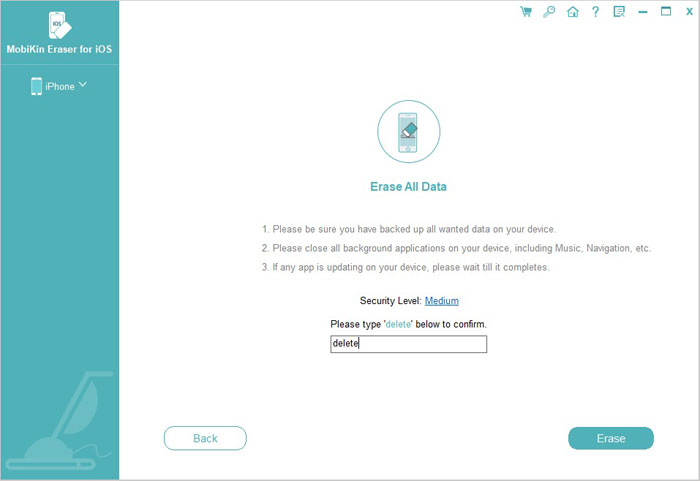
The Erase All Data screen, where you set the level and type "delete".
Features
Three security levels
MobiKin Eraser for iOS offers Low, Medium and High. Low is the quick option with no overwrite after the reset. MobiKin's guide says Medium overwrites the storage once and High overwrites it twice.
A guided reset before erasing
MobiKin Eraser for iOS asks whether the device has been reset. If not, it shows you how to run Erase All Content and Settings. MobiKin says resetting first improves speed and reduces the risk of recovery.
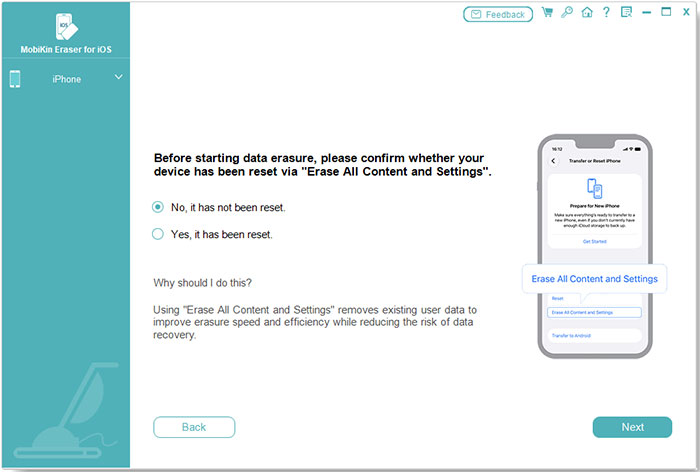
The reset question. Choosing "No" brings up the instructions.
Overwriting with fake data
MobiKin Eraser for iOS fills free storage with junk data after the reset, and version 3.0.9 added 100 fake contacts for a deeper overwrite. Your phone may show a "Storage Almost Full" alert during this stage. Tap Done and carry on.
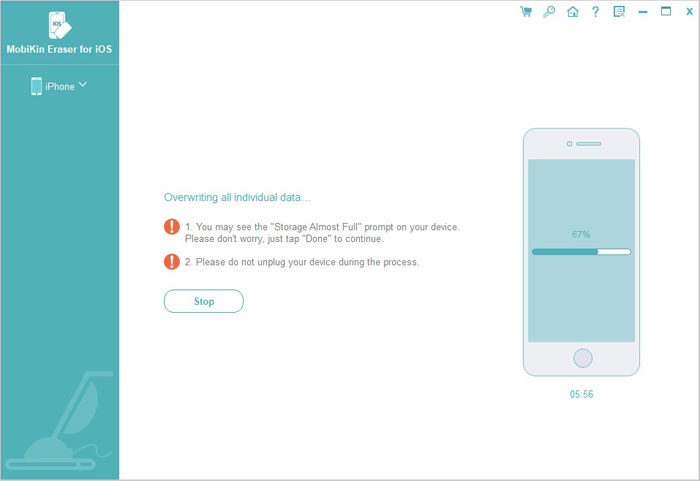
The overwrite stage, with the Storage Almost Full warning.
PDF erasure report
MobiKin Eraser for iOS can save a PDF report listing the device, iOS version, security level, overwrite passes, start and end times and the result. This is the real difference from Apple's own reset, which gives you nothing to file. It suits a shop that needs a record for each customer device.
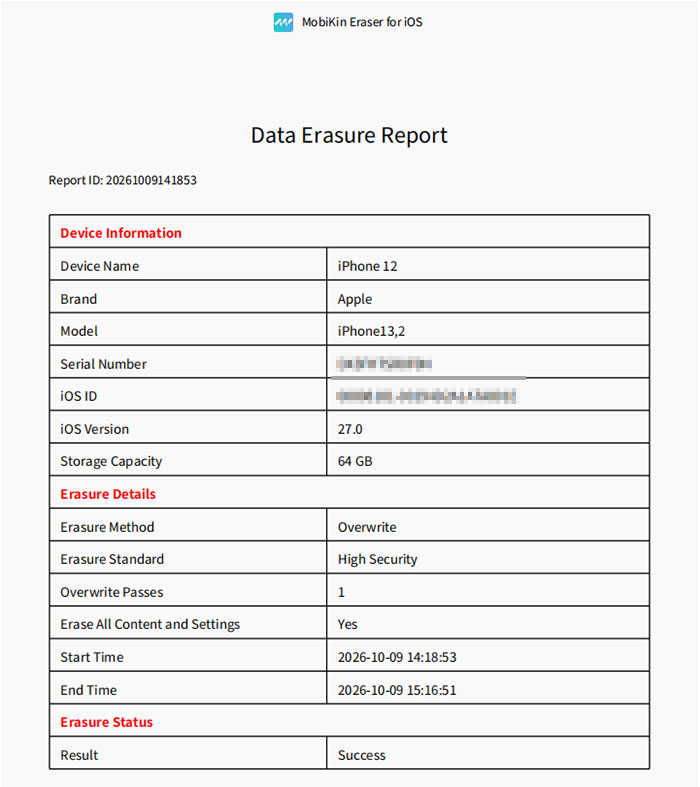
A sample report. It lists High Security with 1 overwrite pass, although the guide says High makes 2, so read your own report closely. It also shows the job taking 58 minutes on a 64 GB iPhone 12.
Benefits
- A paper trail. A saved report beats your memory if a buyer or employer asks.
- Older devices included. The list goes back to iOS 5, so an old iPad or iPod touch in a drawer is covered.
- No subscription. The Lifetime license is one payment for 3 devices.
Real-World Uses
- A small repair shop: keep a report for each customer device. For more than 3 devices, look at the larger licenses.
- An office retiring iPads: file a report with each device as it leaves.
- Selling a phone that held client data: add an overwrite to the reset for your own peace of mind.
Who It's For, and Who Should Skip It
Buy it if you need a dated report for your records, or if your company asks for an overwrite on top of a reset.
Skip it if you're simply selling your own iPhone. Every iPhone encrypts its storage, and Erase All Content and Settings wipes the keys, leaving the old data unreadable. It's free and takes minutes, and you run that same step here anyway. Skip it too if you want to remove selected files only, or if you can't risk a compatibility problem after paying. Android phones need MobiKin's separate Eraser for Android.
Usage Guide
- Back up anything you want to keep. Erased data can't be brought back.
- Install the latest iTunes, then install the program and open it.
- Connect the device by USB, unlock it, tap Trust and click Continue.
- Close iTunes if asked, and turn off Find My in Settings if the program asks.
- Click Erase, click Medium next to Security Level, choose your level and click OK. Type "delete" and click Erase.
- If the device hasn't been reset, follow the steps to run Erase All Content and Settings. Don't close the program. Finish the setup screens and reconnect.
- Select the level again, confirm "Yes, the device has been reset" and click Next.
- Leave the device plugged in while it overwrites, then click Save Report.
Before you buy
- Check the connection in the trial. The FAQ limits the trial to updates and support, but it should show whether your device is detected. That's the only test you get.
- Take the 7-day limit seriously. The product page shows a 30-day badge, but the order page and refund policy both give 7 days for Eraser for iOS and reject change-of-mind requests.
- Pick Lifetime for a one-off job. It costs $10 more than the 1-Year license, and that one renews automatically.
- Sign out first. Turn off Find My and sign out of your Apple account before you start, so the next owner isn't stopped by Activation Lock.
Where it falls short
- The 100% claim is the vendor's own. We found no independent lab test of its erasure, and "military-grade" on the product page isn't explained.
- It's slow and hands-on. Users often mention the time, and the sample report shows nearly an hour.
- All or nothing. The guide and screens show a single Erase All Data job, and users on MobiKin's page keep asking for selective erasing and a preview.
- It needs iTunes. You have to install Apple's software on the PC.
- The support pages lag behind. The FAQ still mentions iOS 11 and older, while the product page lists iOS 27.
- The speed-up claim is marketing. The page says erasing can make an iPhone faster, but that's what any reset does.
What Users Say
Independent reviews of this product are rare. Most online "reviews" are download listings or come from companies selling a rival eraser. Product Hunt had no reviews for it, and we left the rival blogs out.
Praise on MobiKin's review page
The product page shows 4.5 out of 5 from 89 reviews. These are vendor-hosted comments that we can't verify, and a handful of them are near-identical, so give them modest weight:
"Erased my old iPhone before selling it, felt secure knowing nothing could be recovered." - Emily Carter
"I am going to switch to the iPhone X and I want to sell my old iPhone 7. To protect my information, I use this program to erase my phone data and try some recovery tool to restore the files. Guess what! All the erased data cannot be detected" - Lizzy
"It cleaned my iPhone and reset the OS. Now it is ready to be reused safely! I wish iTunes worked that well! :)" - Duke
Lizzy's comment, from 2018, is the only one we saw that mentions a recovery test, and it gives no details.
Criticism on the same page
The same page carries regular complaints, mostly about time and control:
"I used MobiKin iOS Eraser before selling my iPad. It's simple, but takes a long time to finish erasing." - Alice Green
"Great for privacy, but you'll need patience. It's not the fastest tool in the shed." - Lily Evans
"It's effective, but I was hoping for more options to selectively erase data, not just everything." - Michael Clark
"I like the multiple erase levels, but I wish it had a preview before deleting." - Melissa Zhang
"Worked as advertised. I like the different erasing levels, but explanations could be clearer." - Amanda Lewis
MobiKin on Trustpilot
The company page shows 3.6 out of 5 from 48 reviews, read through a page summarizer. None that we read covers this eraser, but they show how the company handles refunds, which matters with a 7-day window:
"I got my refund back with no hassle." - Harris Karagiaouris, September 12, 2025
"But, I cannot re-activate the Mobikin that I already paid for." - Joseph C Gravina, February 4, 2026, who also reports no reply from customer service
The pattern: people find it easy and trust it for resale, while the steady complaints are speed, the lack of selective erasing and unclear level descriptions. Nobody we could verify has properly tested whether wiped data can be recovered.
Comparisons
MobiKin Eraser for iOS vs Erase All Content and Settings
Apple's reset is free, fast and built into every iPhone. MobiKin Eraser for iOS costs $39.95, uses that same reset and then adds an overwrite and a PDF report. If nobody will ask you for a report, Apple's option does the job.
Windows version vs Mac version
Both cost $39.95 for a Lifetime license of 3 devices on 1 PC. The Windows version is much newer at 3.0.9, with the guided reset and PDF report. The Mac version is at 2.0.14 from October 2025 and has neither in its guide.
Editions and Pricing
| License | Term | Devices and PCs | Price |
|---|
| Lifetime (this listing) | One time | 3 devices, 1 PC | $39.95 |
| Lifetime | One time | 9 devices, 3 PCs | $59.95 |
| Lifetime | One time | 30 devices, 1 PC | $259.95 |
| 1 Year | Auto-renews | 3 devices, 1 PC | $29.95 |
| 1 Year | Auto-renews | 9 devices, 3 PCs | $49.95 |
| 1 Year | Auto-renews | 30 devices, 1 PC | $249.95 |
FAQs
Can I try MobiKin Eraser for iOS for free before buying?
Only partly. MobiKin Eraser for iOS's FAQ says the free trial covers updates and technical support, and erasing needs the full version.
Does the MobiKin Eraser for iOS Lifetime license ever renew?
No. The Lifetime license was a one-time $39.95 on the order page, with the renewal term shown as lifetime. Only the 1-Year licenses renew automatically.
Will MobiKin Eraser for iOS remove an Apple ID or Activation Lock?
MobiKin doesn't list this as a feature, and the program asks you to turn off Find My first. Sign out of your Apple account yourself before erasing.
Can I undo an erase with MobiKin Eraser for iOS?
No. MobiKin Eraser for iOS says erased data can't be recovered, so make your iCloud or computer backup first.
Can MobiKin Eraser for iOS wipe Android phones?
No. MobiKin sells Eraser for Android as a separate product.
Does MobiKin Eraser for iOS work without iTunes?
MobiKin's specs say the latest iTunes should be installed on your PC, so plan on installing it.
System Requirements
- Windows 11, 10, 8 or 7
- 750 MHz Intel or AMD processor
- 512 MB RAM or more
- 1 GB or more of free disk space
- The latest iTunes
- An iPhone, iPad or iPod touch on iOS 5 to iOS 27, connected by USB cable
Conclusion
MobiKin Eraser for iOS is worth $39.95 if you need an erasure report on file, and hard to justify otherwise. The reason to buy is the dated PDF record, on top of an overwrite. The main reason not to is that Apple's free Erase All Content and Settings already protects most sellers, while here you can't test an erase before paying and have just 7 days to get your money back.
Download Free TrialBuy Now