MobiKin WhatsApp Recovery for Android: Get Your WhatsApp Chats onto a Windows PC
MobiKin WhatsApp Recovery for Android is a $45.95 Windows program (lifetime license, 3 devices, 1 PC) that copies WhatsApp chats and attachments from an Android phone to your computer as readable HTML or CSV files, without rooting the phone. Despite the name, it works on the chats that still exist: it can bring back deleted conversations only from a backup it made earlier.
So think of it as a WhatsApp archiver with a restore function: install it before you need it, keep backups on your PC, and you can recover what later goes missing. If a chat is already gone and was never backed up by it, it won't find it.
Quick facts
- Version: 2.2.13, released April 29, 2025
- Developer: MobiKin
- Runs on: Windows 11, 10, 8 and 7 (no Mac version for Android)
- Phones: Android 6 to Android 17, no root needed
- Exports: chats as HTML or CSV; photos, videos, audio, documents and stickers in their original formats
- Modes: Recover from Android Device, Recover from Backup File
- Price: $45.95 lifetime for 3 devices on 1 PC. 1-year plans start at $35.95
- Trial: scans and previews; saving to the PC needs a license
- Refunds: 7-day money-back guarantee
- What we checked: installer 30.68 MB downloaded from mobikin.com, and the lifetime 3-device license at $45.95 on the order page on November 11, 2026. We didn't run it on a phone.
Before you buy
MobiKin's own FAQ is plain about it: MobiKin WhatsApp Recovery for Android "can only recover existing data from Android devices". Deleted WhatsApp messages can be restored only from a backup made earlier with this program. To read your chats, the program also has WhatsApp create an end-to-end encrypted backup with a 64-digit key; if you already use end-to-end encrypted backup with a password, you have to turn it off and on again with a key, which changes how your Google Drive backup is protected. Keep a copy of that key.
Download Free TrialBuy Now
Overview
MobiKin WhatsApp Recovery for Android was released in April 2023 and has had five updates since, mostly language support, crash fixes and installer improvements; the latest, 2.2.13 (April 2025), fixed bugs, and MobiKin lists support for Android 17. The left side of the window has two modes and a Toolkit button. You connect the phone with USB debugging, the program walks you through the encrypted backup on the phone, then it shows your WhatsApp chats and attachments with counts and details, ready to export.
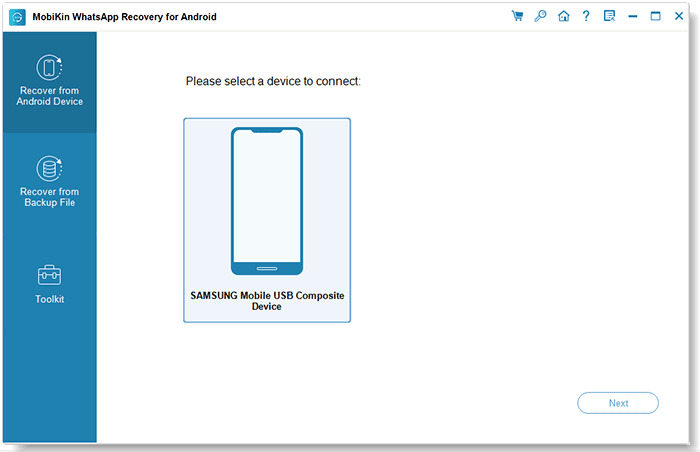
The device selection screen after connecting a Samsung phone over USB.
Features
Export WhatsApp chats without root
MobiKin WhatsApp Recovery for Android reads WhatsApp data from an unrooted Android phone by having WhatsApp make an end-to-end encrypted backup with a 64-digit key, which the program then decrypts with that key. You get every chat with its messages, which you can export as HTML for reading or CSV for a spreadsheet.
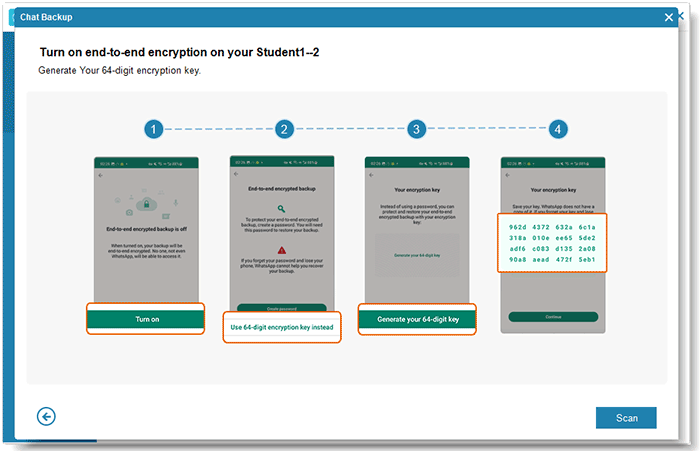
The program's four-step guide to generating WhatsApp's 64-digit encryption key on the phone.
Save photos, videos, voice notes and documents
MobiKin WhatsApp Recovery for Android lists WhatsApp attachments separately, with name, size, format, type and date: images, videos, audio and voice notes, documents and stickers. They're saved to the PC in their original formats, so a voice note stays an Opus file and a document stays a PDF or DOCX.
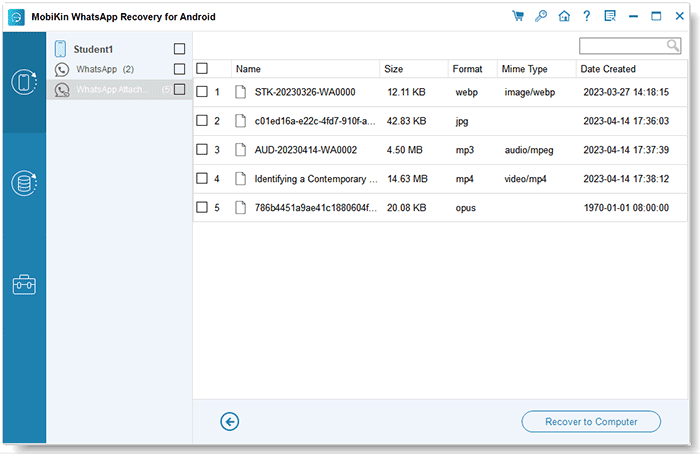
WhatsApp attachments found on a phone: a sticker, a JPG, an MP3, an MP4 and a voice note.
Restore chats from earlier backups
MobiKin WhatsApp Recovery for Android keeps every backup it makes on your PC. In Recover from Backup File mode it lists them by device, brand, date, size, Android version and WhatsApp version, and lets you scan an old one to recover chats that have since been deleted from the phone. You can also point it at backups in another folder.
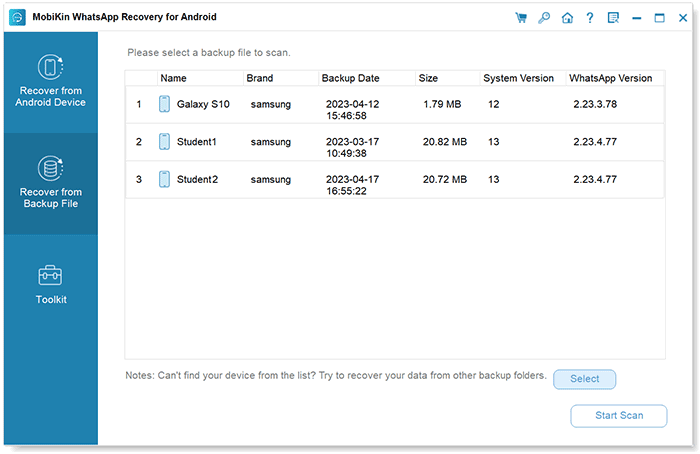
Recover from Backup File: three earlier backups listed with device name, date, size and versions.
Preview and choose
MobiKin WhatsApp Recovery for Android lets you preview chats and attachments and tick only what you want, instead of exporting everything. Several phones can be connected at once; you pick which one to scan.
Benefits
- A readable archive of chats that WhatsApp's own cloud backup doesn't give you: you can open HTML files on any computer.
- Nothing changes on the phone's chats: the export copies data to the PC rather than restoring over the phone.
- All attachments at once, rather than one chat at a time with WhatsApp's built-in Export chat.
- No root, so no warranty or security trade-offs.
Real-World Uses
- You need a complete record of a business WhatsApp conversation, with documents and voice notes, for a client dispute.
- You archive family group chats and photos to the PC every few months, so that anything deleted later can be pulled from an older backup.
- You're switching phones and want a copy of everything on your computer first.
Who It's For, and Who Should Skip It
MobiKin WhatsApp Recovery for Android suits Android users on Windows who want a full, readable WhatsApp archive on their PC, and people who plan ahead and keep regular backups to recover from later.
Skip it if your chats are already deleted and you never ran this program before: it can't find them. In that case, WhatsApp's own Google Drive backup is the only route, by reinstalling WhatsApp and restoring if the backup predates the deletion. Skip it too if you only need one conversation: WhatsApp's built-in Export chat sends a single chat as a text file for free. iPhone users need MobiKin WhatsApp Recovery for iOS instead, and Mac users have no Android version.
Usage Guide
- Install the trial on your Windows PC and open "Recover from Android Device".
- Connect the phone by USB, turn on USB debugging, let the program install its driver, and tap "Allow" on the phone.
- Follow the on-screen steps to turn on WhatsApp's end-to-end encrypted backup with a 64-digit key. If encryption was already on, turn it off and on again. Keep the key, then confirm it in the program.
- Let WhatsApp make the backup and the program copy it. Click "View It" to scan it.
- Preview WhatsApp chats and attachments, tick what you want and click "Recover to Computer".
- Later, use "Recover from Backup File" to open any backup made this way.
Where it falls short
- No recovery of deleted data without its own earlier backup. The name promises more than it does.
- The encryption step is fiddly and changes your WhatsApp backup settings. Only the 64-digit key method is supported, and installing a specific WhatsApp version isn't supported.
- Export only to the PC: it doesn't put chats back into WhatsApp on a phone.
- Slow release pace: the last version came out in April 2025, so a change in WhatsApp's backup format could break it for a while.
What Users Say
We found no independent reviews of this program. The comments on MobiKin's own review page are short, under nicknames, and almost all positive, so read them as the vendor's showcase:
Comments on MobiKin's review page
"A little disappointing at first, but I contacted customer support, and they guided me through a successful retrieval." - Θεοδοσία, August 6, 2026
"Once it scanned, everything was perfectly laid out in HTML format." - Varek F1.1, August 21, 2026
"I connected my Galaxy s25, ran the scan, and it got housands of Whats messages to my PC." - ephyrineFinch, February 4, 2026
"Restored my images and voice notes to my PC without messing up my phone’s data." - Selwy6ncalder, December 9, 2025
"What I liked most was that it worked without requiring root access." - Mia_Harperse, August 6, 2025
The product page itself quotes Ms. Grace, who "encountered a problem with the backup function" after buying, which support then fixed.
MobiKin on Trustpilot
MobiKin's company page shows a TrustScore of 3.6 from 48 reviews across its products (read through a page summarizer). None names this program. Max Falls (September 2025) says another MobiKin tool couldn't restore deleted photos but a refund was approved; Micki Holmes calls an app "Abysmal" but support "Good"; several reviewers praise a support agent named Peter. One reviewer, MudBots D Concrete Printers, reports an SMS export from a MobiKin tool that "STALLS" at about 5%.
The pattern: people like the clear HTML output, the attachment export and not needing root. The friction is in the encryption setup, and support is often needed to get a first backup through.
Comparisons
MobiKin WhatsApp Recovery for Android vs WhatsApp's Google Drive backup
WhatsApp's own backup is free and restores chats into WhatsApp on a new phone, but you can't open or search it on a computer. MobiKin's program gives you readable files on the PC and lets you pick items from old backups. Many people will want both.
MobiKin WhatsApp Recovery for Android vs MobiKin Doctor for Android
Doctor for Android recovers contacts, text messages, call logs, photos, videos, audio and documents, but WhatsApp chats aren't among its data types. For WhatsApp you need this program.
Lifetime vs 1-Year license
The lifetime license is $10 more than a year ($45.95 vs $35.95). Since the program is most useful when you make backups regularly, lifetime is the better buy.
Editions and Pricing
| License | Term | Devices and PCs | Price |
|---|
| Lifetime (this listing) | One-time payment | 3 devices, 1 PC | $45.95 |
| Lifetime | One-time payment | 9 devices, 3 PCs | $75.95 |
| Lifetime | One-time payment | Unlimited devices, 1 PC | $289.95 |
| 1 Year | Renews yearly | 3 devices, 1 PC | $35.95 |
| 1 Year | Renews yearly | 9 devices, 3 PCs | $65.95 |
| 1 Year | Renews yearly | Unlimited devices, 1 PC | $189.95 |
FAQs
Can MobiKin WhatsApp Recovery for Android recover WhatsApp messages I deleted yesterday?
Only if they are in a backup you made earlier with MobiKin WhatsApp Recovery for Android. The program reads the chats that currently exist on the phone; deleted chats come back only from its own earlier backups.
Does MobiKin WhatsApp Recovery for Android work with WhatsApp Business?
MobiKin doesn't list WhatsApp Business as supported for this program. Test it with the free trial before buying if that's what you use.
Do I need to root my phone?
No. MobiKin WhatsApp Recovery for Android works on unrooted phones, using WhatsApp's encrypted backup with a 64-digit key.
What formats are the exported chats in?
MobiKin WhatsApp Recovery for Android saves chats as HTML or CSV, and attachments in their original formats.
Can it put chats back into WhatsApp on my phone?
No. MobiKin WhatsApp Recovery for Android exports to the computer. To move WhatsApp to a new phone, use WhatsApp's own transfer or backup.
Does it work with an iPhone?
No. MobiKin WhatsApp Recovery for Android supports Android phones and tablets only. MobiKin sells WhatsApp Recovery for iOS for iPhones.
How do updates work?
Updates are free. Use Help > Check for updates, then download and reinstall the latest version; your license stays valid.
System Requirements
- Windows 11, 10, 8 or 7
- 750 MHz Intel or AMD processor
- 512 MB RAM or more
- 1 GB of free disk space
- Android phone or tablet with Android 6 to Android 17, WhatsApp installed, and a USB cable
Conclusion
Good as a WhatsApp archiver, not as an undelete tool. MobiKin WhatsApp Recovery for Android turns your WhatsApp chats and attachments into clean files on your PC without root, and its saved backups let you recover later deletions.
If your chats are already lost and you never used it before, it can't help, and the encryption setup takes patience. Buy it to protect your chats going forward; check with the free trial that it reads your phone first, since refunds close after 7 days.
Download Free TrialBuy Now