MobiKin Eraser for Android (Mac): Wipe an Android Phone From Your Mac for a One-Time $39.95
MobiKin Eraser for Android (Mac Version) is a $39.95 one-time Mac program that erases an Android phone or tablet connected to your Mac, overwrites what was there and then walks you through a factory reset. It's for Mac owners selling, trading in or handing down an Android phone who want more assurance than a reset alone.
Think before you buy: this license covers 3 devices, the trial can't erase anything, and the refund window is 7 days. There's also no independent test of its erasure claims.
Quick facts
- Version: 5.0.46, released July 8, 2026
- Developer: MobiKin
- Runs on: Mac OS X 10.10 or later, on an Intel Core 1 GHz or faster according to the spec sheet
- Erases: Android phones and tablets, by USB or Wi-Fi
- Price: $39.95 one time for 3 devices on 1 PC
- Trial: connects your device but doesn't erase, so it only tests compatibility
- Guarantee: 7 days, with listed exceptions
What we checked: the 10 MB disk image, which holds an Intel-only app, the 7-day term on MobiKin's order and refund pages, and the order page, which showed a one-time $39.95 lifetime license with no renewal, on November 6, 2026. We didn't erase a phone or try to recover data afterwards, so the erasure claims here are the vendor's.
Download Free TrialBuy Now
Overview
You install the program on your Mac and connect the phone. A helper app, MobiKin Assistant for Android, goes onto the phone. You pick a security level, type "delete" to confirm, and the program deletes your data and overwrites the storage. It then asks you to run a factory reset to clear system data and settings.
That order is the reverse of the Windows version, where the guide has you reset first. Follow the on-screen steps for your platform.
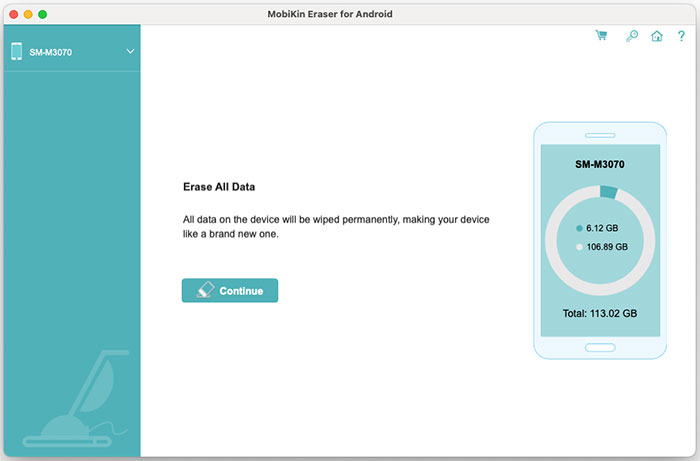
The Mac main window with a Samsung phone connected and its storage shown.
Features
Three security levels
MobiKin Eraser for Android (Mac) offers Low, Medium and High. Low is the quick option, Medium overwrites once and is the recommended default, and High overwrites three times. The dialog says the High standard is based on the U.S. DoD 5220.22-M method.
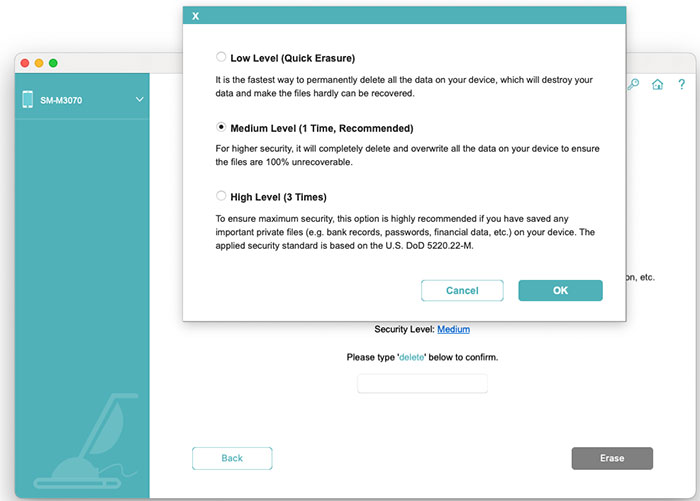
The security level dialog, with the DoD 5220.22-M note under High.
Covers personal data and deleted files
MobiKin Eraser for Android (Mac) targets contacts, messages, call logs, photos, videos, music, notes and apps, along with account logins, passwords, financial records and browsing data. MobiKin says it also overwrites files you'd already deleted.
Two ways to connect
MobiKin Eraser for Android (Mac) works over USB with debugging on, or over Wi-Fi by scanning a QR code with the helper app. Both devices must share a network for Wi-Fi.
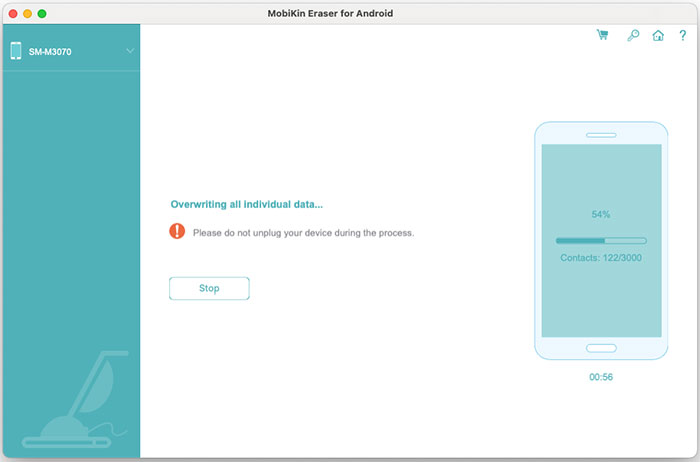
The overwrite stage. A warning says not to unplug the device.
Factory reset as the last step
MobiKin Eraser for Android (Mac) stops at a screen marked "very important" and shows you how to reset the phone from Settings. MobiKin says this clears the system settings and data that the program itself leaves behind.
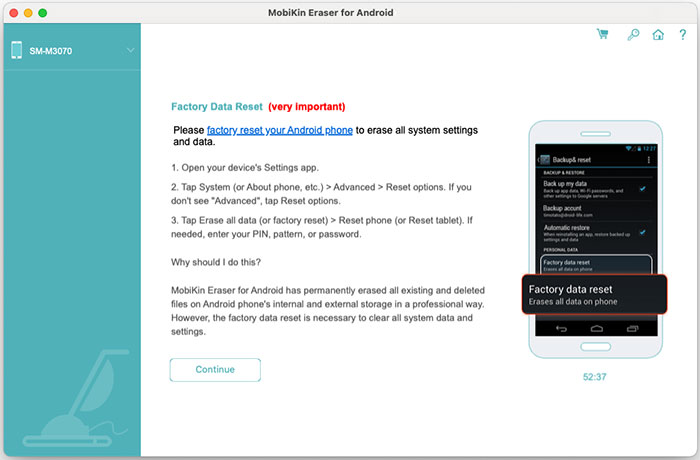
The reset instructions screen after erasing.
Benefits
- Works from a Mac. Many Android erasers are Windows-only, and this one doesn't need a PC.
- A second layer after the reset. Overwriting aims to leave nothing useful for a recovery tool.
- One payment. That suits a job you'll do every couple of years.
Real-World Uses
- Selling a Samsung phone: back it up, wipe it at High and reset it before handing it over.
- Passing a phone to family: one user on MobiKin's page wiped a phone before giving it to a brother.
- Clearing a work phone: wipe it if you held sensitive client messages, though you'll have no erasure report on a Mac.
Who It's For, and Who Should Skip It
Buy it if you only have a Mac, you're cautious about what's left on a phone that held sensitive data, and you accept that the claims aren't independently proven.
Skip it if you have one ordinary modern phone. Android phones encrypt their storage by default, so the free built-in factory reset already protects most people well. Also skip it if you need a saved report, as that's only in the Windows version, or if you want to wipe iPhones, which need MobiKin's separate Eraser for iOS.
Usage Guide
- Back up anything you want to keep. Erased data can't be brought back.
- Install the program. If macOS says it's from an unidentified developer, MobiKin's guide tells you to allow it in Security & Privacy settings.
- Connect the phone by USB, enable USB debugging and allow the Mac on the phone. Or click the Wi-Fi icon and scan the QR code.
- Click Continue, then Medium next to Security Level, choose your level and click OK.
- Type "delete", click Erase and confirm.
- Tap Yes on the phone when it asks to make the helper app the default SMS app, then click OK.
- Wait for the scan, erase and overwrite. Keep the phone connected.
- Factory reset the phone from its Settings app, then click Continue in the program.
Before you buy
- Check the connection in the trial. It won't erase, but it shows whether your Mac and phone can talk to each other. That's your only test before paying.
- Take the 7-day limit seriously. The product page shows a 30-day badge, but the order page and refund policy both give 7 days for Eraser for Android and reject change-of-mind requests.
- Pick Lifetime for a one-off job. The 1-Year licenses auto-renew, which has caught out at least one buyer of the Windows version.
- Expect Rosetta on a newer Mac. The app inside the disk image is built for Intel only, so an Apple silicon Mac has to run it through Apple's Rosetta 2, which Apple plans to phase out in later macOS releases. Install the trial before paying.
Where it falls short
- The 100% claim is the vendor's own. We found no independent lab test of its erasure. Flash storage can also hold data in places software can't reach.
- An unsourced statistic. The product page says "nearly 40%" of used phones keep recoverable data after a reset, with no study named. MobiKin sells the alternative, so weigh that claim accordingly.
- No erasure report. The Windows version gained a report in July 2026. The Mac guide and version history don't mention one.
- Fewer updates. The version history has two entries, the second fixing installation issues, while the Windows version is at 5.1.28.
- No stated Android range. The Mac page has no version line. The shared FAQ says Android 5 to 14, while the Windows page says Android 6 and above, including 17.
- Phone-side setup. You'll deal with USB debugging, a helper app, default SMS permissions and a manual reset.
What Users Say
We found no independent review of the Mac version. Most "reviews" online are giveaway pages or come from companies selling a rival eraser, so we left those out.
On MobiKin's page
The product page shows 4.5 out of 5 from 33 reviews. These are vendor-hosted comments we can't verify, and many are one line:
"This tool is super easy to use and did the job quickly. I felt confident that my data was erased." - Emily Johnson
"Took a couple of attempts, guide of the software were great and have erased all files from an Samsung Galaxy S20 Ultra. Would recommend." - Abigail
"Gave me the confidence,,, though, not a free tool." - Aazin' Has
"The only thing I wish it had was a darker interface theme for long sessions at night." - TanleyWon
The Windows version on Trustpilot
MobiKin's company page shows 3.6 out of 5 from 48 reviews, read through a page summarizer. One review covers Eraser for Android, without naming a platform:
"If you choose the subscription plan, it's set to automatically renew." - Niels Kistrup, June 23, 2025. He adds that the app "didn't recognize my Motorola Moto G6 phone" and that he "Just needed the app to erase one phone."
Software Giveaway
This giveaway site scores Eraser for Android 6.5 and says: "Despite competitive pricing and customer support, there's room for improvement in feature richness." It names no author or test results.
The pattern: users find it simple and single-purpose, and a few needed more than one attempt. Nobody we could verify has tested whether wiped data truly can't be recovered.
Comparisons
MobiKin Eraser for Android (Mac) vs a factory reset
A factory reset is free and enough for most modern encrypted phones. MobiKin Eraser for Android (Mac) adds overwriting before the reset, which may reassure you if the phone held banking data or client files. The program still ends with that reset, so you aren't replacing it, you're adding to it.
Mac version vs Windows version
Both cost $39.95 for a Lifetime license of 3 devices on 1 PC. The Windows version is newer, resets first and overwrites afterwards, and can save an erasure report. Use Windows if you have a PC, and especially if you need proof of erasure.
Editions and Pricing
| License | Term | Devices and PCs | Price |
|---|
| Lifetime (this listing) | One time | 3 devices, 1 PC | $39.95 |
| Lifetime | One time | 9 devices, 3 PCs | $59.95 |
| Lifetime | One time | 30 devices, 1 PC | $259.95 |
| 1 Year | Auto-renews | 3 devices, 1 PC | $29.95 |
| 1 Year | Auto-renews | 9 devices, 3 PCs | $49.95 |
| 1 Year | Auto-renews | 30 devices, 1 PC | $249.95 |
FAQs
Can I try MobiKin Eraser for Android (Mac) for free before buying?
Only partly. MobiKin Eraser for Android's FAQ says the trial is limited to updates and support, and erasing needs the full version. Treat it as a connection test.
Does the MobiKin Eraser for Android (Mac) Lifetime license ever renew?
No. The Lifetime license was a one-time $39.95 on the order page, with the renewal term shown as lifetime. Only the 1-Year licenses renew automatically.
How long does MobiKin Eraser for Android (Mac) take?
It depends on storage size and level. MobiKin's sample finish screen shows 52:37 on a Samsung phone with 113 GB of storage, not counting the reset.
Will MobiKin Eraser for Android (Mac) remove a Google account lock?
MobiKin doesn't list this as a feature. Sign out of your Google account on the phone before you start so the next owner isn't blocked by a Factory Reset Protection prompt.
Does MobiKin Eraser for Android (Mac) work on tablets?
Yes. MobiKin lists Samsung Galaxy Tab models among the supported devices, along with phones from Samsung, Xiaomi, TECNO and other brands.
Can I use the same MobiKin Eraser license on Windows and Mac?
No. MobiKin says the Windows and Mac versions are separate products, each with its own license code.
System Requirements
- Mac OS X 10.10 or later
- Intel Core 1 GHz or faster
- 1 GB or more of free disk space
- An Android phone or tablet connected by USB cable or Wi-Fi
Conclusion
MobiKin Eraser for Android (Mac) is worth $39.95 only if you have a Mac, no PC, and want an extra overwrite before a factory reset. The reason to buy is peace of mind when a phone with sensitive data changes hands. The main reason not to is that a free factory reset already does the job for most modern phones, while this one gives you no way to test an erase before paying and just 7 days to get your money back. Check the connection in the trial first.
Download Free TrialBuy Now