MobiKin Transfer for Mobile: What It Really Moves Between Android and iPhone
MobiKin Transfer for Mobile is a $39.95 Windows program, with a lifetime license for 1 PC, that copies contacts, messages, photos and other data from one phone to another while both are connected to your computer. It's strongest when moving to an Android phone. Going from Android to iPhone, it only carries contacts and books, so check the table below before you buy.
Quick facts
- Version: 6.0.24, released November 4, 2026
- Developer: MobiKin
- Runs on: Windows 11, 10, 8 and 7. A Mac version is sold separately
- Phones: Android 6 to Android 17, and iOS 5 to iOS 27
- Price: $39.95 once for 1 PC, lifetime license
- Trial: transfers only 10 contacts
- Guarantee: 30 days money back, under set conditions
- What we checked: the installer is 48.4 MB and dated November 4, 2026, matching the version notes, and the order page showed a lifetime license at $39.95 with no renewal on November 6, 2026. We read the supported data types in MobiKin's FAQ and its own screenshots, but we didn't run a transfer between two phones.
What Transfers in Each Direction
This is the most important table on this page. Everything here comes from MobiKin's own FAQ, and the program greys out the types it can't move.
| Direction | What moves | What doesn't |
|---|
| Android to Android | Apps, contacts, SMS, call logs, music, photos, videos, books | Nothing major |
| iPhone to Android | Contacts, text messages, books, music, videos, photos | Calendars, Safari bookmarks |
| iPhone to iPhone | Contacts, calendars, books, bookmarks, notes (notes not on iOS 11 or later) | Text messages, photos, music, videos |
| Android to iPhone | Contacts and documents (PDF and EPUB books) | Messages, call logs, photos, music, videos, apps |
Before you buy
- Moving to an iPhone? Think twice. Contacts and books are all that make it across from Android, whatever the marketing line "Complete Android to iPhone transfer" suggests. Apple's free Move to iOS app is the better first choice during setup.
- iPhone to iPhone is limited too. Photos and messages aren't on the list, and Apple's own Quick Start or an iCloud restore handles those for free.
- You need a computer and both phones. They have to be connected at the same time, normally by USB.
- The trial proves the connection. Ten contacts will show you that both phones connect and which types can be ticked. It won't show you speed or a full move.
Download Free TrialBuy Now
Overview
Transfer for Mobile is one window with three columns: the source phone, the destination phone, and a list of content in the middle. Once both phones connect, it counts what's on the source, and you tick what to copy and click Start Copy. A Flip button swaps the phones if they land on the wrong sides. Version 6.0.24 changed the default so nothing is ticked at first, and added a transfer timer.
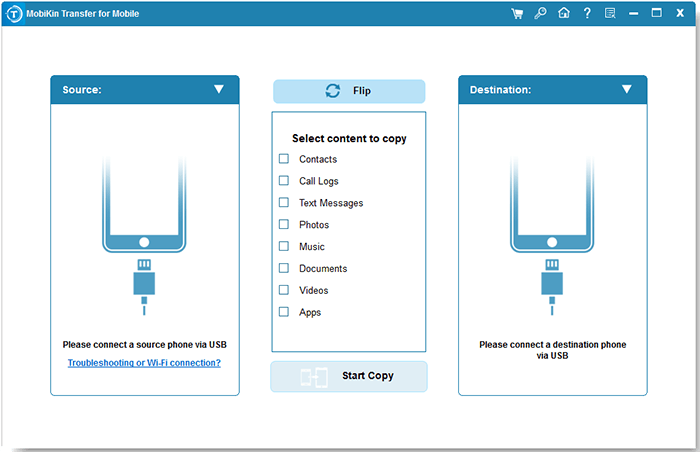
The start screen, waiting for two phones. The content list changes with the phones you connect.
Features
Android to Android, the most complete route
MobiKin Transfer for Mobile moves apps, contacts, call logs, messages, photos, music, videos and documents between two Android phones. It's the one route that carries almost everything, and MobiKin says it supports phones from Samsung, Xiaomi, OPPO, Huawei, Google Pixel and many others on Android 6 and later.
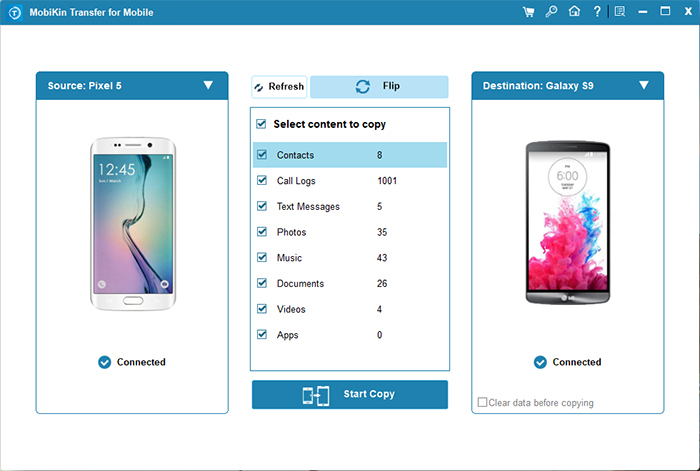
Android to Android: every content type is available, with counts beside each one.
iPhone to Android, for switching away from Apple
MobiKin Transfer for Mobile copies contacts, text messages, books, music, videos and photos from an iPhone to an Android phone. Calendars and Safari bookmarks stay behind. When messages are selected you need to unlock the iPhone and answer a prompt on its screen.
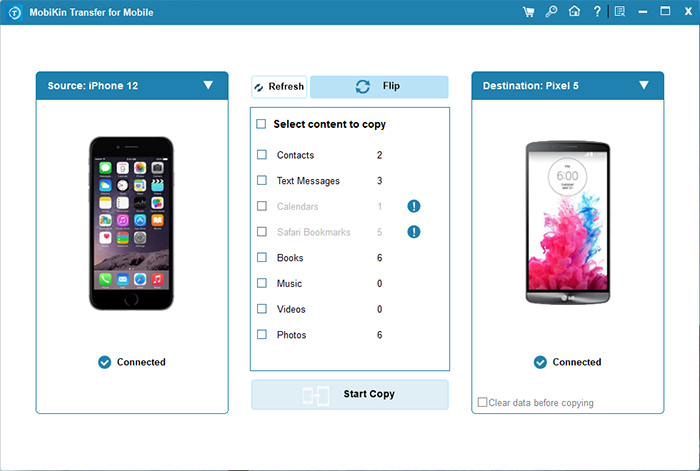
iPhone to Android: Calendars and Safari Bookmarks are greyed out with a warning icon.
iPhone to iPhone, for the data iCloud leaves out
MobiKin Transfer for Mobile copies contacts, calendars, Safari bookmarks and books between iPhones. Text messages, music, videos and photos can't be ticked. That makes it a narrow tool on this route, useful if you want to copy a few types and not restore a whole device.
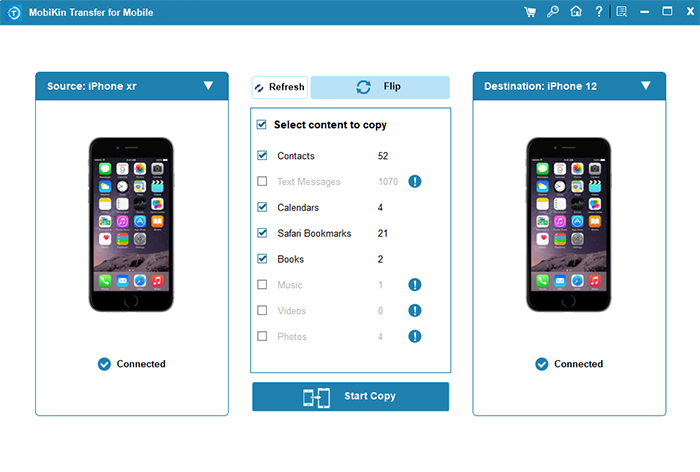
iPhone to iPhone: Text Messages, Music, Videos and Photos are greyed out.
Android to iPhone, contacts and documents only
MobiKin Transfer for Mobile moves contacts and documents to an iPhone. In its own Windows screenshot of this route, the progress window lists only Contacts and Documents. The Android phone needs the MobiKin app in the foreground during the copy.
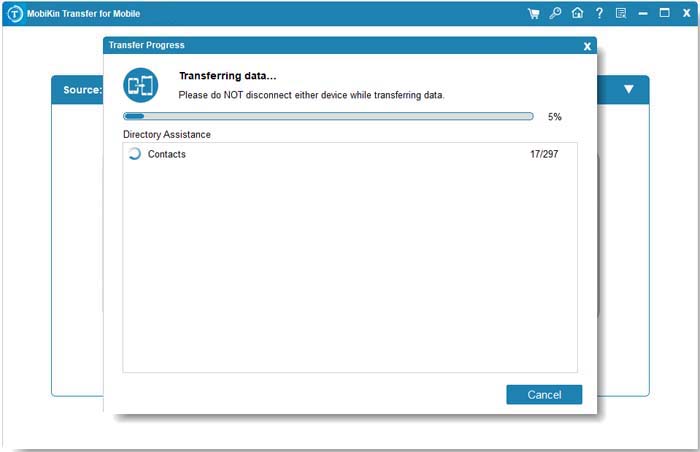
Android to iPhone in progress: contacts and documents are the only two items.
Clearing the destination first
MobiKin Transfer for Mobile has a "Clear data before copying" option when the destination is an Android phone, so you can avoid duplicates on a phone that isn't empty. No factory reset is needed on either phone. If you can't get USB working on an Android phone, a Wi-Fi option with the MobiKin phone app and a QR code is available, with phone and PC on the same network.
Benefits
- No setup deadline. Apple's and Google's migration tools work best when a new phone is being set up. This one runs on phones that are already in use.
- Choose what comes along. Leave the old music behind and take only contacts and messages.
- No cloud account needed. The data goes through your PC, not an online service.
Real-World Uses
- Samsung to Pixel. Copy apps, messages, call logs and photos to a new Android phone.
- iPhone to Android. Bring your messages and photos across when leaving Apple, weeks after the new phone was set up.
- A hand-me-down phone. Tick "Clear data before copying" and move a relative's contacts and photos to an Android replacement.
- Contacts only. Move an address book to an iPhone that's already in use.
Who It's For, and Who Should Skip It
It fits Windows users moving to an Android phone from either platform, especially on a phone that's already set up, where the makers' free tools don't help as much.
Skip it if your new phone is an iPhone. Apple's Move to iOS and iCloud are free and cover far more. Skip it for a straight Samsung-to-Samsung upgrade, since Samsung's own Smart Switch is free. If you only want a copy of a phone on your computer, Assistant for Android or Assistant for iOS is the right MobiKin tool.
Usage Guide
- Install the program on your PC and open it.
- Connect both phones by USB. For Android, turn on USB debugging, install the driver if asked and tap Allow. For iPhone, unlock it and tap Trust.
- Check that the old phone is under Source. If not, click Flip.
- Tick the content to copy. Anything greyed out can't move on that route.
- If the destination is Android and you want it emptied first, tick "Clear data before copying".
- Click Start Copy, keep both phones connected, and wait for "Transfer is completed".
Where it falls short
- The marketing outruns the FAQ. The product page talks about complete Android to iPhone transfer, while the FAQ lists contacts and books. One Trustpilot buyer below ran straight into this.
- Connection is a hurdle. Two phones must both be recognized, with USB debugging and a phone app on Android. MobiKin's FAQ has several articles on failed detection and driver problems.
- Speed claims are the vendor's. MobiKin says it's 20% to 30% faster than rivals, and we couldn't find a test confirming that.
- Refunds aren't unconditional. The policy rejects a change of mind and expects you to work through fixes with support. One buyer below did get a refund.
What Users Say
We found no independent hands-on test of this product. FileHorse lists it, and Trustpilot has the most telling buyer reports, though it rates the whole company. Kevin's and mate bythesea's reviews don't name the product, but they describe phone-to-phone copying.
FileHorse: 9.22 out of 10 from 9 ratings
FileHorse's review for version 5.1.17 lists "Supports multiple data types transfer", "One-click transfer with simple interface" and "Works with a wide range of phone brands" as pros. Its cons are "Free version has limited functionality", "Requires USB debugging for Android devices", "iOS device connection needs iTunes installed" and "Transfer speed may vary based on data size". It also lists "No wireless transfer option available", though Android phones do have a Wi-Fi option.
Trustpilot: 3.6 from 48 reviews (all MobiKin products)
"I bought Transfer to Mobile relying on the ads promoting the program that it transferred from Android to IOS and back." and "The program only allowed me to transfer the Contacts from my Samsung phone to my new IPhone." customer, December 2, 2021, 1 star
On texts in a phone-to-phone move: "it got through 5 or 6 before it got stuck for an hour and a half" Unsatisfied customer, April 12, 2023, 1 star
Under the title "A misleading Mobikin recommendation": "I finally get told they only transfer a very limited amount of the data unless I buy the product." Kevin, May 21, 2026, 2 stars
"i had a difficult task of copy a chinese mainland phone to another phone." and "Mobi aandd Trust happily returned my money." mate bythesea, April 22, 2026, 5 stars
"The app did not work for me, but I believe that was more iPhone 8 to Android flip." Ambro, August 28, 2025, 5 stars
On MobiKin's own site
The comments there are short and we can't verify them, so read them lightly. "Faster than Samsung's Smart Switch" Jasom ZY, June 22, 2026. "Did not overwrite existing data on the my new phone." Ma.s.n.arker, September 16, 2026. "Seamless, although larger files might take a bit longer than expected." aFennick, April 29, 2026.
The pattern: people like the one-window process when both phones connect. Complaints center on Android to iPhone falling short of what buyers expected, and transfers that stall partway. Some buyers report a refund, others couldn't reach anyone.
Comparisons
MobiKin Transfer for Mobile vs Apple's Move to iOS
Move to iOS is free and runs from the phones themselves, and it carries far more to a new iPhone, including messages and photos. Its catch is that it runs during iPhone setup. Transfer for Mobile works any time, but only moves contacts and books on this route.
MobiKin Transfer for Mobile vs Samsung Smart Switch
Smart Switch is free and made for moving to a Galaxy phone. Transfer for Mobile earns its price on routes Smart Switch doesn't cover, such as moving to a Pixel, Xiaomi or OPPO phone.
Editions and Pricing
| Plan | Price | Term | Computers |
|---|
| Lifetime | $39.95 | One payment | 1 |
| 1 Year | $29.95 | Renews automatically | 1 |
| Lifetime | $59.95 | One payment | 2 to 5 |
| 1 Year | $49.95 | Renews automatically | 2 to 5 |
| Lifetime | $99.95 | One payment | 6 to 10 |
| 1 Year | $89.95 | Renews automatically | 6 to 10 |
All plans have the same features. The difference is the term and the number of computers, and plans go up to 26-30 computers. The Buy Now button on this page opens the Lifetime 1 PC license. Prices are from MobiKin's product catalog on November 6, 2026.
FAQs
Can MobiKin Transfer for Mobile move photos from Android to iPhone?
MobiKin Transfer for Mobile can't move photos from Android to iPhone. MobiKin's FAQ lists only contacts and PDF or EPUB books on that route.
Does MobiKin Transfer for Mobile transfer WhatsApp?
MobiKin Transfer for Mobile doesn't list WhatsApp chats among its data types. On Android to Android it copies apps, but MobiKin doesn't say that app data comes with them.
Do I need to factory reset my new phone to use MobiKin Transfer for Mobile?
MobiKin Transfer for Mobile needs no factory reset on either phone, which is its main advantage over tools that run only during setup.
Does MobiKin Transfer for Mobile need iTunes?
FileHorse says MobiKin Transfer for Mobile needs iTunes installed to connect an iPhone, and the notes for version 6.0.24 mention better iOS driver installation. Keep iTunes handy in case an iPhone is not detected.
Are updates to MobiKin Transfer for Mobile free?
MobiKin Transfer for Mobile updates are free in both the trial and the full version, and your registration stays valid for later versions.
Can I get a refund on MobiKin Transfer for Mobile?
MobiKin Transfer for Mobile has a 30-day money-back guarantee, but only under the accepted circumstances in MobiKin's policy. A change of mind doesn't qualify, and a refunded license is disabled.
System Requirements
- Windows 11, 10, 8 or 7
- 750 MHz Intel or AMD processor
- 512 MB RAM or more
- 1 GB or more of free disk space
- Android 6 to 17 or iOS 5 to 27 on both phones, with their USB cables
Conclusion
MobiKin Transfer for Mobile is worth $39.95 if you're moving to an Android phone that's already set up, because it carries nearly everything from another Android and most things from an iPhone, and you can run it at any time. The reason to buy it is that flexibility. The main reason not to is the destination: if your new phone is an iPhone, it moves contacts and books and little else, and Apple's free tools do more. Check the table at the top of this page against your route, then run the trial to see what can be ticked.
Download Free TrialBuy Now