Jutoh: A Desktop Ebook Editor for Kindle and ePub, Bought Once
Jutoh is an ebook editor from Anthemion Software for Windows, Mac and Linux that turns a Word manuscript (or a book written from scratch) into Kindle, ePub, ODT, HTML and even MP3 speech files. It costs $45 once for Jutoh 3, or $90 for Jutoh 3 Plus, with no subscription and no limit on the number of books.
It's for self-publishing authors and small presses who want more control than "upload a Word file and hope": real styles, tables, footnotes, indexes, fixed-layout picture books, and a checker that tells you what will break on a Kindle before Amazon does.
Quick facts
- Version: 3.33
- Developer: Anthemion Software Ltd., run by Julian Smart, who created the wxWidgets toolkit
- Platforms: Windows 7 to 11 (32- and 64-bit), macOS 10.10 and later on Intel and Apple silicon, 64-bit Linux; a portable edition is available
- Imports: Word (DOCX), ODT, ePub 2 and 3, HTML, text, Markdown, CBZ
- Exports: Kindle and ePub 2/3 (reflowable and fixed layout), ODT (for PDF via LibreOffice), HTML, text, Markdown, CBZ, MP3 speech
- Price: Jutoh 3 $45, Jutoh 3 Plus $90, one-time; free updates within version 3
- License: per user, on all your own computers and operating systems
- Demo: up to 20 documents, "CREATED BY JUTOH" at the top of generated chapters, and occasional reminders
- What we checked: the Windows installer Jutoh-3.33-x64-Setup.exe (70.8 MB, dated November 1, 2026) and the order page on November 20, 2026: Jutoh $45 and Jutoh Plus $90, both one-time. We didn't build a book with it.
Download Free DemoBuy Jutoh 3 ($45)Buy Jutoh 3 Plus ($90)
Overview
A Jutoh project holds your book's sections (chapters, title page, contents), its images and styles, and one or more configurations: Kindle, ePub, print and so on, each with its own settings. The window has a project Organizer on the left, the near-WYSIWYG editor in the middle, and an Inspector palette on the right. You import or write the text, fix the formatting, then press Compile, Check and Launch to build the ebook, test it and open it in a viewer such as Kindle Previewer.
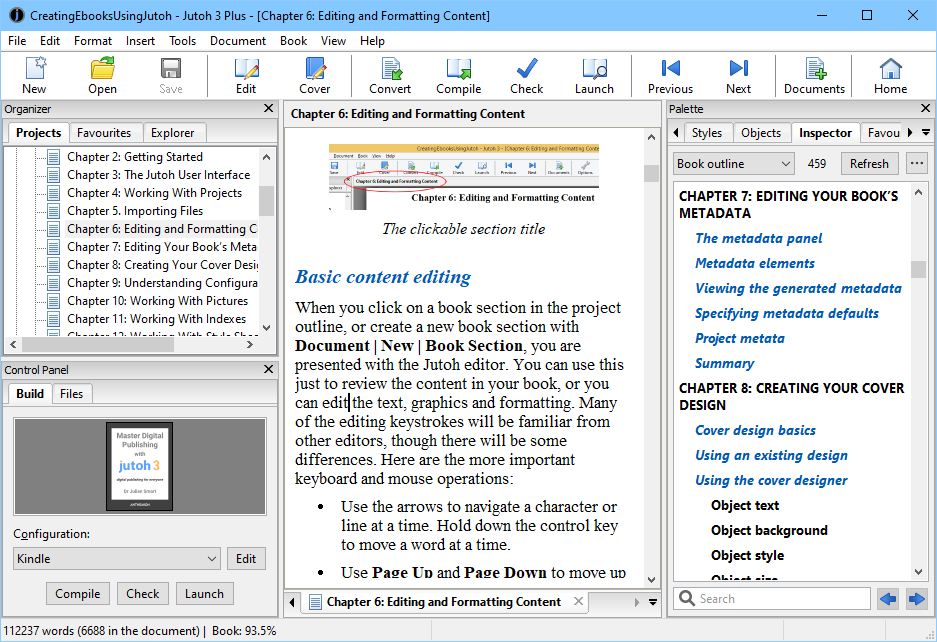
Jutoh 3 Plus editing chapter 6 of a 112,000-word book: chapters in the Organizer, the Kindle configuration with Compile, Check and Launch buttons, and the book outline in the Inspector.
Features
Import a manuscript and split it into chapters
Jutoh imports Word DOCX, ODT, ePub, HTML, Markdown and text files, bringing in pictures, tables and Word fields, and splits the book into sections at your chapter headings. Document Cleanup then applies project-wide fixes, such as consistent indents and stray formatting from Word.
Serious formatting for non-fiction
Jutoh handles more than novels: named paragraph, character, list and box styles, drop caps, tables, footnotes and endnotes, multiple tables of contents, an index, a bibliography with its own database, cross-references, numbered headings, embedded fonts, SVG and MathML (via third-party tools), and ePub 3 forms, audio and video. Conditional formatting lets one project produce slightly different Kindle and ePub editions.
Fixed-layout books
Jutoh builds fixed-layout Kindle and ePub books, where every page is placed exactly: children's picture books, comics, cookbooks with photo spreads. You set the page size, single or double-page spreads and background images, and place text boxes and pictures on each page.
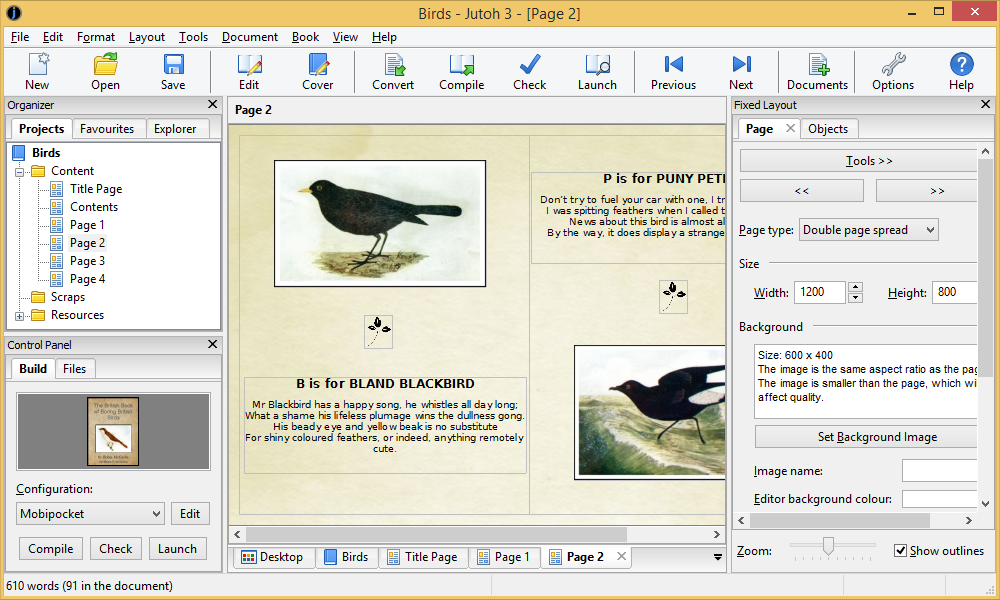
Fixed-layout editing: a double-page spread at 1200 x 800 with picture and text boxes, and the Fixed Layout panel for page type, size and background.
Check before you publish
Jutoh's Check button examines a compiled ePub and lists problems with links to the relevant help topic or setting, including accessibility advice, and Jutoh 3 can write accessibility metadata. Launch opens the result in viewers you configure, such as Kindle Previewer 3 and Adobe Digital Editions, and Examine shows the code inside an ePub or ODT.
Find everything with the Inspector
Jutoh's Inspector shows the book's outline, images, tables and fields, and a Global Find that lists every match across the whole project at once, so you can check how a name is spelled in 40 chapters without opening each one.

Global Find in the Inspector: 45 matches for "Pitfeldry" across a 120,000-word novel, each with its context.
Writing tools, not just formatting
Jutoh 3 added creativity tools: a card-based storyboard for planning scenes by character or thread, timed writing exercises, word-count goals, a character name generator, a scraps folder for research, and the ebook Fiction: The Facts by novelist Harriet Smart.
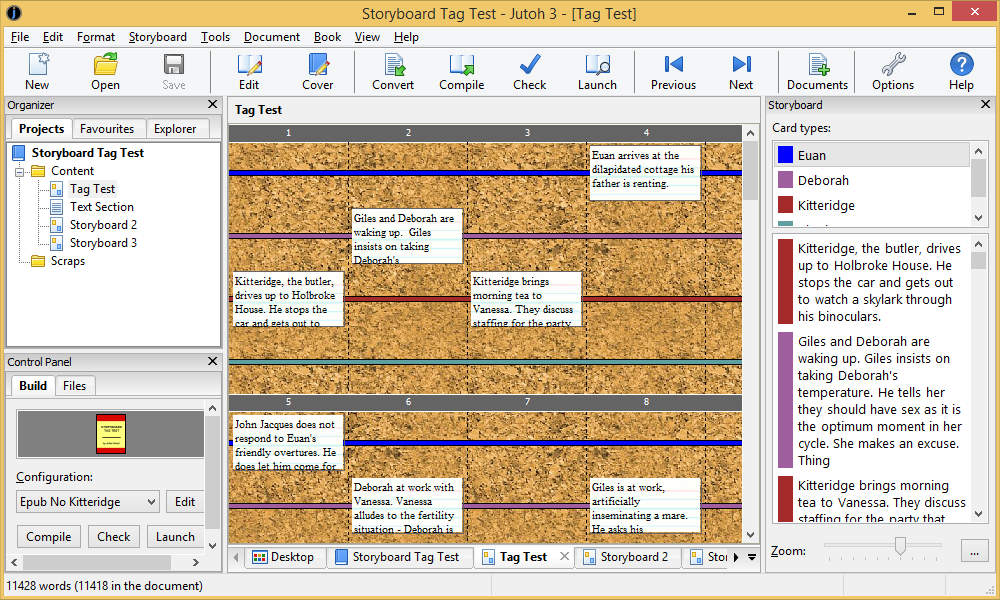
The storyboard: scene cards on a corkboard, in lanes by character (Euan, Deborah, Kitteridge), with the card list on the right.
Audio and print output
Jutoh can compile a book to MP3 using text-to-speech, with speech markup to control pronunciation, and to ODT with detailed page styles, which LibreOffice turns into a print-ready PDF. A basic cover designer with templates is included.
Benefits
- Pay once, publish forever. No subscription and no per-book fee; updates within version 3 are free.
- One license, every computer. Use it on your Windows desktop and your MacBook with the same key.
- Clean, predictable ebooks. Jutoh builds the ePub and Kindle files itself rather than trusting a Word export.
- A developer who answers. Support is by email from the small team that writes it, and the vendor's testimonials repeatedly mention fast replies.
Real-World Uses
- A novelist on KDP: import the final DOCX, run Document Cleanup, compile Kindle and ePub editions and check both before upload.
- A non-fiction author: produce a guide with footnotes, a bibliography, an index and a linked table of contents.
- A picture book: lay out a fixed-layout ePub page by page with full-bleed illustrations.
- A small press (Plus): use HTML templates and scripts to build a series of books the same way every time.
- An audiobook draft: generate an MP3 with text-to-speech to proof-listen to a manuscript.
Who It's For, and Who Should Skip It
Jutoh suits self-publishers and small publishers who want control over every part of their ebook, especially non-fiction with tables, notes and indexes, or fixed-layout books, and who prefer a one-time purchase that runs on Windows, Mac and Linux.
Skip it if you want a polished, modern-looking print-and-ebook designer with no learning curve: Jutoh's interface is dense and old-fashioned, and print PDFs go through LibreOffice. If you write a simple novel and only publish to Amazon, Amazon's free Kindle Create may be enough. Jutoh doesn't run on iPad or Android tablets, and it isn't an HTML/CSS code editor.
Usage Guide
- Download the demo for your system with the button on this page and install it (or use the portable version from a USB drive).
- Create a new project and import your Word or ODT file into it, or start with an empty project. Fill in the title, author and cover.
- Edit and format in the main editor; use Document Cleanup and the Inspector to fix the whole book at once.
- Pick a configuration (Kindle, Epub, ODT) in the Control Panel, then click Compile.
- Click Check to review the advisories, then Launch to see the book in a viewer.
- After buying, click Register on the toolbar (or Help | Register Jutoh) and paste the user name and key from your email.
Before you buy
- Build your actual book in the demo first: the only limits are 20 documents, the "CREATED BY JUTOH" line and reminders, so you'll see exactly what your Kindle and ePub look like.
- Most authors need Jutoh 3, not Plus. Plus is for automation (scripts, HTML templates, personalised ebooks in bulk) and Windows help files.
- Upgrading later from Jutoh 3 to Jutoh 3 Plus costs $45 on the vendor's site, so starting with the standard edition costs nothing extra.
- Major versions can carry an upgrade charge: version 2 users paid a small fee for Jutoh 3.
Where it falls short
- A learning curve. The window is packed with panels and options; expect to spend time in the manual and knowledge base before your first book.
- No direct HTML/CSS editing. Jutoh converts one way to ePub, so hand edits to the output have to be made in another tool such as Sigil and are lost on the next compile.
- Print PDF needs LibreOffice. Jutoh writes ODT; the PDF is made from that.
- Robotic speech. The MP3 output is text-to-speech, and one long-time user called the read-aloud voice robotic.
- Left-to-right languages only. The editor supports Western languages, not Arabic or Hebrew.
What Users Say
Authors' blogs
"I love the formatting software Jutoh." Romance author Meredith Bond, reviewing Jutoh 3.0 in October 2020, singled out the storyboard: "I can't tell you how much I love this new feature." Her criticism was the read-aloud voice, which she found robotic, and she still drafts scenes elsewhere: "I still write my scenes in Word, but then I copy and paste it into the card in Jutoh." Earlier, in 2014, she weighed the price: "Yes, it costs money, but $40 isn't a lot to pay considering that I charge $50 to do it for you."
"They uploaded and converted flawlessly. If you use Smashwords a lot, I recommend Jutoh." Fantasy author Jonathan Moeller, March 2013
"Jutoh does not like doc files. You must upload a docx file." Rebecca Talley, March 2014, who otherwise called it a low-cost, easy way to make ebooks
Testimonials on the vendor's site
"Jutoh is the most full-featured editor I've found. It does everything I need it to do, and plenty more." Peter Kent, author of SEO for Dummies
"I simply imported my Word file and ran some clean-up options and instantly I got my kindle book formatted; talk about hassle free." Dane A. Miller, who had used Scrivener and Calibre before and noted replies within 24 hours from support
"Jutoh's ability to handle very large, complex documents cleanly and without scrambling them is the main reason for my huge respect for Julian's prowess as a programmer." Rob Hills
"Thanks for such a great program. One of the best software investments we've made in the last six years, seriously." Jason Aydelotte, Grey Gecko Press
"24 hrs ago I had never heard of your software. Today you are my hero! I was having difficulty formatting my Kindle Book." G. Brickner
The recurring themes
Users who stick with Jutoh praise its depth (it handles long, complex books cleanly), its one-time price and its personal support. The complaints are about ease of use: a dated, crowded interface and a learning curve that's more than many novelists need. Independent reviews are few; most of the praise comes from authors and the vendor's own testimonials.
Comparisons
Jutoh vs Kindle Create
Kindle Create is free and simple, but it's built for Amazon. Jutoh produces Kindle and standard ePub for every store, plus fixed layout, indexes, bibliographies and MP3, on Windows, Mac and Linux.
Jutoh vs Calibre and Sigil
Calibre converts between ebook formats and Sigil edits ePub code directly; both are free. Jutoh is a book-building environment instead: you format in a word-processor-like editor and it generates the ePub. Many authors use Sigil afterwards for hand fixes.
Jutoh 3 vs Jutoh 3 Plus
Both make the same ebooks. Plus adds an HTML template system, a scripting language for automating import, export and metadata, personalised ebooks in bulk, custom compile messages that flag typos and clichés, and HTB/CHM help-file export.
Editions and Pricing
| Edition | Price | License | What it adds | Buy |
|---|
| Demo | Free | Evaluation | 20 documents, "CREATED BY JUTOH" line, reminders | Free download |
| Jutoh 3 | $45 one-time | One user, all their computers | Full editor, all ebook formats, creativity tools | Buy Jutoh 3 |
| Jutoh 3 Plus | $90 one-time | One user, all their computers | HTML templates, scripting, personalised ebooks, custom compile messages, HTB/CHM export | Buy Jutoh 3 Plus |
FAQs
Do I need to buy Jutoh separately for Windows and Mac?
No. A Jutoh license is per user, not per computer or operating system, so one purchase covers Windows, Mac and Linux on all your own machines.
Can I use Jutoh at home and at work with one key?
Yes. Jutoh can be installed on several machines with the same key, as long as only one copy is in use at a time.
Are Jutoh updates free?
Updates within a major version are free, so every Jutoh 3.x release is included. A new major version (such as Jutoh 4) may carry a small upgrade charge, as the move from version 2 to 3 did.
Does Jutoh add DRM to my ebook?
No. Jutoh doesn't encrypt books; DRM, if you want it, is applied by the store you publish through, such as Amazon KDP or Apple Books.
Can Jutoh make a print-ready PDF for paperbacks?
Indirectly. Jutoh compiles an ODT document with detailed page styles, and LibreOffice (free) exports it to PDF for print-on-demand services.
Does Jutoh run on a Chromebook or iPad?
Jutoh runs on Intel Chromebooks after installing Linux, and on Raspberry Pi; it doesn't run on iOS or Android.
Can Jutoh run from a USB drive?
Yes. Jutoh has a portable mode and a PortableApps.com version, so you can carry it and your settings between computers.
System Requirements
- Windows 7, 8, 10 or 11, 32- or 64-bit (ARM Windows via the 64-bit version under emulation)
- macOS 10.10 or later, Intel or Apple silicon
- Most 64-bit Linux distributions (Debian, RPM and tarball packages)
- 4 GB RAM and about 100 MB of disk space
Conclusion
Jutoh is worth $45 for self-publishers who want full control of their Kindle and ePub files and dislike subscriptions, especially for non-fiction or fixed-layout books that simpler tools mangle. The one reason to buy it: it handles big, complex books cleanly on every desktop OS for a single price. The main reason not to: its interface is old-fashioned and takes time to learn, which is more than a straightforward novel needs. Build your real book in the demo first, and buy Plus only if you need automation.
Download Free DemoBuy Jutoh 3 ($45)Buy Jutoh 3 Plus ($90)