Leawo Prof. DRM eBook Converter: Turn Kobo, Adobe and Kindle Books into Plain ePub, MOBI, AZW3 or TXT Files
Leawo Prof. DRM eBook Converter is a $24.99-a-year (or $49.99 lifetime) Windows tool that strips the copy protection from eBooks you bought in Kobo, Adobe Digital Editions and older Kindle apps, and saves them as ePub, MOBI, AZW3 or TXT. It's for readers who want a book bought in one store to open on another e-reader or app. It isn't a separate program: it's the eBook module of Leawo Prof. DRM, so you install Prof. DRM and activate only this module.
The problem it solves is familiar to anyone who has switched e-readers. You leave a Kindle for a Kobo, or the other way round, and the books you paid for stay locked to the old store's app. The converter reads those downloaded books and writes copies any reader can open.
Quick facts
- Program: Leawo Prof. DRM 3.3.0.1 for Windows, eBook Converter module
- Developer: Leawo Software Co., Ltd.
- Runs on: Windows 7, 8, 8.1, 10 and 11 (a Mac edition is sold separately)
- Book sources: Kindle for PC (only versions before 1.25), Adobe Digital Editions, the Kobo desktop app, e-readers connected by USB, and files you pick yourself
- Reads: ePub, MOBI, AZW3, AZW, KFX, PRC, HTML and TXT
- Writes: ePub, MOBI, AZW3 or TXT (no PDF)
- Price: $24.99 for 1 year (renews automatically) or $49.99 lifetime, one PC
- Free trial: Leawo says the trial converts only the first 20% of each book
- Money-back guarantee: 5 days on the yearly plan, 14 days on lifetime, for technical problems Leawo can't fix
What we checked: the Windows installer linked from Leawo's download page (prof_drm_setup.exe, file version 3.3.0.1, 112,885,600 bytes, signed November 7, 2025 and dated August 21, 2026 on the server) and the prices on the order page for both plans ($24.99 for 1 year, $49.99 lifetime) on November 1, 2026. We didn't convert any books ourselves.
Before you buy
- Kindle is the weak spot. Leawo's own notes say the converter doesn't work with Kindle for PC 1.25 and later (its Mac guide puts the cutoff at 1.24.0). Amazon's help pages say the Legacy Kindle app, previously called Kindle for PC, isn't supported as of June 30, 2026, and point readers to a newer Kindle app instead. If your Kindle books only live in Amazon's current app, expect them not to show up.
- Kobo and Adobe books are the safer bet. Nothing on Leawo's pages limits those two sources to particular app versions.
- Apple Books isn't covered. The supported sources are Kindle, Kobo, Adobe Digital Editions and e-reader devices only.
- Your own books, your local law. Leawo's fair use policy limits its software to "personal, non-commercial use" of content "you have lawfully obtained", and the user takes the legal responsibility. In some countries, the United States among them, breaking DRM can be unlawful even on books you paid for.
- The download is the whole Prof. DRM suite. The free trial link installs Leawo Prof. DRM; the eBook Converter is one of its modules.
Download Free TrialBuy Now
Overview
When you buy an eBook from Amazon, Kobo or a store that uses Adobe's DRM, the file you download is encrypted so it opens only in that store's app or on its e-reader. Leawo Prof. DRM eBook Converter finds the books those apps have downloaded to your PC, removes the encryption and saves an ordinary copy in the format you choose. Leawo says the book's metadata (title, author, language, date and publisher) carries over to the new file.
Prof. DRM opens on a launcher with one tile per module. The eBook Converter tile leads to a small window with Converting and Converted tabs, an Add Files button, an output folder at the bottom and a blue Convert button.
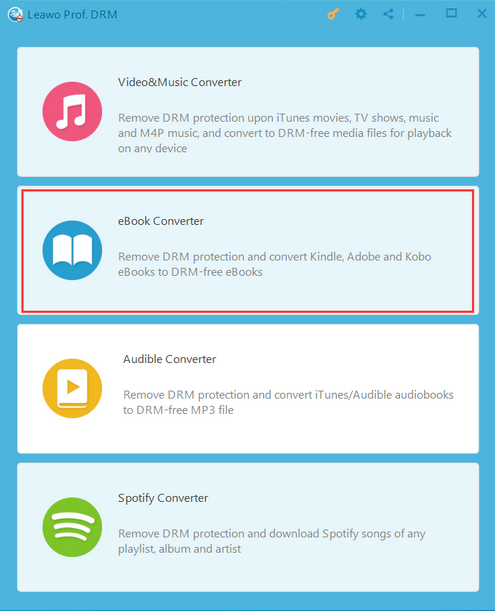
The Leawo Prof. DRM launcher on Windows: four tiles (Video & Music, eBook, Audible and Spotify Converter), with the eBook Converter tile outlined in red.
Features
Library sources listed for you
Leawo Prof. DRM eBook Converter's Add Files panel has a button for each source: Kindle, Adobe, Kobo, E-Device (an e-reader on USB) and Custom for any folder. Click the refresh icon next to a source and every downloaded book appears with its author, publish date and format, so you tick the ones you want instead of hunting through hidden app folders.
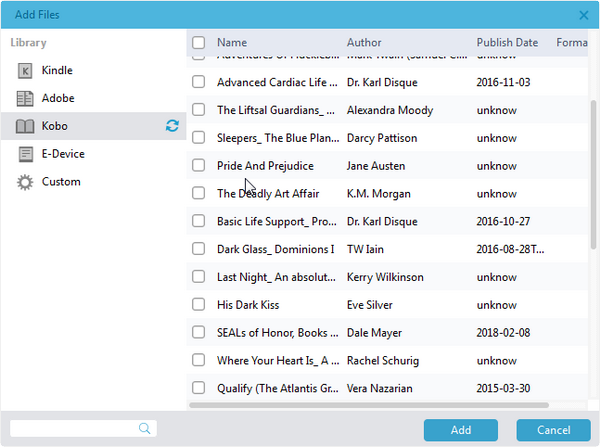
The Add Files panel with the Kobo source selected: downloaded Kobo books listed by name, author and publish date, with Add and Cancel buttons at the bottom.
Kindle books from the older desktop app
Leawo Prof. DRM eBook Converter reads AZW, AZW3 and KFX books that Kindle for PC has downloaded, as long as the app is older than version 1.25. Books have to be downloaded in the Kindle app first; Leawo's guide points you to Tools > Options > Content in Kindle for PC to see where they're stored.
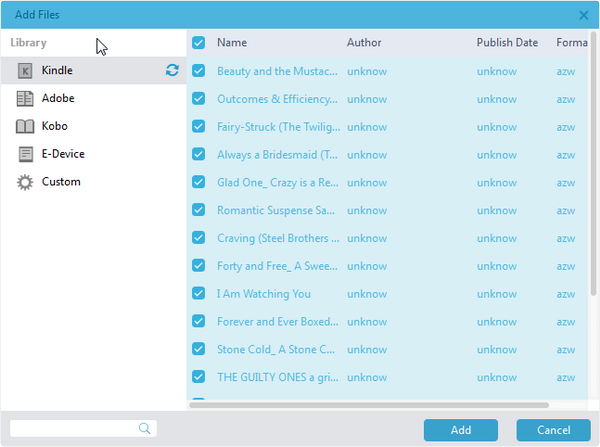
The Kindle source selected and every book ticked: the AZW files show "unknow" for author and publish date, so you pick Kindle books by title.
Four output formats, set per book or for all
Leawo Prof. DRM eBook Converter saves each book as ePub (Kobo, most phone apps), MOBI or AZW3 (Kindle devices) or TXT. The pencil icon on a book opens a small Edit box where you pick the format and click Apply to All or Apply to current.
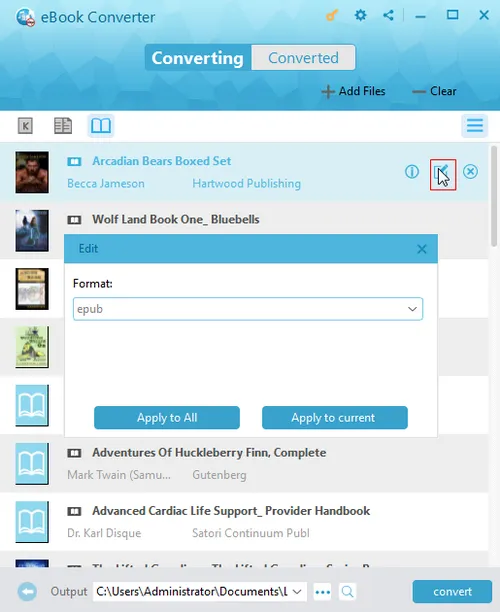
The Converting list with the Edit box open over it: Format set to epub, with Apply to All and Apply to current buttons, and the output folder and Convert button at the bottom.
Batch conversion
Leawo Prof. DRM eBook Converter converts a whole list in one run, and Leawo claims it's 5 times faster than other tools (its Prof. DRM guide says 50 times; neither figure is independently tested). Finished books move to the Converted tab, where a folder icon opens their location and a search box finds a title in a long list.
Benefits
- Change e-readers without rebuying. Books from a Kobo account can go onto a Kindle as AZW3, and Adobe-protected library purchases onto almost anything as ePub.
- Read in the app you like. A plain ePub opens in Apple Books, Google Play Books or any open-source reader, not just the store's own app.
- Keep a backup you control. A converted copy doesn't depend on the store keeping your account, the book or its app alive.
Real-World Uses
- Moving from Kobo to a Kindle: convert a Kobo library to AZW3 or MOBI and copy it to the Kindle over USB.
- Adobe ePubs from a bookshop that isn't around any more: make DRM-free copies while Adobe Digital Editions still opens them.
- Reading on an old e-ink device: connect it by USB, pick its books under E-Device, and save TXT copies for a reader that handles nothing else.
Who It's For, and Who Should Skip It
Good fit: Windows users with a sizeable Kobo or Adobe Digital Editions library, or an older Kindle for PC install that still has their books, who want them on a different reader and live where that's allowed.
Skip it if:
- Your Kindle books are only in Amazon's current Kindle app. The converter needs Kindle for PC older than 1.25.
- You buy from Apple Books. It isn't a supported source.
- You only need one or two books. The free, open-source Calibre with its DRM plugins does the same job if you don't mind setting it up.
- You also want iTunes, Audible or Spotify conversion. The full Leawo Prof. DRM pack covers all of them, eBooks included, for $79.95 a year.
Usage Guide
- Get your books downloaded: open Kindle for PC, Kobo or Adobe Digital Editions, sign in, and download the books you want to convert.
- Install and register: install Leawo Prof. DRM from the trial link, click the key icon at the top right and enter the eBook registration code you bought.
- Open the module: click the eBook Converter tile on the launcher.
- Add books: click Add Files, choose Kindle, Adobe, Kobo, E-Device or Custom, click refresh, tick the books and click Add. Dragging files onto the window works too.
- Choose the format: click the pencil icon on a book, pick ePub, MOBI, AZW3 or TXT, and apply it to one book or all.
- Convert: set the output folder at the bottom, click the blue Convert button, then open the Converted tab to find the files.
Where it falls short
- Store updates switch it off. The Kindle cutoff shows the pattern: when Amazon changed its app and DRM, Kindle support stopped at an old version and hasn't moved since.
- The trial barely shows the result. Converting only 20% of a book proves the book is read, not that the whole file comes out right.
- Short refund windows. 5 days on the yearly plan and 14 on lifetime, and only for faults Leawo can't fix, not a change of mind.
- Dated looks. FixThePhoto's roundup (2020, updated 2022) listed "UI should be updated" as the one con for Prof. DRM.
- Yearly plans renew automatically until you cancel.
What Users Say
Real reviews of the eBook module itself are rare. Most of what Leawo and others publish is about Prof. DRM as a whole, and much of it is about iTunes video. Here's what we could verify.
On Leawo's own pages
The eBook Converter page shows two customer quotes picked by Leawo. Hint Smith: "A fantastic tool that solves my problem exactly. Now I can read eBooks from my old fashion Kindle on my new eReader." Devin Cooper: "This software reliable, the company reliable. Quite nice support service for me. Keep it." The page's rating data claims 4.9 out of 5 from 163 ratings.
Leawo's moderated review center for Prof. DRM showed a 4.8 average from 21 reviews on November 1, 2026, none of them about eBooks. The closest is Steven Michael (January 2020): "I've used Leawo DRM removel on my MAC for a few years and it is the best product for creating MP3s from my streaming service". One reviewer gave a single star with no complaint, just "Very good, sir."
Tech sites
MakeUseOf (Dan Price, "How to Remove DRM From Your Ebooks: 6 Methods to Try", updated February 2023) included Prof. DRM in its list of eBook DRM tools: "The app uses speed as its main selling point" and "That won't make much difference on a single book, but if you are working with thousands of books, the time savings can be significant." It also warned that "the extra features come at a cost", quoting the full pack's prices.
FixThePhoto (best DRM removal software roundup, updated April 2022) listed Prof. DRM's pros as "Very agile", "Lossless conversion" and "Intuitive usage", and its one con as "UI should be updated".
Trustpilot (Leawo as a company)
Leawo's Trustpilot page showed 4.4 out of 5 from 151 reviews on November 1, 2026. None of the English reviews we saw mention eBooks, Kindle, Kobo or Adobe; most praise the disc software and quick support.
The pattern: there's no body of complaints about the eBook module, but no body of praise either. The one concrete warning sign comes from Leawo and Amazon themselves: the Kindle route depends on an app Amazon has retired.
Comparisons
eBook Converter alone vs the full Prof. DRM pack
The eBook Converter on its own costs $24.99 a year or $49.99 lifetime. The full Leawo Prof. DRM pack ($79.95 a year, $129.95 lifetime) adds iTunes video, iTunes music, audiobook and Spotify converters. The cheaper Prof. DRM Media Pack leaves the eBook Converter out, so if books are all you need, the single module is the right buy; if you'd use two or more of the media converters too, the full pack works out cheaper than buying them one by one.
Windows vs Mac edition
Both cost the same and offer the same four output formats. The Mac edition is a separate download and license, and Leawo's Mac Kindle guide sets an even older cutoff: Kindle for Mac 1.23.1 or earlier.
Editions and Pricing
| Plan | Price | Term | Guarantee |
|---|
| eBook Converter, 1 year | $24.99 | Renews yearly, 1 PC | 5 days |
| eBook Converter, lifetime | $49.99 | One-time payment, 1 PC | 14 days |
| Prof. DRM full pack | $79.95 / $129.95 | 1 year / lifetime | 5 / 14 days |
Both eBook plans include free upgrades. A registration code activates only the module it was bought for, which is why the Register window lists each function separately.
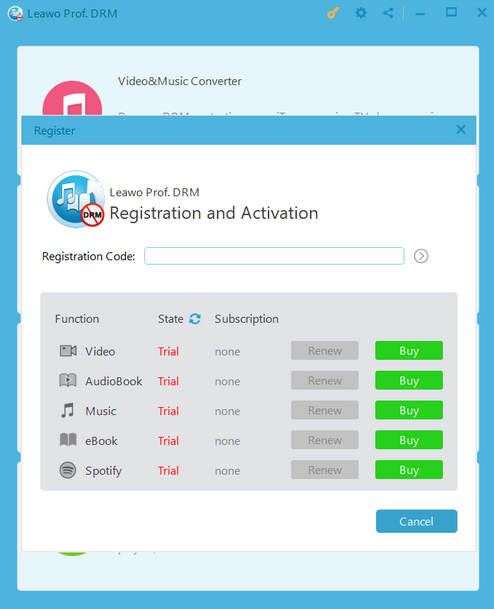
The Registration and Activation window: a box for the registration code and a row each for Video, AudioBook, Music, eBook and Spotify, all showing Trial with a green Buy button.
FAQs
Does Leawo Prof. DRM eBook Converter work with the new Kindle app?
No. Leawo Prof. DRM eBook Converter supports only Kindle for PC versions before 1.25, which Amazon now calls the Legacy Kindle app and stopped supporting on June 30, 2026. Books in Amazon's current Kindle app aren't on Leawo's supported list.
Can Leawo Prof. DRM eBook Converter convert PDF eBooks?
No. Leawo Prof. DRM eBook Converter reads ePub, MOBI, AZW3, AZW, KFX, PRC, HTML and TXT books and writes only ePub, MOBI, AZW3 or TXT. PDFs aren't on either list.
Why does the free trial download Leawo Prof. DRM?
The eBook Converter is one module inside Leawo Prof. DRM. You install the whole suite, and your eBook registration code activates only the eBook function; the other modules stay in trial mode.
What does the Leawo Prof. DRM eBook Converter trial let me do?
Leawo says the trial converts only the first 20% of each book. That's enough to see whether a book is detected and converts, but not to read it.
Can I get a refund if Leawo Prof. DRM eBook Converter doesn't work with my books?
Only for a technical problem Leawo's support can't solve, and only within 5 days on the yearly plan or 14 days on lifetime. Leawo doesn't refund a change of mind, so test your own books with the trial first.
Can I use one Leawo Prof. DRM eBook Converter license on two computers?
No. Each Leawo Prof. DRM eBook Converter license is for one PC, and the Windows and Mac editions are licensed separately.
Do converted books keep the title and author?
Leawo Prof. DRM eBook Converter keeps the book's name, author, language, date and publisher in the converted file, according to Leawo. Kindle books may list "unknow" for author in the Add Files panel, but that's only the list view.
System Requirements
- Windows: 7, 8, 8.1, 10 or 11
- Processor: 1 GHz Intel or AMD or faster
- Memory: 512 MB RAM (1 GB or more recommended)
- Disk: a 108 MB installer
- Other: internet connection, the store app your books came from (Kindle for PC before 1.25, Kobo or Adobe Digital Editions), authorized with your account
Conclusion
Leawo Prof. DRM eBook Converter is worth $24.99 if your books come from Kobo or Adobe Digital Editions and you want them on another reader; it's a poor buy if your library is mainly Kindle. The one reason to buy it is convenience: it lists your downloaded books by store and converts a whole library in a few clicks.
The main reason not to is Kindle. Support stops at an old Kindle for PC that Amazon has retired, and there are almost no independent reviews of the eBook module to reassure you. Run the trial on a couple of your own books before paying, and pick the lifetime plan only once you know they convert.
Download Free TrialBuy Now