Aiseesoft FoneEraser: Wipe an iPhone or iPad Before You Sell It, from Your Windows PC
Aiseesoft FoneEraser is a Windows program that permanently erases everything on an iPhone, iPad or iPod touch connected by USB, overwriting the storage once, twice or three times so the old photos, messages and accounts can't be recovered. It can also clear junk files, unused apps and large files to free up space. A lifetime license for one PC (up to 6 devices) is $37.45 on the order page.
It's for people selling, trading in or handing down an iOS device, and for repair shops and offices that wipe several devices at once.
Quick facts
- Price: $37.45 lifetime license for 1 PC, $19.90 for 1 month, $59 for 3 PCs
- Developer: Aiseesoft Studio
- Runs on: Windows 11, 10, 8.1, 8, 7, Vista and XP (a separate Mac edition exists)
- Erases: iPhone (iPhone 4S up to the iPhone 17 and 18 lines), all iPad models and iPod touch
- Erasing levels: Low (one overwrite), Medium (two) and High (three)
- Also: Free up Space: junk files, unused apps, large files, photo cleanup
- Refund: 30-day money-back guarantee when there's a quality problem
- What we checked: setup file version 1.1.30 (2.1 MB, dated April 16, 2025) downloaded from the vendor, and the three licenses on the order page (lifetime 1 PC $37.45, 1 month $19.90, 3 PCs $59) on November 25, 2026. We didn't erase a device ourselves.
Before you buy
- Erase means everything. Erase All Data wipes the whole device and can't be undone. Back up anything you want to keep first.
- Turn off Find My first. FoneEraser asks you to switch off Find My iPhone before a full erase. Also sign out of your Apple ID, or the next owner will hit Activation Lock.
- Know the free option. On recent iPhones, Settings > General > Transfer or Reset iPhone > Erase All Content and Settings removes the encryption keys, which makes the old data unreadable. FoneEraser adds overwrite passes, several devices at once, and wiping from a PC.
Free DownloadBuy Lifetime (1 PC)
Overview
Deleting photos or doing a quick reset feels like enough, but people worry, with reason on older devices, that recovery tools can pull data back from a phone that was only reset. FoneEraser takes the belt-and-braces route: after erasing, it writes over the phone's storage, once on the Low level, twice on Medium and three times on High, so there's nothing left for a recovery program to find.
The program has two sections. Erase All Data wipes the whole device at the level you choose, after you type 0000 to confirm. Free up Space is for a phone you're keeping: it removes temporary and junk files, uninstalls apps you don't use, deletes large files and cleans up photos to recover storage.
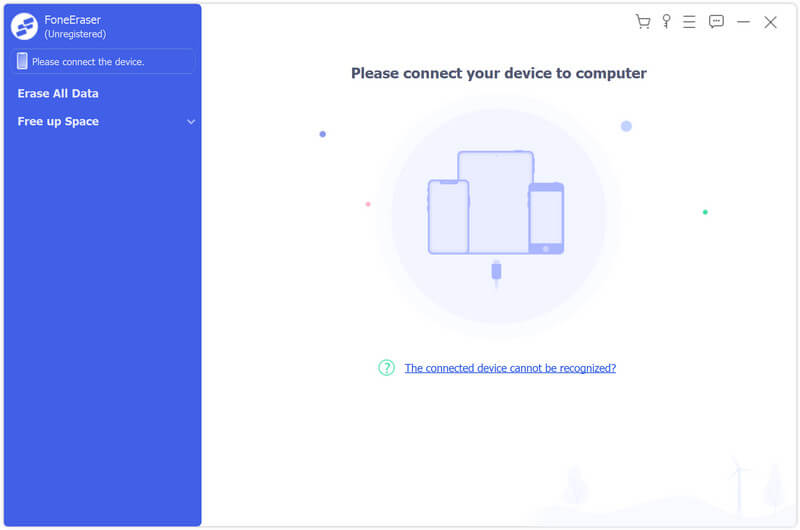
The start screen: connect an iPhone, iPad or iPod by USB; Erase All Data and Free up Space are on the left.
Features
Three erasing levels
Aiseesoft FoneEraser erases at three levels. Low overwrites the data once and is about twice as fast as the others; Medium overwrites twice; High overwrites three times, for confidential work data or a device leaving the company.
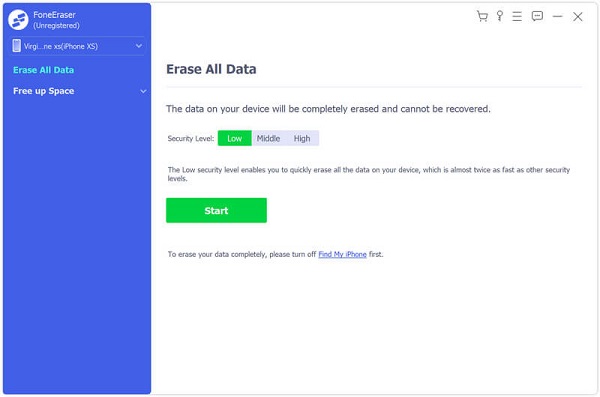
Erase All Data with the Low, Middle and High security levels, and the reminder to turn off Find My iPhone.
Everything on the device
Aiseesoft FoneEraser wipes text content (contacts, messages and iMessages, call history, calendar, notes, reminders, Safari bookmarks and history), media (photos, music, videos, voice memos, books, podcasts), app data from WhatsApp, Viber, Kik, Line and Messenger, and the device's settings.
Several devices at once
Aiseesoft FoneEraser can erase more than one iPhone, iPad or iPod touch connected to the same PC at the same time, which saves a repair shop or IT department from wiping them one by one.
Free up Space for a phone you keep
Aiseesoft FoneEraser's Free up Space tools erase junk files, uninstall applications, delete large files and clean up photos (compressing them or exporting them to the computer), to recover storage without wiping the phone.
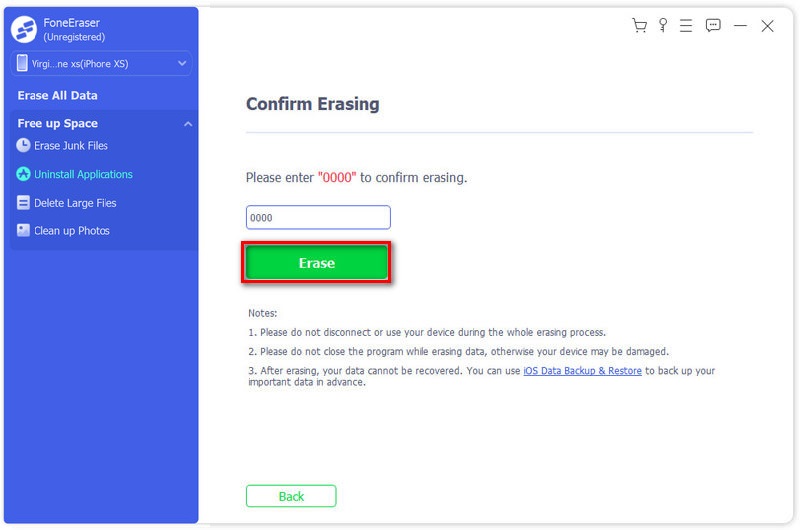
The confirmation step: type 0000 to erase. The Free up Space tools (Erase Junk Files, Uninstall Applications, Delete Large Files, Clean up Photos) are on the left.
Who it's for, and who should skip it
It suits anyone selling or giving away an older iPhone or iPad who wants more than a reset, people wiping a family's worth of old devices in one go, and repair shops and small businesses that clear devices regularly.
Skip it if your iPhone is recent and you're happy with Apple's own Erase All Content and Settings, which is free and designed to make the data unreadable. Skip it too if you want to delete only some messages or photos while keeping the rest: Erase All Data is all or nothing. And if your device is locked or disabled, check with Aiseesoft first; a wipe tool isn't an unlock tool.
Usage Guide
- Download and install FoneEraser on your Windows PC and launch it.
- Connect the iPhone, iPad or iPod touch with a USB cable and tap Trust on the device if asked.
- Turn off Find My iPhone on the device.
- Click Erase All Data and choose Low, Middle or High.
- Click Start, type 0000 to confirm, and click Erase. Keep the device connected and the program open until it finishes.
Where it falls short
- No undo. Once erased, the data can't be recovered, by FoneEraser or anything else. Don't disconnect the device or close the program mid-erase.
- All or nothing. There's no option to wipe just one app's data or one conversation.
- Strict refunds. Aiseesoft's 30-day guarantee covers quality problems with the program, not a change of mind.
What Users Say
Aiseesoft's site shows an average of 4.9 out of 5 from 88 ratings for FoneEraser. We found no in-depth independent review, so here are the customer reviews on the vendor's page, from 2015 to 2024, and what buyers say about Aiseesoft on Trustpilot.
Selling or giving away a device
David, "Wipe everything" (March 15, 2022): "I used it before selling my old iPhone, and it completely wiped everything, leaving no trace behind."
Sarah, "Erase data from iPhoen easily" (April 24, 2023): "I needed a tool to securely erase all data from my old iPhone, and Aiseesoft FoneEraser did exactly that. It's reliable, user-friendly, and provides different levels of data erasure for various needs."
Jayce, "Great tool!" (October 28, 2015): "I want to wipe out all data for selling my iPhone 6 on eBay. So I try Aiseesoft FoneEraser with the high level. Then I use another recovery tools to recover them and get nothing from my iPhone."
Repair shops and space cleanup
Gavin, "The best eraser tool I have used!!" (October 26, 2015): "My customers send 3 iPhones and 3 iPads to my repair shop for erasing all data. I tried many erasing tools, but only FoneEraser works best. I can connect 6 devices to my PC for erasure at the same time. Very quickly!!"
Ashley, "Really worked!!!" (April 9, 2020): "I just accidentally use FoneEraser to clean the junk files on my iPhone. Surprisingly, this tool did such a big favor to free up more space and boost the performance of my iPhone."
Trustpilot (Aiseesoft as a company)
Aiseesoft Studio has a TrustScore of 3.9 from 614 reviews. Edmund K (November 2026), about FoneTrans: "Great customer service and responsiveness."
The criticism is mostly about refunds for other products. B Hackett (October 22, 2026), about Mac FoneTrans: "They refused to issue the refund. and have not fixed the haptics". caitlin hardwick (October 6, 2026): "I was refused a return based on the product not being faulty due to their so called returns policy."
The themes: reviewers trust it to leave nothing behind before a sale, like the multi-device erase, and find it simple. All of these reviews are on the vendor's own site, and Aiseesoft's refund policy is the main complaint about the company.
Editions and Pricing
Each button below orders that license.
| License | Price | Term | Computers | Order |
|---|
| Lifetime | $37.45 | Lifetime | 1 PC, 6 devices | Buy Lifetime |
| 1 Month | $19.90 | 1 month | 1 PC, 6 devices | Buy 1 Month |
| Multi-user | $59.00 | See order page | 3 PCs | Buy 3 PCs |
Prices are from the order page on November 25, 2026. If you're wiping a single phone once, the 1-month license is enough.
FAQs
Is FoneEraser better than Apple's Erase All Content and Settings?
On a recent iPhone, Apple's Erase All Content and Settings already makes the data unreadable by deleting the encryption keys. Aiseesoft FoneEraser adds overwrite passes on top, wipes several devices at once from a PC, and suits older devices or anyone who wants the extra step.
Can Aiseesoft FoneEraser erase a locked or disabled iPhone?
Aiseesoft FoneEraser works on a device the computer can connect to and that trusts the computer. It isn't an unlocking tool, so check with Aiseesoft support before buying it for a locked or disabled device.
Does FoneEraser remove my Apple ID or Activation Lock?
No. Aiseesoft FoneEraser erases the data. Turn off Find My iPhone and sign out of your Apple ID before erasing, so the next owner can set the device up.
Which erasing level should I choose?
Low is fine for most personal phones and is about twice as fast. Choose Medium or High in Aiseesoft FoneEraser for confidential work data or when company policy asks for multiple overwrite passes.
Do I need iTunes installed?
Aiseesoft FoneEraser connects to the device over USB and needs Windows to recognize it; if it doesn't, the program links to help for devices that can't be recognized. Installing Apple's device drivers (which come with iTunes or Apple Devices) usually fixes that.
Is there a Mac version?
Yes, Aiseesoft sells FoneEraser for Mac separately. The licenses on this page are for the Windows edition.
System Requirements
- Windows 11, 10, 8.1, 8, 7, Vista or XP
- A USB cable for each iPhone, iPad or iPod touch
Conclusion
Aiseesoft FoneEraser is worth $37.45 if you wipe iOS devices more than once in a while, wipe several at a time, or want overwrite passes before selling an older iPhone: it's simple, and the multi-device erase is its strongest point. The reason not to buy it: for one recent iPhone, Apple's free Erase All Content and Settings already protects your data. If you need it once, the 1-month license costs less.
Free DownloadBuy Lifetime (1 PC)Buy 3 PCs