A-PDF Scan Optimizer: Straighten, Shrink and Clean Up Scanned PDFs in Batches
A-PDF Scan Optimizer is a $39 Windows tool that fixes scanned PDF files in bulk: it straightens crooked pages, turns color scans into black and white or grayscale, shrinks the images to cut the file size, and deletes blank pages, all without Adobe Acrobat. It's an old program (the current build dates from June 2015 and the vendor lists Windows 7 as its newest system), so it suits people with a lot of scanned paperwork and a simple job to repeat, not anyone looking for a modern PDF editor.
You know the files: a 40-page contract scanned in color at 600 DPI, every page slightly tilted, two blank backs of pages in the middle, and the whole thing too big to email. Scan Optimizer is built for exactly that, and it does it to a whole folder at once.
Quick facts
- Version: 2.9, installer built June 8, 2015
- Developer: A-PDF Solution (A-PDF.com)
- Platform: Windows 7, Vista, XP and 2000 are the systems the vendor lists
- Price: $39, a one-time license for one computer, with free upgrades
- Free trial: every feature works, but each output PDF gets a demo watermark on its first page
- Guarantee: A-PDF offers an unconditional 30-day money-back guarantee
- Needs Acrobat? No. The output opens in Adobe Reader 5 and later
- What we checked: the installer (a-pdf-so.zip, 2.93 MB) downloaded from a-pdf.com on October 24, 2026, whose setup data names it "A-PDF Scan Optimizer 2.9" and whose files are dated June 8, 2015; the price of $39 on the order page on October 24, 2026; and the trial terms in the installer's license text. We didn't install or run it, so we haven't tested it on Windows 10 or 11.
Before you buy
- This is legacy software. The download hasn't changed since June 2015, and the product page still lists only Windows 2000 to Windows 7. Many old Windows utilities still run on Windows 10 and 11, but nobody promises it here, so run the free trial on your own PC first.
- The trial is the real test. It does everything the paid version does and only adds a watermark to the first page, so you can see the deskew and file-size results on your own scans before paying.
- Deskew is for text scans. A-PDF says the straightening works only on scanned text-print pages, and that photos or pictures may cause errors.
- Keep copies. The Optimize button overwrites the original PDFs. Use "Optimize And Save As" to write the results to another folder instead.
Download Free TrialBuy Now
Overview
A-PDF Scan Optimizer has one window split in two. On the left you build a list of PDF files with Add or Add Folder, which can include sub-folders. On the right are four switches, one per job: de-skew, convert to monochrome, resample to reduce the file size, and delete blank pages. Each has a Turn On/Turn Off link and a Settings link. Pick the jobs you want, click Optimize, and every file in the list gets the same treatment.

The A-PDF Scan Optimizer main window: one demo PDF in the file list, the de-skew, monochrome, resample and delete-blank-page options on the right, and the Hot Directory Mode, Optimize and Optimize And Save As buttons along the bottom.
Features
Straighten crooked scanned pages
A-PDF Scan Optimizer checks each scanned image for tilt and rotates it straight. You set the angle range it searches, from 1 to 90 degrees: a setting of 30 looks for skew between -15 and +15 degrees, and a smaller range runs faster. It's meant for pages of printed text, which is what most office scans are.
Turn color scans into black and white or grayscale
A-PDF Scan Optimizer converts scanned images three ways. Threshold makes a clean black-and-white page, using a threshold from 0 to 255 or an Auto button. Ordered dithering keeps some shading as a dot pattern, and Grayscale keeps the tones without the color. The settings tab shows the original and converted page side by side, with the before and after file sizes, so you can judge a setting before running a batch.
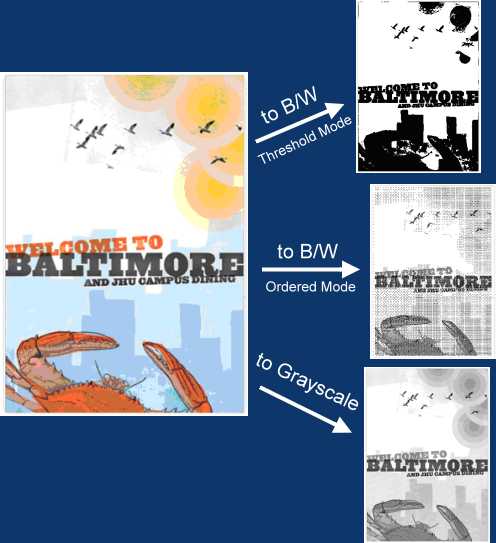
A-PDF's own sample of one color page converted with the Threshold, Ordered and Grayscale modes.
Shrink the file by resampling the images
A-PDF Scan Optimizer cuts file size by reducing the images inside the PDF, three ways: by DPI (images above the maximum DPI you set are reduced, smaller ones are left alone), by scale (a percentage of full size), or by width and height. You also choose the resample filter: quality filters such as Lanczos3, Mitchell or Bicubic, faster ones such as Triangle or FastLinear, or ProjectBW and ProjectWB for black-on-white drawings.
Delete blank pages
A-PDF Scan Optimizer removes unused blank pages from scanned files, the empty backs of single-sided originals that a duplex scanner picks up. It runs in the same pass as the other jobs.
Batch processing and a watched folder
A-PDF Scan Optimizer processes every file in its list in one run, including password-protected PDFs once you type their password (they show a lock icon in the list). It can skip small images such as logos and work on selected pages only. Hot Directory Mode watches folders, for example on a server where a scanner drops its files, and optimizes each new PDF as it arrives and sends it to an output folder.
Benefits
- Files small enough to send. Black-and-white conversion and resampling are the two biggest levers on a scanned PDF's size, and here they run together.
- Pages that read straight. A tilted scan looks careless and is harder to read on screen. Straightening a whole folder takes one click.
- No Acrobat subscription. A one-time $39 covers the scan clean-up jobs that otherwise send people to Acrobat Pro.
- Set it once. Hot Directory Mode turns it into an unattended step after the scanner.
Real-World Uses
- A small office archiving paper files scans in color by default, then runs each day's folder through black-and-white conversion and blank-page removal before filing.
- A law or accounting firm straightens and shrinks scanned contracts and statements so they attach to an email or upload to a client portal.
- A shared scanner on a network drops PDFs into a folder that Hot Directory Mode watches, so every file comes out optimized without anyone opening a program.
- Someone digitizing old manuals or forms downsamples 600 DPI scans to a sensible resolution for reading on screen.
Who It's For, and Who Should Skip It
A-PDF Scan Optimizer fits offices and individuals with many scanned text documents who want to fix them in batches on a Windows PC, and who are happy to run a 2015-era utility after checking it on their system.
Skip it if you need OCR (searchable text): it doesn't recognize text, it only cleans up the images. Skip it if you're on a Mac, since it's Windows-only. Skip it if your scans are mostly photos, which the deskew isn't designed for. And if you already pay for a full PDF editor such as Adobe Acrobat Pro, check its scan tools first, because you may already have what you need.
Usage Guide
- Download and install. Get the 2.93 MB zip from A-PDF, unzip it and run a-pdf-so.exe. Start the program from its desktop shortcut.
- Add your files. Click Add for single PDFs or Add Folder for a whole folder and its sub-folders. You can also drag files in from Windows Explorer.
- Unlock protected files. If a file shows a lock icon, select it and click Unlock to type its password.
- Choose the jobs. On the right, turn de-skew, monochrome, resample and delete-blank-page on or off, and open Settings for each to adjust it. Use the preview on the BW tab to test a threshold.
- Run it. Click Optimize And Save As to write the results to another folder, or Optimize to overwrite the originals.
- Automate it (optional). Click Hot Directory Mode to watch folders and optimize new PDFs as they appear.
- Register. After buying, enter the registration code from your order email into the trial to remove the watermark.
Where it falls short
- No development to speak of. The product page still says version 2.0.0, the installer is 2.9 from 2015, and download sites list version numbers up to 4.3, so even the version is unclear. Don't expect fixes or new features.
- No OCR. The pages stay images. You'll need another tool to make the text searchable.
- Photos and pictures can make the deskew go wrong, by A-PDF's own warning.
- Dated interface and help. The manual dates from September 2009, and the product page's demo video is an old Flash file that modern browsers can't play.
- No newer Windows on the list. Windows 8, 10 and 11 aren't mentioned anywhere on the product page.
What Users Say
Very little independent feedback
A-PDF Scan Optimizer has almost no public reviews. There's no Trustpilot, Capterra or G2 page for it and no magazine review. Free Download Manager shows a rating of 4.0 out of 5 from just 2 votes, with no written comments.
That silence fits a small, single-purpose utility that has sat unchanged for years. It also means the only way to know how well it handles your scans is the free trial, which is fully working apart from the first-page watermark.
Comparisons
Scan Optimizer vs A-PDF's single-purpose tools
A-PDF also sells some of these jobs separately: A-PDF Deskew ($27) only straightens pages, and A-PDF Image Downsample ($27) only shrinks images. If you need just one of them, the single tool is cheaper. If you need two or more, Scan Optimizer at $39 does all four jobs, plus blank-page removal and the watched folder, in one pass.
Scan Optimizer vs a full PDF editor
Full PDF editors such as Adobe Acrobat Pro include scan tools (deskew, optimization and OCR) as part of a much larger and pricier package, and they're maintained. Scan Optimizer is a one-time $39 for the clean-up jobs alone, with no OCR, no editing and no updates in years. It makes sense when the batch clean-up is all you need.
Editions and Pricing
| Version | Price | License | Limits |
|---|
| Free trial | $0 | May be shared freely, unmodified | Demo watermark on the first page of each output PDF |
| Registered | $39, one time | One computer at a time, free upgrades | No watermark |
The registration code arrives by email after you order, and you enter it in the trial you already installed. A-PDF also takes orders by phone and PayPal.
FAQs
Does A-PDF Scan Optimizer work on Windows 10 or 11?
A-PDF Scan Optimizer isn't listed for Windows 10 or 11: the vendor lists Windows 2000, XP, Vista and 7. The free trial is fully working, so install it and process a few of your own scans before you buy.
Can A-PDF Scan Optimizer make a scanned PDF searchable?
No. A-PDF Scan Optimizer doesn't do OCR. It straightens, converts, shrinks and cleans up the scanned images, but the text stays an image. Use an OCR tool afterwards if you need searchable text.
Is the A-PDF Scan Optimizer license a subscription?
No. A-PDF Scan Optimizer is a one-time $39 purchase for one computer. A-PDF's upgrade policy says upgrades are free and the license code stays valid for good.
Can I get a refund for A-PDF Scan Optimizer?
Yes. A-PDF offers an unconditional 30-day money-back guarantee on its products, including Scan Optimizer.
Will A-PDF Scan Optimizer change my original files?
Only if you click Optimize, which overwrites the originals. "Optimize And Save As" leaves them alone and writes the optimized copies to a folder you choose.
Does A-PDF Scan Optimizer need Adobe Acrobat installed?
No. A-PDF Scan Optimizer is a standalone program, and the PDFs it writes open in Adobe Reader 5 and later.
Is there a Mac version of A-PDF Scan Optimizer?
No. A-PDF Scan Optimizer is Windows-only.
System Requirements
- Windows 7, Vista, XP or 2000 (the systems the vendor lists)
- About 3 MB for the download
- Adobe Acrobat not required; output opens in Adobe Reader 5 or later
Conclusion
A-PDF Scan Optimizer is worth $39 for one kind of buyer: someone with stacks of scanned text documents who wants them straight, black and white, smaller and free of blank pages, in batches or from a watched folder, without paying for Acrobat. That one-pass batch clean-up is the reason to buy it. The reason to hesitate is its age: nothing has changed since 2015, Windows 10 and 11 aren't on its list, and there's no OCR. Since the trial does everything except leave the first page unmarked, try it on your own scans and your own Windows version, and buy only if the results are what you need.
Download Free TrialBuy Now