EaseUS BitWiper: Wipe a Drive Before You Sell, Donate or Recycle It
EaseUS BitWiper is a Windows tool that permanently erases whole disks, partitions, free space and individual files so recovery software can't bring them back, with wipe methods from one pass of zeros to DoD 5220.22-M and Gutmann. Pro costs $39.95 a year for one PC ($29.95 a month, $59.95 lifetime); the free edition wipes one disk and shreds five files.
Deleting files or formatting a drive only removes the pointers to the data; the files themselves stay until something overwrites them. Before an old laptop or drive leaves your hands, a wiper overwrites everything.
Quick facts
- Version: 2.2.1
- Developer: EaseUS (Chengdu Yiwo Tech Development Co., Ltd.)
- Platform: Windows 11, 10, 8 and 7
- Wipes: whole HDDs and SSDs (several at once), partitions, free space only, USB drives and memory cards, individual files and folders
- Methods: One Pass Zeros, One Pass Random, Gutmann (free); EaseUS Secure Erase, GOST P50739-95, British HMG IS5 and DoD 5220.22-M variants (Pro)
- Price: Pro $29.95 a month, $39.95 a year, $59.95 lifetime; Technician $99.90 a year, $129.90 for 2 years
- Free edition: 1 disk wipe and 5 file shreds
- Guarantee: 30 days, for technical problems support can't fix
- What we checked: the plan prices on EaseUS's order page on November 27, 2026 ($29.95, $39.95 and $59.95 Pro, $99.90 and $129.90 Technician, in USD, matching EaseUS's 2025 list prices) and the free edition's limits in EaseUS's online help. We didn't wipe a drive with it.
Download Free TrialBuy Now
Overview
EaseUS BitWiper has three tools: Wipe Disk, Wipe Partition and File Shredder. Each is a short wizard: choose what to erase, choose the method by security level and speed, confirm the warning, wait. The partition wiper can erase only the recoverable data in free space, leaving existing files alone.
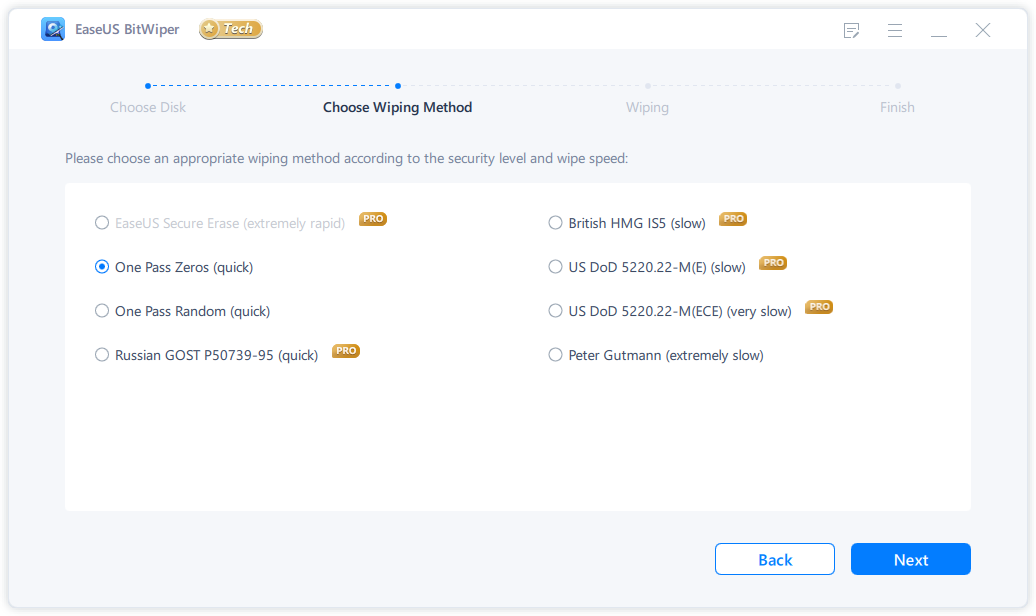
Choose Wiping Method: quick one-pass methods on the left, slower DoD 5220.22-M, HMG IS5 and Gutmann on the right; methods marked PRO need a license.
Features
Wipe whole disks, several at once
EaseUS BitWiper erases a non-system HDD or SSD in one go and can wipe several disks or partitions at the same time, which saves hours when you clear a batch of old drives. EaseUS also lists wiping the C: drive without a bootable CD.
Wipe partitions or just free space
EaseUS BitWiper wipes a single partition or only the free space on it, so files you deleted earlier become unrecoverable while the files you keep are untouched.
File Shredder
EaseUS BitWiper's File Shredder permanently deletes chosen files and folders: add them or drag them in, confirm, click Shred. It can also force-shred files Windows won't let you delete.
Standard wipe methods and SSD Secure Erase
EaseUS BitWiper offers zero and random passes, US DoD 5220.22-M, British HMG IS5, Russian GOST P50739-95 and Peter Gutmann's method, plus EaseUS Secure Erase for SATA, M.2 and NVMe SSDs in the Pro edition.
Real-World Uses
- Selling or donating a PC: wipe the old drive so the buyer can't recover your photos and documents.
- Recycling a box of old drives: wipe several at once with the Technician license.
- Cleaning up after deleting files: wipe free space so already-deleted files can't be recovered.
- Shredding a single sensitive file, such as a scanned passport, without touching the rest of the drive.
Who It's For, and Who Should Skip It
EaseUS BitWiper suits home users and small businesses who want a simple, guided way to erase drives and files on Windows, and IT staff who clear many drives (the Technician license).
Skip it if you need certified erasure with audit reports for compliance; dedicated tools such as Blancco provide verifiable certificates. For a single wipe, free options exist: Windows' own "Reset this PC" with the clean-drive option, your SSD maker's Secure Erase tool, or the free edition's one disk.
Usage Guide
- Download and install EaseUS BitWiper on Windows.
- Choose Wipe Disk, Wipe Partition or File Shredder.
- Select the disk, partitions or files, then click Next.
- Pick a wiping method (faster methods at the top, more passes further down).
- Read the warning, click Wipe or Shred, and wait for it to finish. To go beyond the free limits, click Upgrade and enter a license.
Before you buy
- Wiping is permanent. Double-check the selected disk; there's no undo, and data recovery software won't help afterwards.
- On SSDs, more passes isn't better. Multi-pass methods such as Gutmann were designed for old hard disks; for an SSD the Secure Erase mode is the right choice.
- The free edition may be enough for one old drive.
- EaseUS refunds only on technical grounds. The 30-day guarantee covers a fault support can't fix, not a change of mind, so use the free version first.
Where it falls short
- Slow on big drives. TrishTech notes "Wiping large drives may take time, especially with advanced algorithms."
- No erasure certificate. It reports completion, not a verifiable certificate that a business might need.
- Some steps need know-how. TrishTech says "Some technical knowledge may be needed for specific features, like creating bootable media."
What Users Say
EaseUS BitWiper has a handful of independent write-ups and no large review base.
TrishTech (May 24, 2025)
TrishTech's review notes that "the free version has limited features compared to the Pro version," that "Wiping large drives may take time, especially with advanced algorithms," and that "Some technical knowledge may be needed for specific features, like creating bootable media."
EaseUS on Trustpilot (company-wide)
EaseUS as a company scores 4.9 out of 5 on Trustpilot from 39,773 reviews, mostly about its recovery and backup products; one buyer wrote there on November 25, 2026 that "the pricing is on the higher side only."
The themes: it does a simple job in a guided way; the reservations are speed on large drives with multi-pass methods, the limited free edition and the price for something you may only need once.
Comparisons
EaseUS BitWiper vs free wipers
Free tools such as Eraser (files and free space) or a drive maker's Secure Erase utility cover single jobs. EaseUS BitWiper puts disks, partitions, free space and file shredding in one wizard and wipes several drives at once.
EaseUS BitWiper vs Partition Master's wipe
EaseUS Partition Master also has a disk-wipe function. If you already own it, you may not need BitWiper; BitWiper adds the File Shredder, more wipe methods and parallel wiping.
Editions and Pricing
| Edition | Price | Term | License |
|---|
| Free | $0 | Unlimited | 1 disk wipe, 5 file shreds |
| Pro 1-Month | $29.95 | Auto-renews monthly | 1 PC |
| Pro 1-Year | $39.95 | Auto-renews yearly | 1 PC |
| Pro Lifetime | $59.95 | One-time, lifetime upgrades | 1 PC |
| Technician 1-Year | $99.90 | Auto-renews yearly | Multiple computers |
| Technician 2-Year | $129.90 | Auto-renews every 2 years | Multiple computers |
The Buy Now buttons on this page open EaseUS's plan page, where you choose the edition.
FAQs
Can data wiped with EaseUS BitWiper be recovered?
No. Once EaseUS BitWiper overwrites a disk, partition or file, recovery software can't restore it, so make sure you've copied anything you need first.
Can EaseUS BitWiper wipe the Windows system drive?
EaseUS lists wiping the C: drive or system partition without a bootable CD as a BitWiper feature; you lose Windows on that drive, so do it only on a PC you're retiring.
Which EaseUS BitWiper method should I choose?
For a hard disk, one pass of zeros or random data is enough for most people; DoD and Gutmann add passes and time. For an SSD, use EaseUS Secure Erase.
Does EaseUS BitWiper work on USB drives and SD cards?
Yes. EaseUS BitWiper wipes USB flash drives, memory sticks and micro SD or TF cards as well as internal drives.
Is there a Mac version of EaseUS BitWiper?
No. EaseUS BitWiper runs on Windows only.
System Requirements
- Windows 11, 10, 8 or 7
- HDDs, SSDs (SATA, M.2, NVMe), USB drives and memory cards
Conclusion
EaseUS BitWiper is worth it if you retire drives regularly or want an easy, guided way to wipe disks, free space and single files on Windows; the lifetime license at $59.95 is the sensible buy for occasional use. For one old drive the free edition may be all you need, and businesses that must prove erasure should look at certified tools. Choose the right method for the drive type, and check twice before you click Wipe.
Download Free TrialBuy Now