EaseUS OS2Go: Carry Your Own Windows on a USB Drive
EaseUS OS2Go is a Windows tool that puts a bootable, portable copy of Windows on a USB flash drive or external SSD, either a clone of the PC you're using or a clean install, and also makes Windows 11 install drives that skip the TPM 2.0 and Secure Boot checks. The Professional license costs $29.95 a year or $69.95 for life, and the free demo plans the job but won't write the drive.
Microsoft dropped its own Windows To Go feature years ago, and it only ever worked with certified drives and Enterprise editions. OS2Go fills that gap for ordinary drives and Home and Pro editions: plug the drive into another PC, boot from it, and you're at your own desktop with your programs and files.
Quick facts
- Version: 4.2.0 (installer dated April 24, 2026)
- Developer: EaseUS (Chengdu Yiwo Tech Development Co., Ltd.)
- Runs on: Windows 7, 8, 8.1, 10 and 11, Windows Server 2008 to 2019
- Three tools: WinToGo Creator from the current PC, WinToGo Creator with a new installation, Windows Install Drive Creator
- Price: Professional $29.95 a year, $49.95 for 2 years, $69.95 lifetime (one PC); Technician $99 a year, $159 for 2 years, $299 lifetime
- Demo: free; it plans the job but can't create the drive
- Guarantee: 30 days, for technical problems support can't fix
- What we checked: the installer from EaseUS (os2go_4.2.0_portable.exe, 55.6 MB, file version 4.2.0, signed by Chengdu Yiwo) and the plan prices on EaseUS's order page on November 27, 2026 ($29.95, $49.95 and $69.95 Professional, $99, $159 and $299 Technician, in USD, the same as EaseUS's 2025 list prices). We didn't build a portable drive with it.
Download Free TrialBuy Now
Overview
EaseUS OS2Go opens to one window: the three tools on the right, the options for the selected tool on the left, and the target USB drive at the bottom. Pick a tool, pick the drive, click Next or Install, confirm that the drive will be erased, and it does the rest. It handles MBR and GPT disks, FAT and NTFS, and drives up to 16 TB.
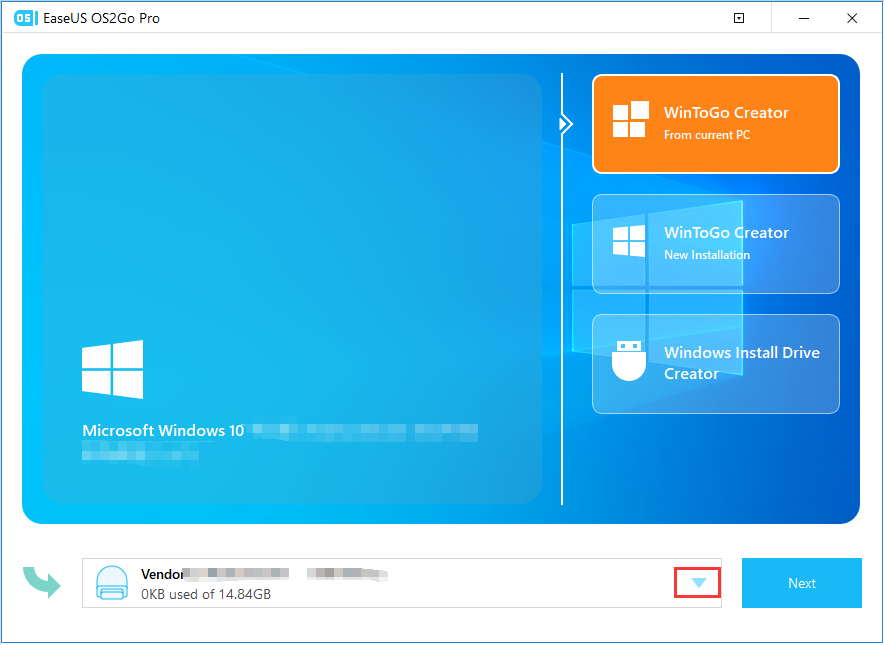
The main window with WinToGo Creator (from current PC) selected, the running Windows 10 on the left and a 14.84 GB USB drive picked as the target.
Features
Clone the Windows you're using to a USB drive
EaseUS OS2Go's WinToGo Creator (from current PC) copies your system disk, with installed programs, settings and files, to the USB drive so it boots as your own Windows on another computer. Before it starts you choose the layout: Autofit the disk, Copy as the source, or Edit disk layout by hand, plus an SSD option for external SSDs.
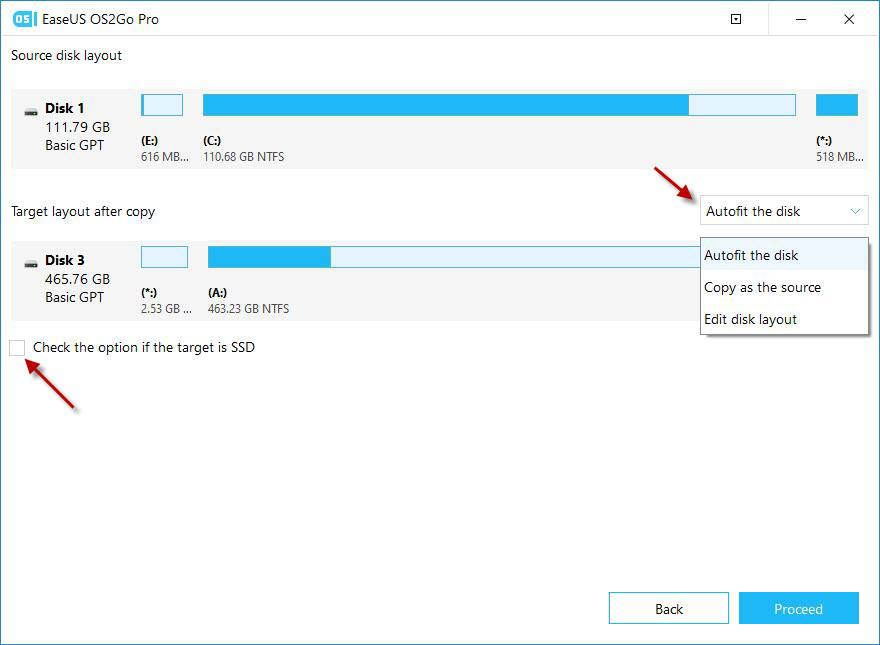
The layout step: a 111.79 GB source disk above a 465.76 GB target, with the Autofit, Copy as the source and Edit disk layout choices and the SSD checkbox.
A clean portable Windows from Microsoft's download
EaseUS OS2Go's WinToGo Creator (New Installation) installs a fresh Windows 11, 10 or 8.1 on the USB drive, downloading the ISO from Microsoft's servers or using one you already have, with EFI or MBR boot. You get a clean desktop on a stick, not a copy of your PC.

WinToGo Creator (New Installation): choose Windows 11, 10, 8.1 or a local ISO file, and EFI or MBR boot.
Windows 11 install drives without the hardware checks
EaseUS OS2Go's Windows Install Drive Creator makes an ordinary installation USB for BIOS and UEFI PCs. For Windows 11 it can remove the TPM 2.0, Secure Boot and minimum-hardware checks and the Microsoft account requirement, so you can install on an older PC that Microsoft's own media refuses.
Windows on a Mac without Boot Camp
EaseUS OS2Go pitches the portable drive as a way to run Windows games and apps on a Mac without partitioning it with Boot Camp. That applies to Intel Macs: Apple Silicon Macs can't boot Windows from a USB drive.
Real-World Uses
- Working on borrowed or shared PCs: boot your own Windows with your apps and logins instead of using the hotel or office machine's setup.
- An emergency system disk: keep a portable Windows to boot a PC whose own Windows is broken and copy files off it.
- Windows 11 on an older PC: make an install drive that skips the TPM 2.0 check.
- IT service work: the Technician license lets one technician use it for many customers' machines.
Who It's For, and Who Should Skip It
EaseUS OS2Go suits people who move between computers and want their own Windows everywhere, Intel Mac owners who want Windows without repartitioning, and anyone who needs a Windows 11 install drive for unsupported hardware.
Skip it if you only need a standard install USB: Microsoft's Media Creation Tool does that for free, and the free Rufus tool can also remove the Windows 11 checks. Also skip it if you expect desktop speed from a cheap flash drive: a portable Windows runs much better from an external SSD.
Usage Guide
- Download OS2Go from EaseUS and run it; the download is a portable program.
- Connect the USB drive or external SSD. Back it up first: everything on it will be erased.
- Pick a tool on the right: WinToGo Creator (from current PC), WinToGo Creator (New Installation) or Windows Install Drive Creator.
- Choose the target drive at the bottom, plus the Windows version for a new installation or install drive, and click Next, Install or Create.
- Confirm the warning, adjust the disk layout if asked, and click Proceed.
- When it's done, boot the target computer from the USB drive through its boot menu.
Before you buy
- The demo doesn't create anything. It lets you walk through the steps and see your drives, but you'll only know whether your drive boots after buying.
- Size the drive for a clone. A sector-by-sector clone needs a drive at least as large as your system disk; Autofit can shrink it if the used space fits.
- You still need a Windows license for the portable copy.
- The yearly and 2-year plans renew automatically, and EaseUS refunds only on technical grounds within 30 days, not for a change of mind.
Where it falls short
- Speed depends on the drive. FileHorse's cons include "Portable OS might run slower compared to native installation," and a 16 GB-plus drive is the practical minimum.
- Drivers on other hardware. A cloned Windows carries the drivers of the PC it came from, so it may need extra drivers or show glitches on very different machines.
- Thin guidance in the app. Ashampoo buyers who rate it well still say the program explains too little and you have to read EaseUS's online help to know which tool to use.
- No Apple Silicon support for the Mac use case, which is most current Macs.
What Users Say
EaseUS OS2Go has few long independent reviews in English; most coverage comes from download sites and store ratings.
FileHorse (editor's review, user rating 8.5/10 from 11 ratings)
FileHorse's top pro is that it "Allows creation of a portable Windows USB drive to use on any computer," along with ease of use, broad Windows version support and quick setup. Its cons: "Portable OS might run slower compared to native installation," the need for a 16 GB-plus drive and a valid Windows license, possible driver problems on different hardware, and the cost.
Ashampoo store (4.2/5 from 109 customer reviews)
Ashampoo resells EaseUS OS2Go; its buyers give it 4.2 out of 5 from 109 reviews (70 five-star, 12 one-star). The positive reviews call it useful for backing up and carrying a system; the critical ones say the program needs better guidance and that you have to look up the online help to understand the three tools. The reviews are translated from other languages, so we summarize rather than quote them.
The themes: buyers like having their own Windows on a stick and the simple three-button design; the complaints are about thin in-app guidance, speed on slow flash drives and the demo that can't prove the result before you pay.
Comparisons
EaseUS OS2Go vs Rufus
Rufus is free and makes Windows install drives, including Windows 11 drives without the TPM check, and it has a basic Windows To Go mode. EaseUS OS2Go's advantage is cloning the Windows you already use, with your programs, to the drive in a guided way. If you only need an installer, Rufus is enough.
EaseUS OS2Go vs Hasleo WinToUSB
WinToUSB is the best-known paid alternative and also clones the running system or installs a fresh portable Windows. The two cover much the same ground; OS2Go's lifetime license costs $69.95 per PC, and its Technician license targets repair shops.
Editions and Pricing
| Edition | 1 year | 2 years | Lifetime | License |
|---|
| Professional | $29.95 | $49.95 | $69.95 | One non-server PC, personal use |
| Technician | $99 | $159 | $299 | One technician serving many customers |
The 1-year and 2-year plans renew automatically. The Buy Now buttons on this page open EaseUS's plan page, where you choose the edition and term.
FAQs
Does EaseUS OS2Go work with Windows Home edition?
Yes. EaseUS OS2Go doesn't need Windows Enterprise the way Microsoft's old Windows To Go feature did; it runs on Windows 7 to 11 and copies whatever edition you have.
How big a USB drive does EaseUS OS2Go need?
EaseUS OS2Go needs a drive at least as large as the used space on your system disk for a clone (or as large as the whole disk for a sector-by-sector copy); a clean installation fits on a smaller drive. An external SSD of 64 GB or more is the comfortable choice.
Can I run the EaseUS OS2Go drive on an M1, M2 or M3 Mac?
No. Apple Silicon Macs can't boot Windows from a USB drive, so the Mac use EaseUS describes applies to Intel Macs only.
Do I need another Windows license for the portable drive?
EaseUS OS2Go copies or installs Windows; it doesn't license it. Using a portable copy on other computers falls under Microsoft's license terms, so check that your license allows it.
Which languages does EaseUS OS2Go support?
EaseUS OS2Go comes in English, German, Spanish, French, Italian, Portuguese, Polish, Japanese, Korean and Simplified and Traditional Chinese.
Can a computer repair shop use the Professional license?
No. EaseUS OS2Go Professional is for one non-server computer and personal use. A technician serving customers needs the Technician license, which must be removed from a customer's PC after the job.
System Requirements
- Windows 7, 8, 8.1, 10 or 11, or Windows Server 2008, 2012, 2016 or 2019
- 1 GHz processor, 2 GB of RAM, 2 GB of free disk space
- A USB flash drive, external HDD or SSD (MBR or GPT, up to 16 TB) for the target
Conclusion
EaseUS OS2Go is worth buying if you want your own Windows, with your programs and files, on a drive you can boot on any PC or Intel Mac; the clone-the-current-PC tool is the reason to pay, since free tools cover install drives. Buy the $69.95 lifetime license rather than a renewing plan if it's a one-off project, put it on an external SSD rather than a slow flash drive, and expect to read the online help once. If all you need is a Windows 11 installer for an unsupported PC, free Rufus does that job.
Download Free TrialBuy Now