EaseUS NTFS for Mac: Write to Windows Drives From Your Mac
EaseUS NTFS for Mac is a small macOS utility that lets your Mac write to NTFS-formatted drives, the Windows format that macOS can only read. It costs $49.95 for a lifetime license or $14.95 a month, and you can try it free for 7 days.
The problem it solves is familiar: you plug a Windows-formatted external drive into a Mac, can open your files, but can't copy anything onto it, rename a folder or delete a file. Reformatting would erase the drive, so a driver like this is the practical fix.
Quick facts
- Version: 3.5.0
- Developer: EaseUS (Chengdu Yiwo Tech Development Co., Ltd.)
- Platform: macOS 10.13 High Sierra to macOS 15; Intel, T2 and Apple Silicon Macs
- Drives: internal and external hard drives, SSDs, USB drives, Thunderbolt drives, SD and CF cards
- Price: $49.95 lifetime, $14.95 a month
- Trial: 7 days, full read and write
- Guarantee: 30 days, for technical problems support can't fix
- What we checked: both plans at checkout on November 20, 2026: EaseUS NTFS for Mac (Lifetime Upgrades) $49.95 and (1-month subscription) $14.95, in USD. We didn't test it on a Mac.
Download Free TrialBuy Now
Overview
Once installed, EaseUS NTFS for Mac lists your NTFS partitions alongside other drives, shows whether each is read-only or writable, and gives you Mount, Eject, Erase and Enable/Disable Writable buttons. It also sits in the Mac status bar, so you can mount or unmount a drive without opening the app or typing Terminal commands.
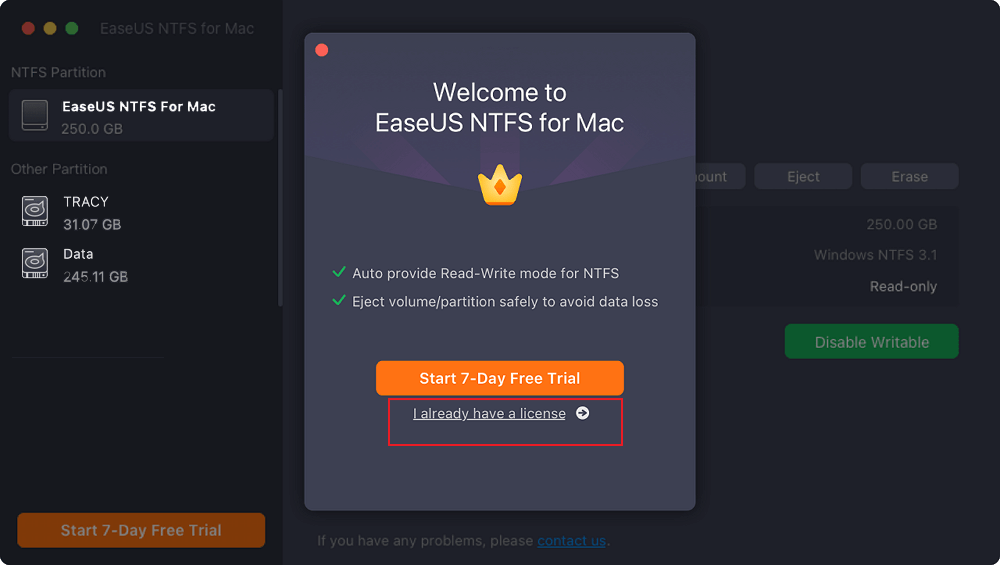
The app's drive list (an NTFS partition and two other partitions) behind the welcome dialog that starts the 7-day trial or takes a license key.
Features
Full read and write on NTFS
EaseUS NTFS for Mac lets you copy, write, edit, rename and delete files on NTFS drives, so a Windows-formatted backup disk or USB stick works in both directions between a PC and a Mac without reformatting.
Mount and eject from the status bar
EaseUS NTFS for Mac mounts and unmounts NTFS volumes from the Mac status bar and ejects them safely to avoid data loss. It handles drives from brands such as WD, Seagate, SanDisk, Samsung, Kingston and LaCie.
Who It's For, and Who Should Skip It
It's for Mac users who share external drives with Windows PCs: people moving files between home and office computers, photographers with Windows-formatted backup disks, or anyone who inherited an NTFS drive full of files.
Skip it if the drive is empty or you can reformat it: exFAT works on both Windows and macOS for free. Also check your macOS version first: EaseUS lists support up to macOS 15, so users on newer releases should run the trial before buying.
Usage Guide
- Download the DMG and drag EaseUS NTFS for Mac into Applications.
- Open it, start the 7-day trial or enter your license key.
- Connect the NTFS drive and click Enable Writable.
- Copy, rename or delete files in Finder as with any Mac drive.
- Eject from the app or the status bar before unplugging.
Where it falls short
- Mixed reliability reports. Several Trustpilot reviewers say writing didn't work for them, and one reports folders on a 2 TB drive going hidden.
- The monthly plan suits few people. For occasional use, a reviewer didn't want to pay monthly; the $49.95 lifetime license is the better buy.
- Back up first. Any third-party file system driver touches the drive's structure, so keep a copy of important data.
What Users Say
EaseUS scores 4.9 out of 5 on Trustpilot from 39,746 reviews overall (November 20, 2026), but reviews that name NTFS for Mac are noticeably more mixed.
Trustpilot
"I have used a free trial to NTFS for Mac. Great program, but i dont want to pay monthly for something i barely use." Leonardo, 5 stars, June 6, 2024
"Trailed the NTFS for mac, easy to cancel the trail over chat, thanks to the rep Park for his help." Richard Carroll, 5 stars, May 30, 2025
"This software is a mess, a waste of time, as it says, it only reads, it doesn't write" alejandro juarez, 1 star, January 12, 2024
"I bought full licensed version of Ease Us NTFS for Mac, since then some of the folders worth 2 TB of data went hidden on the external hard drive." siddharth dhar, 2 stars, June 27, 2023
"I purchased the EaseUS NTFS software to use an external hard drive with my mac. It doesn't work" Mr Kingswood, 1 star, October 8, 2022
The takeaway: it works for many users, but enough people report trouble that the 7-day trial on your own drive and Mac is essential before paying.
Editions and Pricing
| Plan |
Price |
Terms |
| Trial | $0 | 7 days, all features |
| Monthly | $14.95 a month | Auto-renews, cancel anytime |
| Lifetime | $49.95 once | Lifetime free upgrades |
The Buy Now button opens EaseUS's NTFS for Mac page, where both plans have their own Buy buttons.
FAQs
Does EaseUS NTFS for Mac work on Apple Silicon?
Yes. EaseUS NTFS for Mac supports M1, M2 and M3 Macs as well as Intel and T2 models.
Do I need to reformat my drive?
No. EaseUS NTFS for Mac writes to the drive as it is, so your existing Windows files stay in place.
Is there a free version?
EaseUS NTFS for Mac has a 7-day free trial with full read and write access. After that you need the monthly or lifetime license.
Which file systems does it handle?
EaseUS lists NTFS, HFS+, APFS, FAT and exFAT as supported, with NTFS writing being the reason to buy it.
System Requirements
- macOS 10.13 High Sierra to macOS 15
- Intel, Intel with T2, or Apple Silicon Mac
- 100 MB of free disk space
Conclusion
EaseUS NTFS for Mac is worth the $49.95 lifetime license if you regularly move files between a Mac and Windows-formatted drives and can't reformat them. It does one job, mounting NTFS drives writable from the status bar, at a one-time price. The reason for caution is a run of user reports where writing failed, so test it on your own drive and macOS version during the 7-day trial, with a backup in hand.
Download Free TrialBuy Now