EaseUS RecExperts: Screen, Webcam, Audio and Game Recording for Windows
EaseUS RecExperts is a Windows screen recorder that captures the full screen, a region, your webcam, system sound and microphone, or gameplay, with scheduled recordings and a simple trimming editor built in. It costs $69.95 a year, $19.95 a month or $119.95 for a lifetime license on one PC, and the free version lets you try every recording mode.
It's meant for people who need clean recordings without learning OBS: a teacher capturing a lesson, an office worker recording a Teams or Zoom meeting while away, or a gamer saving a match. Press REC, and the file is ready to trim and share.
Quick facts
- Version: 5.2.4 (listed April 28, 2026)
- Developer: EaseUS (Chengdu Yiwo Tech Development Co., Ltd.)
- Platform: Windows 11, 10, 8.1, 8 and 7; a separate Mac edition is sold too
- Records: full screen, region, window, webcam, system audio, microphone, games
- Price: $19.95 a month, $69.95 a year, $119.95 lifetime (1 PC); Business lifetime $199.95 for 2 PCs, $449.95 for 5 PCs
- Free version: records with no time limit and no watermark, but plays back only 1 minute of each recording
- Guarantee: 30 days, for technical problems support can't fix
- What we checked: the prices on the order page on November 20, 2026 ($69.95 for EaseUS RecExperts (Yearly Subscription), $19.95 Monthly, $119.95 Lifetime Upgrades, $199.95 Business 2PC and $449.95 Business 5PC, in USD, before coupons), and the Free vs Pro limits in EaseUS's comparison table. We didn't record with it.
Download Free TrialBuy Now
Overview
RecExperts opens as a slim control bar: pick Full Screen, Region, Audio or Webcam, choose whether to include system sound and the webcam, then hit the big REC button. Around that sit the extras that save time on long recordings: Auto split to cut a long session into files, Auto stop after a set time or size, and a Task scheduler to start a recording on its own.
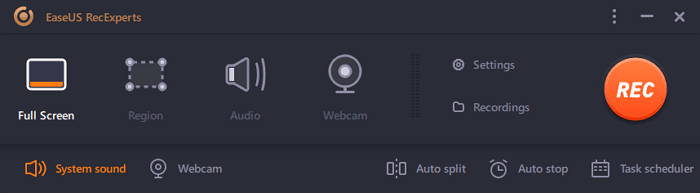
The current RecExperts control bar: four recording modes, Settings and Recordings, and Auto split, Auto stop and Task scheduler along the bottom.
Features
Screen and webcam together
EaseUS RecExperts records the whole screen, a selected area or multiple screens, and can add the webcam as an overlay with a green-screen effect that replaces your background. You can draw annotations while recording and hide the status bar so it doesn't appear in the video. Recordings have no watermark, even in the free version.
Scheduled and unattended recording
EaseUS RecExperts' Task Scheduler starts a recording at a set time for a set duration or until a stop time, with the area, audio input and webcam chosen in advance, and can act when it finishes. Auto stop ends a recording after a length or file size, and Auto split breaks it into parts. This is what makes it useful for webinars and lectures you can't attend live.

The Task Scheduler from EaseUS's online help (an earlier version of the interface): a 10-minute full-screen recording with system sound.
Game mode
EaseUS RecExperts has a Record Game mode that captures gameplay with system sound and an optional webcam at a frame rate you choose. EaseUS advertises 4K recording at up to 144 fps without lag.

Record Game mode over a running game, with System sound, Webcam and Frame rate controls (earlier interface, from the online help).
Audio recording and cleanup
EaseUS RecExperts records system sound and the microphone separately or together, and works as an audio-only recorder for streams or voice notes. A microphone boost and AI noise remover clean up voice, and you can mute your speakers while it records without muting the file.
Player and quick editor
EaseUS RecExperts includes a media player and a basic editor: trim the start and end to the millisecond, add an intro and outro, put a text or picture watermark on the video, and extract the audio track. Screenshots taken during recording are saved alongside the videos.

The trim editor with start and end markers, an Advanced editor button and Export (earlier interface, from the online help).
Benefits
- Short learning curve. One bar, four modes, one button: far less setup than OBS.
- Recordings happen without you. Scheduling and auto stop cover meetings and classes at awkward hours.
- No watermark to remove. Even free recordings are clean.
- A lifetime option. $119.95 once replaces the subscription if you'll use it for years.
Real-World Uses
- A recurring webinar at 3 a.m. Schedule it with system sound, let it stop after 90 minutes, and watch it in the morning.
- A software tutorial. Record a region with your webcam in the corner, annotate the clicks, then add an intro.
- Online lessons. One Trustpilot reviewer records tech videos with it, and others use it for classes.
- Gameplay highlights. Switch to Game mode, set the frame rate, and trim the best minute.
Who It's For, and Who Should Skip It
RecExperts fits Windows users who record now and then or on a schedule and want simple controls: teachers, trainers, office workers and casual gamers.
Skip it if you stream live with scenes and overlays: OBS Studio is free and built for that. Skip it if you need a full video editor for polished tutorials, where Camtasia's timeline goes much further. And if you just need a quick clip now and then, Windows' own Snipping Tool and Xbox Game Bar may be enough.
Usage Guide
- Download the installer from the EaseUS page; it fetches the program during setup.
- Launch RecExperts and pick Full Screen, Region, Audio or Webcam.
- Choose the audio source (system sound, microphone or both) and whether to add the webcam.
- Set the output format and quality in Settings, and turn on Auto split or Auto stop if needed.
- Press REC. Use the floating toolbar to pause, annotate or take a screenshot, then stop.
- Open the recording in the player to trim, add an intro or watermark, and export.
Before you buy
- The free version isn't a usable free recorder. It records full length but plays back only one minute of each file, so you'll need a license to use real recordings.
- EaseUS refunds only on technical grounds. A refund within 30 days needs a fault support can't fix; changing your mind doesn't qualify. EaseUS does offer a price-adjustment refund if its own price drops within 7 days of your purchase.
- The Monthly and Yearly plans renew automatically until you cancel.
- Licenses are per PC. Moving to a new computer means a license reset through support, which many Trustpilot reviewers mention having done.
Where it falls short
- The free version frustrates people. A one-star Trustpilot review calls it "misleading" because full recordings can't be used without paying.
- Activation hiccups. Several reviewers needed support to reactivate after reinstalling Windows or after the app asked them to buy again.
- The editor is basic. Trimming, intros and watermarks only, with no multi-track timeline.
- No independent lab tests. The big tech magazines review EaseUS's recovery software, not RecExperts, so most feedback is from users.
What Users Say
EaseUS as a company scores 4.9 out of 5 on Trustpilot from 39,746 reviews (November 20, 2026), and EaseUS's product page shows a 4.8 rating from 39,633 reviews. Reviews that mention RecExperts are mostly positive, and many are thank-you notes to support staff.
Trustpilot: praise
"EaseUS RecExperts is an excellent screen recording tool that is both powerful and easy to use." Abdelrahman yahia, 5 stars, February 11, 2026
"I've been EaseUS RecExperts for years. It's been reliable and efficient. I've recorded a lot with it." Steve Tegtmeier, 5 stars, August 23, 2026
"They directed me to RecExperts, which has proven to be invaluable as a tool in recording tech videos" larry, 5 stars, November 11, 2026
"I use the EaseUS RecExperts software and am very happy with it." Nico Züchel, 5 stars, "Fast and excellent support", April 6, 2026
Trustpilot: problems
"EaseUS RecExperts uses a very unfair and misleading business practice." P.T., 1 star, "Misleading free version – full recording unusable without payment", January 30, 2026
"when using the application, a message appears asking me to make a new purchase of the product." Mário, "EaseUS RecExperts (Lifetime Upgrades) prompting for a new version, recording only 1 minute of video…", 5 stars, October 12, 2025
"I had an issue with my RecExperts license after reinstalling the computer's operating system." Javi, "Reset license RecExperts", December 3, 2025
"My PC had a problem making it impossible to use EaseUS RecExperts." Carlos Miranda, April 24, 2026 (fixed by support)
The pattern: people who paid like how simple it is and how quickly support answers, while the complaints are about the one-minute playback limit in the free version and about licenses that need resetting after a reinstall.
Comparisons
RecExperts vs OBS Studio
OBS is free, open source and far more powerful for live streaming with scenes. RecExperts is easier: no scenes to build, plus scheduling, auto split and a trimming editor out of the box.
RecExperts vs Bandicam
Both are Windows recorders strong at gameplay. EaseUS's comparison table says Bandicam's free version adds a watermark and stops at 10 minutes, while RecExperts' free version records without a watermark or time limit but plays back only one minute.
Editions and Pricing
| Plan |
Price |
PCs |
Upgrades |
| Free | $0 | 1 | 1-minute playback per recording |
| Monthly | $19.95 a month | 1 | While subscribed |
| Yearly | $69.95 a year | 1 | While subscribed |
| Lifetime | $119.95 once | 1 | Lifetime |
| Business, lifetime | $199.95 (2 PCs), $449.95 (5 PCs) | 2 or 5 | Lifetime, standard tech support |
The Buy Now button opens EaseUS's RecExperts order page, where you choose the plan. Prices above are before any coupon; EaseUS often shows a reduced price on that page.
FAQs
Is EaseUS RecExperts free?
EaseUS RecExperts has a free version that records without a time limit or watermark, but it can only play back the first minute of each recording. Using full recordings needs a paid plan.
Does EaseUS RecExperts work on Mac?
Yes, but as a separate product. EaseUS RecExperts for Mac has its own download and license; a Windows license doesn't cover it.
Can EaseUS RecExperts record a Zoom or Teams meeting by itself?
EaseUS RecExperts can, with the Task Scheduler: set the start time, the duration, the recording area and system sound, and it records without you at the PC. The meeting app must already be open and joined.
Which is better value, yearly or lifetime?
The EaseUS RecExperts lifetime license ($119.95) costs less than two years of the yearly plan ($69.95 a year), so it's the better buy if you'll keep using it past the second year.
How do I move my RecExperts license to a new PC?
EaseUS RecExperts licenses are tied to one PC (or 2 or 5 for Business). To move one, contact EaseUS support for a license reset, then activate on the new computer.
Does EaseUS RecExperts still run on Windows 7?
Yes. EaseUS lists Windows 7, 8, 8.1, 10 and 11 as supported.
System Requirements
- Windows 11, 10, 8.1, 8 or 7
- 1 GHz processor or faster
- 2 GB RAM (1 GB minimum on older systems)
- 1 GB of free disk space
Conclusion
EaseUS RecExperts is worth buying if you want a Windows screen recorder that's easy to set up and can record on a schedule, and the $119.95 lifetime license is the plan to pick if you'll use it for more than two years. The main reason to buy is that it turns meetings, lessons and tutorials into clean files with almost no setup. The main reason not to is that OBS does more for free if you don't mind the learning curve, and the free version here is really a demo. Try every mode free, then buy only if the recordings look right on your PC.
Download Free TrialBuy Now